1. Bubuka
Thank you for choosing the NIMO 17.3" IPS FHD Laptop. This manual provides essential information for setting up, operating, maintaining, and troubleshooting your device. Please read it carefully to ensure optimal performance and longevity of your laptop.
The NIMO N171 laptop features a 17.3-inch Full HD IPS display, powered by an Intel Core i3-1215U processor, 8GB of DDR4 RAM, and a 256GB PCIe SSD. It comes pre-installed with Windows 11 Home and includes a backlit keyboard with a fingerprint reader for enhanced security and convenience.

Image: NIMO 17.3 inch IPS FHD Laptop, showcasing tampilan badag sarta desain sleek.
2. Setélan
2.1 Unboxing sareng Inspeksi Awal
Sacara saksama miceun sadaya komponén tina bungkusan. Pastikeun aya item di handap ieu:
- 1 x Nimo N171 Laptop
- 1 x Type-C 65W PD Fast Charger
- 1 x Manual Pamaké (dokumén ieu)
- Windows 11 Home (pre-installed)
Pariksa laptopna pikeun ayana karusakan fisik. Upami aya karusakan, langsung hubungi layanan palanggan.
2.2 Ngecas Laptop
Before first use, fully charge the laptop battery. Connect the provided 65W Type-C PD Fast Charger to the laptop's Type-C charging port and then to a power outlet. The charging indicator light will illuminate.

Image: The 65W Type-C PD Charger, illustrating its compact design and compatibility with various devices.
2.3 Daya Awal sareng Setup Windows
Press the power button located on the laptop. The laptop will boot up and guide you through the Windows 11 Home setup process. Follow the on-screen instructions to configure language, region, network, and user accounts.
3. Parentah Operasi
3.1 Tampilan sareng Visual
The NIMO N171 features a 17.3-inch Full HD (1920x1080) IPS anti-glare display, offering wide viewing angles and vibrant colors. Adjust brightness using the function keys (Fn + Fx keys, refer to keyboard layout for specific keys).

Image: The 17.3-inch FHD IPS display, highlighting its immersive viewing experience with narrow bezels.
3.2 Keyboard and Input
The laptop is equipped with a full-size backlit keyboard and a numeric keypad. The backlight can be toggled or adjusted using dedicated function keys. The touchpad supports multi-touch gestures for navigation.

Image: Close-up of the backlit keyboard and integrated fingerprint reader on the touchpad.
3.3 Reader Sidik
For secure and quick login, utilize the built-in fingerprint reader located on the touchpad. Configure your fingerprint in Windows Settings > Accounts > Sign-in options.
3.4 Webcam Privacy Shield
The terpadu webcam features a physical privacy shield. Slide the cover to the left to open the camera and to the right to close it, ensuring your privacy when the camera is not in use.
3.5 Palabuhan konektipitas
The laptop offers a variety of ports for connecting peripherals and external displays:
- USB 3.2 Gen1: Transfer data kecepatan tinggi.
- USB 2.0: Konéktivitas USB standar.
- USB Tipe-C: For data transfer and charging (65W PD).
- Standard HDMI 1.4: Sambungkeun ka monitor éksternal atanapi TV.
- Slot Kartu SD Mikro: Expand storage or transfer files tina kartu memori.
- Jack audio: Sambungkeun headphone atanapi spéker éksternal.
- Slot konci Kensington: Pikeun kaamanan fisik.

Image: Diagram illustrating the various connectivity ports on the NIMO laptop.
3.6 Manajemén batré
The laptop is equipped with a large capacity battery, providing up to 7 hours of usage. For optimal battery health, avoid frequently draining the battery completely and store the laptop in a cool, dry place.

Image: Visual representation of the laptop's battery capacity and typical usage scenarios.
4. Pangropéa
4.1 beberesih
Anggo lawon anu lemes sareng henteu ngaganggu pikeun ngabersihkeun layar sareng permukaan luar. Pikeun noda anu bandel,ampBilas lawon saeutik ku cai atanapi pembersih anu aman pikeun layar. Hindarkeun bahan kimia anu keras atanapi bahan anu abrasif.
4.2 Apdet parangkat lunak
Regularly check for and install Windows updates to ensure your system has the latest security patches and performance improvements. You can find updates in Windows Settings > Windows Update.
4.3 Manajemén Panyimpenan
Périodik ulangview and manage your 256GB SSD storage. Delete unnecessary files, uninstall unused applications, and consider cloud storage for large files pikeun ngajaga kinerja sistem anu optimal.
5. Cara ngungkulan
This section addresses common issues you might encounter with your NIMO laptop.
- Laptop teu hurung: Ensure the charger is properly connected and the battery has sufficient charge. Try holding the power button for 10-15 seconds to perform a hard reset.
- Layar kosong atanapi kedip-kedip: Restart the laptop. If connected to an external display, try disconnecting and reconnecting the HDMI cable.
- Masalah konektivitas Wi-Fi atanapi Bluetooth: Check if Wi-Fi/Bluetooth is enabled in Windows settings. Restart your router or the laptop. Update network drivers if necessary.
- kinerja slow: Close unnecessary applications. Check for background processes consuming high resources (Task Manager). Ensure sufficient free storage space on the SSD.
- Kibor atanapi touchpad henteu ngaréspon: Restart the laptop. Ensure no external devices are interfering.
If you encounter persistent issues not covered here, please refer to the Warranty and Support section for assistance.
6. Spésifikasi
Detailed technical specifications for the NIMO N171 Laptop:
| Fitur | Spésifikasi |
|---|---|
| merek | NIMO |
| Ngaran modél | Nimo N171G |
| Ukuran layar | 17.3 inci |
| Resolusi layar | 1920 x 1080 piksel (FHD) |
| Prosesor | Intel Core i3-1215U (6 Cores, nepi ka 4.4 GHz) |
| Ram | 8 GB DDR4 (3200 MHz) |
| Hard Drive | 256 GB PCIe SSD |
| Grafik Coprocessor | Integrated Graphics (Intel) |
| Sistem operasi | Windows 11 Imah |
| Tipe Wireless | 802.11a/b/g/n/ac (Wi-Fi 6) |
| Bluetooth | Bluetooth 5.2 |
| palabuhan USB | 1x USB 2.0, 3x USB 3.0, 2x USB Type-C (1 for PD charging) |
| Port HDMI | HDMI 2.1 |
| Webkaméra | 2 MP Tukang Webcam Resolution (with privacy shield) |
| Fitur husus | Fingerprint Reader, Backlit Keyboard, HD Audio, Memory Card Slot, Numeric Keypad |
| Rata Kahirupan Batré | 5-7 Jam |
| Item Beurat | 4.6 pon |
| Dimensi produk | 15.66 x 9.99 x 0.74 inci |
7. Garansi jeung Rojongan
NIMO is committed to providing high-quality products and customer satisfaction.
7.1 Garansi Produsén
Your NIMO laptop is covered by a comprehensive 2-Taun Garansi Produsén from Nimo Direct Inc. This warranty covers defects in materials and workmanship under normal use. Please retain your proof of purchase for warranty claims.

Image: Illustration of NIMO's 2-year support commitment.
7.2 90-Day Hassle-Free Returns
Nimo Direct Inc. offers a Kawijakan Balik 90-Hari. If you are not satisfied with your purchase, you may return the product within 90 days from the date of purchase. Please refer to the return policy details provided at the time of purchase or contact customer support.
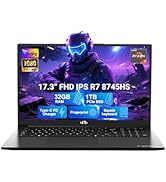
Image: Visual representation of the 90-day return policy.
7.3 Bantuan Pelanggan
For any product-related questions, technical support, or warranty claims, please contact our professional customer service team:
- Surélék: service@nimopc.com
- Telepon: Refer to your product packaging or NIMO's official website for current phone support numbers.
- Online: Visit the official NIMO websitus kanggo FAQ sareng sumber daya dukungan tambahan.
Our dedicated support team is available to assist you and resolve any issues promptly.

Image: Depiction of NIMO's professional customer assistance team.


