1. Bubuka
Thank you for choosing the Klarus E5 Plus Ultra-Slim Dual Switch Triple-Light EDC Flashlight. This manual provides detailed instructions for the safe and efficient operation, maintenance, and troubleshooting of your new device. Please read this manual thoroughly before use and retain it for future reference.
2. Produk Langkungview
The Klarus E5 Plus is a compact and versatile everyday carry (EDC) flashlight featuring three distinct light sources and a dual-switch design for intuitive control. Its ultra-slim profile, magnetic base, and pocket clip offer multiple hands-free lighting options.

Figure 1: Klarus E5 Plus Flashlight with key features highlighted.
3. Eusi Paket
- Klarus E5 Plus Flashlight
- Kabel Ngecas USB-C
- Manual pangguna (dokumén ieu)

Figure 2: Contents included in the Klarus E5 Plus package.
4. Spésifikasi
| Fitur | Rincian |
|---|---|
| Modél | E5 PLUS |
| Kaluaran Max | 650 Lumens (Side COB) |
| Sumber Cahaya | Front (White), Side (Warm White, Red) |
| Diménsi | 4.45" L x 0.98" W x 0.31" H (113mm x 25mm x 8mm) |
| Beurat | 1.26 oz (39g) |
| Batré | Diwangun-di 500mAh Litium-ion |
| Port ngecas | USB-C |
| Waktu Ngecas | Kira-kira. 1.5 jam |
| Max Runtime | Nepi ka 12.5 jam (modeu handap) |
| Tahan cai | IPX4 (tahan cipratan) |
| Bahan | Galunggung Aluminium (6061) |
| Fitur husus | Dual Switch, Magnetic Base, Pocket Clip, Flicker-Free Dimming |

Figure 3: Physical dimensions and weight comparison.
5. Setup: Charging the Battery
The Klarus E5 Plus features a built-in rechargeable lithium-ion battery. Before first use, fully charge the device.
- Locate the USB-C charging port on the side of the flashlight, protected by a silicone cover.
- Gently lift the silicone cover to expose the USB-C port.
- Connect the provided USB-C cable to the flashlight and plug the other end into a compatible USB power source (e.g., computer, wall adapter).
- During charging, the indicator light on the flashlight will illuminate red.
- Once fully charged (approximately 1.5 hours), the indicator light will turn blue.
- Disconnect the charging cable and securely close the silicone cover to maintain IPX4 water resistance.

Figure 4: Charging the Klarus E5 Plus via USB-C.
6. Parentah Operasi
The E5 Plus features two distinct switches for controlling its multiple light sources.
6.1. Head Light (Front White Light) Operation
- Hurungkeun/Pareuman: Pencét jeung tahan tombol Pindah Lampu Kepala (upper button) for 0.5 seconds.
- Robah Caang: With the head light on, single-click the Pindah Lampu Kepala to cycle through brightness modes (Low, High).
- Mémori Mode: The head light will remember the last used brightness mode when turned off and on again.
6.2. Side Light (Warm White & Red Light) Operation
- Hurungkeun/Pareuman: Pencét jeung tahan tombol Side Light Switch (lower button) for 0.5 seconds.
- Change Brightness (Warm White): With the warm white side light on, single-click the Side Light Switch to cycle through brightness modes (Low, Medium, High, Turbo).
- Toggle Red Light: With the warm white side light on, double-click the Side Light Switch to switch to Red Constant-On mode. Double-click again to return to warm white.
- Strobe beureum: From Red Constant-On mode, single-click the Side Light Switch to activate Red Strobe mode. Single-click again to return to Red Constant-On.
- Mémori Mode: The warm white side light will remember the last used brightness mode. Red light modes do not have memory and will default to Red Constant-On when reactivated.

Figure 5: Dual switch operation for the Klarus E5 Plus.
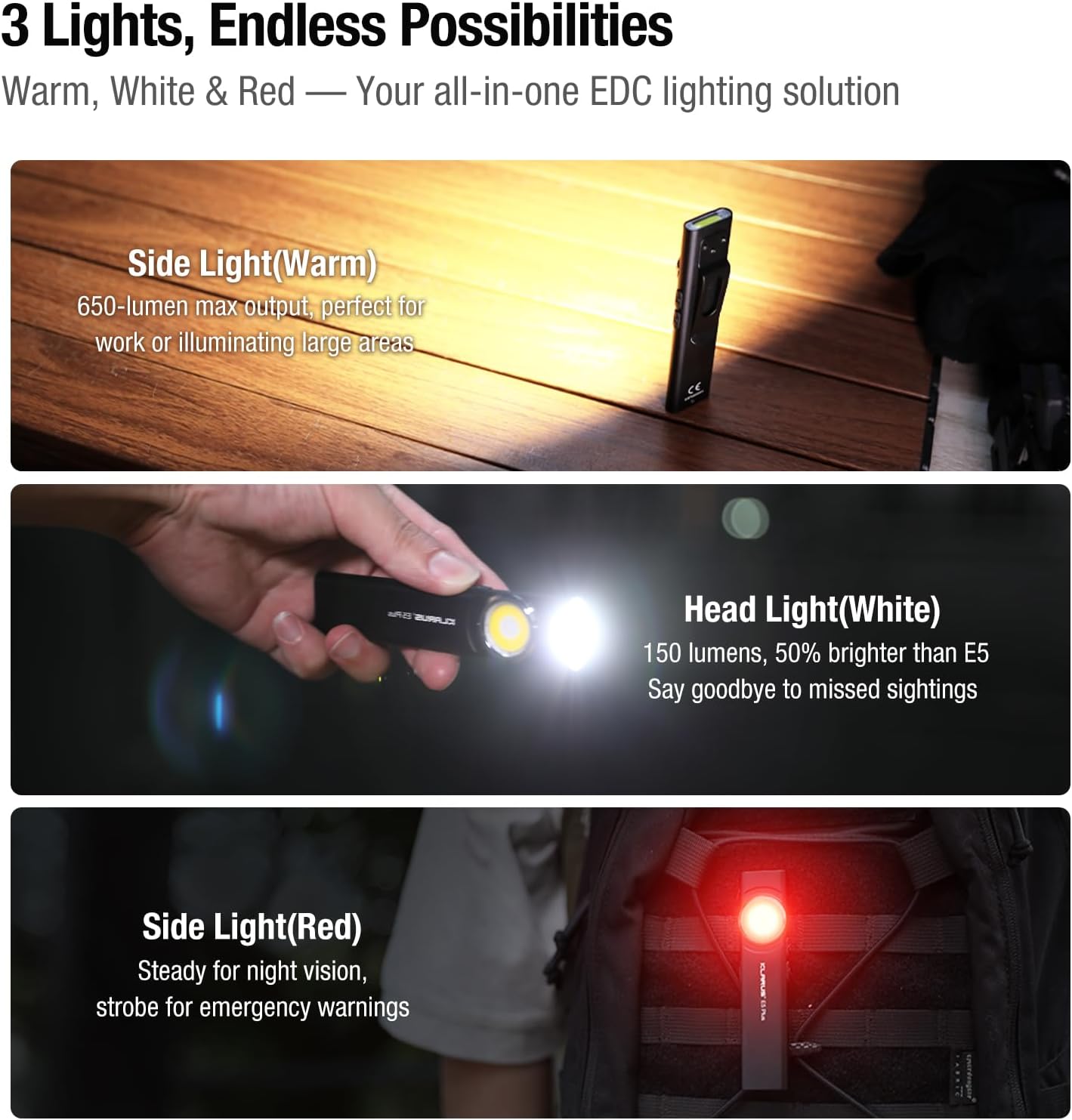
Figure 6: Three light sources and their applications.

Figure 7: Hands-free usage with magnetic base and clip.
7. Pangropéa
- beberesih: Ngusap awak senter ku hipu, damp lawon. Hindarkeun pembersih abrasive atanapi pangleyur.
- Ngecas: Recharge the battery regularly to maintain optimal performance, especially if stored for extended periods.
- Panyimpenan: Nyimpen senter di tempat tiis, garing jauh ti sinar panonpoé langsung jeung hawa ekstrim.
- Tahan cai: Ensure the USB-C port's silicone cover is securely closed to maintain IPX4 water resistance.
8. Cara ngungkulan
| Masalah | Mungkin Cukang lantaranana | Solusi |
|---|---|---|
| Senter teu hurung. | Batré lemah atanapi mode konci kaluar diaktipkeun. | Charge the battery. Ensure no buttons are accidentally pressed during storage. |
| Kaluaran lampu taram. | Low battery or incorrect mode selected. | Charge the battery. Cycle through brightness modes to select a higher setting. |
| Indikator ngecas teu jalan. | Loose connection or faulty cable/charger. | Ensure USB-C cable is securely connected. Try a different USB-C cable or power source. |
9. Video Produk Resmi
The following videos provide additional visual guidance and demonstrations of the Klarus E5 Plus flashlight's features and operation.
Klarus E5 Plus - Ultra-Slim Dual Switch Triple-Light EDC Flashlight
Video 1: Hiji leuwihview of the Klarus E5 Plus, highlighting its ultra-slim design, dual switch, and triple-light functionality. This video demonstrates the product's key features and versatility.
10. Garansi jeung Rojongan
Klarus products are manufactured to high-quality standards. For warranty information, technical support, or service inquiries, please refer to the official Klarus websitus atanapi ngahubungan dealer otorisasi Anjeun. Punten tahan bukti pameseran anjeun pikeun klaim garansi.
Pabrikan: KLARUS


