Bubuka
Thank you for choosing the GOBOULT Soniq Over Ear Bluetooth Headphones. These headphones are designed to provide a superior audio experience with features like 70 hours of playtime, 40mm bass drivers, Zen™ ENC microphone, Type-C fast charging, and dual device pairing. This manual will guide you through the setup, operation, and maintenance of your new headphones to ensure optimal performance.
Naon dina Box
Mangga parios eusi pakét pikeun mastikeun yén sadaya barang aya:
- Soniq Headphone
- Kabel Ngecas Tipe-C
- Manual pamaké
- Bantalan Ceuli (parantos dipasang)
- Kartu Garansi
Fitur Produk Leuwihview
The GOBOULT Soniq headphones come equipped with several advanced features:
- Dipanjangkeun Playtime: Nepi ka 70 jam playback audio dina hiji muatan.
- Modeu EQ anu tiasa disaluyukeun: Saluyukeun sora profiles for bass boost, balanced audio, or vocal clarity.
- Pembatalan Noise Lingkungan (ENC): Ningkatkeun kajelasan telepon ku cara ngirangan bising latar.
- Dual Device Pairing: Seamlessly connect and switch between two devices simultaneously.
- Powerful Audio Drivers: 40mm bass-boosted drivers for rich sound.
- Latest Bluetooth Technology: Bluetooth 5.4 for faster pairing and stable connections.
- Desain nyaman: Lightweight build with cushioned earcups for prolonged wear.
- Tahan cai: IPX5 rating for splash, rain, and sweat protection.
- Tactile Controls: Easy-to-use physical buttons for volume, playback, and mode switching.
- Rojongan Asisten Sora AI: Compatible with Google Assistant and Siri.

Gambar: Leuwihview of key features including 70H battery, EQ modes, ENC, dual pairing, 40mm drivers, and Bluetooth 5.4.

Image: Close-up of the GOBOULT Soniq headphone earcup highlighting the 40mm power-packed bass neodymium drivers with BoomX™ Technology and Memory Foam.
Guide Setup
1. Ngecas Headphone
Before first use, fully charge your GOBOULT Soniq headphones. Use the provided Type-C charging cable to connect the headphones to a compatible USB power source.
- A muatan pinuh nyadiakeun nepi ka 70 jam playtime.
- Fast charging feature: 10 minutes of charge provides approximately 8 hours of playtime.
- Indikator LED bakal nunjukkeun status ngecas sareng mareuman atanapi ngarobih warna nalika dicas pinuh.

Image: GOBOULT Soniq headphones connected via Type-C cable, illustrating 70 hours playtime and fast charging capability.
2. Powering on / Pareum
To power on, press and hold the Power button for approximately 3 seconds until the LED indicator lights up. To power off, press and hold the Power button again for 3 seconds until the LED indicator turns off.
3. Papasangan Bluetooth
Turutan léngkah-léngkah ieu pikeun nyapasangkeun headphone anjeun sareng alat anu diaktipkeun Bluetooth:
- Pastikeun headphone tos dicas pinuh sareng pareum.
- Press and hold the Power button for 5-7 seconds until the LED indicator flashes red and blue alternately, indicating pairing mode.
- Dina alat anjeun (smartphone, tablet, laptop), aktipkeun Bluetooth sareng milarian alat anu sayogi.
- Select "GOBOULT Soniq" from the list of found devices.
- Sakali nyambung, indikator LED bakal kedip-kedip biru laun atanapi tetep biru polos.

Image: GOBOULT Soniq headphones highlighting Bluetooth 5.4 for fast and stable connection.
Parentah Operasi
1. Kadali dasar
The headphones feature tactile buttons for easy control:
- Tombol Daya: Pencét terus tahan pikeun hurung/pareum. Pencét sakeudeung pikeun puter/pareum.
- Volume Naik (+): Pencét pondok pikeun ningkatkeun volume. Pencét lila pikeun lagu salajengna.
- Volume Turun (-): Pencét pondok pikeun ngirangan volume. Pencét lila pikeun lagu saméméhna.
- Multi-function Button (often combined with Power or a dedicated button): Answer/End calls, activate voice assistant.

Image: Close-up of the right earcup showing tactile button controls for volume and play/pause.
2. Modeu EQ
Customize your audio experience with multiple EQ modes. Press the dedicated EQ button (or a specific combination, refer to quick start guide if available) to cycle through modes:
- Modeu Panguat Bass: Enhances low frequencies for a deeper bass sound.
- Modeu Saimbang: Nyadiakeun pro sora nétralfile suitable for various genres.
- Mode Vokal: Optimizes mid-range frequencies for clearer vocals.
- Modeu Kaulinan: Reduces latency for a more synchronized gaming audio experience (60ms ultra-low latency).
- Modeu Musik: Standar audio profile kanggo ngadangukeun musik sacara umum.
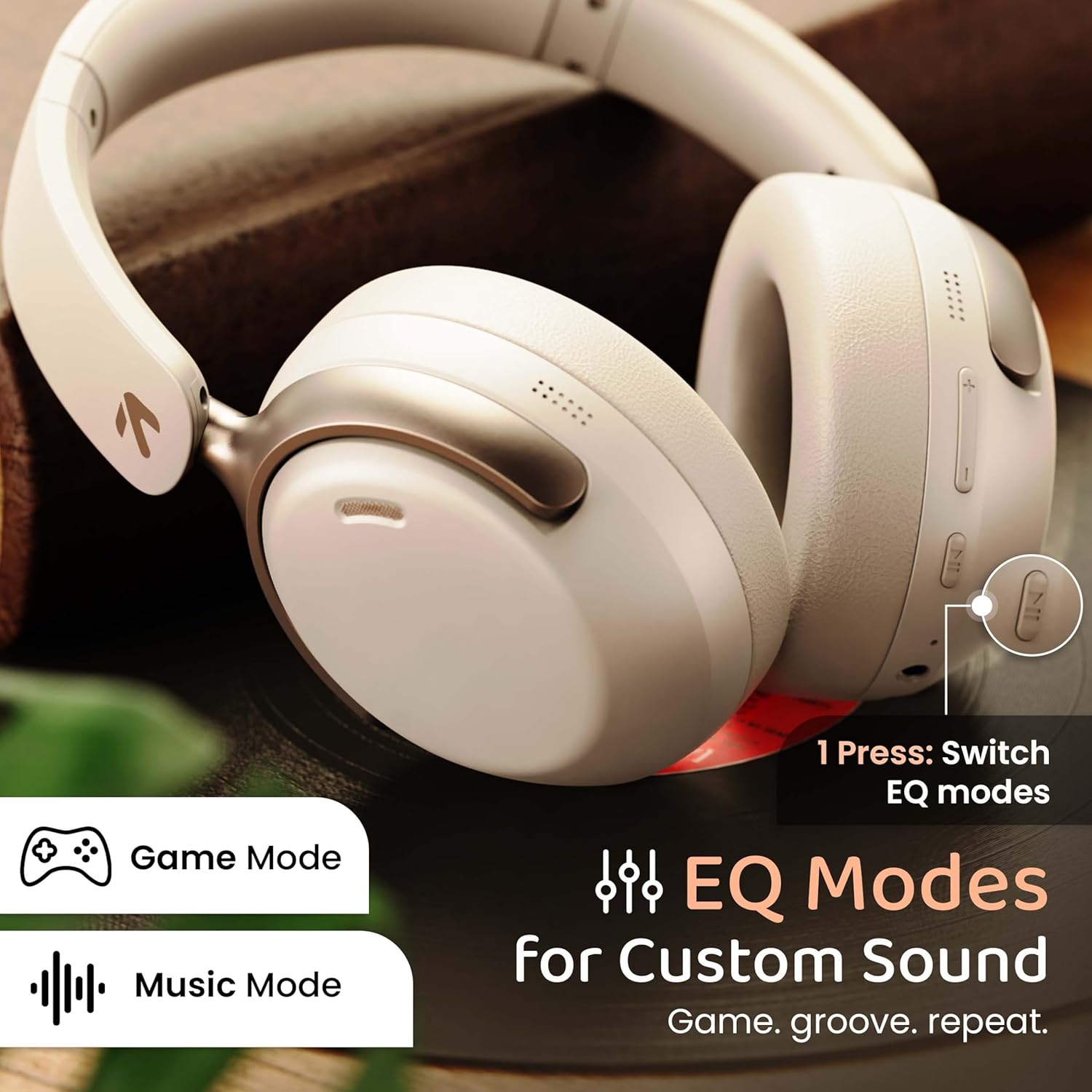
Image: GOBOULT Soniq headphones illustrating the EQ modes for custom sound, including Game Mode and Music Mode.

Image: GOBOULT Soniq headphones highlighting Combat™ Gaming Mode with 60ms ultra-low latency, tailored for mobile gaming and real-time sound accuracy.
3. Dual Device Pairing
The headphones support dual device pairing, allowing you to connect to two devices simultaneously and switch between them seamlessly.
- Pasangkeun headphone sareng alat anu munggaran sapertos anu dijelaskeun dina bagian "Pasangan Bluetooth".
- Nonaktipkeun Bluetooth dina alat munggaran.
- Masangkeun headphone sareng alat kadua.
- Aktipkeun deui Bluetooth dina alat munggaran. Headphone kedah otomatis nyambung ka kadua alat eta.
- Audio will play from the device currently active. To switch, pause audio on the first device and start playing on the second.

Image: GOBOULT Soniq headphones demonstrating dual device connectivity with a laptop and a smartphone.
4. Wired Mode (AUX)
For a wired connection, use a standard 3.5mm AUX cable (not included) to connect the headphones to your audio source. In wired mode, the headphones operate passively, and the built-in microphone will not function.

Image: GOBOULT Soniq headphones showing the option for wireless mode and an optional wired mode via AUX cable, noting that the mic is off in wired mode.
5. Pangurangan Bising Lingkungan (ENC) pikeun Telepon
The Zen™ ENC microphone technology helps reduce ambient noise during calls, ensuring clearer conversations. This feature is automatically active during phone calls.

Image: Close-up of the GOBOULT Soniq headphone earcup highlighting the Zen™ ENC Mic for processed calling, ambient noise isolation, enhanced call experience, and sharper voice clarity.
6. Asisten sora
Activate your device's voice assistant (Google Assistant or Siri) by pressing the multi-function button (or specific button, refer to quick start guide) for approximately 2 seconds.

Image: GOBOULT Soniq headphones with icons for Google Assistant and Siri, indicating personalized AI assistant support.
Pangropéa sareng Perawatan
- beberesih: Lap headphone ku lawon anu lemes sareng garing. Entong nganggo pembersih atanapi pelarut anu abrasif.
- Tahan cai: The headphones are IPX5 water resistant, meaning they are protected against splashes, rain, and sweat. Do not submerge them in water or expose them to strong jets of water.
- Panyimpenan: Nalika henteu dianggo, simpen headphone dina tempat anu tiis, garing, jauh tina sinar panonpoé langsung sareng suhu anu ekstrim. Desain foldable ngamungkinkeun pikeun neundeun kompak.
- Perawatan batré: Pikeun manjangkeun umur batre, ulah miceun headphone sacara sering. Ngeusi batre aranjeunna rutin, sanajan teu di pamakéan konstan.
Image: GOBOULT Soniq headphones illustrating IPX5 water resistance, indicating protection against splash, rain, and sweat.

Image: GOBOULT Soniq headphones showcasing their adjustable headband, foldable design, and movable earcups for maximum comfort and portability.
Pamérésan masalah
| Masalah | Solusi anu mungkin |
|---|---|
| Headphone teu hurung. | Pastikeun headphone tos dicas. Sambungkeun ka sumber daya nganggo kabel Tipe-C. |
| Teu tiasa dipasangkeun sareng alat. |
|
| Taya sora atawa volume low. |
|
| Microphone not working in wired mode. | The built-in microphone is not active when using the AUX wired connection. This is normal operation. |
| sambungan intermittent. |
|
spésifikasi
| Fitur | Rincian |
|---|---|
| Ngaran modél | AirBass |
| Téhnologi konektipitas | Bluetooth, Kabel, Nirkabel |
| Téknologi Komunikasi Nirkabel | Bluetooth 5.4 |
| Rentang Bluetooth | 10 Méter |
| Ukuran Supir Audio | 40 Milimeter |
| Tipe Supir Audio | Supir dinamis |
| Kahirupan batré | 40 Jam |
| Port ngecas | Type-C Fast Charging Jack |
| Kontrol bising | Pembatalan Noise Lingkungan (ENC) |
| Tingkat Résistansi Cai | IPX5 (Splash, Rain, Sweat Proof) |
| Latén Audio | 60 Milidetik (Modeu Kaulinan) |
| Wangun Earpiece | Leuwih Ceuli |
| Bahan | Memory Foam (Ear Cushions) |
| Item Beurat | 227 gram |
| Ukuran produk (L x W x H) | 17 x 5.5 x 19 cm |
| Tipe Controller | Button, Google Assistant |
| Impedansi | 32 ohm |
| Sensitipitas | 118 dB |
Garansi sareng Rojongan
Your GOBOULT Soniq Over Ear Bluetooth Headphones come with a 1-taun jaminan produsén from the date of purchase. This warranty covers manufacturing defects and ensures the reliability of your product.
For warranty claims, technical support, or any inquiries, please refer to the contact information provided on the warranty card included in your package or visit the official GOBOULT support websitus.
Please retain your purchase receipt as proof of purchase for warranty validation.


