Produk Leuwihview
The GDFStudio Modern LED Coffee Table is designed to enhance your living space with its sleek high-gloss finish, wood grain texture, and integrated LED lighting. This versatile table features a tempered glass top and a convenient storage compartment, making it a functional and stylish addition to any room.
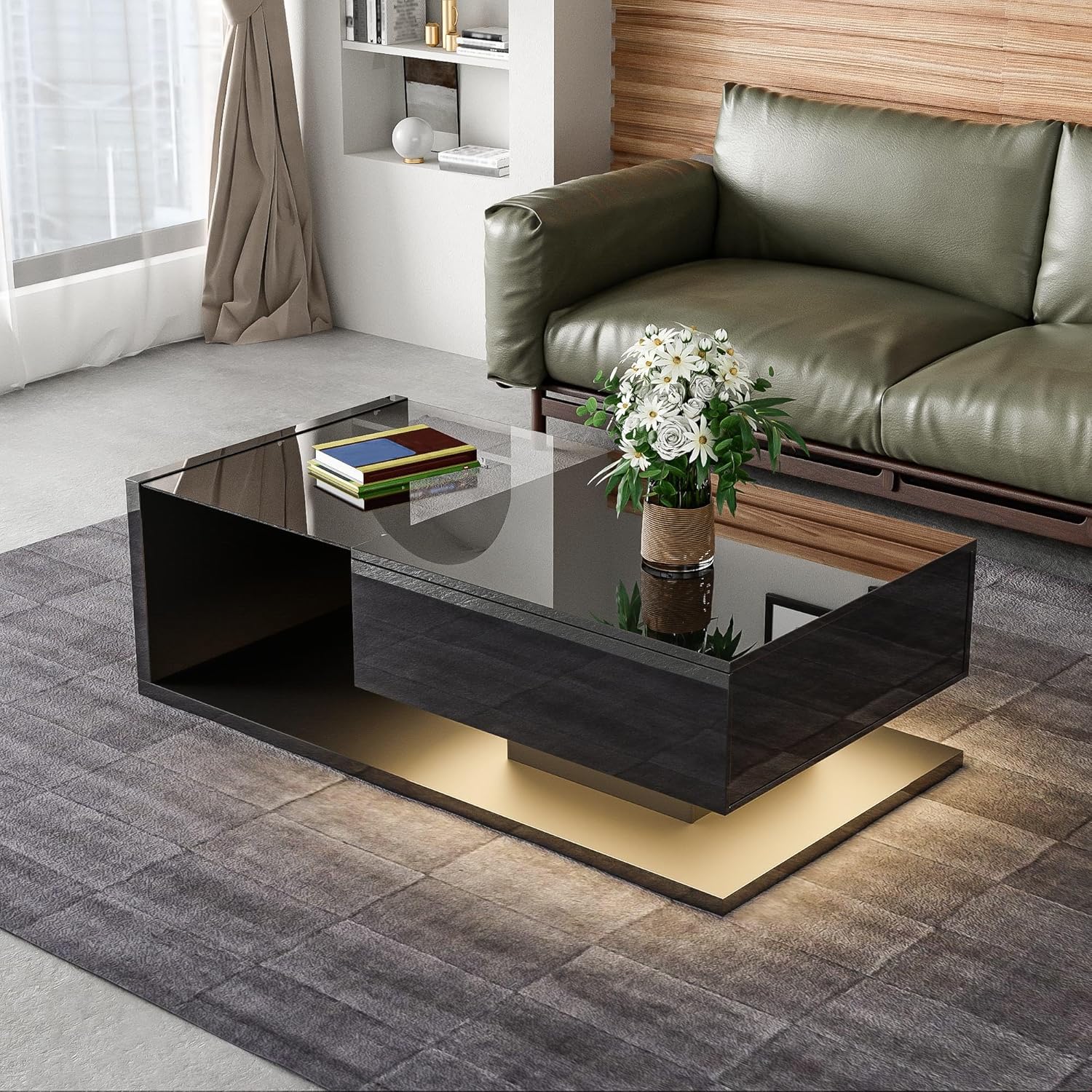
Image: The GDFStudio Modern LED Coffee Table, showcasing its black high-gloss finish and tempered glass top, positioned in a contemporary living room.
Fitur konci:
- Modern High-Gloss Design: Sleek black high-gloss surface with wood grain accents.
- Glass Top with LED Lighting: Tempered glass tabletop with 16-color adjustable LED lights.
- AmpRuang Panyimpenan: Built-in compartment for organizing items.
- Konstruksi Teguh & Awét: Made from high-quality particle board with a solid base.
Émbaran Kasalametan
Mangga baca tur ngartos sagala parentah kaamanan saméméh assembly sarta pamakéan. Paranti nuturkeun parentah ieu bisa ngakibatkeun tatu atawa ruksakna produk.
- Ulah ngaleuwihan kapasitas beurat maksimum tina 130 lbs (59 kg) dina méja.
- Pastikeun sadaya sekrup sareng pengikatna pageuh diketatkeun nalika dipasang sareng parios sacara berkala upami kendur.
- A protective film is applied to the high-gloss surfaces. Please remove this film completely before use to reveal the intended finish.
- Tetep bagian leutik sarta parabot assembly kaluar jangkauan sahiji barudak.
- Hindarkeun nempatkeun barang panas langsung dina beungeut cai tanpa panyalindungan.
Setup sareng Majelis
Assembly of the GDFStudio Modern LED Coffee Table is required. All necessary instructions and tools are included in the packaging. It is recommended to assemble the table on a soft, clean surface to prevent scratches.
Sateuacan Anjeun Ngawitan:
- Buka bungkus sadaya komponén sareng pariksa kana daptar bagian anu disayogikeun dina manual assembly anjeun.
- Pastikeun anjeun gaduh spasi nyukupan pikeun assembly.
- Have a Phillips head screwdriver and any other basic tools ready, though most specialized tools should be included.
Léngkah-léngkah Majelis (Panduan Umum):
- Identify and separate all components according to the assembly diagram.
- Attach the main support structures using the provided hardware.
- Assemble the storage compartment and integrate it into the main structure.
- Carefully place the tempered glass top onto the designated area.
- Connect the LED lighting system according to the specific wiring instructions.
- Tighten sadayana fasteners aman, tapi ulah overtighten.
- Remove the protective film from all high-gloss surfaces.

Image: The coffee table with its integrated storage compartment revealed, demonstrating its functional design for organizing items.
Operating Instructions (LED Lighting)
The GDFStudio Modern LED Coffee Table features built-in 16-color adjustable LED lights to create the perfect ambiance. The LED system is controlled via a remote control or a compatible mobile application (if applicable, refer to your specific LED kit instructions).
Fitur LED:
- 16 Changing Colors: Select from a wide spectrum of colors to match your mood or decor.
- Sababaraha Modeu: Includes Flash mode (single or multi-color) and Gradient mode (single or multi-color) for dynamic lighting effects.
- Kacaangan adjustable: Redupkeun atanapi caangkeun lampu sakumaha karesep anjeun.

Image: An illustration detailing the 16 available LED color options and the different lighting modes (Flash and Gradient) that can be controlled, possibly via a smartphone application.
Operasi dasar:
- Ensure the LED power adapter is securely plugged into a wall outlet.
- Use the provided remote control (or app) to turn the lights ON/OFF.
- Select your desired color from the color palette on the remote/app.
- Toggle between Flash and Gradient modes using the dedicated buttons.
- Adjust brightness using the brightness control buttons.
Pangropéa sareng Perawatan
Proper care will ensure the longevity and appearance of your GDFStudio Modern LED Coffee Table.
- Beberesih permukaan: For the high-gloss and wood grain surfaces, wipe with a soft, damp cloth. Avoid abrasive cleaners or harsh chemicals that can damage the finish.
- Perawatan Kaca Tempered: Clean the glass top with a glass cleaner and a lint-free cloth. Do not use sharp objects on the glass.
- Lampu LED: The LED lights are designed for long-term use and typically do not require maintenance. If issues arise, refer to the troubleshooting section.
- Pilem pelindung: As mentioned, ensure the protective film is removed from all high-gloss surfaces before initial use.
- Distribusi beurat: Distribute weight evenly on the tabletop and within the storage compartment to prevent stress on the structure.
Pamérésan masalah
If you encounter any issues with your coffee table, please refer to the common problems and solutions below. For persistent issues, contact customer support.
| Masalah | Mungkin Cukang lantaranana | Solusi |
|---|---|---|
| Lampu LED teu hurung. | Power adapter unplugged, remote battery dead, loose connection. | Check power connection. Replace remote battery. Ensure all LED wiring connections are secure. |
| Méja karasana oyag sanggeus dirakit. | Fasteners not fully tightened, uneven floor. | Re-tighten all assembly screws. Ensure the table is on a level surface; use furniture pads if necessary. |
| Scratches on high-gloss surface. | Protective film not removed, abrasive cleaning. | Ensure protective film is fully removed. Use only soft cloths and non-abrasive cleaners. |
spésifikasi
| Atribut | Rincian |
|---|---|
| merek | GDFStudio |
| Nomer modél | 337250 |
| Warna | Hideung |
| Bahan Utama | Particle Board, Tempered Glass |
| Ukuran produk (L x W x H) | 41.5" L x 21.5" W x 12.5" H (105.41 x 54.61 x 31.75 cm) |
| Beurat bersih | 57.9 lbs (26.26 kg) |
| Kapasitas beurat | 130 lbs (59 kg) |
| Fitur LED | 16-color adjustable lights included |
| Majelis | Required (Instructions & Tools Included) |

Image: A detailed diagram illustrating the dimensions of the coffee table in inches, including length, width, and height, as well as internal compartment measurements.
Garansi sareng Rojongan
For any questions, concerns, or assistance with your GDFStudio Modern LED Coffee Table, please contact the seller or manufacturer directly. Refer to your purchase documentation for specific warranty terms and contact information.
Penjual: GDF Studio CA
Kabijakan pamulangan: 30-day refund/replacement policy through the seller.
It is recommended to retain your proof of purchase for warranty claims or support requests.


