1. Produk Langkungview
The ORICO 6-in-1 USB C Docking Station (Model: PW11-6PR) is a versatile multiport adapter designed to expand the connectivity of your USB-C enabled devices. It provides essential ports for display output, high-speed data transfer, network connectivity, and power delivery, enhancing productivity and convenience for users of Windows, Mac, and other compatible systems.

Figure 1: ORICO 6-in-1 USB C Hub Overview
2. Eusi Paket
- ORICO 6-in-1 USB C Docking Station (Model: PW11-6PR)
- Manual pamaké
3. Tata perenah
The docking station features a compact design with clearly labeled ports for easy identification and connection.

Figure 2: Port Layout of the Docking Station
- USB-C Input Cable: Connects to your host device (laptop, tablet, smartphone).
- 3 x Port USB-A 3.0: For connecting USB peripherals such as keyboards, mice, external hard drives, or USB flash drives. Supports data transfer speeds up to 5 Gbps.
- Port HDMI: For connecting to an external display (monitor, TV, projector). Supports resolutions up to 4K@30Hz.
- Palabuhan Ethernet (RJ45): Provides stable wired network connectivity with speeds up to 1 Gbps.
- Port USB-C PD (Pangiriman Daya): For connecting a power adapter to charge your host device and power the docking station. Supports up to 100W power input.
4. Fitur
- 6-in-1 Multiport Hub: Expands a single USB-C port into 6 functional ports: 4K@30Hz HDMI, 3 USB-A 3.0, 1G Ethernet, and 100W PD.
- Kaluaran HDMI 4K@30Hz: Supports high-resolution video output to external displays, backward compatible with 1080P@60Hz and 720P@60Hz.
- 5 Gbps Data Transfer: Three USB-A 3.0 ports enable rapid data transfer, allowing a 1GB video file to be transferred in seconds.
- Pangiriman Daya 100W: The PD port allows simultaneous charging of your laptop while using other connected USB accessories, eliminating the need to choose between charging and connectivity.
- 1G High-Speed Ethernet: Provides a stable and fast wired internet connection (10 Mbps–1 Gbps), ideal for streaming, video calls, and large file downloads. A Cat 5e cable is recommended for optimal performance.
- Kasaluyuan lega: Compatible with Windows 11/10/8/7, Mac OS X, and Linux. Supports laptops, tablets, and smartphones with a compatible USB-C port.
- Desain kompak & portabel: Features a sleek, lightweight aluminum alloy build, making it easy to carry for business trips, mobile work, or meetings.
5. Parentah Setup
- Nyambung ka Alat Host: Plug the integrated USB-C cable of the docking station into a compatible USB-C port on your laptop, tablet, or smartphone. Ensure your device's USB-C port supports DisplayPort Alternate Mode for video output.
- Sambungan Daya (Opsional tapi Disarankeun): For stable operation and to charge your host device, connect your original USB-C power adapter to the USB-C PD port on the docking station.
- Sambungkeun Periferal:
- Tampilan HDMI: Sambungkeun kabel HDMI tina monitor/TV anjeun ka port HDMI dina stasiun dok.
- Jaringan Ethernet: Connect an Ethernet cable (Cat 5e or higher recommended) from your router/modem to the RJ45 Ethernet port on the docking station.
- Alat USB: Plug your USB-A peripherals (e.g., mouse, keyboard, USB drive) into the USB-A 3.0 ports.
- Pamasangan supir: The docking station is plug-and-play for most operating systems and typically does not require additional drivers. If prompted, follow on-screen instructions.

Figure 3: Broad Compatibility of the Docking Station
6. Parentah Operasi
6.1. Video Output via HDMI
Connect an HDMI-enabled display to the docking station's HDMI port. Your host device should automatically detect the external display. You can configure display settings (e.g., mirror, extend) through your operating system's display settings.

Figure 4: 4K@30Hz HDMI Display Connection
6.2. Data Transfer via USB-A 3.0 Ports
Plug your USB devices into the three USB-A 3.0 ports. These ports support data transfer speeds up to 5 Gbps, allowing for quick synchronization and file mindahkeun.

Figure 5: High-Speed Data Transfer
6.3. Wired Network Connection via Ethernet
Connect an Ethernet cable to the RJ45 port for a stable and fast wired internet connection. This is particularly useful in environments with unreliable Wi-Fi or for tasks requiring high bandwidth.
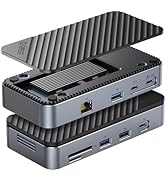
Figure 6: 1Gbps Ethernet Connection
6.4. Pangisian Daya Pangiriman (PD)
Connect your laptop's USB-C power adapter to the docking station's USB-C PD port. The docking station will pass through up to 85W of power to charge your laptop while simultaneously powering the hub and connected devices.

Figure 7: 100W Power Delivery
7. Kasaluyuan
The ORICO 6-in-1 USB C Docking Station is designed for broad compatibility. Please ensure your host device's USB-C port supports the necessary functions for optimal performance.
- Kasaluyuan Alat Host: Devices with a full-featured USB-C port (supporting data, power delivery, and DisplayPort Alternate Mode). This includes many modern laptops (e.g., MacBook Pro/Air, Dell XPS, Surface Pro, ThinkPad/Yoga), tablets (e.g., iPad Pro/Air), and some smartphones.
- Kasaluyuan Sistim: Windows 11/10/8/7, macOS X, Linux, Android.
- Important Note on USB-C Ports: Not all USB-C ports are created equal. Please confirm your laptop's USB-C port supports DisplayPort Alternate Mode for video output.

Figure 8: Understanding USB-C Port Functionality
8. Cara ngungkulan
- Taya Kaluaran Video:
- Pastikeun port USB-C alat host anjeun ngadukung Modeu Alternatif DisplayPort.
- Check the HDMI cable connection between the docking station and the display.
- Verify the display input source is set correctly.
- Coba balikan deui alat host anjeun.
- Alat USB Teu Dipikawanoh:
- Ensure the docking station is properly connected to your host device.
- Cobi sambungkeun alat USB langsung ka alat host anjeun pikeun mastikeun éta tiasa fungsina sacara mandiri.
- If using high-power USB devices, ensure the docking station is connected to an external power source via its PD port.
- Henteu aya sambungan Ethernet:
- Pariksa sambungan kabel Ethernet ka stasiun dok sareng router/modem anjeun.
- Pariksa setélan jaringan anjeun dina alat host anjeun.
- Pastikeun router/modem anjeun jalan kalawan bener.
- Masalah ngecas:
- Ensure your USB-C power adapter is connected to the PD port and is capable of providing sufficient power (e.g., 100W).
- Check if your host device supports USB-C Power Delivery.
9. Spésifikasi
| Fitur | Spésifikasi |
|---|---|
| Dimensi produk | 3.74 x 1.75 x 0.67 inci |
| Item Beurat | 3.52 ons |
| Nomer modél | PW11-6PR |
| merek | ORICO |
| Warna | kulawu |
| Panganteur Hardware | Ethernet, HDMI, USB 3.0 Type A, USB-C PD |
| Fitur husus | Powered, Plug and Play |
| Kaluaran HDMI | 4K@30Hz (backward compatible with 1080P@60Hz, 720P@60Hz) |
| USB-A 3.0 Data Transfer Speed | Nepi ka 5 Gbps |
| Laju Ethernet | 10 Mbps / 100 Mbps / 1 Gbps |
| USB-C PD Ngecas | Nepi ka 100W input (85W kaluaran pikeun host) |
10. Pangropéa
- Jaga alat tetep beresih sareng leupas tina lebu. Anggo kaén anu lemes sareng garing pikeun beberesih.
- Ulah nepi ka stasiun dok kakeunaan suhu anu ekstrim, kalembaban, atanapi sinar panonpoé langsung.
- Ulah nyobian ngabongkar atawa ngalereskeun alat sorangan. Kontak rojongan customer pikeun pitulung.
- Pegatkeun sambungan alat upami teu dianggo salami waktos anu lami.
11. Émbaran Kasalametan
- Alat ieu dimaksudkeun pikeun pamakéan jero rohangan wungkul.
- Ulah ngalaan alat ka cai atawa cairan séjén.
- Hindarkeun ragrag atanapi ngagentoskeun alat kana tabrakan anu kuat.
- Jauhkeun tina jangkauan barudak.
- Paké ngan adaptor kakuatan cocog jeung kabel.
12. Video Produk Resmi
Video: ORICO 6-in-1 USB C Docking Station with 1G Ethernet. This video demonstrates the features and connectivity of the ORICO 6-in-1 USB C Docking Station, including its HDMI, Ethernet, USB-A, and PD charging capabilities.
13. Garansi jeung Rojongan
ORICO products come with a standard manufacturer's warranty. For detailed warranty information, technical support, or customer service inquiries, please refer to the official ORICO website or contact your retailer. Please retain your proof of purchase for warranty claims.


