1. Bubuka
The Audiolab 9000A is a high-performance integrated amplifier designed to be the central component of any advanced audio system. It combines a powerful amplifier, a high-resolution Digital-to-Analog Converter (DAC), and a dedicated phono preamplifier, offering extensive connectivity and advanced features for audiophiles.
This manual provides essential information for setting up, operating, and maintaining your Audiolab 9000A to ensure optimal performance and longevity.
2. Émbaran Kasalametan
Mangga baca sadaya pitunjuk kaamanan kalayan saksama sateuacan ngoperasikeun unit ieu. Simpen buku panduan ieu kanggo rujukan ka hareup.
- Sasayogian tanaga: Connect the unit only to a power supply of the type marked on the rear panel.
- Ventilasi: Pastikeun ventilasi nyukupan. Ulah meungpeuk bukaan ventilasi.
- Cai sareng Uap: Ulah ngalaan unit ka hujan atawa Uap. Ulah nempatkeun objék ngeusi cairan dina unit.
- Panas: Ulah neundeun unit ieu caket kana sumber panas sapertos radiator, pancatat panas, kompor, atanapi alat sanés anu ngahasilkeun panas.
- beberesih: Ngabersihan ngan ku kaén garing. Ulah make cleaners cair atawa cleaners aerosol.
- Palayanan: Entong nyobian ngalayanan unit ieu nyalira. Rujuk sadayana jasa ka tanaga jasa anu mumpuni.
3. Naon dina Box
Carefully unpack the contents of the box. You should find the following items:
- Audiolab 9000A Terpadu Amppangagung
- Kabel listrik
- Kadali jauh
- Manual pangguna (dokumén ieu)
- Antennas (for Bluetooth connectivity)
4. Produk Langkungview
Panel hareup
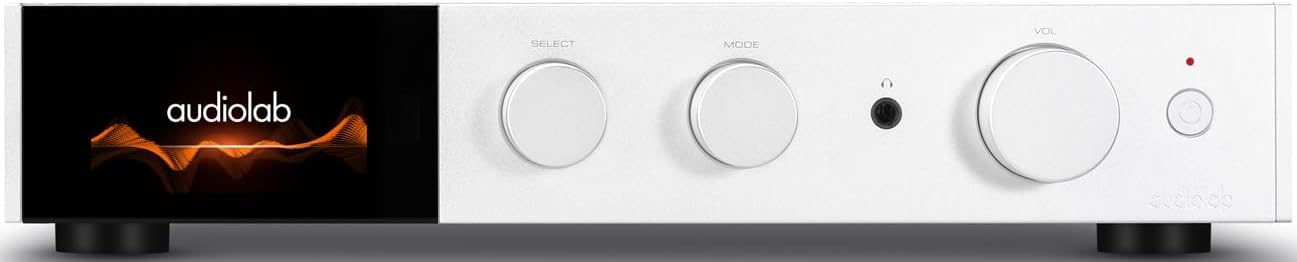
Gambar 4.1: Hareupeun view of the Audiolab 9000A, displaying the Audiolab logo on its full-color IPS LCD screen. The front panel features three rotary controls for Select, Mode, and Volume, along with a headphone jack and power button.

Gambar 4.2: Hareupeun view of the Audiolab 9000A, showcasing the full-color IPS LCD screen displaying VU meters. This visual option provides real-time audio level feedback.
The 9000A features a 4.3-inch (800 x 480mm) full-color IPS LCD screen, providing clear and informative playback, source, and file information. It also offers various display options, including two VU meter styles, allowing for visual feedback or a discreet appearance.
Sambungan Panel Rear

Figure 4.3: Rear panel of the Audiolab 9000A, showing a comprehensive array of input and output connections. These include analog, XLR, phono (MM), power amplifier input, SPDIF (coaxial and optical), PC USB, Bluetooth antenna, pre-amplifier output, stereo speaker terminals, and 12V trigger connections.
The rear panel provides a wide range of connectivity options, including multiple analog and digital inputs, a dedicated phono input, balanced XLR input, and various outputs for speakers and external components. Bluetooth antennas are also located here for wireless streaming.
Fitur konci
- Amppangajén: Discrete Class AB power amplifier delivering 100W per channel into 8 ohms (160W into 4 ohms). Features Audiolab's CFB (Complementary Feedback) topology for superior linearity.
- Digital-to-Analog Converter (DAC): Equipped with the ESS 9038PRO flagship 32-bit DAC chip, supporting PCM up to 32-bit/768kHz and DSD up to DSD512.
- MQA Decoding: Full MQA decoding capability for high-resolution streaming.
- Phon Stage: Dedicated high-performance, low-noise Moving Magnet (MM) phono stage with JFET-based circuitry and precise RIAA equalization.
- Headphone Amppanguat: Headphone eupan balik ayeuna khusus amplifier with wide bandwidth and high slew rate.
- Konektipitas: Multiple analog inputs (3 x AUX, 1 x XLR), digital inputs (2 x Coaxial, 2 x Optical, 1 x PC USB), Bluetooth 5.1 with aptX HD/AAC/LDAC support.
- Modeu Operasi: Integrated, Pre-Power, and Pre Only modes for versatile system integration.
5. Setélan
5.1 Nempatkeun
Place the Audiolab 9000A on a stable, level surface away from direct sunlight, heat sources, and excessive moisture. Ensure there is adequate space around the unit for ventilation.
5.2 Nyambungkeun Speaker
- Ensure the 9000A is powered off and unplugged from the mains.
- Connect your loudspeakers to the speaker terminals on the rear panel (refer to Figure 4.3). Ensure correct polarity: red (+) to red (+) and black (-) to black (-).
- Tighten the binding posts securely, but do not overtighten.
5.3 Nyambungkeun Sumber Audio
The 9000A offers a variety of input options:
- Analog Inputs (AUX1, AUX2, AUX3): Use RCA cables to connect analog sources like CD players, tuners, or tape decks.
- Input XLR saimbang: For high-quality analog sources with XLR outputs.
- Input Phono (MM): Connect your turntable directly to this input. Ensure your turntable has a Moving Magnet (MM) cartridge.
- Digital Inputs (COAX1, COAX2, OPT1, OPT2): Connect digital sources such as CD transports, media streamers, or TVs using coaxial or optical cables.
- PC USB (USB B): Connect your computer for high-resolution audio playback.
- Bluetooth: Attach the supplied antennas to the rear panel for optimal Bluetooth signal reception.
5.4 Sambungan Daya
Once all audio connections are made, connect the supplied power cord to the IEC inlet on the rear panel and then to a suitable mains power outlet.
6. Parentah Operasi
6.1 Powering on / Pareum
Press the power button on the front panel or the remote control to switch the unit on or off. The display will illuminate upon power-on.
6.2 Pamilihan Sumber
Use the "SELECT" rotary control on the front panel or the source buttons on the remote control to cycle through the available input sources (AUX1, AUX2, AUX3, XLR, Phono, COAX1, COAX2, OPT1, OPT2, PC USB, Bluetooth).
6.3 Volume Control
Adjust the listening volume using the "VOL" rotary control on the front panel or the Volume Up/Down buttons on the remote control.
6.4 Modeu operasi
The 9000A offers three distinct operating modes, selectable via the menu:
- Modeu Terpadu: This is the default mode, where the pre-ampliifier jeung kakuatan amplirén stages are combined. Use this for connecting digital and analog sources directly to the 9000A and driving a pair of speakers.
- Modeu Pra-Kakuatan: This mode disconnects the pre-ampliifier jeung kakuatan amplirén stages. The 9000A can then be used solely as a power amplifier (e.g., connected to an AV processor) or to insert external signal processing between the pre-out and power-in connections.
- Pre Only Mode: In this mode, the 9000A functions solely as a pre-amplifier, outputting the processed signal via its pre-amplifier outputs to an external power amppangagung.
6.5 Saringan Digital
For digital inputs, the 9000A provides user-selectable digital filters to optimize the response to suit the source file and partnering equipment. Access these options through the unit's menu system.
6.6 Konektipitas Bluetooth
- Ensure the Bluetooth antennas are connected to the rear panel.
- Select "Bluetooth" as the input source on the 9000A.
- Dina alat sélulér anjeun (smartphone, tablet, laptop), aktipkeun Bluetooth sareng milarian alat anu sayogi.
- Select "Audiolab 9000A" from the list to pair. Once paired, audio from your device will stream wirelessly to the amppangagung.
- The 9000A supports aptX HD, AAC, and LDAC protocols for high-quality wireless audio.
6.7 Kaluaran headphone
Connect your headphones to the 6.35mm (1/4 inch) headphone jack on the front panel. Connecting headphones will automatically mute the main speaker outputs.
7. Pangropéa
- beberesih: Use a soft, dry, lint-free cloth to clean the unit. Do not use abrasive cleaners, waxes, or solvents.
- Ventilasi: Pariksa sacara berkala yén liang ventilasi bersih tina lebu sareng runtah.
- Sambungan: Ensure all cables are securely connected. Loose connections can affect sound quality.
- Panyimpenan: Upami nyimpen unit kanggo waktos anu panjang, pegatkeun sambungan tina catu daya sareng simpen di tempat anu tiis sareng garing.
8. Cara ngungkulan
| Masalah | Mungkin Cukang lantaranana | Solusi |
|---|---|---|
| Taya kakuatan | Power cord not connected; Power outlet faulty; Unit in standby mode. | Check power cord connection; Try a different outlet; Press power button on unit or remote. |
| Teu aya sora ti panyatur | Incorrect input selected; Speaker cables loose or incorrectly connected; Volume too low; Mute function active; Headphone connected. | Select correct input; Check speaker connections and polarity; Increase volume; Deactivate mute; Disconnect headphones. |
| Taya sora ti hiji saluran | Speaker cable loose or faulty; Source cable faulty; Speaker faulty. | Check speaker and source cable connections; Test with another speaker or source. |
| Humming atanapi buzzing noise | Ground loop; Nearby electrical interference; Faulty cable. | Ensure all components are properly grounded; Move unit away from other electronics; Try different cables. |
| Masalah papasangan Bluetooth | Antennas not connected; Device too far; Device already paired with another unit. | Connect Bluetooth antennas; Move device closer; Disconnect from other devices and try pairing again. |
9. Spésifikasi
| Kategori | Rincian |
|---|---|
| Katerangan Umum | terpadu Amppangagung |
| Dipasang kaluaran Kaluaran | 2 x 100W (8 ohms, THD<1%); 2 x 160W (4 ohms, THD<1%) Class AB |
| Chip DAC | ES9038Pro 32-bit DAC |
| tampilan | 4.3" (800 x 480mm) Full View IPS LCD |
| MQA Decoding | Built-in Certified MQA Full Decoder (PC USB, Coax/Optical) |
| Bluetooth | Bluetooth 5.1 (aptX/aptX HD/AAC/LDAC) Support |
| Phon Stage | Dedicated High-performance, Low-noise MM Phono Stage |
| Headphone AMP | Dedicated Ayeuna-Eupan Balik Headphone AMP |
| Modeu Operasi | Integrated / PRE-POWER / PRE Only Modes |
| USB Upgrade Support | Sumuhun |
| Input | 3 x Analogue, 1 x XLR, 1 x Phono (MM), 1 x Power Amplifier, 2 x SPDIF (Coax), 2 x SPDIF (Optical), 1 x PC USB (USB B), 1 x Bluetooth, 1 x 12V Trigger |
| Kaluaran | 1 x PRE Amplifier, 1 x Speaker stereo, 1 x Headphone, 1 x 12V pemicu |
| Sampling Frequency (Optical/Coaxial) | 44.1kHz-192kHz |
| Sampling Frequency (PC USB) | 44.1kHz-768kHz (PCM) / DSD64, DSD128, DSD256, DSD512 |
| Praamplifier Gain (max.) | +6dB (Line), +53dB (Phono MM) |
| Praamplifier THD | <0.0004% (1kHz @ 2V, Volume = 0dB) |
| DAC THD | <0.001% (1kHz @ 0dBFS) |
| Kakuatan Amplifier THD | <0.002% (1kHz @ 50W / 8 ohm) |
| Headphone Amplifier THD | <0.01% (1kHz, 50mW) |
| Beurat bersih | 9.4 kg |
| Ukuran (W x H x D) | 444 x 342 x 89 mm |
| Pilihan Rengse | Hideung / Pérak |
| Sarat kakuatan | 100-120V ~ 50/60Hz |
10. Garansi jeung Rojongan
Audiolab products are manufactured to the highest standards and undergo rigorous quality control. This product is covered by a manufacturer's warranty, the terms of which may vary by region. Please refer to the warranty card included with your product or visit the official Audiolab websitus kanggo inpormasi garansi lengkep.
For technical support, service, or inquiries regarding your Audiolab 9000A, please contact your authorized Audiolab dealer or distributor. You can also find support resources, FAQs, and contact information on the official Audiolab websitus: www.audiolab.co.uk


