1. Bubuka
This manual provides instructions for the RETROSUN KC-909 CD Player Remote Control Replacement. This remote is designed to replace original remote controls for various portable and desktop CD players. It operates using infrared technology and requires no programming or pairing.
2. Kasaluyuan
The KC-909 remote control is specifically designed for use with the following CD player brands:
- Weeuus
- Gueray
- KOGODA
- ROADOM
- RealinKus
- KOVCDVI
- Greadio Portable CD Player
- Desktop CD Player models from the listed brands
Catetan penting:
This is NOT a universal CD player remote control. Before ordering, please ensure that your old or original remote control's button layout and color match the images provided for the KC-909 to confirm compatibility.

Image 2.1: The KC-909 remote control, highlighting its compatibility with various CD player brands.
3. Setélan
3.1 Pamasangan batré
The KC-909 remote control requires two (2) 1.5V AAA batteries (not included). Follow these steps to install the batteries:
- Panggihan kompartemen batré dina tonggong kadali jauh.
- Geser panutup kompartemen batré ka handap pikeun mukakeunana.
- Selapkeun dua batré AAA, mastikeun terminal positif (+) jeung négatip (-) align bener jeung markings jero kompartemen nu.
- Geser panutup kompartemen batré deui kana tempatna nepi ka klik aman.
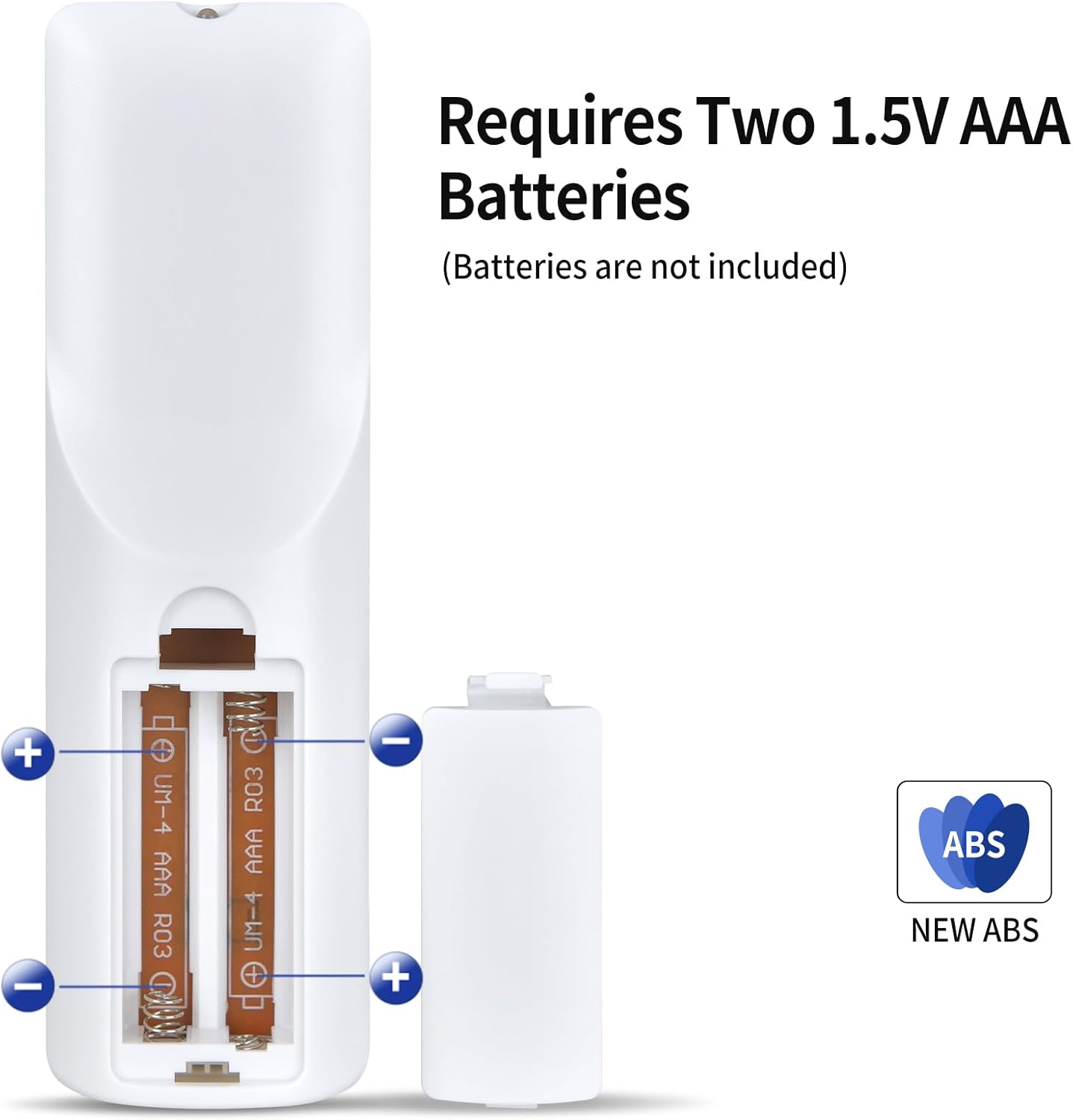
Image 3.1: Illustration of how to correctly insert two AAA batteries into the remote control's battery compartment.
3.2 Pamakéan awal
Once batteries are installed, the remote control is ready for immediate use. No programming or pairing is required.

Image 3.2: The remote control is ready to use directly after battery installation.
4. Ngoperasikeun Remote Control
The KC-909 remote control features a standard layout for CD player functions. Point the remote control directly at your CD player for optimal performance.
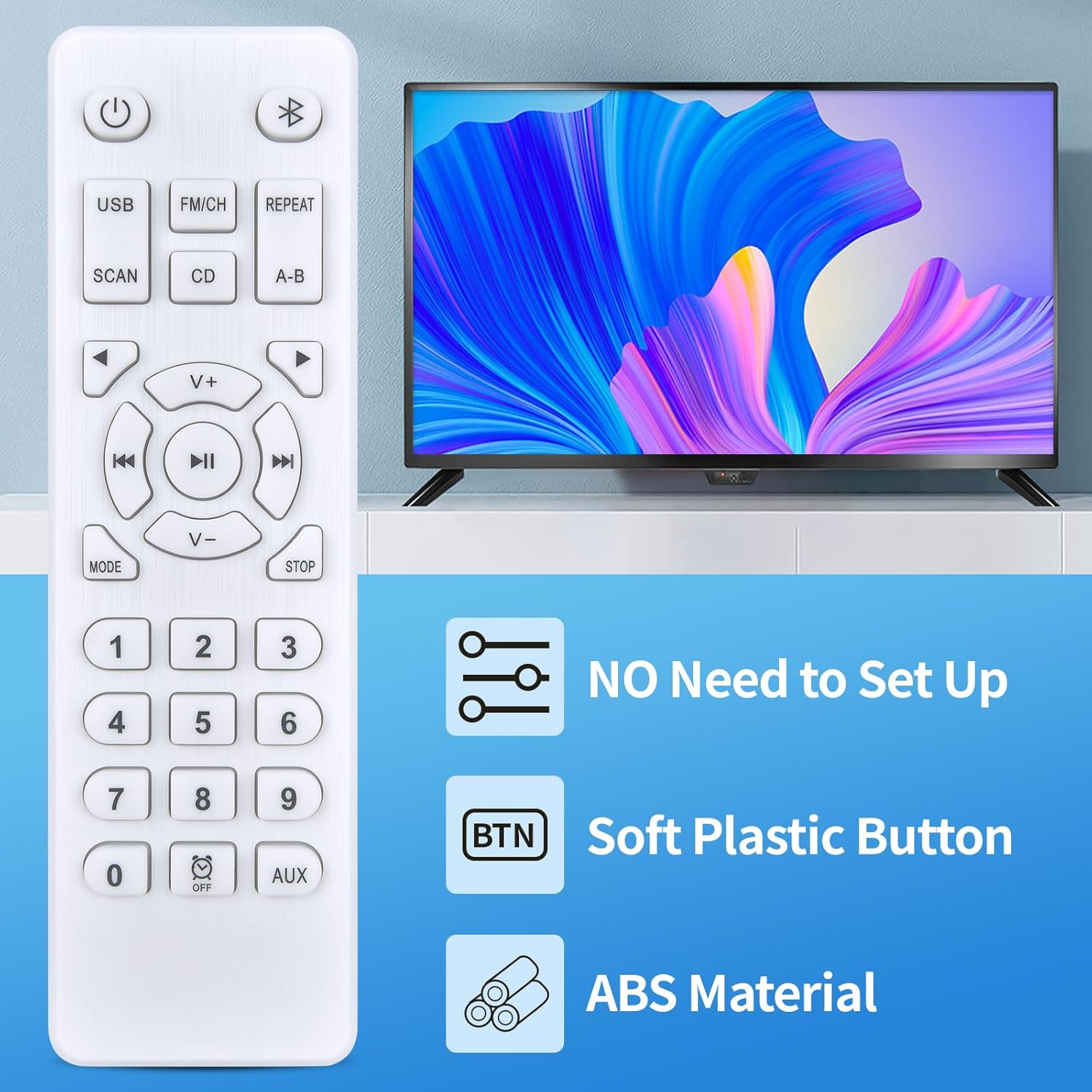
Image 4.1: The KC-909 remote control, featuring soft plastic buttons and durable ABS material.
4.1 Fungsi Tombol
Familiarize yourself with the primary functions of the remote control buttons:
- Tombol Daya (⏻): Turns the CD player on or off.
- USB: Switches to USB input mode (if supported by your CD player).
- FM/CH: Switches to FM radio mode or changes channels (if supported).
- ULANG: Ngaganti modeu puter balik anu diulang (contona, diulang hiji, diulang sadayana).
- SCAN: Scans for radio stations or tracks.
- CD: Switches to CD playback mode.
- AB: Sets and repeats a specific section of a track.
- Directional Arrows (▲ ▼ ◄ ►): Navigation within menus or tracks.
- V+ / V-: Ngaronjatkeun atawa ngurangan volume.
- Lagu saméméhna (⏮): Skips ka awal lagu ayeuna atawa lagu saméméhna.
- Maénkeun/Pareuman (⏸): Ngamimitian atanapi ngareureuhkeun playback.
- Lagu salajengna (⏭): Loncat kana lagu salajengna.
- MODÉ: Cycles through different playback modes or settings.
- Eureun (⏹): Ngeureunkeun playback.
- Tombol Jumlah (0-9): Direct track selection or input.
- OFF (⏰): Timer or sleep function (if supported).
- AUX: Switches to Auxiliary input mode (if supported).
4.2 Rentang Operasi
The remote control offers a reliable operating range of approximately 8 meters (26 feet). Its 120-degree wide-angle infrared design helps eliminate strict positioning constraints, allowing for flexible use within this range.

Image 4.2: The remote control provides precise control from up to 8 meters (26 feet).
5. Pangropéa
5.1 beberesih
Pikeun ngabersihkeun kadali jauh, usap pabeungeutannana kalayan lembut sareng kaen garing. Pikeun kokotor nekad, a rada damp cloth can be used, followed by a dry cloth. Avoid using abrasive cleaners, solvents, or harsh chemicals, as these can damage the remote's finish or internal components.
5.2 Ngagantian batré
Replace the batteries when the remote control's response becomes sluggish or it stops functioning. Always replace both AAA batteries at the same time with new ones. Do not mix old and new batteries, or different types of batteries.
5.3 Panyimpenan
When not in use for extended periods, it is recommended to remove the batteries from the remote control to prevent potential leakage and damage. Store the remote in a cool, dry place away from direct sunlight and extreme temperatures.
6. Cara ngungkulan
If you encounter issues with your RETROSUN KC-909 remote control, please refer to the following common solutions:
- Jauh teu ngabales:
- Pariksa naha batréna dipasang kalayan leres sareng polaritas anu leres (+/-).
- Replace the batteries with fresh 1.5V AAA batteries.
- Ensure there are no obstructions between the remote control and the CD player's infrared receiver.
- Make sure you are within the effective operating range (up to 8 meters / 26 feet).
- Remote functions are incorrect:
- Verify that your CD player model is listed as compatible. This remote is not universal.
- Compare the button layout of the KC-909 with your original remote to ensure it is the correct replacement.
- Réspon anu silih genti:
- Ieu tiasa nunjukkeun daya batré anu lemah. Ganti batréna.
- Ensure a clear line of sight to the CD player.
7. Spésifikasi
| Fitur | Rincian |
|---|---|
| Nomer Modél (Jarak Jauh) | KC-909 |
| Nomer Modél Barang (Produsen) | ZW324 |
| merek | RETROSUN |
| Warna | Bodas |
| Bahan | ABS kualitas luhur |
| Sumber Daya | 2 x Batré AAA 1.5V (teu kalebet) |
| Operating Technology | Infrabeureum (IR) |
| Rentang Operasi | Nepi ka 8 méter (26 suku) |
| Ukuran Paket | 5.51 x 1.65 x 0.67 inci |
| Item Beurat | 1.41 ons (0.04 Kilogram) |

Image 7.1: Physical dimensions of the KC-909 remote control.
8. Garansi jeung Rojongan
For any questions, concerns, or support regarding your RETROSUN KC-909 remote control, please contact the seller or manufacturer directly through your purchase platform. Please refer to your purchase documentation for specific warranty details, as these may vary.


