Bubuka
Hatur nuhun pikeun meuliasing the Dierya DK68 Wireless Mechanical Gaming Keyboard. This manual provides detailed instructions on how to set up, operate, and maintain your keyboard. Please read this manual thoroughly before use to ensure optimal performance and longevity of your device.

Image: The Dierya DK68 wireless mechanical gaming keyboard, showcasing its compact 60% layout and RGB backlighting.
Fitur konci
- Kompak 60% Layout: 68-key design for space efficiency, with all functions accessible via FN key combinations. Ideal for portability and maximizing desk space.
- Tri-Mode Seamless Connectivity: Supports USB-C wired, Bluetooth, and 2.4GHz wireless receiver connections. Easily switch between up to 3 devices (PC, Mac, smartphone/tablet).
- Customizable 16.8 Million Color RGB Backlight: Features 21 dynamic lighting effects. Adjust effects and colors using FN key combinations.
- Long-Lasting Battery & Standby: Equipped with a 3000mAh battery, providing approximately 8 hours of continuous use with backlight on, or up to 90 hours with backlight off. Standby time up to 360 hours (approx. 15 days).
- Saklar Mékanis Awét: Utilizes Dierya's proprietary mechanical switches with a 60 million keystroke lifespan. Red switches (linear, silent) are suitable for gaming and office work.
- N-Key Rollover (NKRO): Ensures all key presses are registered accurately, even during simultaneous inputs, for competitive gaming.
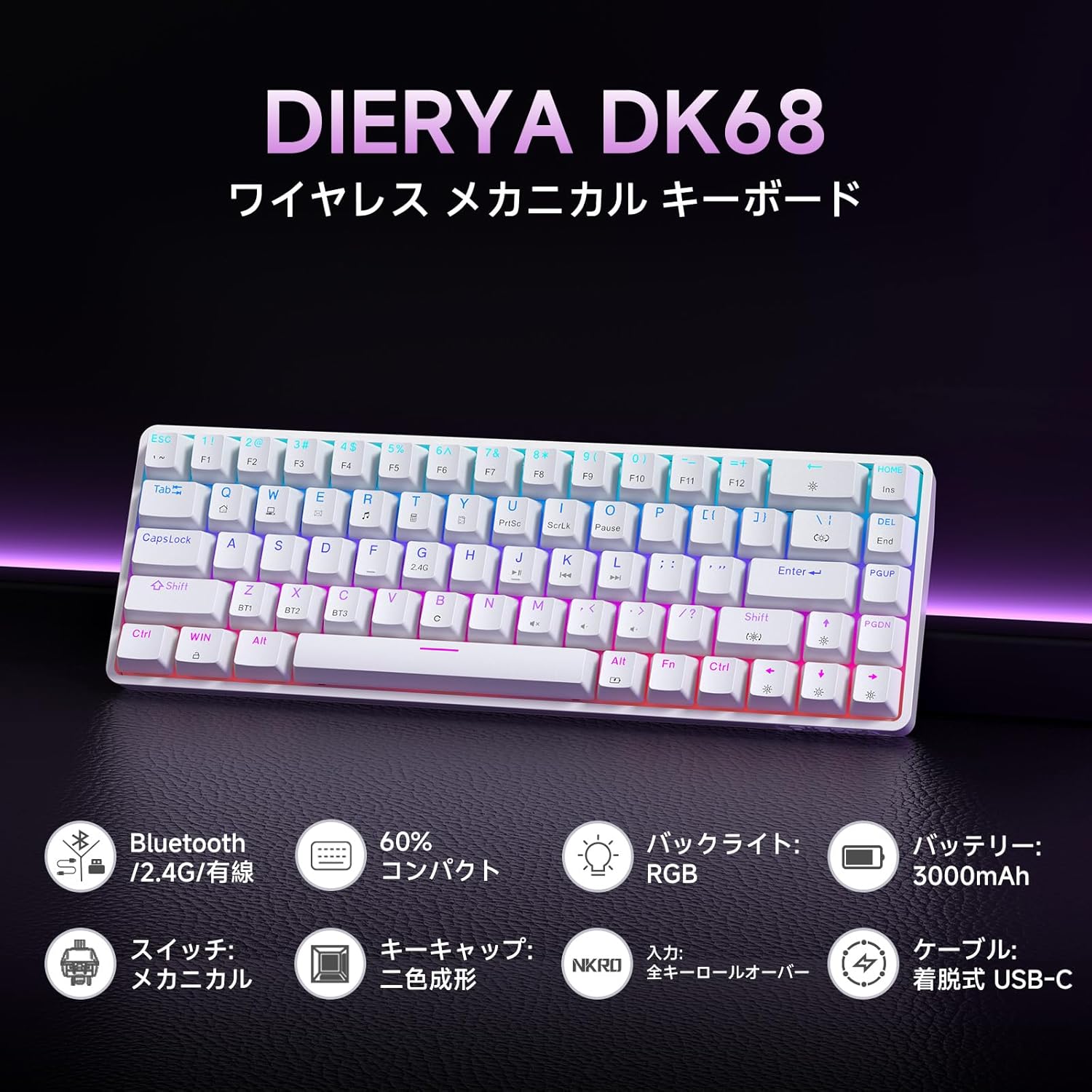
Gambar: Hiji leuwihview of the Dierya DK68 keyboard's main features, including Bluetooth/2.4G/Wired connectivity, 60% compact design, RGB backlight, 3000mAh battery, mechanical switches, double-shot keycaps, N-Key Rollover, and a detachable USB-C cable.
Disetél
1. Ngecas kibor
Before first use, fully charge the keyboard using the provided USB-C cable. Connect the cable to the keyboard's USB-C port and to a power source (e.g., computer USB port, USB wall adapter).
- Lampu indikator ngecas bakal nembongkeun status ngecas.
- Ngecas pinuh biasana peryogi sababaraha jam.
2. Nyambungkeun kibor
The DK68 supports three connection modes: USB-C wired, 2.4GHz wireless, and Bluetooth.
Sambungan Kabel USB-C
- Sambungkeun kabel USB-C anu disayogikeun kana port USB-C kibor.
- Sambungkeun tungtung kabel anu sanés ka port USB anu sayogi dina komputer anjeun.
- Kibor bakal otomatis dikenal sareng siap dianggo.
Sambungan nirkabel 2.4GHz
- Locate the 2.4GHz USB receiver (usually stored in a compartment on the keyboard or packaging).
- Colokkeun panarima USB ka port USB nu sadia dina komputer Anjeun.
- Hurungkeun keyboard. Kibor kedah otomatis nyambung ka panarima.
- If connection is not established, press FN + Urang Sunda to switch to 2.4GHz mode.
Sambungan Bluetooth
The keyboard can store up to three Bluetooth device pairings.
- Hurungkeun kibor.
- Pencét jeung tahan FN + Z, FN + X, atawa FN + C for 3-5 seconds to enter pairing mode for BT1, BT2, or BT3 respectively. The indicator light will flash rapidly.
- On your device (PC, Mac, smartphone, tablet), enable Bluetooth and search for new devices.
- Select "Dierya DK68" from the list of available devices.
- Sakali dipasangkeun, lampu indikator bakal eureun kedip-kedip sarta tetep solid.
- Pikeun pindah antara alat Bluetooth anu dipasangkeun, pencét FN + Z, FN + X, atawa FN + C sakeudeung.

Image: Diagram illustrating the three connection modes: USB-C wired, Bluetooth, and 2.4GHz wireless, along with compatibility icons for Windows, Mac, iOS, Android, Xbox, PC, Laptop, and Tablet.
Parentah Operasi
1. FN Key Combinations
Due to the compact 60% layout, many functions are accessed using the FN konci digabungkeun sareng konci anu sanés.
| Kombinasi | Fungsi |
|---|---|
| FN + 1-0 (top row) | F1-F10 |
| FN + - = | F11, F12 |
| FN + Backspace | Hurungkeun Lampu Latar ON/OFF |
| FN + Shift | Robah Warna Lampu Latar |
| FN + | | Robah Modeu Lampu Latar |
| FN + Panah luhur | Ningkatkeun Caang Lampu Latar |
| FN + Panah handap | Turunkeun Caang Lampu Latar |
| FN + Panah Kénca | Turunkeun Laju Lampu Latar |
| FN + Panah Katuhu | Ningkatkeun Laju Lampu Latar |
| FN + Z/X/C | Switch Bluetooth Device (BT1/BT2/BT3) |
| FN + Urang Sunda | Switch to 2.4GHz Wireless Mode |
| FN + T | Switch to USB-C Wired Mode |
| FN + WIN | Konci/Buka konci Windows Key |

Image: A visual guide to customizing the RGB backlight on the Dierya DK68 keyboard using FN key combinations for turning the light on/off, changing colors, modes, brightness, and speed.
2. Kustomisasi Lampu Latar RGB
The keyboard features over 20 dynamic RGB lighting effects. Use the FN key combinations listed above to personalize your lighting experience.
- Pencét FN + Backspace pikeun ngahurungkeun atawa mareuman lampu tukang.
- Pencét FN + Shift mun siklus ngaliwatan kelir lampu tukang béda.
- Pencét FN + | to switch between various lighting effects.
- Paké FN + Panah Luhur/Turun to adjust brightness and FN + Panah Kénca/Katuhu to adjust effect speed.
3. Modeu Hemat Daya
To conserve battery life, the keyboard will automatically enter sleep mode after approximately 3 minutes of inactivity. Press any key to wake it up.
Pangropéa
- beberesih: Use a soft, dry cloth to wipe the keyboard surface. For deeper cleaning, you may use a can of compressed air to remove dust and debris from between the keycaps. Avoid using harsh chemicals or abrasive materials.
- Panyimpenan: Simpen kibor di tempat anu tiis sareng garing jauh tina sinar panonpoé langsung sareng suhu anu ekstrim.
- Perawatan batré: To prolong battery life, avoid fully discharging the battery frequently. Charge the keyboard regularly, especially if it will be stored for an extended period.
- Ngahapus Keycap: If you need to remove keycaps for cleaning or switch replacement, use a keycap puller to avoid damage. Pull straight up with gentle force.
Pamérésan masalah
- Keyboard teu ngabales:
- Pastikeun kibor dihurungkeun.
- Pariksa tingkat batré jeung ngecas lamun perlu.
- Verify the correct connection mode (USB-C, 2.4GHz, or Bluetooth) is selected.
- Pikeun 2.4GHz, pastikeun panarima parantos dipasang kalayan leres.
- Pikeun Bluetooth, pasangkeun deui alat upami sambungan leungit.
- Coba sambungkeun nganggo kabel USB-C pikeun nyingkahan masalah nirkabel.
- Konci henteu ngadaptar atanapi ngetik dua kali:
- Clean under the keycaps to remove any debris.
- Pastikeun saklar-saklarna dipasang kalawan bener.
- Lampu latar RGB teu jalan:
- Ensure the backlight is turned on (FN + Backspace).
- Check battery level; low battery might disable backlighting.
- Sambungan Bluetooth teu stabil:
- Ensure the keyboard is within range of the device.
- Ngaleutikan gangguan ti alat nirkabel séjén.
- Coba pasangkeun deui kibor sareng alat anjeun.
spésifikasi
| Fitur | Rincian |
|---|---|
| merek | DIERYA |
| Nomer modél | DK68 |
| Tata perenah | 60% (68 Konci) |
| Konektipitas | 2.4GHz Nirkabel, Bluetooth, USB-C Kabel |
| Pindah Tipe | Mechanical Red Switches (Linear, Silent) |
| Angkatan Aktuasi | 45gf (±15gf) |
| Perjalanan Aktuasi | 2.0mm (±0.6mm) |
| Keystroke Lifespan | Kira-kira. 60 juta |
| Lampu tukang | RGB (16.8 million colors, 21+ effects) |
| Kapasitas batré | Batré Litium 3000mAh |
| Daya Tahan Batré (Lampu Latar Hurung) | Kira-kira. 8 jam |
| Daya Tahan Batré (Lampu Latar PAREUM) | Kira-kira. 90 jam |
| Waktu sayaga | Kira-kira. 360 jam (15 dinten) |
| Kasaluyuan | Windows, Mac, iOS, Android, Xbox, PC, Laptop, Tablet |
| Ukuran (L x W x H) | 372 x 115 x 51 mm |
| Beurat | 830 g |
| Kancing konci | Double-shot (OFS height) |
| Anti Ghosting | Rollover N-Key Pinuh (NKRO) |

Image: A diagram showing the compact 60% layout of the Dierya DK68 keyboard with its dimensions: 372mm length, 115mm width, and 51mm height, highlighting its 68-key configuration.

Gambar: Deukeut view of the Dierya DK68's mechanical red switches, detailing their linear and silent operation, 45gf actuation force, 2.0mm travel, and pre-lubricated design for smooth keystrokes.

Image: An exploded diagram of the Dierya DK68 keyboard, showing its internal layers including ABS keycaps, mechanical switches, positioning plate, EVA mat, PCB, high-density sound-absorbing foam, and bottom case, highlighting its robust construction.
Garansi sareng Rojongan
DIERYA products are designed for durability and performance. For warranty information or technical support, please refer to the official DIERYA websitus atanapi ngahubungan layanan palanggan maranéhanana langsung. Simpen resi pameseran anjeun salaku bukti pameseran pikeun klaim garansi.


