1. Bubuka
This manual provides detailed instructions for the setup, operation, maintenance, and troubleshooting of your DIERYA DK68 Wireless Mechanical Keyboard. Please read this manual thoroughly before using the product to ensure proper functionality and to maximize your user experience.
2. Eusi Paket
Pastikeun yén sadaya item aya dina bungkusan:
- 1 x DIERYA DK68 68-Key Wireless Mechanical Keyboard
- 1 x Panarima Nirkabel 2.4G
- 1 x USB-C kana Kabel USB-A
- 1 x Manual Instruksi (Dokumén ieu)
3. Produk Langkungview
The DIERYA DK68 is a compact 68-key mechanical keyboard featuring triple-mode connectivity (wired USB-C, 2.4GHz wireless, and Bluetooth 5.0). It is equipped with linear red mechanical switches and customizable RGB backlighting.

Image: The DIERYA DK68 Wireless Mechanical Keyboard in white, showcasinkalayan tata letak 68-konci anu ringkes sareng lampu latar RGB.
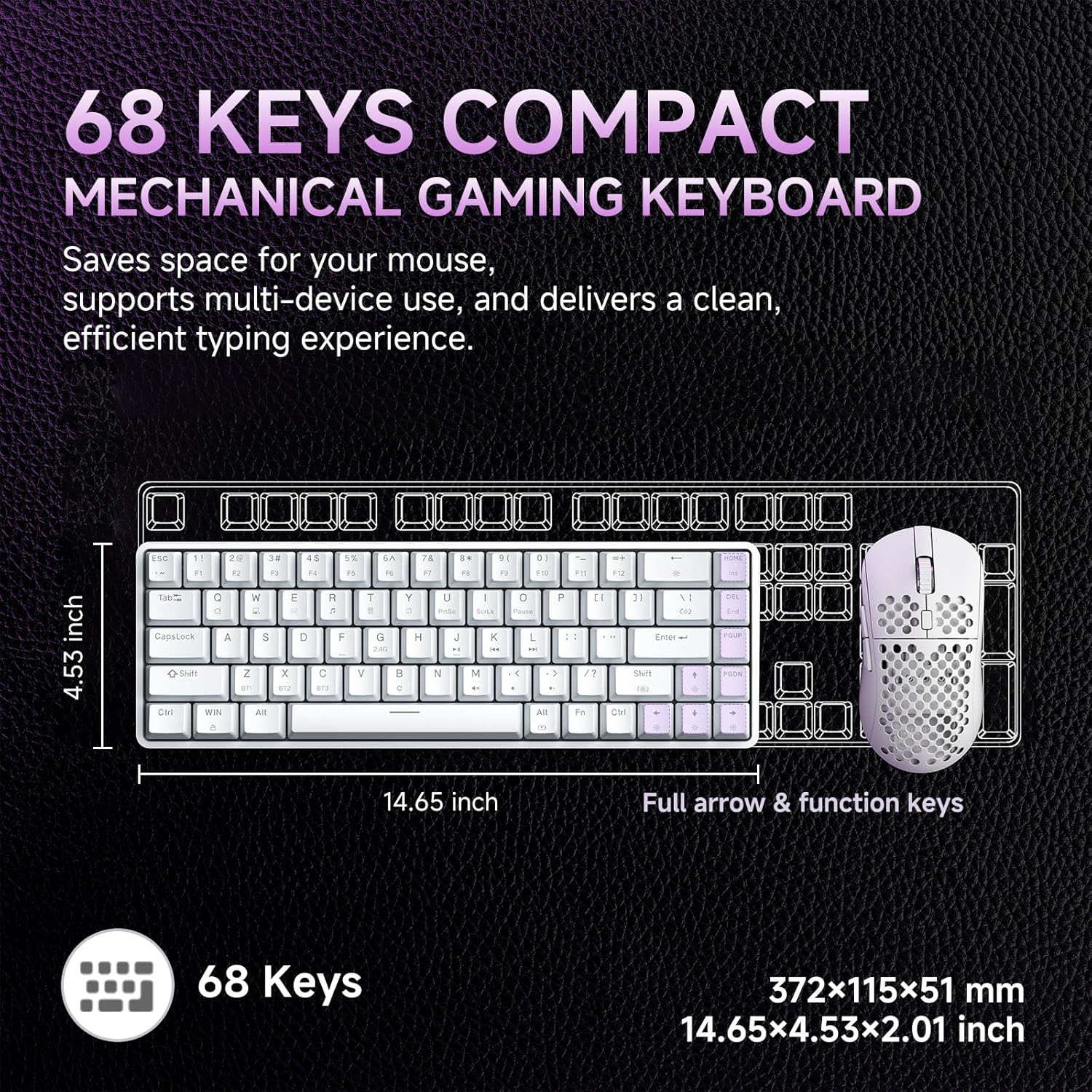
Image: A diagram illustrating the compact dimensions of the DIERYA DK68 keyboard, measuring 14.65 inches in length and 4.53 inches in width.
4. Setélan
4.1 Sambungan Kabel (USB-C)
- Sambungkeun kabel USB-C anu disayogikeun kana port USB-C kibor.
- Connect the other end of the USB-C cable to an available USB-A port on your computer.
- Kibor bakal otomatis dikenal sareng siap dianggo.
4.2 2.4GHz Sambungan Wireless
- Locate the 2.4G wireless receiver included in the package.
- Colokkeun panarima 2.4G kana port USB-A anu sayogi dina komputer anjeun.
- Turn on the keyboard using the switch located on the back or side of the keyboard.
- Kibor kedahna otomatis nyambung ka panarima. Upami henteu, pencét Fn + Urang Sunda pikeun ngamimitian papasangan.
4.3 Bluetooth 5.0 Sambungan
Kibor ngarojong nyambungkeun nepi ka tilu alat Bluetooth.
- Pastikeun keyboard diaktipkeun.
- Pencét jeung tahan Fn+Z, Fn + X, atawa Fn + C for 3-5 seconds to enter pairing mode for Bluetooth device 1, 2, or 3 respectively. The indicator light will flash rapidly.
- On your device (PC, laptop, tablet, smartphone), enable Bluetooth and search for new devices.
- Select "DIERYA DK68" from the list of available devices to pair.
- Once paired, the indicator light will stop flashing and remain solid for a few seconds.
- Pikeun pindah antara alat Bluetooth anu dipasangkeun, pencét Fn+Z, Fn + X, atawa Fn + C sakeudeung.

Image: Visual representation of the DIERYA DK68's triple-mode connectivity options: USB-C, Bluetooth 5.0, and 2.4GHz wireless, compatible with various operating systems.
5. Parentah Operasi
5.1 Fungsi Keyboard Dasar
The DK68 features a 68-key layout. Many standard functions are accessed via the Fn kombinasi konci.
- Fn + 1-12: F1-F12 function keys.
- Fn + Q/W/E/R/T/Y: Multimedia controls (specific functions may vary).
- Fn + Tombol Panah: Page Up, Page Down, Home, End.
- Fn + Backspace: Delete.
5.2 Kontrol cahaya RGB
The keyboard offers 20 built-in RGB lighting effects and 16.8 million customizable colors.
- Fn + Backspace: Turn backlight On/Off.
- Fn+Shift: Switch light colors (for certain modes).
- Fn + |\: Switch light modes (cycle through 20 effects).
- Fn + Panah luhur: Ningkatkeun kacaangan.
- Fn + Panah handap: Turunkeun kacaangan.
- Fn + Panah Kénca: Decrease light speed.
- Fn + Panah Katuhu: Increase light speed.

Image: A visual guide to controlling the RGB backlighting on the DIERYA DK68 keyboard using Fn key combinations for mode, color, brightness, and speed adjustments.
5.3 Manajemén batré
The keyboard is equipped with a 3000mAh lithium battery.
- Ngecas: Connect the keyboard via the USB-C cable to a power source (computer USB port or USB wall adapter). The charging indicator light will show charging status.
- Kahirupan batré: Up to 12 hours with backlighting on, and up to 333 hours with backlighting off.
- Saré Otomatis: The keyboard enters auto-sleep mode after 3 minutes of inactivity to conserve power. Press any key to wake it up.

Image: An infographic detailing the 3000mAh battery capacity, showing 12 hours of use with lights on, 333 hours with lights off, 3-minute auto-stop, and Type-C charging.
5.4 Kustomisasi Parangkat Lunak
For advanced customization of keys, macros, and lighting effects, download the dedicated software from the official DIERYA website. This software allows for:
- 16.8 million customizable lighting colors.
- Music-sync lighting effects.
- Full-key macro programming.
- Macro recording and editing.
- Custom shortcut keys.
6. Pangropéa
- beberesih: Use a soft, dry cloth to wipe the keyboard surface. For deeper cleaning, use compressed air to remove dust and debris from between keycaps. Avoid using liquid cleaners directly on the keyboard.
- Panyimpenan: Simpen kibor di tempat anu tiis sareng garing jauh tina sinar panonpoé langsung sareng suhu anu ekstrim.
- Ngahapus Keycap: If removing keycaps for cleaning or switch replacement, use a keycap puller to avoid damage.
7. Cara ngungkulan
| Masalah | Solusi |
|---|---|
| Kibor henteu ngaréspon (Kabel) | Pastikeun kabel USB-C nyambung pageuh kana kibor sareng komputer. Cobi port atanapi kabel USB anu sanés. |
| 2.4GHz wireless connection unstable or not connecting | Ensure the 2.4G receiver is plugged in and the keyboard is powered on. Re-pair by pressing Fn + Urang Sunda. Move the receiver closer to the keyboard. Avoid interference from other wireless devices. |
| Masalah sambungan Bluetooth | Ensure Bluetooth is enabled on your device. Re-enter pairing mode (Fn + Z/X/C) and re-pair. Forget the device on your computer/phone and try pairing again. Ensure the keyboard is charged. |
| RGB backlighting not working | Pencét Fn + Backspace to toggle the backlight. Check brightness settings (Fn + Panah luhur/handap). Ensure the keyboard battery is not critically low. |
| Keys not registering (Anti-Ghosting) | The keyboard features full N-Key Rollover (NKRO). If specific keys are not registering, try cleaning under the keycap or contact support. |
| Keyboard not charging | Verify the USB-C cable and power source are functional. Try a different cable or charging port. |
8. Spésifikasi
| Fitur | Rincian |
|---|---|
| Modél | DIERYA DK68 |
| Konektipitas | Kabel USB-C, Nirkabel 2.4GHz, Bluetooth 5.0 |
| Pindah Tipe | Linear Red Mechanical Switches |
| Jumlah konci | 68 Konci (Tata Letak 60%) |
| Lampu tukang | RGB (16.8 Juta Warna, 20 Mode) |
| Kapasitas batré | 3000 mah |
| Kahirupan batré | Up to 12 hours (backlight on), 333 hours (backlight off) |
| Anti Ghosting | Rollover N-Key Pinuh (NKRO) |
| Bahan Keycap | Acrylonitrile Butadiene Styrene (ABS) Double-shot |
| Alat nu cocog | Laptop, PC, Smartphone |
| Diménsi | 14.65 x 4.53 x 2.01 inci (372 x 115 x 51 mm) |
| Item Beurat | 1.83 pon (820g) |
| Komponén Kaasup | Keyboard, 2.4G Receiver, USB Cable, Instruction Manual |
9. Garansi jeung Rojongan
DIERYA products are designed for reliability and performance. For warranty information, technical support, or service inquiries, please refer to the official DIERYA websitus atanapi ngahubungan rojongan customer maranéhanana langsung. Simpen resi pameseran anjeun salaku bukti pameseran pikeun klaim garansi.
For the latest drivers and software, please visit: www.dierya.com


