Bubuka
The Google Pixel 10 is an advanced Android smartphone designed for everyday use, featuring the powerful Google Tensor G5 chip, an exceptional camera system, and integrated Gemini AI capabilities. This manual provides essential information for setting up, operating, maintaining, and troubleshooting your device.
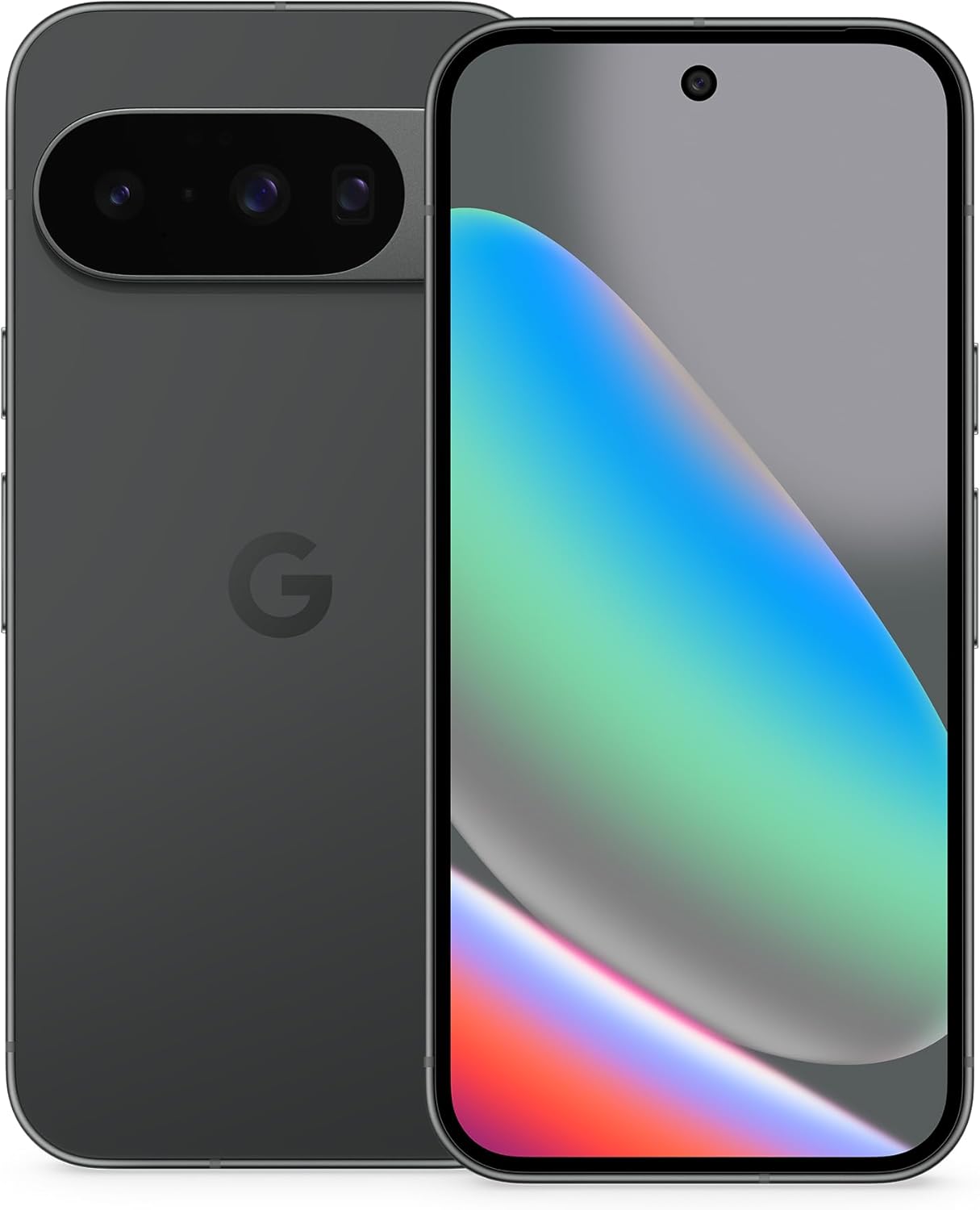
Figure 1: Google Pixel 10 in Obsidian. The device features a sleek design with a prominent camera bar on the rear and a full-screen display on the front.
Naon dina Box
- Hapé
- Kabel USB
- Buklet Garansi

Figure 2: The Google Pixel 10 box contents, showing the Pixel 10 with eSIM and a 1m USB-C to USB-C cable. A Support, Safety & Warranty Booklet is also included but not pictured.
Disetél
1. Daya Awal Hurung
- Press and hold the Power button (located on the right side of the device) until the Google logo appears.
- Turutan parentah dina-layar pikeun milih basa anjeun, wewengkon, jeung nyambung ka jaringan Wi-Fi.
2. Mindahkeun Data
If you are switching from an old phone, the Pixel 10 offers a seamless data transfer process. Follow the on-screen instructions to transfer your apps, photos, contacts, and other data. This process typically takes about 20 minutes.

Figure 3: The Pixel 10 facilitates easy switching from previous devices, allowing users to text high-res images and react with emoji to iPhone users.
3. SIM Card / eSIM Activation
The Pixel 10 supports eSIM technology, allowing you to activate your cellular plan digitally without a physical SIM card. You can also store multiple numbers. Consult your carrier for eSIM activation instructions.
Figure 4: The Pixel 10 is eSIM-only, enabling digital plan switching and storage of multiple numbers.
4. Setup Kaamanan
Set up your preferred security method: fingerprint unlock, face recognition, PIN, or password. These measures protect your device and data.
Parentah Operasi
1. Napigasi
- Sapuan: Gesek ka luhur ti handap pikeun muka aplikasi, gesek ka luhur terus tahan pikeun aplikasi nu panganyarna, gesek ti sisi kénca atawa katuhu pikeun balik deui.
- Tombol: Use the power button for screen on/off and long-press for power options. Volume buttons control media and call volume.
2. Témbongkeun
The 6.3-inch Actua display offers a 120 Hz refresh rate for smooth scrolling and a peak brightness of 3,000 nits for clear visibility even in direct sunlight.

Figure 5: The Pixel 10 receives 7 years of Pixel Drops, ensuring continuous new features and updates.
Fitur kaméra
The Pixel 10 features an upgraded triple rear camera system, designed to capture high-quality photos and videos in various conditions.
1. Triple Rear Camera System
- Lensa Utama: 50 MP wide-angle for detailed shots.
- Lensa Ultrawide: 13 MP for expansive landscape and group photos.
- Lensa Tele: New 5x optical zoom, with up to 20x Super Res Zoom for distant subjects.

Figure 6: The Pixel 10's new 5x telephoto lens offers up to 20x Super Res Zoom for capturing distant details.
2. Night Sight
Capture crisp, clear photos in low-light settings without the need for a flash.

Figure 7: Night Sight feature enables brilliant photos from dusk to dawn, even in challenging low-light conditions.
3. Camera Coach
Receive intelligent suggestions to improve your photos, helping you frame shots and adjust settings for optimal results.

Figure 8: Camera Coach assists in snapping your best pictures, including features like Auto Best Take for group photos and intelligent reframing suggestions.
4. Kaméra Hareup
The front camera is ideal for high-quality selfies and video calls.
Fitur AI
The Google Pixel 10 integrates advanced AI capabilities, powered by Gemini, to enhance productivity and creativity.
1. Asisten AI Gemini
- Gemini Live: Engage in natural, free-flowing conversations with Gemini. Use your camera to ask questions about your surroundings or brainstorm ideas across apps.
- Magic Cue: This feature proactively suggests relevant information and actions based on your activities, such as flight info when calling an airline.

Figure 9: Gemini Live allows you to share your camera view and talk through what's around you, providing instant information.

Figure 10: Magic Cue proactively suggests relevant information and actions, such as flight details when calling an airline.
Durability & Display
- Résistansi scratch: The Pixel 10 is designed with scratch-resistant Corning Gorilla Glass Victus 2.
- Perlindungan Cai sareng Lebu: An IP68 rating ensures protection against water and dust.
- Actua Display: The 6.3-inch Actua display offers a 120 Hz refresh rate and 3,000-nit peak brightness for excellent visibility in various lighting conditions.

Figure 11: The Pixel 10 is designed for durability with scratch-resistant glass and IP68 water and dust protection, ensuring it holds up against spills and tumbles.
Batré & Ngecas
- Kahirupan batré: Enjoy 24+ hours of battery life with typical usage.
- Ngecas gancang: The device supports fast-charging capabilities.
- Ngecas nirkabel: Pixelsnap wireless charging (Qi2-certified) is supported.
Konektipitas
- Nirkabel: Bluetooth, NFC, and Wi-Fi connectivity are standard.
- Carrier Flexibility: As an unlocked Android phone, it offers the flexibility to change carriers and choose your own data plan, working with major carriers like Google Fi, Verizon, T-Mobile, and AT&T.
Software & Updates
The Pixel 10 runs on Android 16 and benefits from 7 years of Pixel Drops, ensuring your phone receives regular software updates and new features over time.
spésifikasi
| Fitur | Rincian |
|---|---|
| Ngaran modél | Piksel 10 |
| Sistem operasi | Android 16 |
| Modél CPU | Google Tensor G5 |
| Ram | 12 GB |
| Kapasitas Panyimpenan Mémori | 128 GB |
| Ukuran layar | 6.3 inci |
| Resolusi | 1440 x 3120 |
| Refresh Laju | 120 Hz |
| Kapasitas batré | 4970 mAh |
| Telepon Talk Time | 30 Jam |
| Cai & Tahan Lebu | IP68 |
| Dimensi produk | 6 x 2.8 x 0.3 inci |
| Item Beurat | 6.9 ons |
Pangropéa
- Apdet parangkat lunak: Regularly install system updates to ensure optimal performance and security.
- beberesih: Anggo lawon anu lemes sareng henteu lint pikeun ngabersihan layar sareng awak. Hindarkeun bahan kimia anu kasar.
- Perawatan batré: To prolong battery life, avoid extreme temperatures and fully discharging the device frequently.
Pamérésan masalah
1. Screen Unresponsiveness
If the screen becomes unresponsive, try restarting the device. Press and hold the Power button for approximately 20 seconds until the device restarts. Ensure your GPU drivers are up to date via system updates.
2. Lagging Performance
If the phone experiences lag, especially with multiple apps or browser tabs open, try closing unused applications, clearing app caches, and restarting the device. Regular software updates often include performance improvements.
3. Masalah Konéktivitas Bluetooth
If Bluetooth turns on automatically or has connectivity issues, check Bluetooth settings and ensure it is configured as desired. Restarting the device can often resolve minor connectivity glitches.
Garansi & Rojongan
Your Google Pixel 10 comes with a manufacturer's warranty. Please refer to the included Warranty Booklet for detailed terms and conditions. For additional support, visit the official Google support websitus atanapi ngahubungan layanan palanggan.


