1. Bubuka
Welcome to your new Kaidi KD-7019 TWS Bluetooth Earbuds. This manual provides instructions for the setup, operation, and maintenance of your device. Please read it carefully to ensure proper use and to maximize your listening experience.
Eusi pakét
- 1 Pair of Kaidi KD-7019 Earbuds
- 1 Charging Case with Touch Screen
- 1 Kabel Ngecas USB-C
- 1 Buku Panduan Pamaké
- Multiple pairs of silicone ear tips (Small, Medium, Large)
2. Produk Langkungview
Komponen Earbud
The Kaidi KD-7019 earbuds feature an ergonomic in-ear design for a comfortable and secure fit. Each earbud includes a touch-sensitive area for control functions.
Casing Pangisi Daya nganggo Layar Toél
The charging case not only protects and charges your earbuds but also features an integrated touch screen display for advanced control and information.

Figure 2.1: The product packaging for the Kaidi KD-7019 TWS Bluetooth Earbuds, displaying the brand 'KRIDI' (Kaidi) and 'ANC TWS Tela Touch' (ANC TWS Touch Screen) along with the model number KD-7019.

Figure 2.2: An illustration of the Kaidi KD-7019 charging case's LCD touch screen, detailing various functions such as music control, volume control, sound equalizer, 'Find My Buds' locator, ambient sound modes (ANC), spatial sound, flashlight, and lock screen wallpaper.
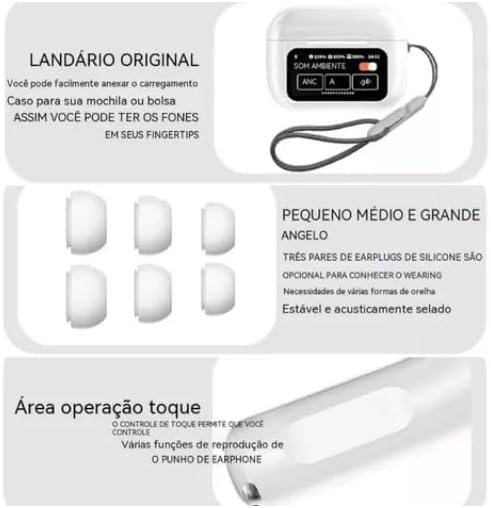
Figure 2.3: This image highlights key features: a lanyard attachment point on the charging case for portability, three pairs of silicone ear tips (small, medium, large) for a comfortable and secure fit, and the touch operation area on the earbuds for controlling playback and other functions.
3. Setélan
3.1 Ngecas Earbuds sareng Case
- Connect the provided USB-C cable to the charging case and a compatible power source (e.g., USB wall adapter, computer USB port).
- The touch screen on the charging case will display the current charging status.
- Ensure both earbuds are correctly placed inside the charging case to charge them simultaneously.
- A full charge for both the earbuds and the case typically takes approximately 2 hours.
3.2 Nyapasangkeun sareng Alat Bluetooth
- Open the lid of the charging case. The earbuds will automatically power on and enter Bluetooth pairing mode.
- On your desired device (e.g., smartphone, tablet, laptop), navigate to the Bluetooth settings.
- Aktipkeun Bluetooth sareng milarian alat anu sayogi.
- Select "Kaidi KD-7019" from the list of detected devices to initiate the connection.
- A ajakan sora ti earbuds bakal mastikeun pasangan suksés.
4. Parentah Operasi
4.1 Basic Earbud Controls (Touch)
Headphone ieu ngagaduhan area anu sénsitip kana toél pikeun ngontrol pamuteran audio sareng telepon kalayan gampang.
- Puter / Reureuh: Ketok tunggal dina boh earbud.
- Lagu salajengna: Ketok dua kali dina earbud katuhu.
- Lagu Sateuacanna: Ketok dua kali dina earbud kénca.
- Ngajawab / mungkas Telepon: Ketok tunggal dina boh earbud.
- Nolak Telepon: Press and hold either earbud for approximately 2 seconds.
- Aktipkeun Asisten Sora: Ketok tilu kali dina boh earbud.
4.2 Charging Case Touch Screen Functions
The integrated touch screen on the charging case provides additional control and information without needing to access your paired device.
- Kontrol Musik: Navigate through tracks, play, and pause directly from the screen.
- Kontrol volume: Adjust the audio playback volume.
- Ekualiser Sora: Select from various preset equalizer modes to customize your audio experience (e.g., Acid Rock, Pop, Classical).
- Modeu Sora Ambient: Toggle between Active Noise Cancellation (ANC), Transparency Mode, and Normal mode to suit your environment.
- "Find My Buds" Locator: Activate this function to emit a sound from misplaced earbuds, aiding in their retrieval.
- Sora spasial: Enable or disable spatial audio features for an immersive sound experience.
- Senter: Activate a small light feature on the charging case for convenience.
- Wallpaper Layar Konci: Customize the display background of the touch screen.
- Pintonan Tanggal sareng Waktos: View the current date and time directly on the case screen.
5. Pangropéa
5.1 beberesih
- Use a soft, dry, lint-free cloth to clean the earbuds and the charging case.
- Do not use abrasive cleaners, alcohol, or chemical solvents, as these can damage the device.
- If necessary, gently clean the silicone ear tips with a damp cloth and mild soap, then ensure they are completely dry before reattaching them to the earbuds.
5.2 Panyimpenan
- Always store the earbuds in their charging case when not in use. This protects them from damage and keeps them charged.
- Hindarkeun ngalaan alat ka suhu anu ekstrim, sinar panonpoé langsung, atanapi kalembaban anu luhur.
6. Cara ngungkulan
Isu umum jeung Solusi
- Henteu aya sora:
- Pastikeun earbud tos dicas cekap.
- Verify that the Bluetooth connection is active and stable.
- Adjust the volume on both your connected device and via the charging case touch screen.
- Teu Bisa Dipasangkeun:
- Confirm that the earbuds are in pairing mode (open case lid).
- Pareuman terus hurungkeun Bluetooth dina alat Anjeun.
- If previously paired, try forgetting "Kaidi KD-7019" from your device's Bluetooth list and attempt pairing again.
- Ensure no other devices are currently connected to the earbuds.
- Masalah ngecas:
- Check the USB-C cable and power adapter for damage and proper connection.
- Ensure both earbuds are correctly seated in their charging slots within the case.
- Clean the charging contacts on both the earbuds and the case if they appear dirty.
- Kontrol Toél Teu Ngarespon:
- Ensure the touch areas on the earbuds are clean and dry.
- Place the earbuds back into the charging case, close the lid, and then reopen it to reset them.
7. Spésifikasi
Data Téknis
| Fitur | Rincian |
|---|---|
| merek | Kaidi |
| Modél | KD-7019 (also referred to as 3041) |
| Vérsi Bluetooth | 5.3 |
| Protokol anu dirojong | HFP, HSP, A2DP, AVRCP |
| Unit Supir | 13 mm |
| Jarak Pangiriman | > 10 méter |
| Kapasitas Batré Earbud | 30 mAh |
| Kapasitas batré Case | 360 mAh |
| Waktos Puterkeun Musik | Nepi ka 5 jam (dina volume 80%) |
| Waktu Ngecas (Earbud & Casing) | Kurang leuwih 2 jam |
| Métode kontrol | Toél |
| Alat nu cocog | Telepon Sélulér, Tablet, Buku Catetan |
| Kontrol bising | Pembatalan Noise Lingkungan (ENC) |
| Sertifikasi ANATEL | 10545-23-12308 |
| Beurat produk | 190 g |
| Ukuran Paket | 23 x 13 x 4 cm |
8. Garansi jeung Rojongan
8.1 Émbaran jaminan
Based on the available product information, this product does not come with a manufacturer's warranty. Please refer to the return and warranty policies provided by your retailer or point of purchase for any potential coverage.
8.2 Rojongan Palanggan
For further assistance, technical support, or inquiries regarding your Kaidi KD-7019 TWS Bluetooth Earbuds, please contact the retailer or seller from whom you purchased the product.


