1. Bubuka
This manual provides detailed instructions for the installation, operation, and maintenance of your BOTSLAB G980H 3-Channel 4K Dash Cam. Please read this manual thoroughly before using the device to ensure proper functionality and safety. Keep this manual for future reference.
2. Eusi Paket
Pastikeun yén sadaya item anu didaptarkeun di handap kalebet kana pakét anjeun. Lamun aya item nu leungit atawa ruksak, mangga ngahubungan rojongan customer.

Image: Contents of the BOTSLAB G980H Dash Cam package, including the main unit, rear camera, cables, and accessories.
- BOTSLAB G980H Multi-Channel Dash Cam Unit
- Rear Camera (6.5M cable)
- 128GB Kartu MicroSD
- Car Charger (3.5M cable)
- Installation Pry Bar
- Electrostatic Film (x2)
- 3M Tapes (x2)
- Manual pamaké
- Kartu Peringatan
3. Produk Langkungview
The BOTSLAB G980H is a 3-channel dash camera system designed to record video from the front, rear, and interior of your vehicle. It features 4K front recording, 1080P for rear and cabin cameras, a 3.18-inch touch screen, voice control, built-in GPS, and 5.8GHz Wi-Fi for fast file mindahkeun.
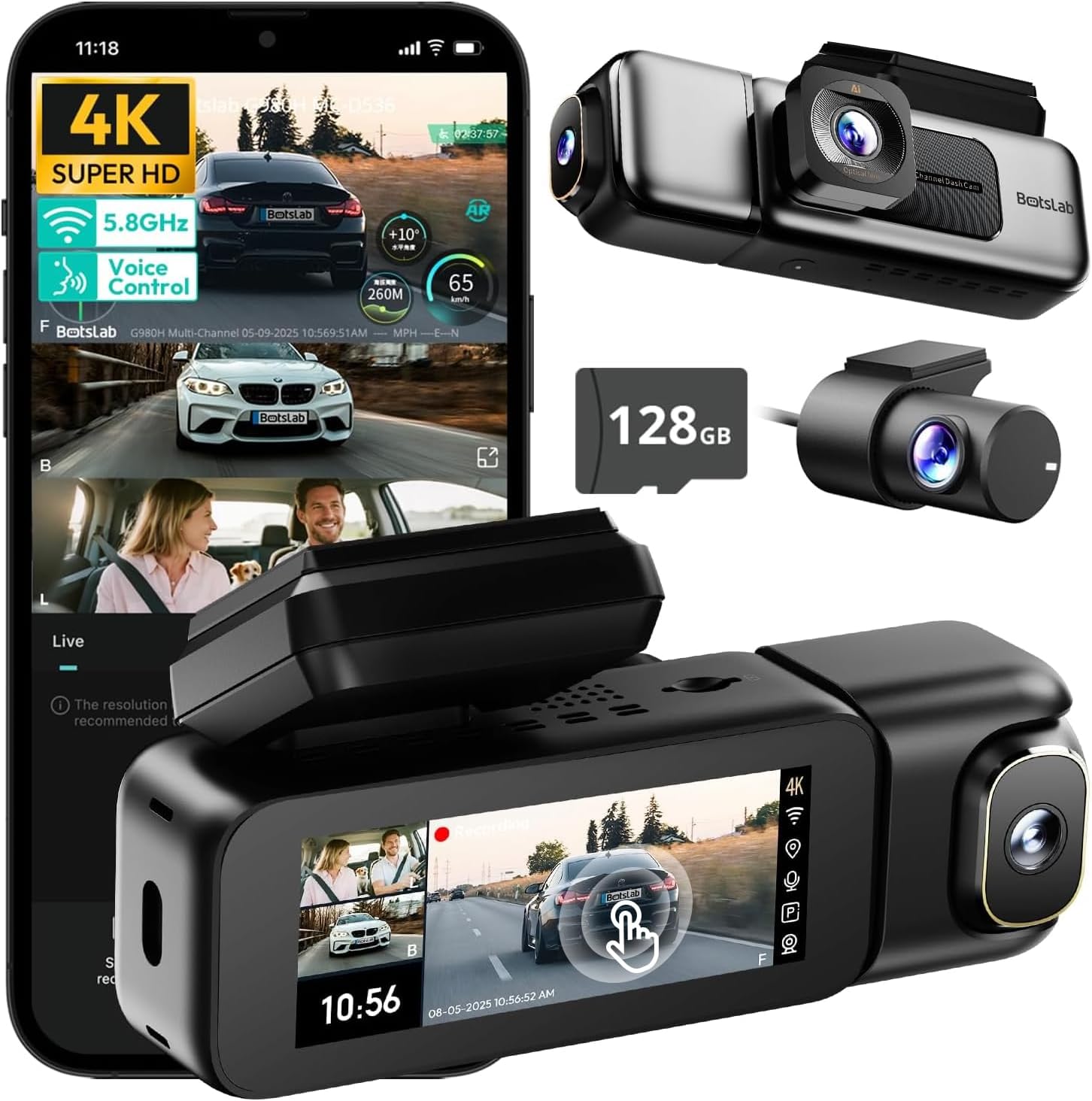
Image: The BOTSLAB G980H 3-Channel Dash Cam, showing the main unit, detachable cabin camera, rear camera, and a 128GB MicroSD card.

Image: Visual representation of the dash cam's wide viewing angles: 170° for the front camera (4K), 120° for the cabin camera (1080P), and 150° for the rear camera (1080P).

Image: Diagram illustrating the dash cam's low-light performance features, including F1.8 aperture, 940nm infrared lights, WDR technology, and a 6-lens system for clear footage.

Image: Illustration highlighting the supercapacitor's role in maintaining data safety during sudden power loss and its resistance to extreme temperatures (-20°C to 70°C).
Fitur konci:
- Rekaman 3-Kanal: Simultaneous 4K front, 1080P rear, and 1080P cabin recording.
- lebar View Sudut: 170° front, 150° rear, and 120° cabin for comprehensive coverage.
- Layar Toél 3.18": Intuitive interface for settings adjustment and playback.
- Kontrol sora: Hands-free operation for common functions.
- Diwangun-di GPS: Records speed, location, and routes.
- Wi-Fi 5.8GHz: Gancang file transfer and app connectivity.
- Monitor Parkir: Three modes (Sentry, Time-Lapse, Collision Detection) for 24/7 surveillance (requires hardwire kit).
- Superkapasitor: Enhanced durability and safety in extreme temperatures.
- WDR & HDR: Optimized imaging in varying light conditions.
- Ngarekam loop: Rekaman kontinyu, nimpa tulisan pangkolotna files nalika kartu pinuh.
- G-Sénsor: Otomatis ngonci footage nalika tabrakan.
4. Setup & Instalasi
Follow these steps to properly install your BOTSLAB G980H Dash Cam in your vehicle.

Image: The dash cam's adjustable design, featuring a magnetic snap-on mechanism for the cabin camera and 90-degree vertical and 360-degree horizontal rotation for optimal view kustomisasi.

Image: A simplified diagram showing the typical installation points for the G980H Multi-Channel Dash Cam, including the main unit on the windshield, the rear camera, and the car charger connection.
- Prepare the MicroSD Card: Insert the provided 128GB MicroSD card into the dash cam's card slot. Ensure the card is correctly oriented.
- Pasang kaméra hareup:
- Bersihkeun wewengkon kaca di mana anjeun maksudna pikeun masang dashcam.
- Apply the electrostatic film to the chosen area on the windshield.
- Attach the dash cam mount to the electrostatic film using the 3M adhesive tape. Ensure a secure fit.
- Slide the main dash cam unit onto the mounted bracket.
- Pasang kaméra tukang:
- Identify a suitable location on your rear windshield for the rear camera. Clean the area.
- Attach the rear camera using its adhesive.
- Route the rear camera cable to the main dash cam unit, tucking it along the vehicle's headliner and pillars using the pry bar.
- Sambungkeun kabel kaméra pungkur ka port ditunjuk dina Unit dash cam utama.
- Sambungkeun Kakuatan:
- Connect the car charger cable to the main dash cam unit.
- Colokkeun carjer mobil kana stop kontak 12V kendaraan anjeun (stop kontak korek rokok).
- Route the power cable neatly to avoid obstruction.
- Adjust Camera Angles: Power on the dash cam and adjust the front, cabin (if detachable), and rear camera angles to ensure optimal coverage. The cabin camera features a magnetic snap-on design and can be rotated 90 degrees vertically, while the main unit allows 360-degree rotation for the front lens.
5. Operasi dasar
Learn how to use the primary functions of your dash cam.
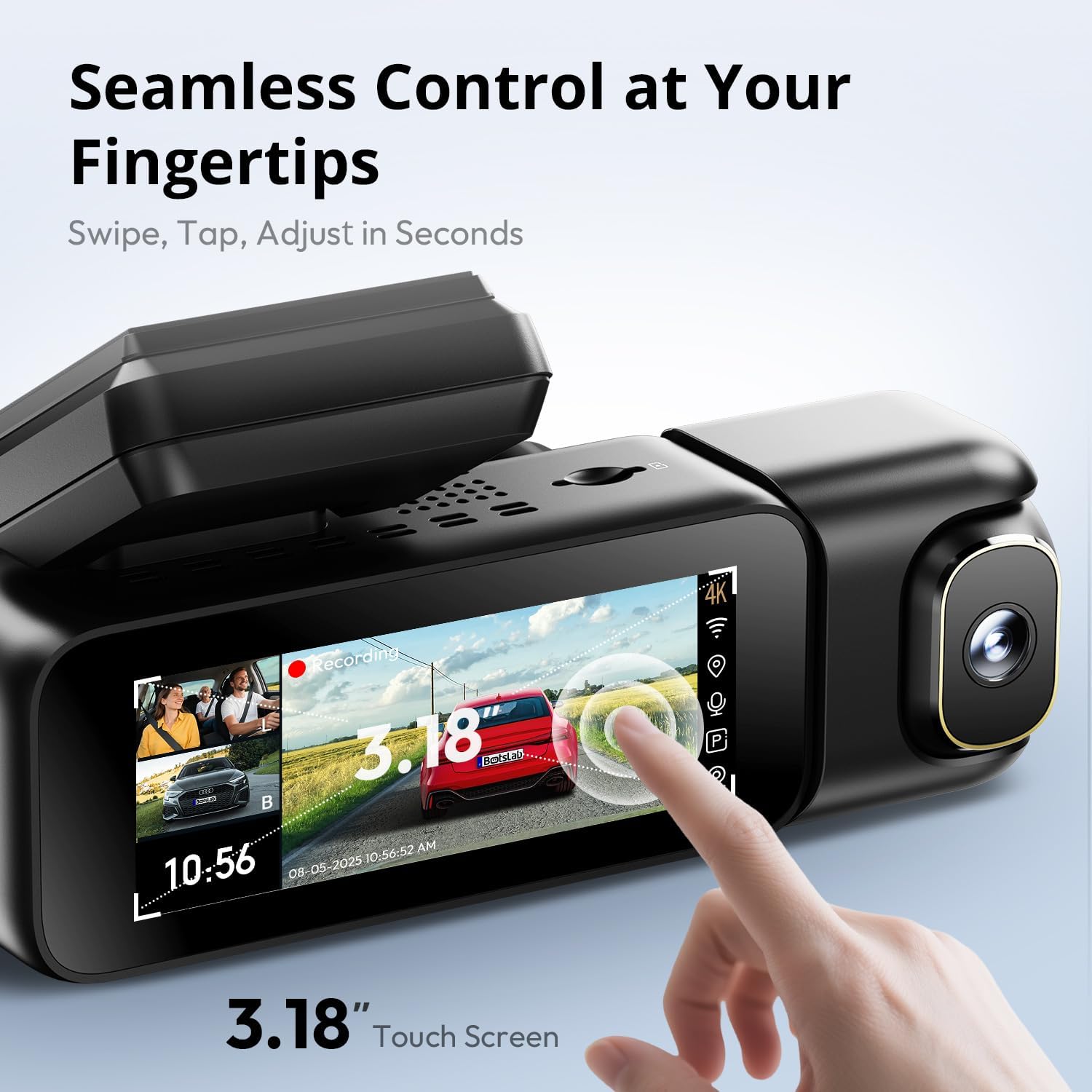
Image: A close-up of the dash cam's 3.18-inch touch screen, showing the live view from multiple cameras and on-screen controls for recording and settings.
Hurungkeun/Pareuman:
- Kaméra dasbor bakal otomatis hurung sareng mimiti ngarékam nalika konci kontak kendaraan anjeun dihurungkeun.
- Eta bakal otomatis pareum teu lila saatos kontak dipareuman.
Ngarékam:
- Rekaman Normal: The dash cam continuously records in a loop. When the MicroSD card is full, the oldest unlocked files anu overwritten.
- Rekaman Darurat (G-Sensor): In the event of a sudden impact or collision, the built-in G-sensor will automatically detect the event and lock the current video segment (including 8 seconds prior to the event) to prevent it from being overwritten.
Operasi layar:
- The 3.18-inch touch screen allows you to navigate menus, adjust settings, and view hirup footage or recorded videos.
- Swipe and tap gestures are used for control.
6. Fitur canggih
Kontrol sora:
Operate your dash cam hands-free using voice commands for safer driving. The dash cam responds to specific phrases.
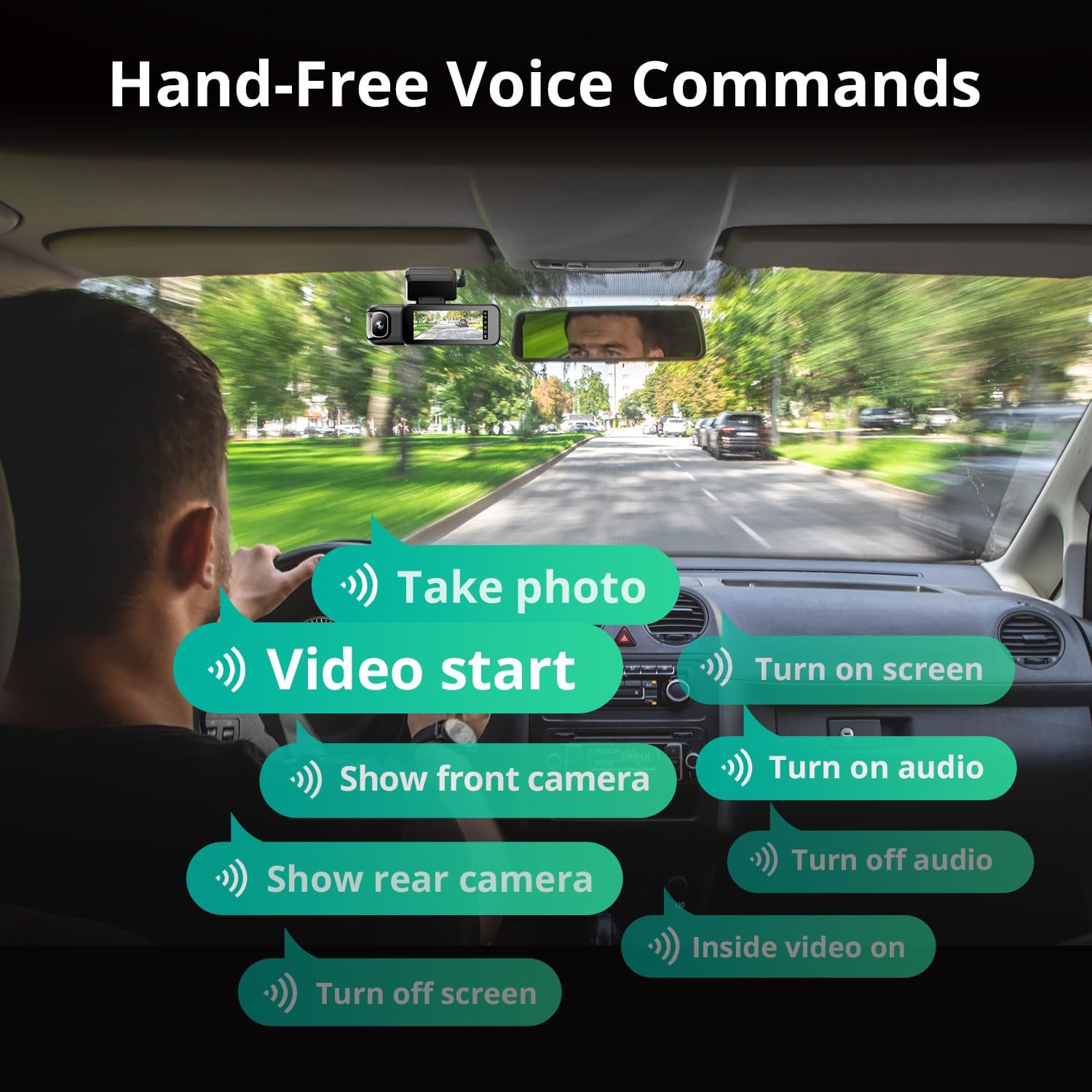
Image: A visual guide to the available voice commands, such as "Take photo," "Video start," "Turn on screen," "Show front camera," "Show rear camera," "Turn on audio," "Turn off audio," "Inside video on," and "Turn off screen."
Paréntah sora anu umum di antarana:
- "Nyandak poto"
- "Video start"
- "Hidupkeun layar"
- "Témbongkeun kaméra hareup"
- "Témbongkeun kaméra pungkur"
- "Hidupkeun audio"
- "Turn off audio"
- "Inside video on"
- "Pareuman layar"
24/7 Parking Monitor:
The dash cam offers continuous surveillance when your vehicle is parked. A hardwire kit (ASIN: B0FH2H9DDB) is required for this functionality.
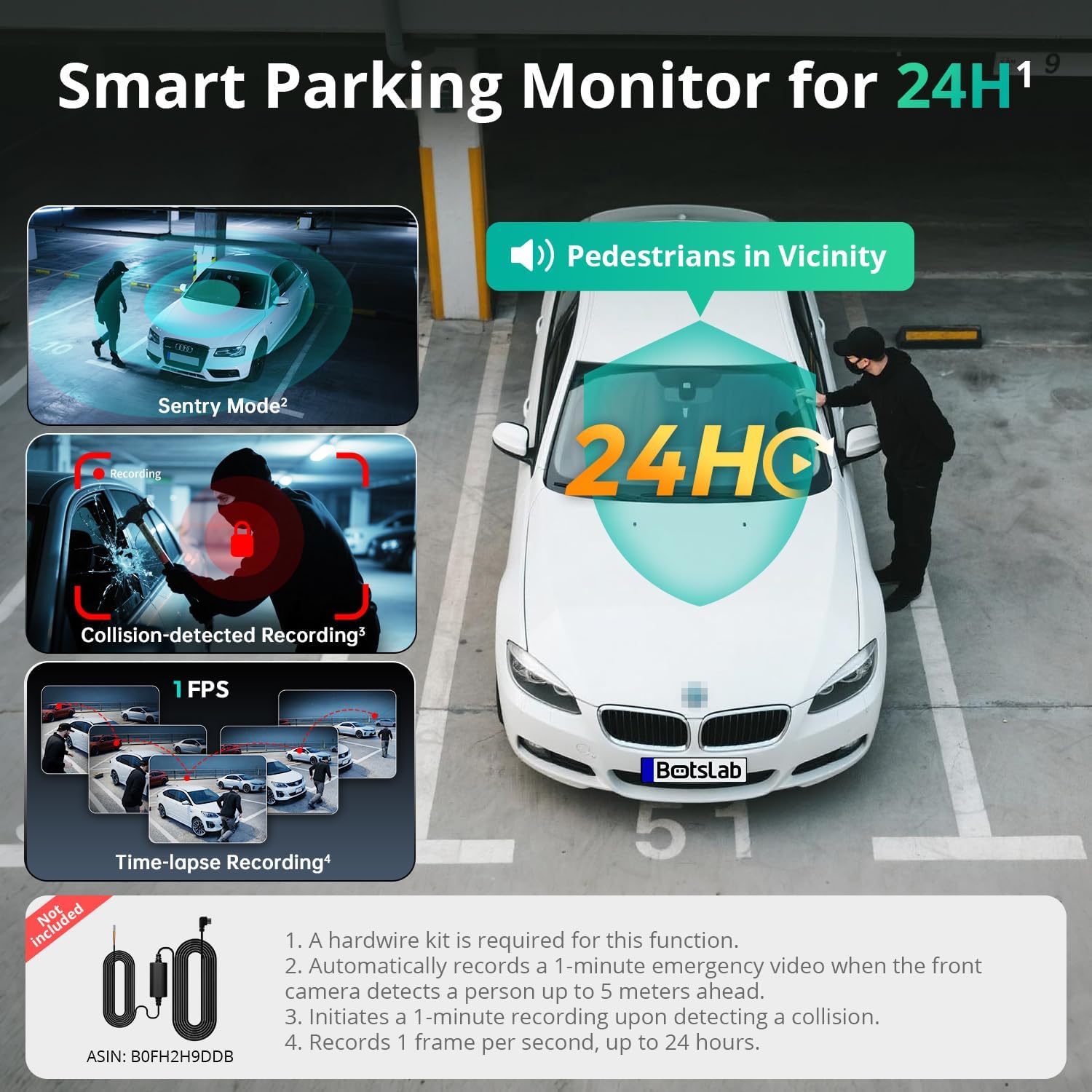
Image: An illustration of the three parking monitor modes: Sentry Mode (detects people within 5 meters), Collision-detected Recording (locks footage on impact), and Time-lapse Recording (1 frame per second for extended surveillance).
Modeu sadia:
- Modeu Pangjaga: Automatically records a 1-minute emergency video when the front camera detects a person within 5 meters.
- Selang waktos: Records at 1 frame per second for extended surveillance, up to 24 hours.
- Deteksi tabrakan: Locks 1-minute footage upon detecting an impact.
Diwangun-di GPS:
The integrated GPS module records your vehicle's speed, location, and driving routes. This data can be viewed via Google Maps integration through the BOTSLAB App or a dedicated PC player.

Image: A visual showing the dash cam's built-in GPS functionality, displaying recorded routes, speed, and location data integrated with Google Maps on a smartphone and computer.
5.8GHz Wi-Fi & BOTSLAB App:
Connect your dash cam to the BOTSLAB App on your smartphone via 5.8GHz (or 2.4GHz) Wi-Fi for fast file transfers, live view, settings configuration, video editing, and sharing.

Image: An illustration demonstrating the 5.8GHz Wi-Fi capability for 5X faster file transfer speeds, enabling quick preview and playback of recorded videos on a smartphone.

Image: Screenshots of the Botslab App interface on a smartphone, showing options to capture, edit, and share video footage, as well as a timeline for video playback and management.
Image: A smartphone displaying the Botslab App icon, with logos for Google Play and the App Store, indicating where to download the application.
To use the app:
- Download the BOTSLAB App from the Google Play Store or Apple App Store.
- Register and sign in to your account.
- Follow the in-app instructions to connect your dash cam via Wi-Fi.
7. Pangropéa
- Ngabersihan lensa: Bersihkeun lénsa kaméra sacara rutin nganggo lawon anu lemes sareng henteu buluan pikeun mastikeun kualitas pidéo anu jelas.
- Kartu MicroSD: Format the MicroSD card periodically (e.g., once a month) through the dash cam's settings to maintain optimal performance and prevent data corruption. Back up any important files saméméh pormat.
- Pembaruan firmware: Check for firmware updates via the BOTSLAB App to ensure your dash cam has the latest features and improvements.
- Suhu: Avoid exposing the dash cam to extreme temperatures for prolonged periods when not in use. The supercapacitor design supports a wide operating temperature range of -20°C to 70°C.
8. Cara ngungkulan
| Masalah | Mungkin Cukang lantaranana | Solusi |
|---|---|---|
| Dash cam teu hurung. | Teu aya catu daya; carjer mobil rusak; sambunganna kendor. | Pariksa sambungan carjer mobil; cobian stop kontak 12V anu béda; pastikeun kontak kendaraan hurung. |
| Ngarekam eureun atawa freezes. | MicroSD card error; card full; incompatible card. | Format the MicroSD card; replace with a high-quality U3 or higher speed card; ensure card capacity is supported (up to 512GB). |
| Kualitas pidéo goréng. | Lénsa kotor; pilem pelindung masih kénéh dipasang dina lénsa; setélan résolusi salah. | Clean lenses; remove any protective films; check video resolution settings in the menu. |
| Masalah sambungan Wi-Fi. | Incorrect password; distance from phone; app issues. | Ensure correct Wi-Fi password; keep phone close to dash cam; restart app and dash cam. |
| Kontrol sora teu ngaréspon. | Loud environment; incorrect commands; microphone obstructed. | Speak clearly and directly to the dash cam; ensure correct commands are used; check for obstructions near the microphone. |
| Monitor parkir teu jalan. | Hardwire kit not installed; incorrect settings. | Ensure the hardwire kit (ASIN: B0FH2H9DDB) is correctly installed; verify parking monitor settings are enabled. |
9. Spésifikasi
| Fitur | Rincian |
|---|---|
| Ngaran modél | G980H 3 Channel Dashcam |
| Resolusi kaméra hareup | 4K (2160p) |
| Rear/Cabin Camera Resolution | 1080P |
| widang View | Front: 170°, Rear: 150°, Cabin: 120° |
| tampilan | 3.18" Layar Toél |
| Konektipitas | 2.4/5.8GHz Wi-Fi |
| GPS | Diwangun-di GPS |
| Panyimpenan | Ngarojong kartu MicroSD dugi ka 512GB (kalebet 128GB) |
| Sumber Daya | Superkapasitor |
| Suhu Operasi | -20°C nepi ka 70°C (-4°F nepi ka 158°F) |
| Diménsi | 3.5 x 3.5 x 1.18 inci |
| Item Beurat | 1.78 pon |
10. Jaminan & Dukungan
BOTSLAB is committed to providing excellent customer service and support for your product.

Gambar: Hiji leuwihview of Botslab Care services, including 365-day professional service, lifetime technical help, 30-day free returns, and 24/7 customer support.
Image: Contact information for Botslab support, including the Botslab APP, global.botslab.com, service@botslab.com, and Botslab Users Group on Facebook.
- Garansi: Your BOTSLAB G980H Dash Cam comes with a comprehensive 12-month warranty.
- Bantosan Téknis: Lifetime technical support is available for all BOTSLAB products.
- Kontak Rojongan: If you encounter any issues or have questions, please contact us through the Amazon Message Center or via the following channels:
- BOTSLAB App: Download the app, then navigate to Me > Support.
- Websitus: Nganjang global.botslab.com
- Surélék: service@botslab.com
- Komunitas: Join the Botslab Users Group on Facebook.


