1. Bubuka
Thank you for choosing the LIGE FV21-D Women's Smartwatch. This device combines elegant design with advanced fitness and communication features to enhance your daily life. This manual provides detailed instructions for setup, operation, and maintenance to ensure optimal use of your smartwatch.
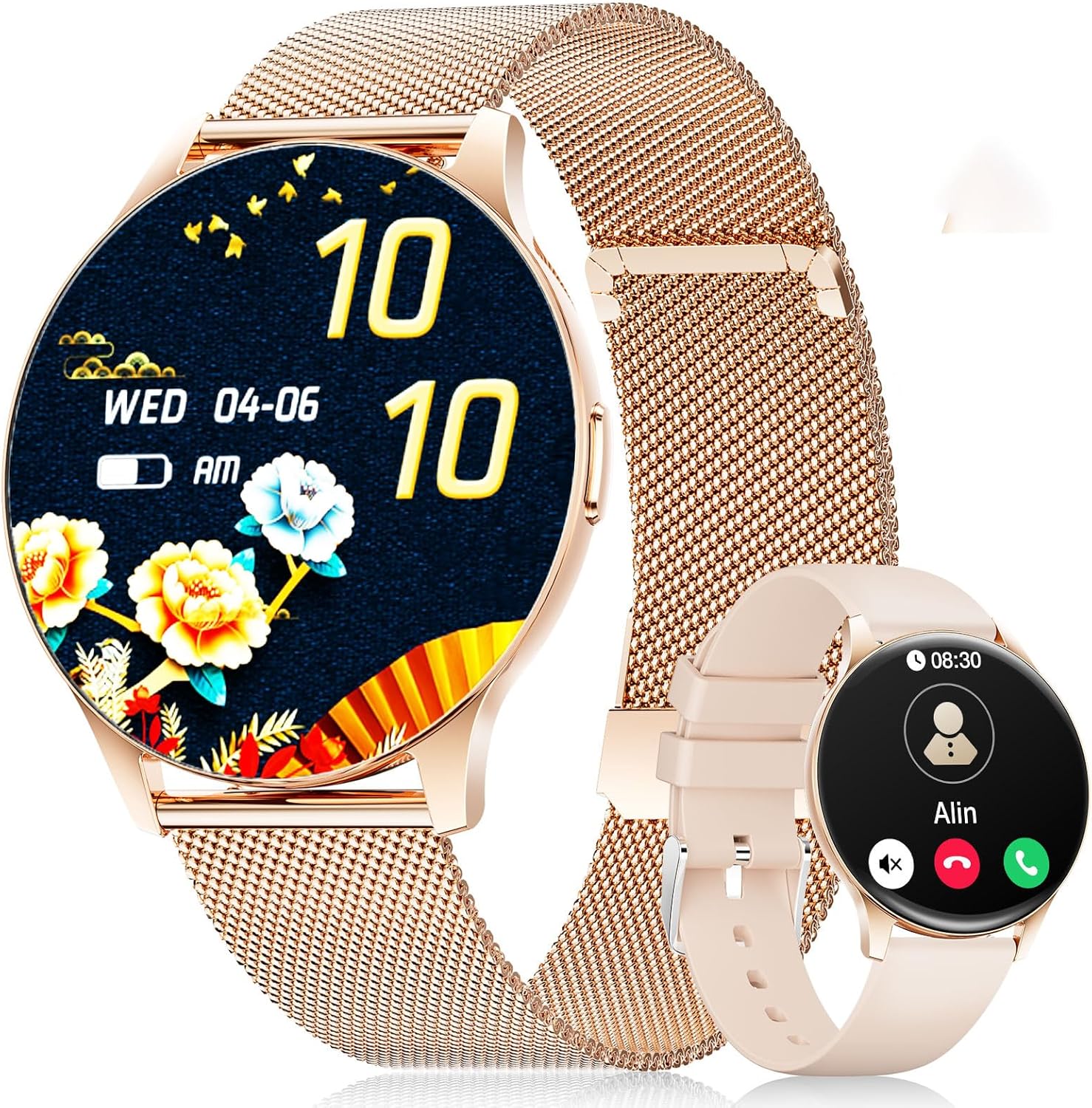
Image: The LIGE FV21-D Smartwatch, showcasing its rose gold casing with a mesh strap and an alternative beige silicone strap. The main display shows a floral watch face, while the smaller inset shows a call interface.
2. Eusi Paket
Punten parios yén sadaya barang aya dina pakét anjeun:
- LIGE FV21-D Smartwatch
- Metal Mesh Strap (Rose Gold)
- Silicone Strap (Beige)
- Kabel Ngecas
- Manual pangguna (dokumén ieu)
3. Setélan
3.1 Ngecas Smartwatch
- Sambungkeun kabel ngecas kana port ngecas di tukangeun jam tangan pinter.
- Plug the USB end of the charging cable into a standard USB power adapter (not included) or a computer's USB port.
- The watch display will indicate charging status. Ensure the watch is fully charged before first use. A full charge typically takes approximately 2 hours.
3.2 Daya Hurung/Pareuman
- Daya Hurung: Press and hold the side button for a few seconds until the LIGE logo appears.
- Pareum listrik: Pencét terus tahan tombol sisi, teras pilih pilihan "Pareuman" dina layar.
3.3 Pamasangan Aplikasi sareng Papasangan
To unlock the full functionality of your smartwatch, you need to pair it with your smartphone using the dedicated application.
- Unduh Aplikasi: Milarian pikeun "FitCloudPro" in your smartphone's app store (Apple App Store for iOS or Google Play Store for Android) and install it.
- Aktipkeun Bluetooth: Pastikeun Bluetooth diaktipkeun dina smartphone Anjeun.
- Buka Aplikasi: Launch the FitCloudPro app and follow the on-screen instructions to create an account or log in.
- Tambahkeun Alat: In the app, navigate to the "Device" or "Add Device" section. The app will search for available smartwatches.
- Pilih Jam anjeun: Select "FV21-D" or the corresponding device name from the list.
- Konfirmasi pasangan: A pairing request may appear on both your phone and the smartwatch. Confirm the pairing on both devices.
- Pasihan Idin: Bere idin anu diperyogikeun (contona, bewara, lokasi, kontak) ka aplikasi pikeun fungsi lengkep.
Note: The smartwatch supports Android 4.4+ and iOS 9.0+ operating systems.
4. Parentah Operasi
4.1 Napigasi Dasar
- Layar cabak: The 1.43-inch HD AMOLED touch display allows for intuitive interaction.
- Gesek ka luhur/handap: Gulung ka ménu sareng béwara.
- Gesek Kénca/Katuhu: Aksés pungsi gancang atawa widget béda.
- Ketok: Pilih hiji item atawa mastikeun hiji aksi.
- Tombol samping: Pencét pikeun mulang ka layar utama atanapi ngahudangkeun tampilan. Pencét lila pikeun pilihan daya.
4.2 Ngaropea Watch Faces
Your smartwatch offers over 200 customizable watch faces. You can change them directly on the watch or through the FitCloudPro app.
- Dina Watch: Long-press the home screen, then swipe left or right to browse available watch faces. Tap to select.
- Via Aplikasi: Open the FitCloudPro app, go to the "Watch Faces" section, and choose from the gallery. You can also upload your own photos to create custom watch faces.
4.3 Phone Function (Bluetooth Call)
Once paired, you can make and receive calls directly from your smartwatch.
- Nelepon: Access the "Dialer" or "Contacts" function on the watch to initiate a call.
- Narima Telepon: Nalika telepon asup, jam tangan bakal ningalikeun ID panelepon. Anjeun tiasa ngawalon atanapi nolak telepon langsung tina layar jam tangan.
4.4 Modeu Olahraga
The smartwatch supports over 120 sports modes, including yoga, cycling, running, and more. To start a workout:
- Buka menu "Olahraga" atanapi "Latihan" dina jam tangan anjeun.
- Pilih kagiatan anu dipikahoyong.
- Tap to start tracking. The watch will record data such as duration, calories burned, and heart rate.
- To end a workout, swipe or tap the screen and select the "End" option.
4.5 Pangimeutan Kaséhatan
The FV21-D smartwatch provides comprehensive health tracking features:
- Monitor Detak Jantung: Terus-terusan monitor denyut jantung anjeun sapopoe. View data real-time dina jam tangan atanapi tren rinci dina aplikasi.
- Tracker Saré: Automatically monitors your sleep patterns, including deep sleep, light sleep, and wake times. Access sleep analysis in the FitCloudPro app.
- Pedometer: Tracks your daily steps taken.
- Calorie Measurement: Estimates calories burned based on activity and personal data.
- Monitor SpO2 (Oksigén Getih): Ukur tingkat jenuh oksigén getih anjeun.
- Nyukcruk siklus menstruasi: For female users, the app can track and predict menstrual cycles.
Catetan: Alat ieu sanés alat médis. Data kaséhatan ngan ukur kanggo rujukan sareng henteu kedah dianggo pikeun diagnosis atanapi pangobatan médis.
4.6 Notifications and Reminders
Receive notifications directly on your wrist:
- Telepon sareng Pesen: Get alerts for incoming calls, SMS, and messages from various apps (e.g., WhatsApp, Facebook). Configure app notifications in the FitCloudPro app.
- Jam alarem: Set alarms through the app to vibrate on your wrist.
- Panginget Sedentary: The watch can remind you to move after periods of inactivity.
- Inpormasi Cuaca: View kaayaan cuaca ayeuna sareng ramalan (merlukeun sinkronisasi aplikasi).
- Asistén Sora: Aksés asisten sora smartphone anjeun langsung tina jam tangan.
4.7 Tahan Cai (IP68)
The FV21-D smartwatch is IP68 waterproof, meaning it is resistant to dust and can withstand immersion in water up to 1.5 meters for 30 minutes. It is suitable for daily use, such as washing hands, rain, and sweating during exercise. However, it is not recommended for hot showers, saunas, or diving, as steam and hot water can damage the seals.
5. Pangropéa
5.1 Ngabersihkeun Smartwatch
- Ngusap layar arloji jeung awak ku lawon lemes, tanpa serat.
- Lamun perlu, rada dampen lawon jeung cai. Ulah make bahan kimia kasar atawa bahan abrasive.
- Ensure the watch is completely dry before charging.
5.2 Tali ngagantian
Your smartwatch comes with two interchangeable straps: a metal mesh strap and a silicone strap. To replace them:
- Panggihan pin pelepas cepat di bagian bawah tali tempat pin tersebut terhubung ke badan jam tangan.
- Slide the pin inwards to detach the strap.
- Align the new strap with the watch lugs and insert one end of the pin into the hole.
- Slide the quick-release pin inwards, position the strap, and release the pin to secure it. Ensure both ends of the pin are properly seated.
5.3 Perawatan Batré
- Hindarkeun sering-sering ngeusi batre.
- Cas jam tangan sacara rutin, sanajan teu dianggo, pikeun ngajaga kasehatan batréna.
- Simpen arloji dina tempat anu tiis sareng garing upami henteu dianggo kanggo waktos anu lami.
6. Cara ngungkulan
| Masalah | Solusi anu mungkin |
|---|---|
| Jam tangan teu bisa dihurungkeun. | Pastikeun arloji dicas pinuh. Sambungkeun ka carjer sahenteuna 30 menit. |
| Teu tiasa dipasangkeun sareng smartphone. |
|
| Bewara teu katampa. |
|
| Data kaséhatan anu teu akurat. |
|
| hirup batré pondok. |
|
Upami anjeun mendakan masalah anu teu didaptarkeun di dieu atanapi peryogi bantosan langkung lanjut, mangga tingal bagian dukungan.
7. Spésifikasi
| Fitur | Rincian |
|---|---|
| Nomer modél | FV21-D |
| tampilan | 1.43 Inch HD AMOLED (466 x 466) |
| Diménsi | 1.81 x 1.81 x 0.87 inci |
| Item Beurat | 6.7 ons |
| Konektipitas | Bluetooth |
| Kasaluyuan System Operasi | Android 4.4+ sareng ios 9.0+ |
| Tahan cai | IP68 |
| Jenis Batré | Polimer Litium (1 diperyogikeun, kalebet) |
| Fitur husus | Pedometer, Fitness Tracker, Multi-Sport Tracker, Heart Rate Monitor, Oximeter (SpO2), Sleep Tracker, Bluetooth Call, Music Player, Voice Assistant, Reminders, Alarm Clock, Text Messages, Notifications, Sedentary Reminder, Cycle Tracking. |
| Kapasitas Panyimpenan Mémori | 256 MB |
| GPS | GPS Via Smartphone |
8. Garansi jeung Rojongan
LIGE is committed to ensuring your satisfaction with the FV21-D Smartwatch. Should you have any questions, require technical support, or encounter any issues with your device, please do not hesitate to contact our customer service team.
Please refer to the contact information provided with your purchase documentation or visit the official LIGE websitus pikeun detil rojongan.


