Bubuka
This manual provides essential information for using your realme Note 70T Smartphone. It covers device setup, operation, maintenance, and troubleshooting to ensure optimal performance and user experience.
Naon dina Box
Upon unboxing your realme Note 70T, verify that the following items are included:
- realme Note 70T Smartphone
- Kabel USB (Tipe-C)
- Gancang Mimitian Guide
- Émbaran Kasalametan
Disetél
- Selapkeun Kartu SIM: Locate the SIM card tray on the side of the device. Use the provided SIM ejector tool to open the tray. Insert your Nano-SIM card(s) and an optional microSD card into the designated slots. Ensure the tray is fully reinserted.
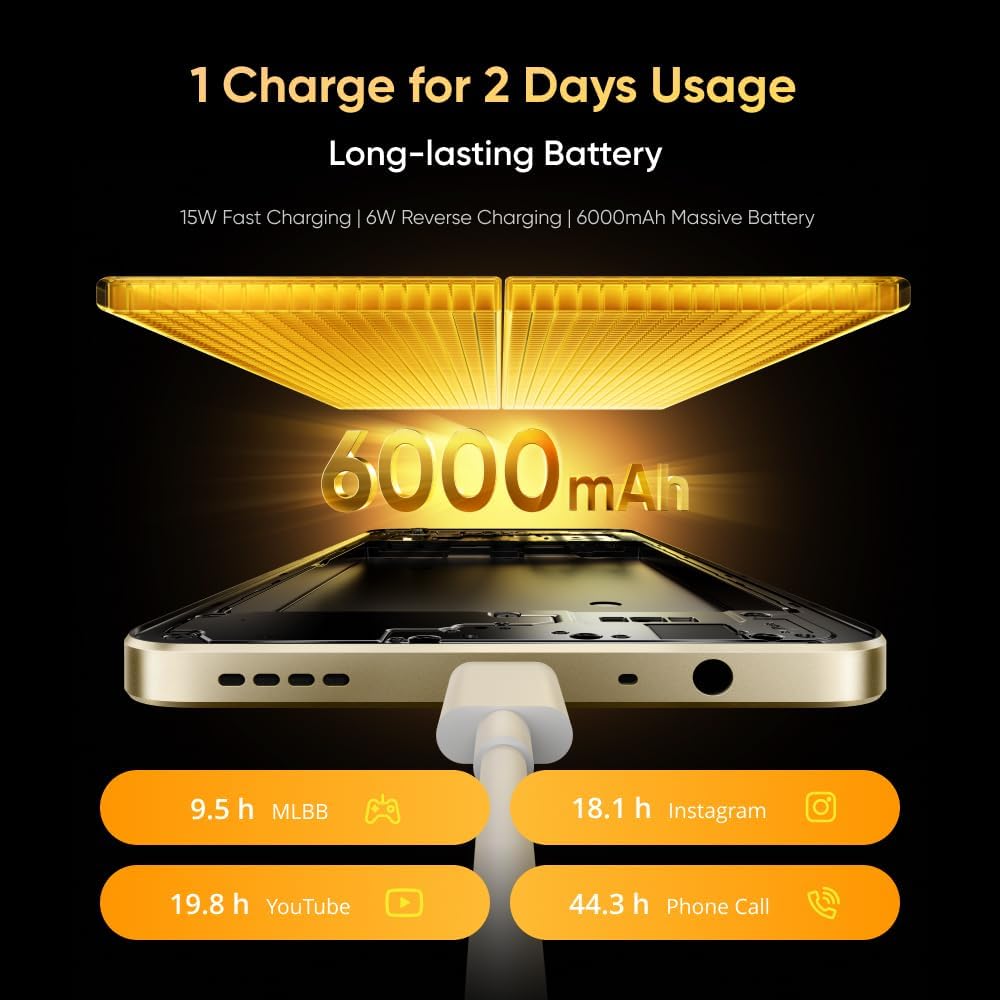
Image: The realme Note 70T smartphone, showing its sleek design and indicating the location for SIM card insertion.
- Daya Hurung: Press and hold the Power button located on the side of the device until the realme logo appears.
- Setup Awal: Turutan ajakan dina layar pikeun milih basa anjeun, sambungkeun ka jaringan Wi-Fi, sareng nyetel akun Google anjeun.
Parentah Operasi
Basic Device Functions
- Hurungkeun/Pareuman: Pencét terus tahan tombol Daya. Pilih "Pareuman" atanapi "Mulai deui" tina menu.
- Kontrol volume: Anggo tombol Volume Naék sareng Volume Turun di sisi pikeun nyaluyukeun volume média, telepon, sareng alarm.
- Napigasi: Utilize on-screen gestures or navigation buttons (Home, Back, Recent Apps) as configured in settings.
Batré sareng Ngecas
The realme Note 70T is equipped with a 6000 mAh battery, designed for extended usage.
- Ngecas: Connect the provided USB Type-C cable to the phone's charging port and a compatible 15W power adapter.
- Ngecas gancang: The device supports 15W fast charging for quicker power replenishment.
- Ngecas Balik: Use a compatible OTG cable to utilize your phone as a power bank to charge other devices (6W reverse charging).

Image: Illustration of the realme Note 70T connected to a charger, highlighting its 6000 mAh battery capacity and charging capabilities.
Fitur tampilan
Experience smooth visuals on the 90Hz Eye Comfort Display.
- The 6.74-inch display offers a maximum brightness of 563 nits and up to 180Hz touch samplaju ling pikeun interaksi responsif.
- Pulse Light: The device features a Pulse Light for immediate notifications and signals, with 9 optional colors and 5 brightness modes.

Image: The realme Note 70T display showcasing its 90Hz refresh rate for a smooth visual experience.
Pamakéan kaméra
The realme Note 70T features a 50 MP Main Camera, a 13 MP Ultra Wide Camera, and a 5 MP Front Camera.
- Peningkatan AI: Utilize AI features like AI Clear Face for sharpening blurry portraits, AI Image Matting for easy subject extraction, and AI Eraser to remove unwanted elements.
- Modeu wengi: Candak poto anu jelas sareng lengkep dina kaayaan cahaya anu kirang.

Image: A close-up of the realme Note 70T camera module, highlighting its 13MP AI camera capabilities for capturing detailed moments.
AI and Performance Features
- AI Call Noise Reduction 2.0: Intelligent noise filtering for clear phone calls.
- Peningkatan AI: Optimizes frequently used apps for superior smoothness and performance.
- Octa-core Chipset: Powered by an octa-core processor for efficient performance in gaming, streaming, and daily tasks.

Image: The realme Note 70T screen displaying the AI Boost feature, which optimizes app performance for a smoother user experience.
Durability jeung Desain
- Military-Grade Shock Resistance: The ArmorShellTM Tough Build provides military-grade resistance to impacts, protecting against drops up to 1.8 meters.
- IP54 Tahan Lebu sareng Cai: The device is protected against daily splashes, spills, and dust.
- SonicWave Ejection: The speaker vibrates to expel accumulated water.
- Desain Ultra-Slim: With a thickness of 7.94 mm and a weight of 201g, the phone offers a comfortable grip.

Image: The realme Note 70T smartphone shown in a rugged environment, illustrating its military-grade shock resistance.
Pangropéa
- beberesih: Anggo lawon anu lemes sareng henteu lint pikeun ngabersihan layar sareng awak. Hindarkeun bahan abrasive atanapi bahan kimia kasar.
- Apdet parangkat lunak: Pariksa sareng pasang apdet parangkat lunak sacara rutin pikeun mastikeun kinerja sareng kaamanan anu optimal. Buka Setélan > Ngeunaan telepon > Apdet parangkat lunak.
- Manajemén Panyimpenan: Périodik mupus teu perlu files sareng aplikasi pikeun ngajaga rohangan panyimpen anu cekap sareng laju alat.
Pamérésan masalah
- Alat teu hurung: Ensure the battery is charged. Connect the charger and wait a few minutes before attempting to power on again. If unresponsive, press and hold the Power button for 10-15 seconds.
- Masalah ngecas: Verify the charging cable and adapter are securely connected and undamaged. Try a different charger if available.
- Masalah Konektipitas Jaringan: Check if Airplane Mode is off. Restart the device. Verify your SIM card is correctly inserted and your mobile data plan is active.
- Aplikasi katirisan / nabrak: Close the app and reopen it. If the issue persists, clear the app's cache (Setelan > Aplikasi > [Ngaran Aplikasi] > Panyimpenan > Hapus cache) atanapi pasang deui aplikasina.
spésifikasi
| Fitur | Rincian |
|---|---|
| merek | realme |
| Modél | N70T |
| Sistem operasi | Android 14 |
| Ram | 24 GB (Dynamic RAM) |
| Panyimpenan internal | 256 GB |
| Kapasitas batré | 6000 mAh |
| Ngecas Gancang | 15W |
| Ngabalikeun ngecas | 6W |
| Tipe tampilan | LCD |
| Ukuran tampilan | 6.74 inci |
| Refresh Laju | 90Hz |
| Resolusi tampilan | 1080x2400 |
| Kaméra Utama | 50 MP |
| Ultra Wide Camera | 13 MP |
| Kaméra hareup | 5 MP |
| Prosesor | Octa-inti |
| Konektipitas | 4G |
| Lebu jeung Cai Résistansi | IP54 |
| Kandelna | 7.94 mm |
| Beurat | 201 g |
Garansi sareng Rojongan
Your realme Note 70T Smartphone comes with a standard manufacturer's warranty. For detailed warranty terms, conditions, and support, please refer to the warranty card included in the product packaging or visit the official realme support websitus. Simpen bukti pameseran anjeun pikeun klaim garansi.


