Bubuka
This manual provides detailed instructions for the operation and maintenance of your CYBORIS YGS-S18 2-in-1 Magnetic Split Bluetooth Speaker. Designed for versatility, this speaker system offers both combined and separated stereo sound experiences, magnetic attachment capabilities, and robust waterproofing for various environments.
Naon dina Box
- CYBORIS YGS-S18 2-in-1 Magnetic Split Bluetooth Speaker (2 units)
- Manual Pitunjuk (dokumén ieu)
- TYPE-C ngecas Cable
- Kabel Audio 3.5mm

Image: The CYBORIS YGS-S18 speaker in its combined form, along with its charging and audio cables.
Produk Leuwihview
The CYBORIS YGS-S18 consists of two individual speaker units that can be magnetically joined or separated for a wider stereo sound field. Each unit features intuitive controls and a vibrant LED light display.
Kontrol jeung palabuhan

Image: Close-up of the speaker showing the control buttons: Power On/Off/Play/Pause, Switch Playback Mode/Turn Light On/Off, Volume -/Previous track, and Volume +/Next track.
- Power On/Off / Play/Pause Button: Controls power and music playback.
- Tombol Mode (M): Switches between Bluetooth, TF card, AUX, and USB playback modes. Also controls the LED lights.
- Tombol Volume - / Trek Saméméhna: Ngurangan polumeu ku pencét pondok, skip ka lagu saméméhna ku pencét panjang.
- Tombol Volume + / Trek Salajengna: Ningkatkeun polumeu ku pencét pondok, skip ka lagu salajengna sareng pencét panjang.
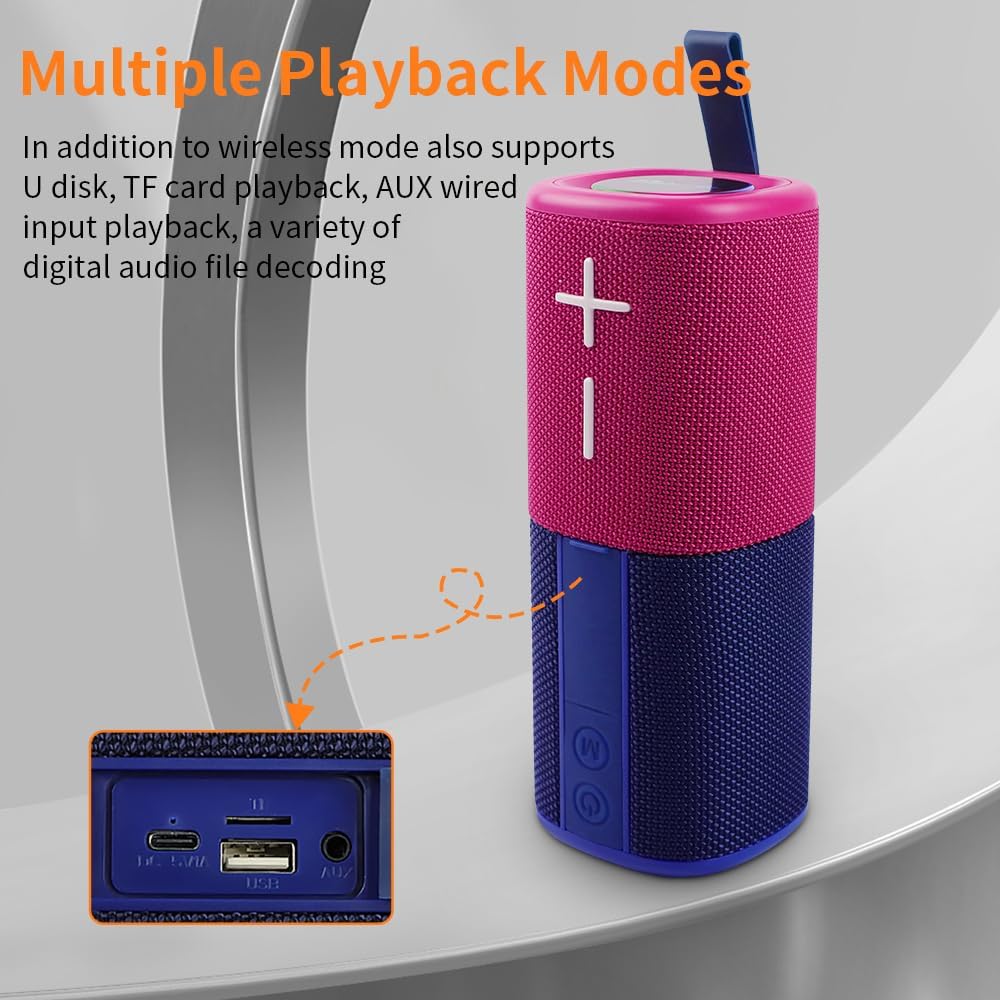
Image: The side panel of the speaker revealing the input ports: DC 5V/A (Type-C charging), TF card slot, USB port, and AUX port.
- DC 5V/A Port (Type-C): Pikeun ngecas speaker.
- Slot Kartu TF: Pikeun muterkeun musik langsung tina kartu TF (MicroSD).
- Port USB: Pikeun muterkeun musik langsung tina flash drive USB.
- Pelabuhan AUX: For wired audio input using the 3.5mm audio cable.
Disetél
1. Charging the Speakers
Before first use, fully charge both speaker units. Connect the provided Type-C charging cable to the DC 5V/A port on each speaker and to a compatible USB power adapter (not included). The LED indicator will show charging status.
2. Powering on / Pareum
Press and hold the Power On/Off button on each speaker unit to power them on or off. A sound prompt will indicate the power status.
3. Bluetooth Pairing (Single Speaker Mode)
- Ensure the speaker is powered on and in Bluetooth mode (indicated by a flashing blue LED).
- Dina alat anjeun (smartphone, tablet, laptop), aktipkeun Bluetooth sareng milarian alat anu sayogi.
- Select "YGS-S18" from the list. A sound prompt will confirm successful pairing.
4. True Wireless Stereo (TWS) Pairing (Splittable Mode)
To achieve a wider stereo sound, you can pair both speaker units together:
- Ensure both speaker units are powered on and not connected to any other Bluetooth device.
- Press the Power On/Off button on one speaker unit twice quickly. It will enter TWS pairing mode.
- Dua spiker bakal otomatis nyambung. Aya sora nu bakal mastikeun pasangan TWS geus suksés.
- Once TWS paired, connect your device to one of the speakers via Bluetooth (as described in step 3). Both speakers will now play audio in stereo.

Image: Two CYBORIS YGS-S18 speakers, separated and placed on either side of a laptop, demonstrating True Wireless Stereo (TWS) connectivity for an immersive sound experience.
Parentah Operasi
Puterkeun Musik
- Puter / Reureuh: Pencét pondok tombol Power On/Off.
- Penyesuaian volume: Short press the Volume + or Volume - buttons.
- Lagu Salajengna / Saméméhna: Long press the Volume + for next track, or Volume - for previous track.
Switching Playback Modes
Press the 'M' (Mode) button to cycle through available playback modes: Bluetooth, TF Card, AUX, and USB. Insert the respective media (TF card, USB drive) or connect the 3.5mm audio cable for these modes to become active.
Leungeun-Free Telepon
Nalika disambungkeun via Bluetooth, mikropon internal spiker ngamungkinkeun nelepon tanpa nganggo leungeun:
- Ngajawab Telepon: Pencét pondok tombol Power On/Off.
- Tungtung Telepon: Short press the Power On/Off button during a call.
- Nolak Telepon: Pencét lila tombol Daya Hurung/Pareum.
Pangaruh Lampu LED
The speaker features colorful breathing lights that can be controlled:
- Hurungkeun/Pareuman Lampu: Pencét lila tombol 'M' (Modeu).

Image: The base of the CYBORIS YGS-S18 speaker unit illuminated with colorful LED lights, indicating active light effects.
Attachment magnét
Each speaker unit is equipped with strong magnets, allowing it to attach to metallic surfaces such as refrigerators, metal shelves, or vehicle panels. This feature provides flexible placement options for your audio experience.

Image: Two CYBORIS YGS-S18 speakers, one red and one blue, magnetically attached to the side of a refrigerator, demonstrating their versatile placement.
Pangropéa
- beberesih: Use a soft, dry cloth to clean the speaker's exterior. Do not use harsh chemicals or abrasive materials.
- Tahan cai: The speaker has an IPX6 waterproof rating, meaning it can withstand strong jets of water. However, it is not designed for submersion. Ensure all port covers are securely closed before exposure to water.
- Panyimpenan: Simpen spéker di tempat anu tiis sareng garing jauh tina sinar panonpoé langsung sareng suhu anu ekstrim upami henteu dianggo kanggo waktos anu lami.

Image: The CYBORIS YGS-S18 speaker, in its combined form, being splashed with water, highlighting its IPX6 waterproof capability.
Pamérésan masalah
| Masalah | Mungkin Cukang lantaranana | Solusi |
|---|---|---|
| Speaker teu hurung. | batré lemah atawa euweuh muatan. | Cas speaker nganggo kabel Tipe-C anu disayogikeun. |
| Teu bisa masangkeun via Bluetooth. | Speaker is already connected to another device, or not in pairing mode. | Ensure the speaker is in Bluetooth pairing mode (flashing blue LED). Disconnect from other devices if necessary. Restart both the speaker and your device. |
| Papasangan TWS gagal. | Speakers are too far apart, or one is already paired to a device. | Ensure both speakers are close to each other and not connected to any other Bluetooth device. Follow TWS pairing steps carefully. |
| No sound from TF card/USB/AUX. | Incorrect mode selected, or media not properly inserted/connected. | Press the 'M' button to select the correct input mode. Ensure the TF card/USB drive is inserted correctly or the AUX cable is fully plugged in. |
| Kualitas sora henteu saé. | Low battery, interference, or source audio quality. | Charge the speaker. Move closer to the connected device. Try different audio sources. |
spésifikasi
| Fitur | Rincian |
|---|---|
| merek | CYBORIS |
| Ngaran modél | S18 (YGS-S18) |
| Tipe Speaker | Outdoor, Portable, Splittable |
| Téhnologi konektipitas | Bluetooth V5.3 |
| Jangkauan Komunikasi Nirkabel | Nepi ka 18 méter (59 suku) |
| Mode Kaluaran Audio | Stereo (when TWS paired) |
| Speaker Maksimum Kaluaran Power | 20 Watt (total) |
| Réspon Frékuénsi | 20 KHz |
| Kapasitas batré | 2 x 2000mAh (Total 4000mAh) Polymer Lithium Battery |
| Waktu maén | Nepi ka 24 jam |
| Tingkat Résistansi Cai | IPX6 (Tahan cai) |
| Métode kontrol | Toél tombol |
| Dimensi produk | 3"D x 3"W x 8"H (combined) |
| Item Beurat | 0.8 Kilogram (1.76 pon) |
| Supported Playback Modes | Bluetooth, TF Card, AUX, USB |
Video Produk Resmi
CYBORIS YGS-S18 Speaker Overview
Video: video ieu nyadiakeun leuwih umumview of the CYBORIS YGS-S18 speaker, demonstrating its split functionality and portability. It highlights how the two units can be separated for a wider sound experience.
Garansi sareng Rojongan
The CYBORIS YGS-S18 speaker comes with a limited warranty. For specific warranty details, please refer to the warranty card included with your product or contact CYBORIS customer support. For further assistance, visit the official CYBORIS store or contact their support channels.


