Bubuka
Welcome to the bmani Wireless Earbuds user manual. These Bluetooth headphones are designed for comfort and performance, featuring a secure over-ear fit, long battery life, and intuitive controls. This manual will guide you through setting up, operating, and maintaining your new earbuds.
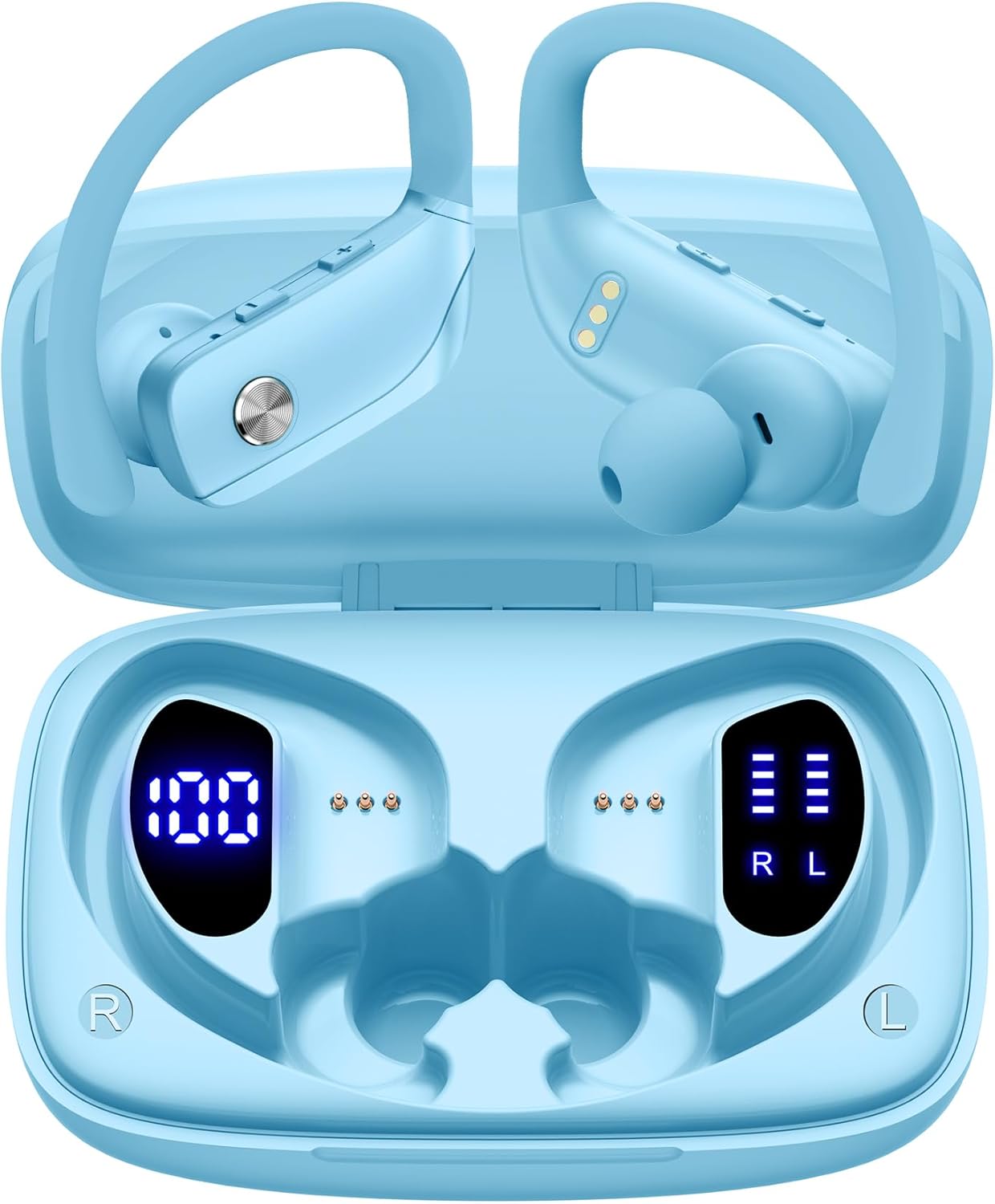
Image: The bmani Wireless Earbuds in their open sky blue charging case, showcasinearbud sareng bagian jero wadahna.
Naon dina Box
- Earbuds nirkabel
- Ngecas Case
- Eartips (three size options: L, M, S)
- Kabel Tipe-C
- Manual pangguna (dokumén ieu)

Image: This image displays all the items included in your bmani Wireless Earbuds package: the two wireless earbuds, their charging case, a set of three different sized eartips (L, M, S), a Type-C charging cable, and the user manual.
Produk Leuwihview & Fitur
The bmani Wireless Earbuds are engineered for an exceptional audio experience with user-friendly features.
Dual LED Displays Charging Case
The charging case features dual LED displays. The left display shows the remaining battery power of the case in percentage. The right side indicates the charging process of each earbud with four grids, each representing 25% of the bud's power. The LED indicator light will flash during charging.

Image: This image highlights the dual LED digital display on the charging case. The left screen shows the charging case's battery capacity as a percentage, while the right screen displays the power status of the left (L) and right (R) earbuds using four bars each.
Hirup Batré Panjang
Enjoy extended listening sessions with up to 8 hours of music time per earbud and an additional 40 hours provided by the 600mAh charging case, totaling 48 hours of playback.

Image: This diagram illustrates the impressive battery life: 8 hours of music time per earbud (50mAh each) and an additional 40 hours of listening time provided by the 600mAh charging case, totaling 48 hours of playback.
Bluetooth 5.0 and Hi-Fi Stereo Sound Quality
Equipped with advanced Bluetooth 5.0 technology, these earbuds provide a clear and smooth connection with extended range and fewer dropouts, ensuring crystal-clear calls and uninterrupted music listening. The 10mm speakers deliver Hi-Fi stereo sound.

Image: This image visually represents the 10mm speakers within the earbuds, emphasizing their capability to deliver Hi-Fi stereo sound.

Image: This image emphasizes the Bluetooth 5.0 technology, offering extended range and fewer dropouts, and the integration with voice assistants like Siri.
Designed for Sports (IPX5 Water Resistant)
These sport headphones are designed to stay securely in place during long hours of training, preventing shifting or falling out. They come with flexible earhooks and three pairs of ear caps (S, M, L) to ensure a comfortable and suitable fit, even during intense activities like camping, running, or working out. They are also IPX5 water-resistant, protecting them from splashes and sweat.

Image: This image shows a woman wearing the earbuds during exercise, highlighting their secure fit. An inset graphic demonstrates the flexible earhooks and the three included eartip sizes (L, M, S) for personalized comfort.

Image: This infographic summarizes key features: Dual LED Battery Display, 600mAh Charging Case, Anti-skid Earhooks, IPX5 Waterproof rating, Hi-Fi Stereo sound, and Voice Assistant compatibility.
Disetél
Ngecas Earbuds sareng Case
Sateuacan dianggo anu munggaran, eusian pinuh earbud sareng wadahna.
- Connect the provided Type-C cable to the charging port on the back of the case.
- Colokkeun tungtung séjén kana sumber kakuatan USB.
- The LED display on the case will show the charging progress.
- Once fully charged, the display will show 100% for the case and full bars for both earbuds.
Pairing with Your Device (One-step Pairing)
The bmani earbuds feature automatic pairing for convenience.
- Buka wadah ngecas sareng cabut kadua earbuds. Aranjeunna bakal otomatis hurung sareng nyobian ngapasangkeun.
- Dina alat anjeun (smartphone, tablet, laptop, jsb.), aktipkeun Bluetooth.
- Milarian pikeun "T16" in the list of available Bluetooth devices and select it to connect.
- Sakali disambungkeun, anjeun bakal ngadéngé ajakan audio, sarta earbuds bakal siap dipaké.
- Headphone bakal otomatis nyambung deui ka alat anu terakhir dipasangkeun nalika dicabut tina casingna.

Image: This image demonstrates the one-step pairing process, showing the earbuds connected to a smartphone. It also highlights their wide compatibility with various Bluetooth-enabled devices, including notebooks, TVs, desktops, smartwatches, and tablets.
Parentah Operasi
Ngagem Earbuds
For optimal sound and comfort, ensure the earbuds are worn correctly.
- Put the ear hook over the back of your ear.
- Insert the ear cap into your ear canal.
- Adjust by twisting the earbud for a comfortable and secure fit.

Image: This visual guide provides three simple steps for wearing your earbuds: 1. Place the ear hook over your ear. 2. Insert the ear cap into your ear. 3. Adjust the earbud by twisting it for a secure and comfortable fit.
Kadali
The bmani earbuds feature intuitive button controls.
| Aksi | Fungsi |
|---|---|
| Pencét Sakali | Puter / Reureuh Musik, Jawab / Tungtung Telepon |
| Quick Double-click (R) | Lagu salajengna |
| Quick Double-click (L) | Lagu saméméhna |
| Press "+" Button | Volume Up |
| Press "-" Button | Volume Turun |
| Quick Triple-click | Aktipkeun Asisten Sora |
| Tahan | Daya Hurung/Pareuman |

Image: This image illustrates the dual audio controls on the earbuds. It shows the physical volume buttons (+/-) and a diagram explaining single click for play/pause, double click for track navigation, and holding the button for power on/off.

Image: This infographic details the various controls: single click for call answer/end and play/pause, double click for next/previous track, pressing +/- for volume, and triple click for voice assistant.
Pangropéa
To ensure the longevity and optimal performance of your bmani Wireless Earbuds, follow these maintenance guidelines:
- beberesih: Regularly clean the earbuds and charging case with a soft, dry, lint-free cloth. Do not use harsh chemicals or abrasive materials.
- Eartips: Remove and clean the eartips periodically. You can gently wash them with mild soap and water, then ensure they are completely dry before reattaching.
- Tahan cai: The earbuds are IPX5 water-resistant, meaning they can withstand splashes and sweat. Do not submerge them in water or expose them to heavy rain. Ensure they are dry before placing them back in the charging case.
- Panyimpenan: Upami teu dianggo, simpen earbud dina wadah ngecasna pikeun ngajagi tina lebu sareng karusakan.
- Ngecas: Use only the provided Type-C cable for charging. Avoid extreme temperatures during charging and storage.
Pamérésan masalah
If you encounter any issues with your bmani Wireless Earbuds, please refer to the following common solutions:
Earbuds not pairing with each other or with device:
- Pastikeun kadua earbuds dicas pinuh.
- Place both earbuds back into the charging case, close the lid, wait a few seconds, then open the lid and take them out again. This often resets the pairing.
- On your device, forget or delete "T16" from your Bluetooth device list. Then, try the pairing process again from step 1.
- Pastikeun teu aya alat Bluetooth séjén anu ngaganggu sambungan.
Henteu aya sora atanapi volume rendah:
- Pariksa tingkat polumeu boh dina earbuds sareng alat anu disambungkeun.
- Pastikeun yén earbuds dipasang leres dina ceuli anjeun.
- Clean any debris from the eartips or earbud speakers.
- Sambungkeun deui earbuds ka alat anjeun.
Kasus ngecas teu ngecas:
- Pastikeun yén kabel Tipe-C disambungkeun sacara aman ka casing sareng sumber listrik.
- Coba adaptor atawa port USB anu béda.
- Pariksa kabel ngecas pikeun karuksakan nanaon.
Earbud nu murag:
- Try different sizes of eartips provided in the box to find the best fit for your ears.
- Ensure the ear hooks are correctly positioned over your ears.
spésifikasi
| Fitur | Rincian |
|---|---|
| Ngaran modél | T16 |
| Téhnologi konektipitas | Nirkabel (Bluetooth 5.0) |
| Kahirupan batré | Up to 8 hours (earbuds), 40 hours (with charging case) |
| Ngecas Kapasitas Case | 600 mah |
| Kapasitas Batré Earbud | 50mAh (masing-masing) |
| Tahan cai | IPX5 |
| Tipe Kontrol | Tombol Control |
| Bahan | palastik |
| Item Beurat | 2 ons |
| Dimensi produk | 3.54 x 2.36 x 0.79 inci |
| Komponén Kaasup | Charging Case, Eartip, Type-C Cable, User Manual, Wireless Earbuds |
| Alat nu cocog | All Bluetooth-enabled mobile phones, tablets, laptops, computers, audiobooks, TV, and all devices with Bluetooth 5.0 |
Garansi & Rojongan
bmani products are designed with quality and reliability in mind. For specific warranty information or technical support, please refer to the contact details provided on the product packaging or visit the official bmani websitus. Simpen resi pameseran anjeun pikeun klaim jaminan.


