1. Produk Langkungview
The bmani T16 Wireless Earbuds are designed for active lifestyles, offering an ultra-long 80-hour playtime with their dual LED display charging case. They feature immersive stereo sound with 10mm dynamic drivers, clear calls with dual microphones, and seamless Bluetooth connectivity. The adjustable over-ear hooks ensure a secure and comfortable fit for various activities. Easy button controls provide intuitive management of music and calls.
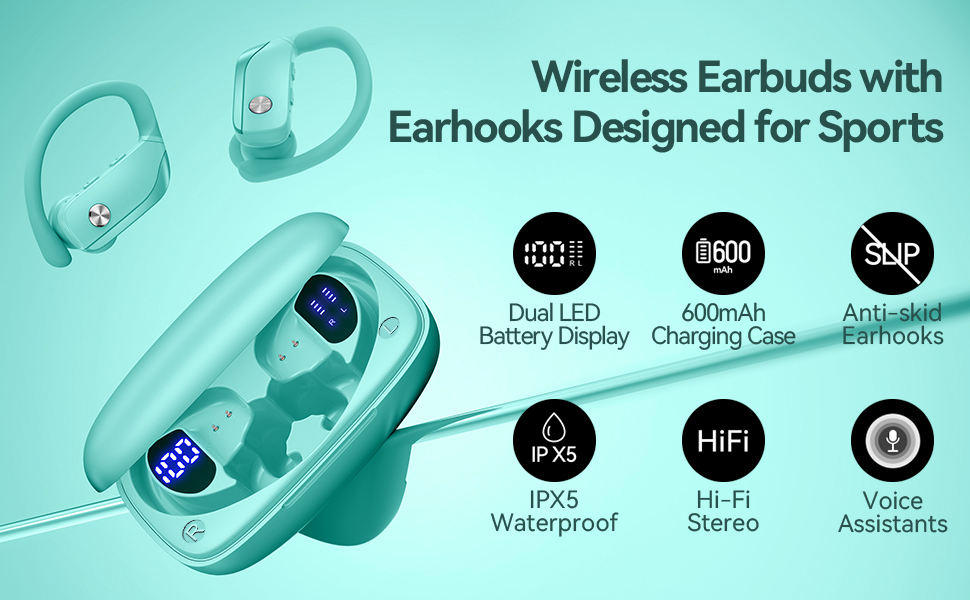
Image: bmani T16 Wireless Earbuds in their charging case, highlighting 80 hours of total playtime and the dual LED battery display.
2. Naon dina Box
- bmani T16 Wireless Earbuds (Left and Right)
- Wadah Pangisi Daya nganggo Layar LED
- Ceuli (ukuran Leutik, Sedeng, Ageung)
- Kabel Ngecas Tipe-C
- Manual pangguna (dokumén ieu)

Image: The bmani T16 Wireless Earbuds, charging case, and various eartip sizes.
3. Setup jeung papasangan
The bmani T16 earbuds feature one-step pairing for quick and easy connection to your devices.
- Papasangan awal: Buka wadah ngecas. Earbuds bakal otomatis hurung tur asup kana mode papasangan.
- Dina smartphone anjeun, tablet, atawa alat Bluetooth-diaktipkeun sejen, buka setélan Bluetooth.
- Milarian pikeun alat anu sayogi teras pilih "T16" tina daptar.
- Sakali disambungkeun, anjeun bakal ngadéngé ajakan sora confirming pasangan suksés.
- Sambungan deui otomatis: After the initial pairing, the earbuds will automatically reconnect to the last paired device when removed from the charging case.

Image: Illustration of the one-step pairing process for the bmani T16 earbuds with a smartphone and other compatible devices.
Video: An official seller video demonstrating the features and pairing process of the bmani T16 Wireless Earbuds.
4. Pitunjuk Nganggo
For optimal sound quality and a secure fit, follow these steps to wear your bmani T16 earbuds:
- Choose the correct eartip size (S, M, L) that best fits your ear canal.
- Place the flexible ear hook over the back of your ear.
- Lembut selapkeun earbud kana saluran ceuli anjeun.
- Adjust the earbud and hook by twisting until you achieve a comfortable and secure fit. The ear hooks are designed to adapt to different ear shapes, minimizing slippage during movement.

Image: Visual guide demonstrating how to correctly position the bmani T16 earbuds with their flexible ear hooks for a secure fit.
5. Kadali operasi
The bmani T16 earbuds feature intuitive physical buttons for easy control of your audio and calls.
- Puter / Reureuh: Klik sakali dina salah sahiji earbud.
- Lagu salajengna: Quick double-click on the Right (R) earbud.
- Lagu Sateuacanna: Quick double-click on the Left (L) earbud.
- Volume Up: Press the "+" button on the earbud.
- Volume Turun: Press the "-" button on the earbud.
- Ngajawab / mungkas Telepon: Klik sakali dina salah sahiji earbud.
- Nolak Telepon: Hold either earbud button.
- Aktipkeun Asisten Sora (Siri / Asisten Google): Quick triple-click on either earbud.
- Hurungkeun/Pareuman: Hold the button on either earbud.
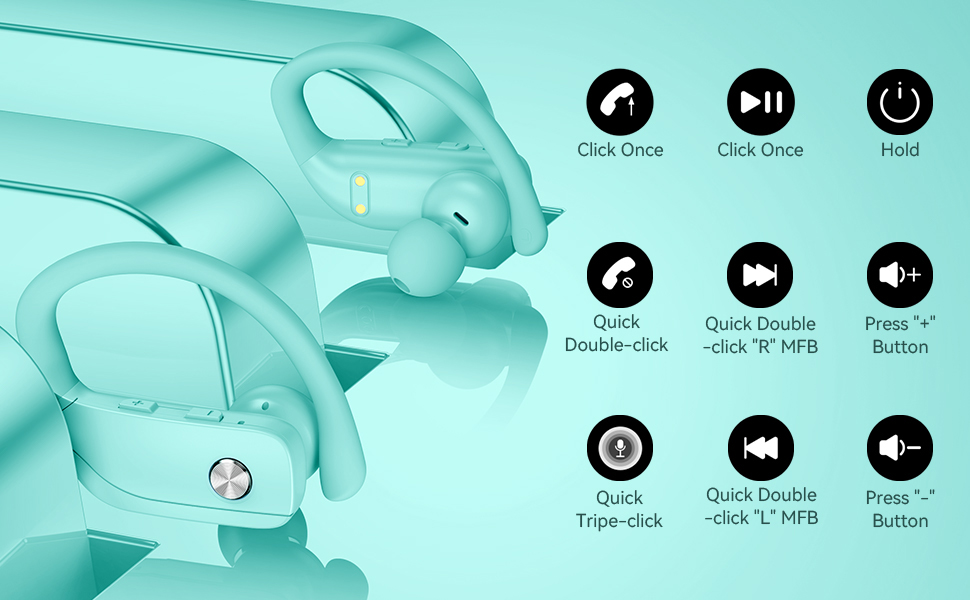
Image: Detailed diagram showing the various button controls on the bmani T16 earbuds for managing audio playback, calls, and voice assistant.
6. Ngecas
The bmani T16 earbuds and charging case provide an impressive 80 hours of total playtime.
- Ngecas Earbud: Place the earbuds back into the charging case. The LED indicators on the case will show the charging status of each earbud. Each earbud offers up to 8 hours of playtime per charge.
- Ngecas Kasus: Connect the provided Type-C charging cable to the charging port on the case and to a USB power source. The digital display on the left side of the case will show the remaining power percentage tina kasus ngecas.
- The charging case can recharge the earbuds multiple times, extending total usage to 80 hours.
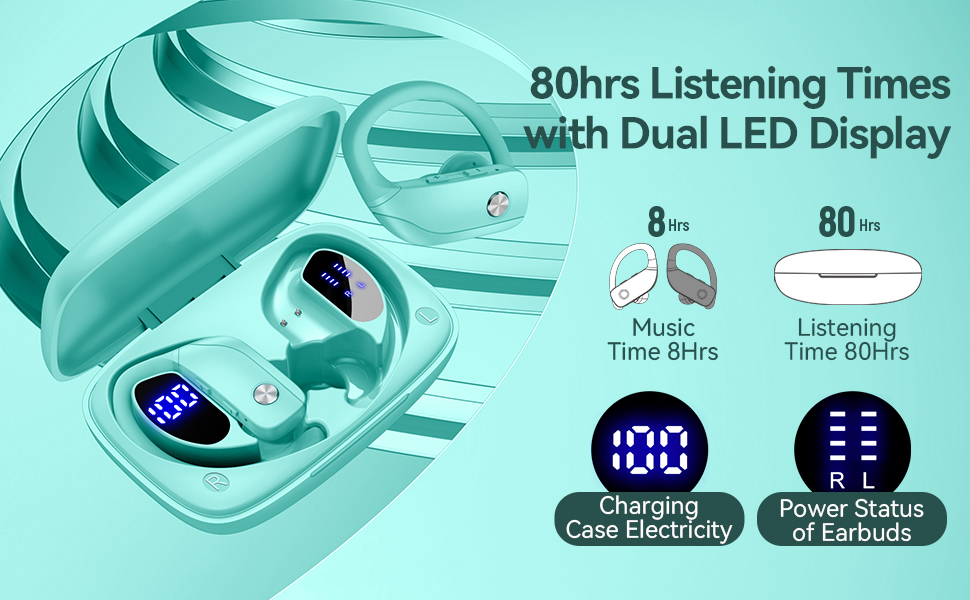
Image: The bmani T16 charging case with its dual LED digital display, indicating the battery percentage tina wadahna sareng status ngecas unggal earbud.
Pidéo: Pidéo resmi anu dipidangkeun ku nu ngajualasing the 48-hour playback (note: product features state 80H) and LED display of the bmani T16 Sport Earphones.
7. Pangropéa
- Bersihkeun earbud sareng kontak pangisi daya sacara rutin nganggo lawon anu lemes sareng garing pikeun nyegah ngumpulna lebu sareng kokotor.
- Hindarkeun ngalaan earbuds ka suhu anu ekstrim atanapi sinar panonpoé langsung kanggo waktos anu berkepanjangan.
- Simpen earbuds dina wadah ngecas nalika henteu dianggo pikeun ngajagi aranjeunna sareng pastikeun tetep dicas.
- The earbuds are sweat-resistant and dust-resistant, but avoid submerging them in water.
8. Cara ngungkulan
- Earbuds teu dipasangkeun: Ensure both earbuds are removed from the case and are powered on. Turn off Bluetooth on your device and turn it back on. If issues persist, try resetting the earbuds (refer to the full user manual for specific reset instructions).
- Teu aya sora: Pariksa tingkat volume dina alat sareng earbud anjeun. Pastikeun earbud disambungkeun kalayan leres kana alat anjeun via Bluetooth.
- Masalah ngecas: Pariksa yén kabel ngecas parantos disambungkeun kalayan pageuh kana wadah sareng sumber daya. Pastikeun kontak ngecas dina earbud sareng di jero wadahna bersih sareng bébas tina kokotor.
- Koneksi teu stabil: Ensure your device is within the Bluetooth range (approximately 33 feet/10 meters) and there are no significant obstacles between the earbuds and your device.
9. Spésifikasi
| Ngaran modél | T16 |
| Téhnologi konektipitas | Nirkabel (Bluetooth 5.0) |
| Waktu maén (Earbuds) | Dugi ka 8 jam per muatan |
| Total Playtime (kalawan Case) | Nepi ka 80 jam |
| Tipe Supir Audio | 10mm Supir Dinamis |
| Fitur Control Noise | Noise Cancellation (Dual Mics) |
| Tingkat Résistansi Cai | Sweat-resistant and Dust-resistant |
| Métode kontrol | Tombol Kontrol |
| Panempatan Ceuli | Leuwih Ceuli |
| Item Beurat | 2 ons |
10. Garansi jeung Rojongan
bmani offers a lifetime warranty for permanent replacement of damaged, defective, upgraded, or lost products. Please refer to the warranty card included in your package for activation details and terms. For further assistance, please contact bmani customer support.


