Bubuka
This manual provides essential information for setting up, operating, maintaining, and troubleshooting your NIMO 17.3 Gaming Laptop. Designed for high performance with an AMD Ryzen 9 8945HS processor and Radeon 780M graphics, this laptop offers a powerful computing experience for gaming, creative work, and everyday tasks. Please read this manual thoroughly to ensure optimal use and longevity of your device.
1. Setup Awal
1.1 Ngabongkar sareng Ngahurungkeun Mimiti
Carefully remove your NIMO laptop and all accessories from the packaging. Place the laptop on a stable, flat surface. Before first use, it is recommended to fully charge the battery.

The NIMO 17.3 Gaming Laptop, ready for initial setup.
1.2 Ngecas Batré
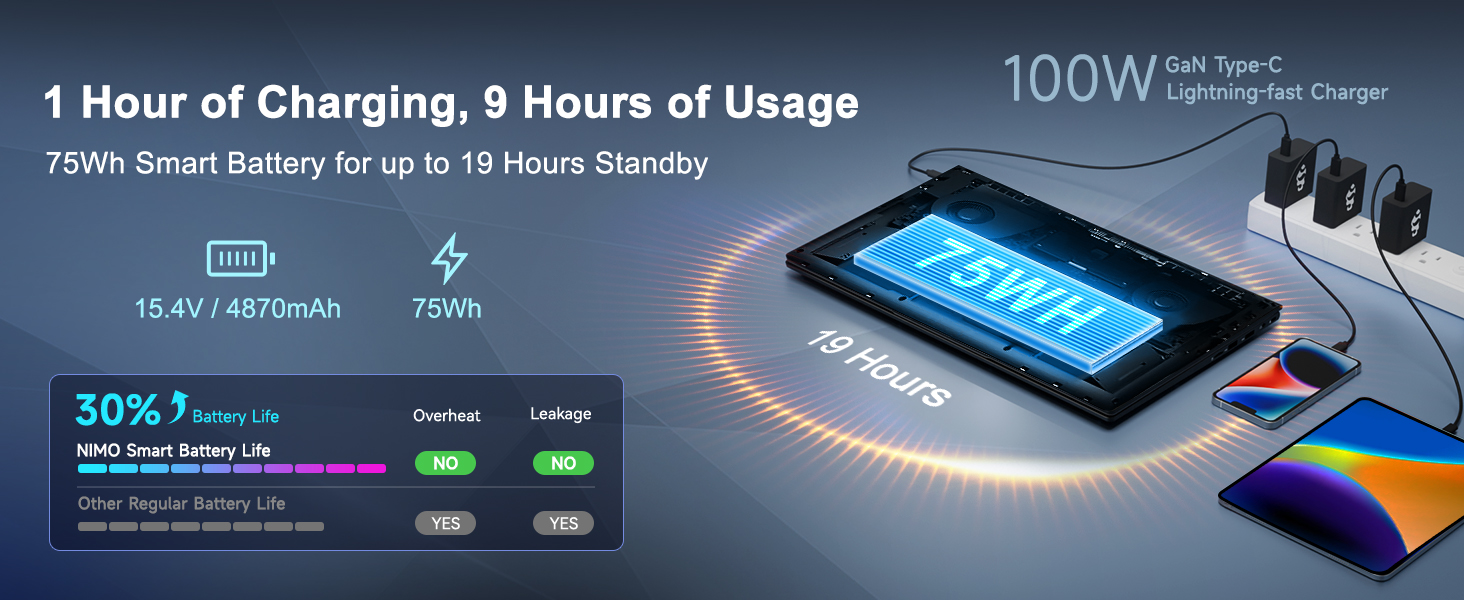
Connect the provided 100W PD Type-C fast charger to the USB-C port on your laptop and then to a power outlet. The charging indicator light will illuminate. Allow the laptop to charge fully before its first use for optimal battery calibration.

The 100W GaN Type-C charger connected to the laptop, illustrating fast charging capability.
1.3 Konfigurasi Sistem Operasi
Upon first power-on, you will be guided through the Windows 11 setup process. Follow the on-screen instructions to configure language, region, network settings, and user accounts.
1.4 Fingerprint Reader Setup
For enhanced security and quick login, set up the integrated fingerprint reader during the Windows 11 setup or later via Windows Settings > Accounts > Sign-in options. Follow the prompts to register your fingerprints.

Close-up of the backlit keyboard and integrated fingerprint reader for secure access.
1.5 Nyambungkeun périferal
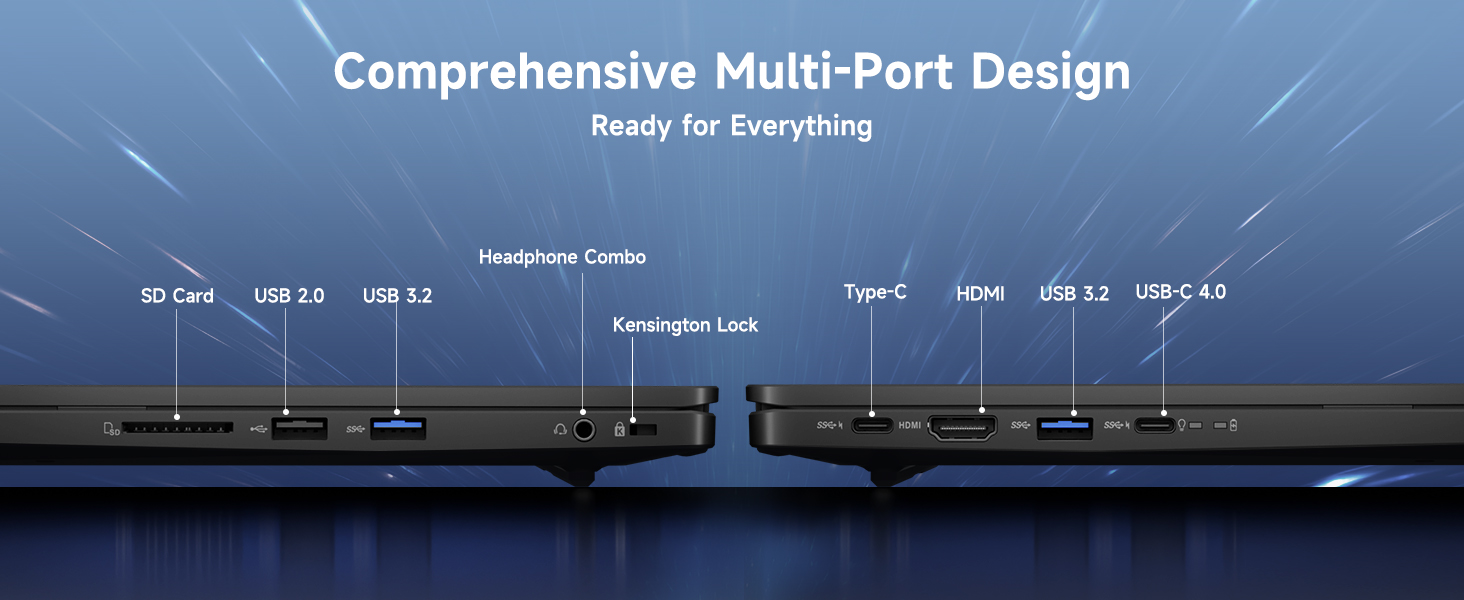
Your NIMO laptop features a comprehensive multi-port design for various peripherals:
- USB-C 4.0: For ultra-fast data transfer, external displays, and eGPU support.
- USB 3.2: Transfer data kecepatan tinggi pikeun alat anu cocog.
- USB 2.0: Pikeun alat USB standar.
- HDMI: Sambungkeun ka monitor éksternal atanapi TV.
- Slot Kartu SD: Pikeun kartu memori.
- Headphone Combo Jack: For audio output and microphone input.
- Slot konci Kensington: Pikeun kaamanan fisik.
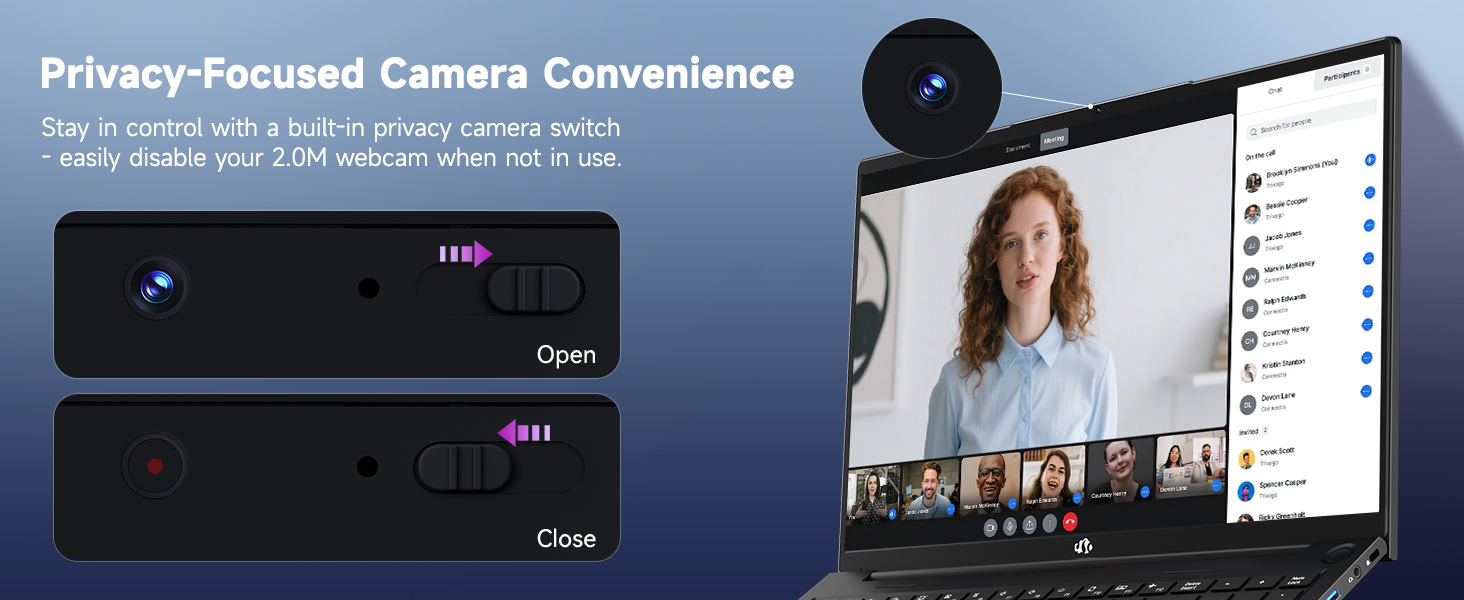
Diagram illustrating the comprehensive multi-port design of the NIMO laptop, including USB-C 4.0, HDMI, USB 3.2, USB 2.0, SD Card slot, Headphone Combo, and Kensington Lock.
2. Parentah Operasi
2.1 Power On/Off and Sleep Modes
- Daya Hurung: Pencét tombol daya anu aya dina kibor.
- Pareum listrik: Klik tombol Mimitian, teras Daya > Pareuman.
- Modeu Bobo: Klik tombol Mimitian, teras Daya > Sare, atanapi tutup tutup laptop.
2.2 Nganggo kibor sareng Touchpad
The NIMO laptop features a full-size keyboard with a numeric keypad and adjustable backlighting. Press Fn + F10 (or similar function key depending on model) to cycle through backlight brightness levels. The large touchpad supports multi-touch gestures for navigation.
2.3 Fitur tampilan
Experience clear visuals on the 17.3-inch Full HD (1920x1080) IPS display. This screen provides vibrant colors and wide viewing angles, suitable for various applications from productivity to entertainment.

The NIMO laptop displaying a vibrant image, highlighting its 17.3-inch Full HD IPS screen.
2.4 WebSaklar Privasi kaméra
For privacy, your laptop includes a physical webcam privacy switch. Slide the switch to the left to cover the camera lens and disable the webcam, or to the right to uncover and enable it.
Ilustrasi tina webcam privacy switch in both open and closed positions, demonstrating how to control camera access.
2.5 Kinerja Leuwihview
The NIMO laptop is powered by an AMD Ryzen 9 8945HS processor, offering 8 cores and 16 threads with a max boost clock of 5.2GHz. Integrated AMD Radeon 780M graphics provide capable performance for gaming and demanding creative applications.

Diagram némbongkeunasing the AMD Ryzen 9 8945HS processor with its 8 cores/16 threads and integrated Ryzen AI NPU.

Visual representation of the AMD Radeon 780M graphics, emphasizing its capabilities for gaming and creative work.
3. Perawatan sareng Pangropéa
3.1 Ngabersihan Laptop
- layar: Anggo kaén anu lemes sareng teu aya serat anu hampang dampDieusian ku cai atanapi pembersih layar. Ulah nyemprot cairan langsung kana layar.
- Keyboard sareng Chassis: Paké lawon lemes, garing. Pikeun kokotor nekad, a rada damp lawon bisa dipaké. Ulah make bahan kimia anu kasar.
- Palabuhan: Paké hawa dikomprés pikeun gently mupus lebu tina palabuhan.
3.2 Manajemén batré
The laptop is equipped with a 75Wh battery. To prolong battery life:
- Hindarkeun sering-sering ngeusi batre.
- Simpen laptop di tempat anu tiis sareng garing upami henteu dianggo kanggo waktos anu lami.
- Utilize power-saving settings in Windows 11.

Graphic illustrating smart battery optimization features, including extended battery life, smart power control, safe fast charging, and battery health protection.
3.3 Dissipation panas
The NIMO laptop features an efficient cooling system with dual fans and double copper pipes to manage heat. Ensure that the ventilation openings are not blocked during use to maintain optimal performance and prevent overheating.
Internal view of the laptop's efficient heat dissipation system, featuring dual fans and double copper pipes.
3.4 Apdet parangkat lunak
Regularly update your Windows 11 operating system and device drivers to ensure system stability, security, and optimal performance. You can check for updates via Windows Settings > Windows Update.
4. Cara ngungkulan
This section addresses common issues you might encounter with your NIMO laptop.
4.1 Masalah kakuatan
- Laptop teu hurung: Ensure the charger is securely connected and the power outlet is functional. Try holding the power button for 15-20 seconds to perform a hard reset.
- Batré teu ngecas: Verify the charger is correctly plugged into both the laptop and the wall. Check for any damage to the charger cable or port.
4.2 Masalah tampilan
- Henteu aya tampilan dina layar: Connect an external monitor via HDMI to check if the issue is with the laptop's internal display. If the external monitor works, the internal display or its connection may be faulty.
- Layar nu kedip-kedip: Apdet panggerak grafis anjeun. Saluyukeun laju refresh tampilan dina setélan Windows.
4.3 Masalah Konektipitas
- Wi-Fi teu nyambung: Pastikeun Wi-Fi diaktipkeun dina setélan Windows. Pareuman terus hurungkeun deui router sareng laptop anjeun. Apdet driver nirkabel.
- Alat Bluetooth teu dipasangkeun: Ensure Bluetooth is enabled on both devices. Remove and re-add the device in Windows Bluetooth settings.
4.4 Degradasi Kinerja
- kinerja slow: Tutup aplikasi anu teu perlu. Pariksa Task Manager pikeun panggunaan CPU/RAM anu luhur. Pastikeun rohangan kosong anu cekap dina SSD. Jalankeun scan virus.
- Overheating: Ensure ventilation vents are clear. Use the laptop on a hard, flat surface. Consider reducing demanding workloads.
5. Spésifikasi Téknis
| Fitur | Spésifikasi |
|---|---|
| merek | NIMO |
| Ngaran modél | NIMO N175L |
| Ukuran layar | 17.3 inci |
| Resolusi layar | 1920 x 1080 piksel (Full HD) |
| Prosesor | AMD Ryzen 9 8945HS (Up to 5.2 GHz) |
| Ram | 32 GB DDR5 |
| Hard Drive | SSD 1024 GB (Status Padet) |
| Grafik Coprocessor | AMD Radeon 780M (Terpadu) |
| Sistem operasi | Windows 11 |
| Tipe Wireless | 802.11a/b/g/n/ac |
| palabuhan USB | 1x USB 2.0, 3x USB 3.0, 1x USB-C 4.0 |
| Rata Kahirupan Batré | 12.8 Jam |
| Item Beurat | 3.84 pon |
| Dimensi produk | 15.66 x 9.99 x 0.74 inci |
| Warna | Hideung |
| Fitur husus | Backlit Keyboard, Fingerprint Reader, HD Audio, Numeric Keypad |
6. Garansi sarta Rojongan Palanggan
6.1 Émbaran jaminan
Your NIMO laptop comes with a garansi 2 taun for support and service. Additionally, NIMO offers a Kawijakan mulang 90 dinten from the date of purchase for any reason.
Image depicting a technician working on a laptop, symbolizing the 2-year support provided for NIMO products.
Image of a customer receiving a package, representing the 90-day return policy for NIMO products.
6.2 Ngahubungan Rojongan
For any product-related questions, technical assistance, or warranty claims, please contact NIMO customer support:
- Surélék: service@nimopc.com
- Professional customer assistance is available to help resolve your issues.
Image of customer service representatives, indicating professional customer assistance is available.


