Bubuka
Thank you for choosing the Bigben Karaoke Microphone. This all-in-one portable karaoke system combines a stereo microphone with a powerful 15W Bluetooth speaker and dynamic light effects, designed to enhance your singing and music listening experience. This manual provides essential information for safe and optimal use of your device.
Émbaran Kasalametan
- Baca sadaya parentah sateuacan nganggo alat.
- Jauhkeun alat tina cai sareng Uap.
- Entong kakeunaan suhu anu ekstrim atanapi sinar panonpoé langsung.
- Ulah nyobian ngabongkar atawa ngalereskeun alat sorangan. Rujuk ka tanaga jasa anu mumpuni.
- Anggo ngan ukur asesoris ngecas anu ditangtukeun.
- Jauhkeun tina jangkauan barudak.
Eusi pakét
Punten parios yén sadaya barang aya dina pakét:
- Bigben Karaoke Microphone (Model PARTYBTMIC2WH)
- Kabel Ngecas (USB)
- Manual pangguna (dokumén ieu)
- Front Glass (as an included component, likely pre-installed or a protective cover)

Gambar 1: The Bigben Karaoke Microphone shown in its retail packaging. The packaging highlights features such as Bluetooth connectivity, 4 vocal effects, and wireless speaker functionality.
Produk Leuwihview
The Bigben Karaoke Microphone features an integrated speaker and various controls for an interactive experience.
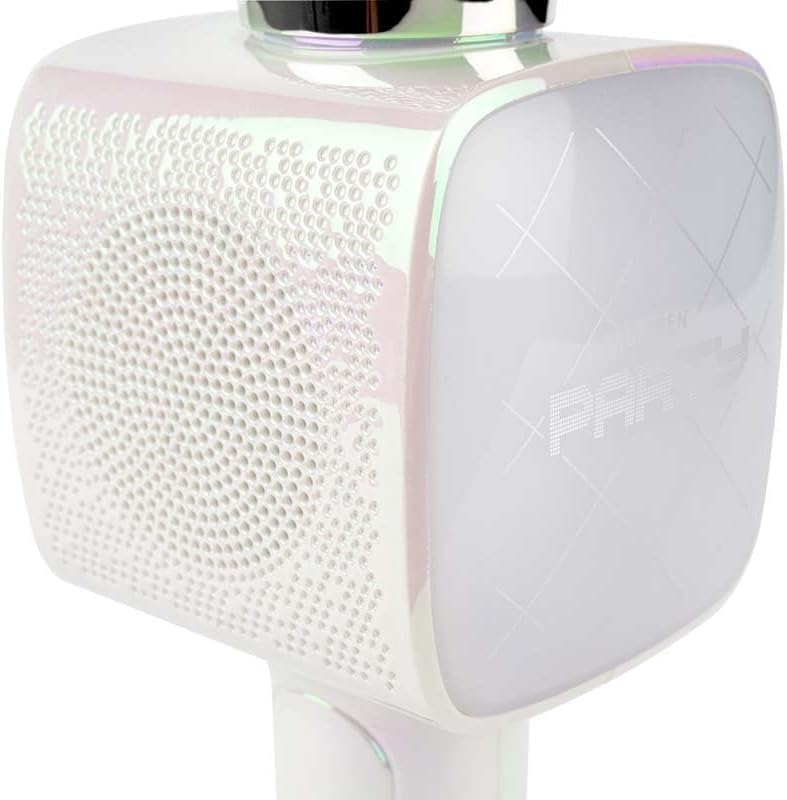
Gambar 2: A nutup-up view of the Bigben Karaoke Microphone, focusing on the speaker grille and the light-up panel. The panel displays "PARTY" and shows dynamic light effects.
Fitur konci:
- Bluetooth 5.0: For stable wireless connection to your devices.
- Speaker terpadu: 15W output for clear and powerful sound.
- Pangaruh cahaya: Dynamic lighting to enhance the karaoke experience.
- Balukar sora: 4 different vocal effects and an echo effect.
- Sababaraha Input: USB, Micro SD, and 3.5mm headphone jack.
Disetél
1. Ngecas Mikropon
- Connect the provided USB charging cable to the microphone's charging port.
- Sambungkeun tungtung kabel USB anu sanés ka adaptor kakuatan USB anu cocog (teu kalebet) atanapi port USB komputer.
- Lampu indikator ngecas bakal hurung. Saatos dicas pinuh, lampu tiasa robih warna atanapi pareum.
2. Powering on / Pareum
- To power on, press and hold the Power button for a few seconds until the indicator light illuminates and you hear an audible prompt.
- Pikeun mareuman, pencét jeung tahan deui tombol Daya nepi ka lampu indikator pareum.
3. Papasangan Bluetooth
- Ensure the microphone is powered on and in Bluetooth pairing mode (usually indicated by a flashing light).
- Dina smartphone anjeun, tablet, atawa alat Bluetooth-diaktipkeun sejen, buka setélan Bluetooth.
- Milarian pikeun available devices and select "Bigben Karaoke Mic" (or similar name) from the list.
- Once paired, you will hear a confirmation sound, and the indicator light will stop flashing.
Parentah Operasi
1. Maénkeun Musik
- Ngaliwatan Bluetooth: After successful pairing, play music from your connected device. The sound will output through the microphone's speaker.
- Via USB/Micro SD: Insert a USB drive or Micro SD card (with music files) into the respective port. The microphone will automatically detect and play music.
- Via 3.5mm Audio Cable: Connect an external audio source using a 3.5mm audio cable (not included) to the headphone input.
2. Ngagunakeun Mikropon
- Speak or sing directly into the microphone grille.
- Adjust the microphone volume using the dedicated controls on the device.
3. Éfék Sora
- Éfék Vokal: The microphone offers 4 different vocal effects. Press the "Effect" button (or similar labeled button) to cycle through these effects.
- Pangaruh Gema: Activate or adjust the echo effect using its dedicated control.
4. Pangaruh Cahaya
The microphone features dynamic light effects. These lights typically activate automatically when the device is on and can often be toggled or changed using a dedicated light button, if available.
Pangropéa
- beberesih: Wipe the microphone with a soft, dry cloth. Do not use abrasive cleaners or solvents.
- Panyimpenan: Simpen alat dina tempat anu tiis sareng garing jauh tina sinar panonpoé langsung upami henteu dianggo.
- Perawatan batré: For optimal battery life, charge the device regularly, even if not used frequently.
Pamérésan masalah
| Masalah | Mungkin Cukang lantaranana | Solusi |
|---|---|---|
| Taya kakuatan | Batré béak. | Charge the microphone fully. |
| Taya sora tina speaker | Volume is too low; device not connected; incorrect input mode. | Increase volume; ensure Bluetooth is paired or cable is connected; check USB/Micro SD insertion. |
| Mikropon teu jalan | Microphone volume is too low; microphone function is off. | Increase microphone volume; ensure microphone is active. |
| Sambungan Bluetooth teu stabil | Device is too far from the microphone; interference. | Move devices closer; avoid obstacles; disconnect and re-pair. |
spésifikasi
| Fitur | Rincian |
|---|---|
| merek | Bigben |
| Nomer modél | PARTYBTMIC2WH |
| Konektipitas | Bluetooth 5.0, USB, Micro SD, 3.5mm Headphone Jack |
| Kaluaran Speaker | 15W |
| Balukar Sora | 4 Vocal Effects, Echo Effect |
| Ukuran produk (L x W x H) | 20 x 15 x 10 cm |
| Item Beurat | 300 gram |
| Warna | Bodas |
| Jumlah Saluran | 2 |
| Batré Diperlukeun | Yes (type unknown, likely integrated rechargeable) |
Garansi sareng Rojongan
For warranty information and customer support, please refer to the documentation provided with your purchase or visit the official Bigben websitus. Simpen bukti pameseran anjeun pikeun klaim garansi.
For technical assistance or further inquiries, please contact Bigben customer service through their official channels.


