Bubuka
The ELEHEAR-Beyond Hearing Aids are Over-The-Counter (OTC) rechargeable Bluetooth hearing aids designed for seniors and adults with mild to moderate hearing loss. They feature AI noise cancellation, superior sound quality, Bluetooth 5.3 connectivity, and app control for a personalized listening experience.
This manual provides essential information for the proper setup, operation, and maintenance of your ELEHEAR-Beyond Hearing Aids. Please read it thoroughly before use.
Eusi pakét
Your ELEHEAR-Beyond Hearing Aids package includes the following items:

Ngecas Case
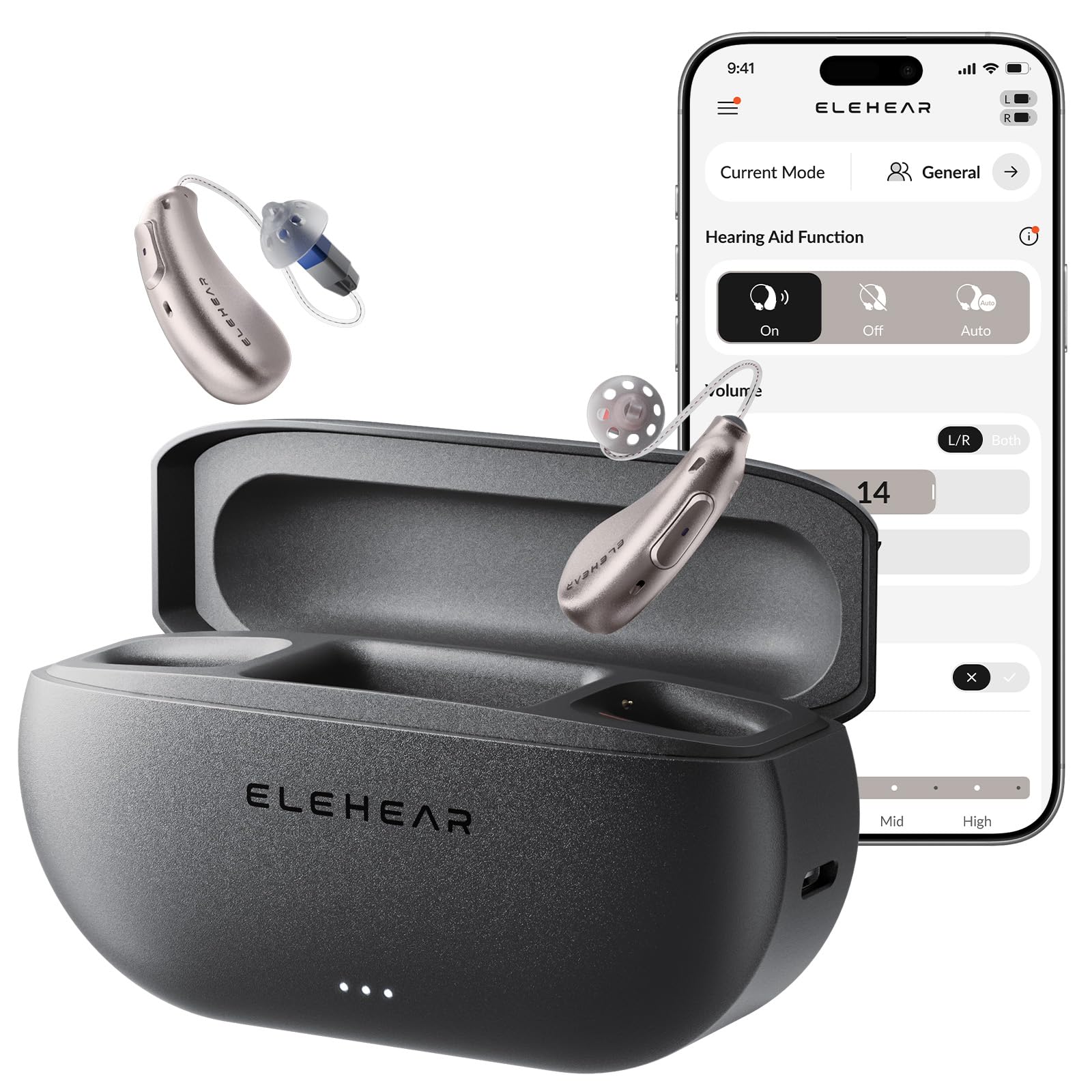
ELEHEAR-Beyond Hearing Aids (Pair)

Assorted Ear Domes and Wax Guards

USB-A ka USB-C ngecas Cable

Multi-function Tool Pen
Disetél
1. Ngecas Awal
Before first use, fully charge the hearing aids and the charging case. The charging case provides up to 4 additional charging cycles, offering a total of 100 hours of battery life. A 15-minute fast charge can provide up to 6 hours of usage.
- Place the hearing aids into the charging case. Ensure they are correctly seated; indicator lights on the hearing aids will illuminate.
- Sambungkeun kabel USB-A ka USB-C kana wadah ngecas sareng sumber daya.
- The indicator lights on the case will show charging status. All lights will be solid when fully charged.
Video: ELEHEAR-Beyond Hearing Aids Product Overview. This video demonstrates the charging process and key features of the hearing aids.
2. Selecting Ear Domes
Proper fit is crucial for optimal sound quality and comfort. Experiment with the various ear dome sizes provided to find the best fit for your ears. The correct dome size ensures a secure fit and minimizes feedback.
Gambar: A single ELEHEAR-Beyond hearing aid shown with multiple sizes and styles of ear domes, illustrating the options for a comfortable and effective fit.
3. Pamasangan Aplikasi sareng Papasangan Bluetooth
The ELEHEAR app allows for advanced customizable hearing settings. Download the app from your device's app store (iOS and Android compatible).
- Pastikeun Bluetooth diaktipkeun dina smartphone Anjeun.
- Remove the hearing aids from the charging case to initiate pairing mode.
- Open the ELEHEAR app and follow the on-screen instructions to connect your hearing aids.
- Once connected, you will hear a beep or a "Connected" voice prompt.

Gambar: A smartphone screen showing the ELEHEAR app, with the hearing aids and charging case in the background, demonstrating the app control feature.
Parentah Operasi
Basic Controls (On-Device)
- Penyesuaian volume: Use the small button on the hearing aid to adjust the volume up or down.
- Hurungkeun/Pareuman: Press and hold the button for a few seconds to power the hearing aids on or off.
App Controls and Features
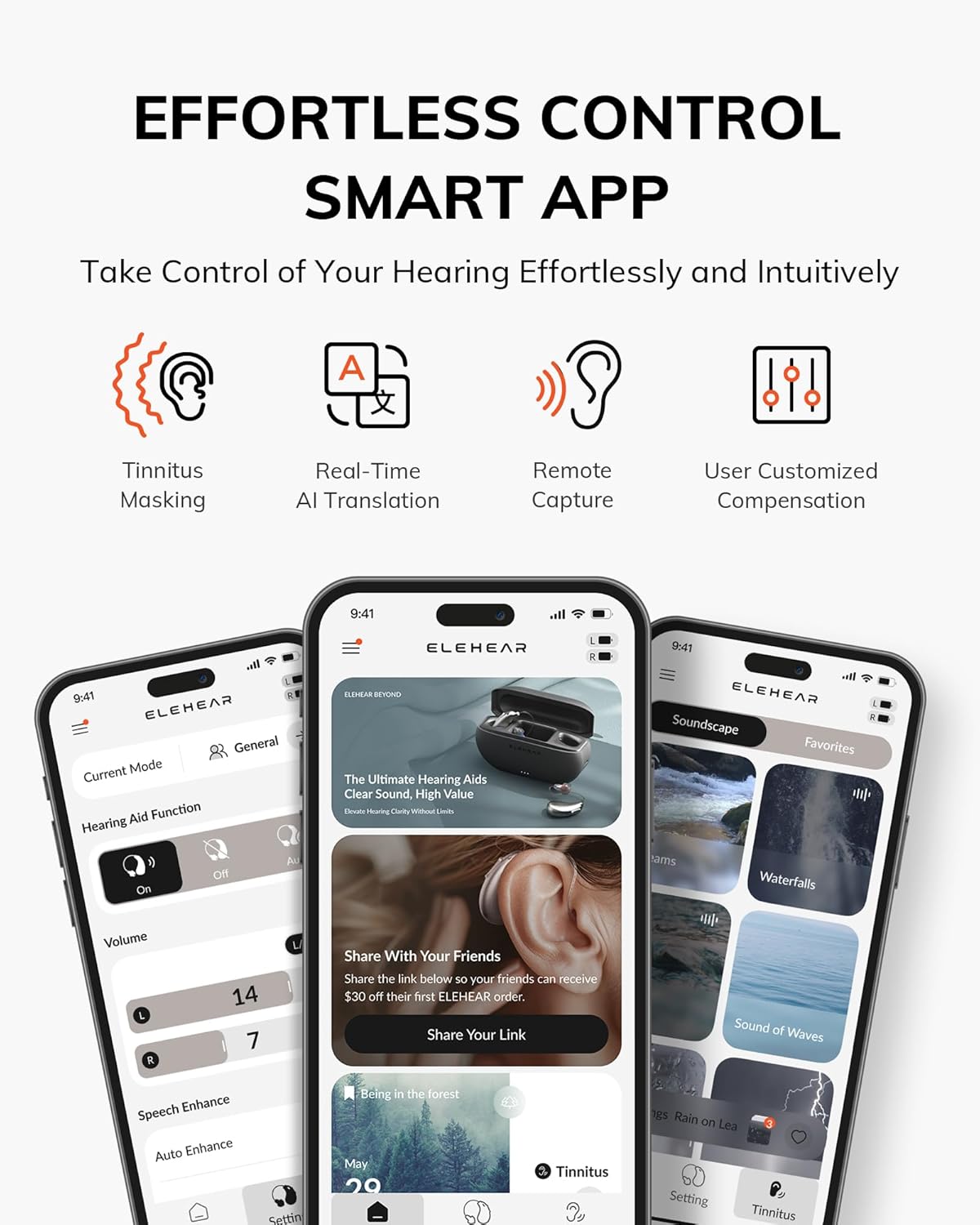
The ELEHEAR app provides advanced control over your hearing experience:
- Kontrol volume: Adjust the volume for each ear independently (Left/Right).
- Hearing Aid Function: Switch between On, Off, or Auto modes.
- Speech Enhance: Activate this feature to boost speech clarity and reduce background noise by up to 24dB.
- Ngepaskeun: Fine-tune frequency and sound directionality for personalized clarity.
- Modeu Pamandangan: Easily switch between four tailored scene modes (e.g., crowded cafes, quiet calls) for different situations.
- Tinnitus Masking: Access 20 natural sounds to help reduce tinnitus and improve sleep.
- Tarjamahan AI Waktos Nyata: Utilize the app's translation function for various languages.
- Remote Sound Capture: Enhance listening by focusing on sounds from a distance, useful for watching TV.
- Pembaruan OTA: Receive wireless software updates for new features and improvements.

Gambar: A smartphone displaying the ELEHEAR app, showcasing options for volume, speech enhancement, tuning, and soundscape selection for tinnitus relief.
Pangropéa
Ngabersihkeun Alat Dédéngéan Anjeun
Regular cleaning ensures optimal performance and longevity of your hearing aids.
- Use the provided multi-function tool pen to gently clean the ear domes and the body of the hearing aids.
- Remove any earwax or debris from the ear domes and sound outlets.
- Replace wax guards as needed to prevent blockages.
Gambar: A close-up of the multi-function tool pen, used for cleaning the hearing aids and replacing wax guards.
Pamérésan masalah
If you encounter any issues with your ELEHEAR-Beyond Hearing Aids, please refer to the following common solutions:
- Henteu aya sora: Ensure the hearing aids are charged and powered on. Check the volume settings in the app.
- Kualitas Sora Lemah/Eupan Balik: Verify that the ear domes are correctly fitted and free of wax. Try a different size ear dome.
- Masalah Konektipitas Aplikasi: Ensure Bluetooth is enabled on your phone and the hearing aids are removed from the charging case. Restart the app or your phone if necessary.
- Batré Teu Ngecas: Check the charging cable and power source. Ensure the hearing aids are properly seated in the charging case.
For severe or persistent issues, or if you have severe or profound hearing loss, we strongly recommend consulting a licensed audiologist before considering any OTC hearing aid, to ensure you receive the most appropriate solution for your needs.
spésifikasi
| merek | ELEHEAR |
| Nomer modél | ELEHAER-Beyond CG1 |
| Item Beurat | 4.4 ons |
| Dimensi produk | 1 x 1 x 1 inci |
| Batré | 3 batré Litium Ion diperlukeun (kaasup) |
| Warna | Champagne Emas |
| Bahan | palastik |
| Gaya | Both Ear |
| Battery Life (Hearing Aids) | Dugi ka 20 jam kalayan biaya tunggal |
| Total Daya Tahan Batré (kalayan Casing Pangecas) | Nepi ka 100 jam |
Garansi sareng Rojongan
ELEHEAR-Beyond Hearing Aids offer a worry-free experience. For any questions or support, please contact our professional service team.
- Telepon: (888) 669-1099
- Surélék: support@elehear.com
- Jam jasa: 8 AM - 2 AM CST, Monday - Friday
For your convenience and to resolve your issue promptly, please contact us directly. Do not return to the store.

Gambar: A group of smiling customer support representatives, emphasizing the availability of professional assistance.


