This manual provides essential instructions for the safe operation, setup, and maintenance of your JIKEFUN CZ20 Drone. Please read this manual thoroughly before operating the drone to ensure proper function and to prevent damage or injury. Keep this manual for future reference.
Image 1: JIKEFUN CZ20 Drone with included accessories, showcasing the drone, remote control, batteries, and carrying case.
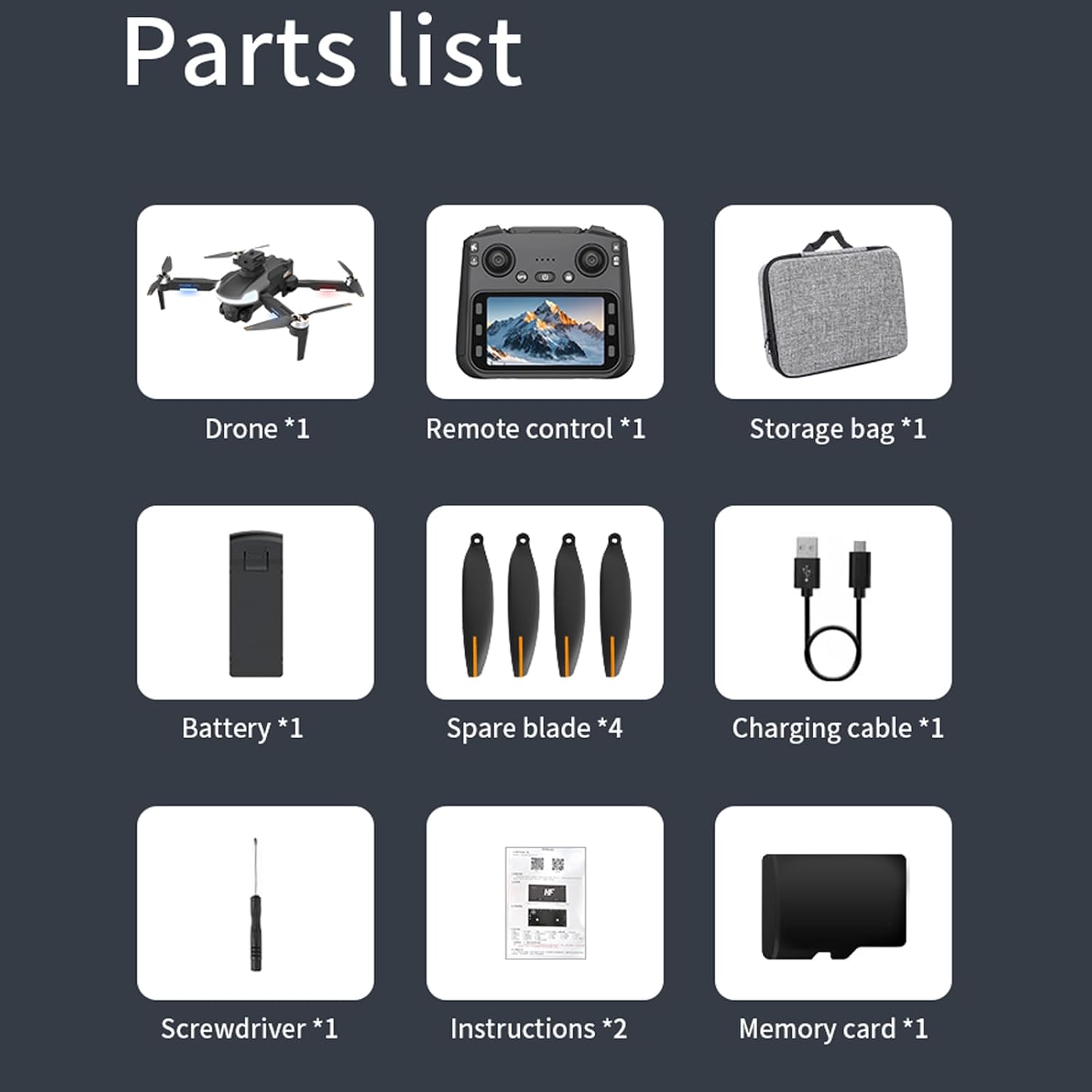
2. Eusi Paket
Pastikeun yén sadaya item anu didaptarkeun di handap kalebet kana pakét anjeun:
CZ20 Drone x 1
Kadali Jarak Jauh nganggo Layar x 1
Intelligent Flight Battery x 3
Spare Propellers (4A4B) x 1 set
Kabel Ngecas USB x 1
Obeng x 1
Buku Panduan x 1
Wi-Fi Manual x 1
Kartu Mémori 8GB x 1
Pamaca Kartu x 1
Gambar 2: A lengkep view of all components included in the JIKEFUN CZ20 Drone package, including the drone, remote, batteries, and tools.
3. Pedoman Kasalametan
Pikeun mastikeun operasi anu aman sareng nyegah karusakan, punten perhatikeun ieu:
Watesan Umur: This product is not intended for users under 16 years old.
Kasalametan batré: Always fully charge batteries before use. Low power can lead to loss of control.
Lingkungan hiber: Hiber di tempat anu kabuka, jauh ti jalma, sasatoan, wangunan, sareng halangan. Hindarkeun hiber dina angin kenceng atanapi kaayaan cuaca anu goréng.
Garis Panempoan: Jaga garis pandang visual sareng drone sepanjang waktos.
Kasalametan Baling-baling: Jauhkeun leungeun jeung beungeut tina baling-baling puteran.
Privasi: Respect the privacy of others when using the camera.
4. Setélan
4.1 Ngeusi batre
Ensure both the drone's flight battery and the remote control are fully charged before use. A red indicator light signifies charging, and it turns off when charging is complete.
Connect one end of the USB charging cable to the drone battery's charging port.
Connect the other end of the USB cable to a power supply (e.g., USB wall adapter).
Repeat the process for the remote control, connecting the USB cable to its charging port.
Video 1: This video demonstrates the charging process for both the drone battery and the remote control. (Note: This video is a general drone operation tutorial and may not specifically feature the CZ20 model, but the charging steps are applicable.)
4.2 Pre-Flight Preparation
Selapkeun Kartu SD: Insert the provided 8GB memory card into the designated slot on the remote control.
Deploy Drone Arms: Buka leungeun drone lalaunan dugi ka pageuh kana posisina.
Install Drone Battery: Selapkeun batré hiber anu tos dicas kana kompartemen batré drone dugi ka ngaklik kalayan pageuh.
Drone nu Bisa Dihurungkeun: Pencét sareng tahan tombol daya dina drone dugi ka lampu indikator hurung.
Power On Remote Control: Slide the power switch on the remote control to the 'ON' position.
4.3 Kalibrasi
Perform calibration before each flight for optimal stability and control.
Kalibrasi Gyro: With the drone and remote powered on and connected, press the gyro calibration button on the remote. The drone's front arm lights will become steady, and the rear arm lights will blink, indicating successful calibration.
Geomagnetic Calibration: Press and hold the geomagnetic calibration button on the remote. The drone's lights will flash yellow to green. Pick up the drone and rotate it clockwise horizontally until the remote emits a 'drop' sound. Then, turn the drone clockwise vertically until another 'drop' sound is heard. Place the drone back on a level surface.
4.4 GPS Signal Search
For outdoor flight, ensure a strong GPS signal. The drone's yellow lights will turn blue upon successful GPS signal acquisition. Milarian pikeun more than 8 stars to fly.
Image 3: The CZ20 Drone with its remote control, highlighting the GPS automatic homing feature.
5. Parentah Operasi
Image 4: A detailed diagram of the remote control, indicating the function of each button and joystick.
5.1 Kontrol hiber dasar
Berangkat: Press the one-key take-off button to unlock the motors, then push the left rocker up to take off.
Rise/Descend: Push the left rocker up to rise, down to descend.
Rotasi: Push the left rocker left for left rotation, right for right rotation.
Advance/Recoil: Push the right rocker up to advance, down to recoil.
Left/Right Fly: Push the right rocker left for left-hand fly, right for right-hand fly.
5.2 Remote Control Screen Functions
The remote control features an integrated screen for enhanced control and viewing.
Buka layar: Press and hold the screen open button (bottom left) to activate the screen.
Poto/Video: Press the photo button (top right) to take a picture. Press the record button (bottom right) to start/stop video recording.
Napigasi Menu: Press the menu button (bottom left) to enter the menu. Use the up/down buttons to navigate and the OK button to select.
Kacaangan layar: In the menu, select the brightness adjustment function and use the up/down buttons to adjust.
Pormat Kartu SD: In the menu, select the format function to format the SD card.
5.3 Saluyukeun Kacepetan
The drone has multiple speed gears:
Laju low: Setélan standar.
Laju Sedeng: Press the speed switch button once (remote emits two 'drop' sounds).
Gancang: Press the speed switch button twice (remote emits three 'drop' sounds).
5.4 Camera Power Control
Power Down Camera: Press the camera power down button.
Power Up Camera: Press the camera power up button.
5.5 Mode Ngahindarkeun halangan
To activate the obstacle avoidance mode, press and hold the speed switch button.
Image 5: The CZ20 Drone showcasing its 360-degree omnidirectional obstacle avoidance capability.
5.6 Automatic Return Mode
Long press the return button on the remote control to activate the automatic return mode. The drone will automatically return to its take-off point.
5.7 Indoor Flight Preparation
For indoor flight, where GPS signals may be weak or unavailable:
Turn off GPS: Press the GPS button on the remote control to disable GPS mode.
Calibrate Gyroscope: Press the gyro calibration button to calibrate the gyroscope for stable indoor flight using optical flow positioning.
5.8 Pamasangan sareng Koneksi APLIKASI
To use the drone with the mobile application:
Unduh APP: Scan the QR code in the manual or search for the designated APP (e.g., "LW Pro") in your device's app store. Download and install it.
Hurungkeun Wi-Fi: Aktipkeun Wi-Fi dina smartphone Anjeun.
Connect to Drone Signal:Milarian pikeun the drone's Wi-Fi signal (e.g., "WIFI-GPS-5BA23E") and connect to it.
Open Drone APP: After successful Wi-Fi connection, open the drone APP. (Note: The remote control screen cannot be connected at this time).
Telepon Gunung: Open the phone stand on the remote control and securely clip your smartphone into place. You can now view the screen through the APP.
6. Pangropéa
6.1 agul ngagantian
If a blade is damaged, replace it promptly to maintain flight performance and safety.
Hapus Old Blade: Use the provided screwdriver to carefully remove the screw securing the damaged blade.
Note Blade Type: Observe the distinction between 'A' and 'B' blades. Ensure you install the correct type.
Pasang Blade Anyar: Place the corresponding new blade onto the motor shaft and secure it with a screw using the screwdriver.
Up to 23 minutes per battery (69 minutes total with 3 batteries)
Image 6: A visual representation of the drone's key parameters and dimensions.
8. Cara ngungkulan
Drone teu hurung: Ensure the battery is fully charged and correctly inserted. Press and hold the power button for a few seconds.
Kadali jauh teu nyambung: Ensure both the drone and remote are powered on. Perform gyro calibration. Check battery levels.
Penerbangan teu stabil: Perform gyro and geomagnetic calibration. Ensure propellers are correctly installed and undamaged. Fly in calm conditions.
Henteu aya sinyal GPS: Pastikeun anjeun aya di daérah luar anu kabuka kalayan jelas view of the sky. Wait for the drone to acquire enough satellites (more than 8 stars).
Masalah sambungan APP: Ensure Wi-Fi is enabled on your phone and connected to the drone's Wi-Fi network. Close and reopen the APP.
Ngahindarkeun halangan henteu jalan: Ensure the obstacle avoidance mode is activated by pressing and holding the speed switch button.
9. Garansi jeung Rojongan
For warranty information, technical support, or service inquiries, please refer to the contact information provided with your purchase or visit the official JIKEFUN websitus. Simpen bukti pameseran anjeun pikeun klaim garansi.
JIKEFUN RC Pesawat Parentah jeung Panungtun Operasi Parentah komprehensif jeung pituduh operasional pikeun JIKEFUN RC pesawat remote control, ngawengku setelan, hiber, ngecas, jeung ngungkulan pikeun model kawas FX635, FX620, FX622, jeung FX623.
Cuori Kitchenware and Cookware Catalog 2024 Explore the comprehensive Cuori catalog featuring a wide range of high-quality kitchenware, cookware, knives, thermoses, barware, and kitchen scales. Discover innovative designs and durable products for every culinary need.