1. Bubuka
This manual provides essential information for setting up, operating, and maintaining your NIMO 17.3" IPS FHD Gaming Laptop. Designed for both productivity and entertainment, this laptop features an AMD Ryzen 7 8745HS processor, 64GB DDR5 RAM, and a 2TB PCIe 4.0 SSD, ensuring a responsive and powerful user experience.
Image 1.1: NIMO 17.3" FHD Gaming Laptop overview, nyorot fitur konci.
2. Naon dina Box
Mangga pastikeun sadaya barang aya nalika muka kotakna:
- 1 x NIMO N177 Laptop
- 1 x Type-C 100W PD Fast Charger
- 1 x Manual Pamaké
- Windows 11 Home (Pre-installed)
3. Setup Awal
3.1 Ngahurungkeun sareng Ngecas
- Connect the provided 100W Type-C PD Fast Charger to the laptop's USB-C port and a power outlet.
- Buka tutup léptop. Laptop tiasa hurung sacara otomatis, atanapi anjeun kedah mencét tombol daya.
- Allow the battery to charge fully before initial use. A 15-minute charge can provide approximately 2 hours of use.

Image 3.1: Illustration of the laptop charging process and battery life.
3.2 Windows 11 Configuration
Follow the on-screen prompts to complete the Windows 11 setup process. This includes selecting your region, connecting to a Wi-Fi network, and creating a user account.
3.3 Fingerprint Reader Setup
For enhanced security and quick login, set up the integrated fingerprint reader:
- Navigate to Windows Settings > Accounts > Sign-in options.
- Select 'Fingerprint recognition (Windows Hello)' and follow the instructions to register your fingerprint.

Image 3.2: The backlit keyboard and fingerprint sensor for secure login.
4. Ngoperasikeun Laptop Anjeun
4.1 Kinerja sareng seueur tugas
Your NIMO laptop is equipped with an AMD Ryzen 7 8745HS processor (8-core/16-thread, up to 4.9GHz) and 64GB DDR5 RAM, providing robust performance for demanding applications, gaming, and seamless multitasking. The 2TB PCIe 4.0 SSD ensures fast boot times and rapid data access.

Image 4.1: Details of the AMD Ryzen 7 8745HS processor.

Image 4.2: Laptop demonstrating seamless multitasking with ample storage and RAM.
4.2 Pintonan
The 17.3" FHD (1920x1080) IPS anti-glare display offers immersive visuals with vibrant colors and wide viewing angles. The ultra-thin bezel design provides an 85% screen-to-body ratio for an expansive viewpangalaman.

Image 4.3: The 17.3" FHD IPS display for visual clarity.
4.3 Kibor sareng Touchpad
The full-size keyboard includes a numeric keypad and features backlighting for comfortable typing in various lighting conditions. The precision gesture touchpad allows for intuitive navigation and supports multi-touch gestures.
4.4 Webkaméra
The integrated 2MP webcam is suitable for video calls and online meetings. For privacy, the laptop includes a physical privacy switch to disable the webcam lamun teu dipaké.

Image 4.4: Privacy-focused camera convenience with a built-in switch.
5. Konektipitas
5.1 Palabuhan jeung Interfaces
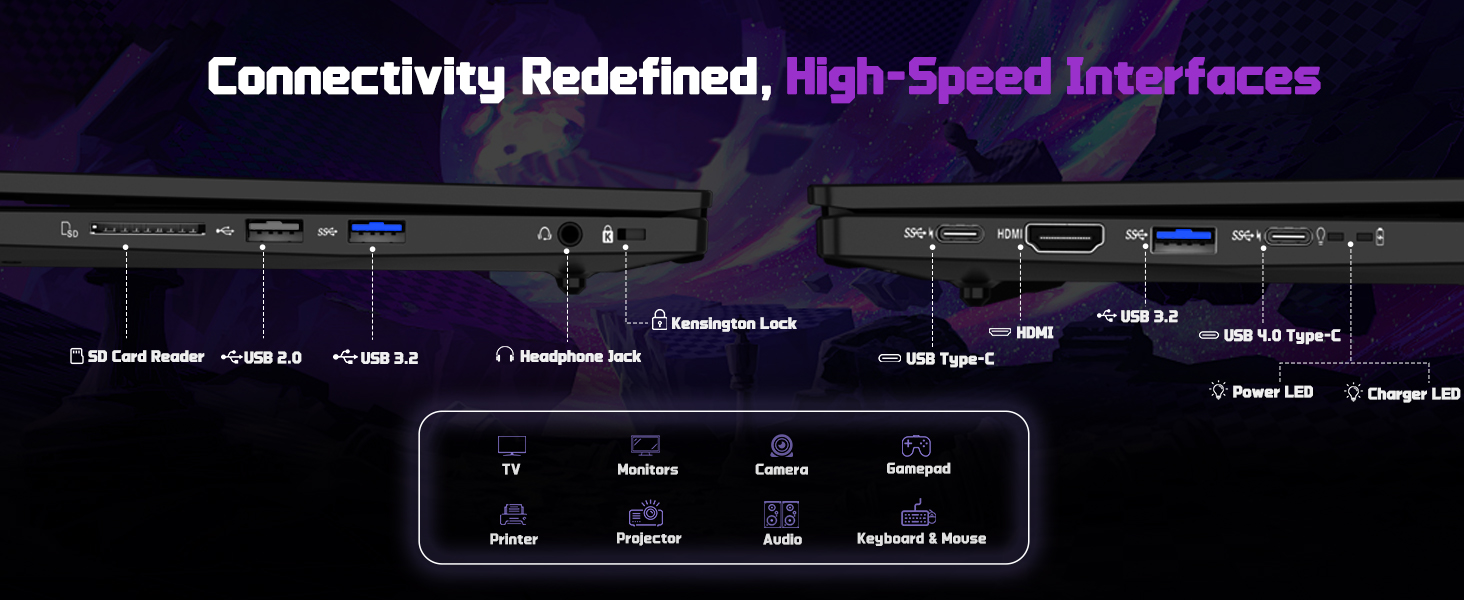
The NIMO N177 laptop offers a variety of ports for connecting peripherals and external displays:
- 1 x USB 2.0 Port
- 3 x USB 3.0 palabuhan
- 1 x USB 4.0 Type-C Port (supports 100W PD charging, data transfer, and display output)
- 1 x Port HDMI
- 1 x Headphone Jack
- 1 x SD Card Reader
- 1 x Kensington Konci slot

Image 5.1: Detailed diagram of the laptop's high-speed interfaces.
5.2 Konéktipitas Wireless
The laptop supports 802.11a/b/g/n/ac Wi-Fi for reliable wireless internet access and Bluetooth for connecting wireless accessories.
6. Pangropéa
6.1 beberesih
- Anggo lawon anu lemes sareng henteu buluan pikeun ngabersihkeun layar sareng permukaan luar.
- Hindarkeun ngagunakeun bahan kimia anu kasar atanapi bahan abrasive.
- For the screen, use a specialized screen cleaner and a microfiber cloth.
6.2 Apdet parangkat lunak
Regularly check for and install Windows updates and driver updates to ensure optimal performance and security. You can find driver updates on the NIMO official websitus.
6.3 Panyimpenan sarta penanganan
Store the laptop in a cool, dry place. Avoid exposing it to extreme temperatures, direct sunlight, or excessive moisture. Handle the laptop with care to prevent physical damage.
7. Cara ngungkulan
If you encounter issues with your NIMO laptop, try the following common troubleshooting steps:
- Henteu aya kakuatan: Ensure the charger is securely connected to both the laptop and a working power outlet. Check if the power adapter's LED indicator is on.
- Masalah tampilan: If the screen is blank, try connecting an external monitor to verify if the laptop is functioning. Adjust display settings in Windows.
- Performance Lambat: Tutup aplikasi anu teu perlu, pariksa prosés latar tukang, sareng pastikeun rohangan panyimpenan anu cekap.
- Masalah konektipitas: For Wi-Fi issues, restart your router and the laptop. For peripheral issues, ensure drivers are updated and connections are secure.
- Sistim teu responsif: Press and hold the power button for 10-15 seconds to force a shutdown, then restart the laptop.
For persistent issues, refer to the support section or contact NIMO customer service.
8. Spésifikasi
| Fitur | Spésifikasi |
|---|---|
| merek | NIMO |
| Ngaran modél | NIMO N177L |
| Ukuran layar | 17.3 inci |
| Resolusi layar | 1920 x 1080 Piksel (FHD IPS) |
| Prosesor | AMD Ryzen 7 8745HS (8 Core, nepi ka 4.9 GHz) |
| Ram | 64 GB DDR5 (4800 MHz) |
| Hard Drive | 2 TB SSD (PCIe 4.0) |
| Grafik Coprocessor | AMD Radeon 780M (Terpadu) |
| Sistem operasi | Windows 11 Imah |
| Tipe Wireless | 802.11a/b/g/n/ac |
| palabuhan USB | 1 x USB 2.0, 3 x USB 3.0, 1 x USB 4.0 Tipe-C |
| Fitur husus | Backlit Keyboard, Fingerprint Reader, HD Audio, Numeric Keypad |
| Rata Kahirupan Batré | 15.5 Jam (75Wh) |
| Item Beurat | 3.84 pon |
| Dimensi produk | 15.66 x 9.99 x 0.74 inci |
| Warna | Hideung |
9. Garansi jeung Rojongan
9.1 Émbaran jaminan
Your NIMO laptop is backed by a garansi 2 taun. This warranty covers manufacturing defects and ensures your satisfaction. The product also includes partial U.S. assembly.
9.2 Sarat jeung Kaayaan Balik deui
NIMO offers hassle-free 90-dinten mulih from the date of purchase. Please refer to your purchase documentation for detailed return instructions.
9.3 Rojongan Palanggan
Our dedicated support team is available to assist you with any questions or issues. You can contact us via:
- Surélék: service@nimopc.com
- resmi urang website or product page (for contact details).
We aim to provide quick solutions and a worry-free experience.
Gambar 9.1: Leuwihview of NIMO's customer commitment and support.


