1. Produk Langkungview
The Noble FoKus Apollo headphones are designed to deliver high-fidelity audio with advanced features for an enhanced listening experience. They incorporate a unique hybrid driver system, active noise cancellation, and versatile connectivity options.
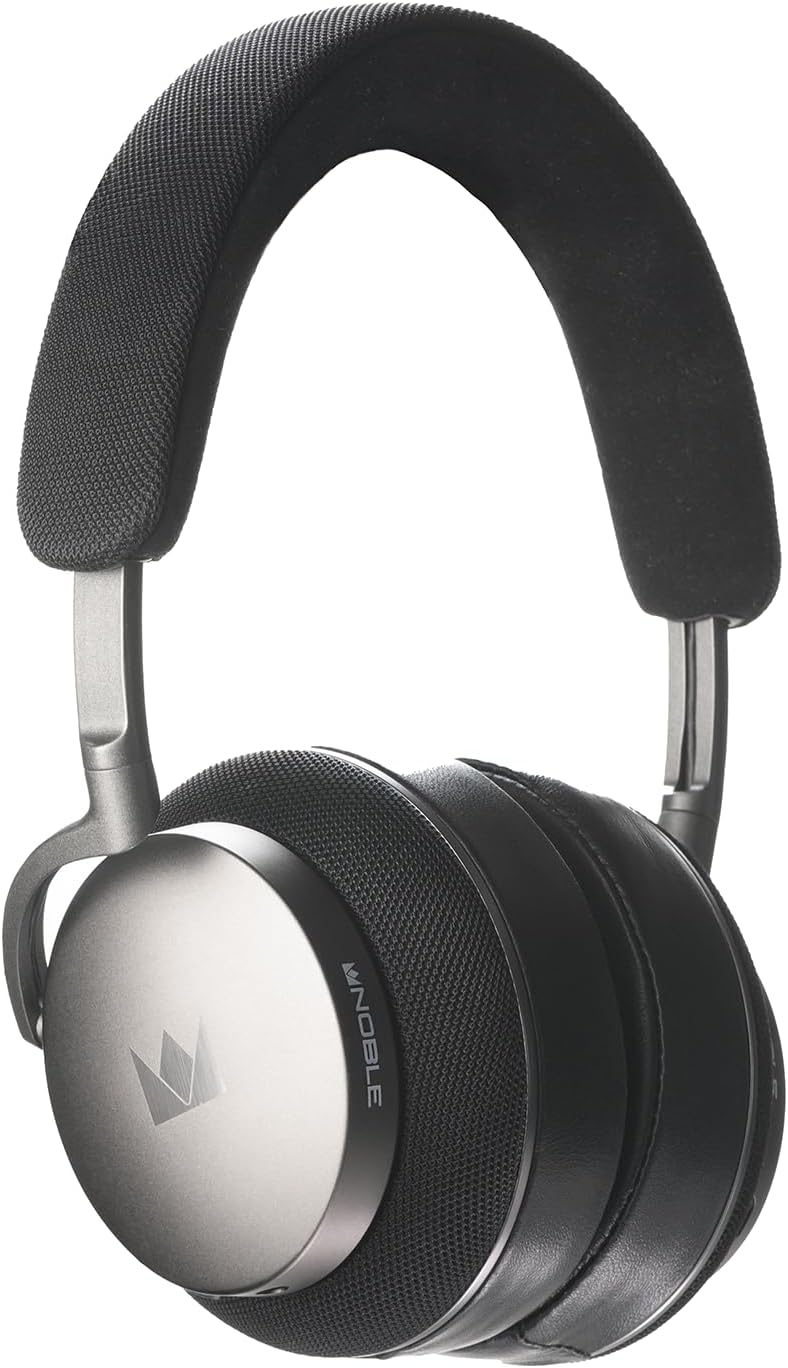
Gambar 1.1: Hareupeun view of the Noble Fokus Apollo Over-Ear Wireless Headphones.
2. Eusi Paket
Pastikeun yén sadaya item aya dina bungkusan:
- Noble Fokus Apollo Over-Ear Wireless Headphones x 1
- EVA Carrying Case x 1
- 3.5mm Auxiliary Cable x 1
- Adaptor 3.5mm ka 4.4mm x 1
- Kabel Ngecas USB-C x 1
- Two-Prong Airline Adapter x 1
- 1/4" Adapter for Headphone Amplifiers x 1
- Detachable Boom Microphone x 1
3. Fitur konci
- Hybrid Driver System: Features a 40mm dynamic driver and a 14.5mm planar magnetic driver for balanced audio reproduction.
- Hybrid Active Noise Cancellation (ANC): Reduces ambient noise by up to -35dB.
- Rojongan Audio Resolusi Tinggi: Compatible with LDAC, aptX HD, and AAC codecs.
- Bluetooth 5.3: Provides stable wireless connectivity and multi-point support.
- Hirup batré anu panjang: Up to 80 hours of playback without ANC, 60 hours with ANC.
- Detachable Boom Microphone: Enhances call clarity with an onboard mute switch.
- Konektipitas kabel: Supports 3.5mm auxiliary cable connection.
- Bahan Premium: Constructed with an anodized aluminum frame, memory foam, protein leather earpads, and Alcantara headband.
- Noble FoKus App Compatibility: Allows for sound customization, including EQ and hearing test features.
4. Setup Awal
4.1 Ngecas Headphone
Before first use, fully charge the headphones. Connect the supplied USB-C cable to the charging port on the headphones and the other end to a USB power source (e.g., computer, wall adapter).
- Indikator LED bakal nunjukkeun status ngecas.
- Ngeusi batre pinuh biasana butuh 2-3 jam.
4.2 Powering on / Pareum
- Pikeun Ngahurungkeun: Pencét terus tahan tombol Daya salami 3 detik dugi ka indikator LED hurung.
- Pikeun mareuman: Pencét jeung tahan tombol Daya salila 5 detik nepi ka indikator LED pareum.
5. Parentah Operasi
5.1 Nyapasangkeun Bluetooth
- Pastikeun headphone dipareuman.
- Pencét jeung tahan tombol Daya salila kurang leuwih 5-7 detik nepi ka indikator LED hurung biru jeung beureum, nunjukkeun mode papasangan.
- Dina alat anjeun (smartphone, tablet, komputer), aktipkeun Bluetooth sareng milarian alat anu sayogi.
- Select "Noble FoKus Apollo" from the list.
- Sakali nyambung, indikator LED bakal flash biru lalaunan.
Dukungan headphone sambungan multipoint, allowing simultaneous connection to two devices. To connect a second device, repeat the pairing process while already connected to the first. The headphones will automatically switch between devices based on audio playback.
5.2 Modeu Pembatalan Noise Aktif (ANC) sareng Transparansi
The headphones feature a dedicated button to cycle through noise control modes:
- Press the ANC button once to activate Pembatalan Noise aktip.
- Press the ANC button again to switch to Modeu Transparansi, which allows ambient sounds to pass through.
- Press the ANC button a third time to turn off noise control.
5.3 Sambungan kabel
For wired listening, connect the supplied 3.5mm auxiliary cable to the headphone's audio jack and your audio source. The headphones can be used passively in wired mode even when powered off or out of battery.
- Use the 3.5mm to 4.4mm adapter for compatible audio sources.
- Use the 1/4" adapter for headphone amplifsters.

Gambar 5.1: Sisi view of the headphones, highlighting the audio input ports.
5.4 Using the Detachable Boom Microphone
Attach the boom microphone to the designated port on the left earcup for enhanced voice clarity during calls or gaming. The boom mic includes a physical mute switch.
- Slide the switch on the boom mic to mute or unmute your voice.
- The headphones also feature an integrated 6-mic system for calls when the boom mic is not attached.

Image 5.2: Close-up of the earcup, showing the port for the detachable boom microphone.
5.5 Noble FoKus App
Download the Noble FoKus app from your device's app store to access additional features, including:
- Customizable Equalizer (EQ) settings.
- Personalized hearing test for optimized sound profiles.
- Ngamutahirkeun firmware.
6. Perawatan sareng Pangropéa
- beberesih: Use a soft, dry cloth to clean the headphones. Avoid abrasive materials or harsh chemicals.
- Earpads: The protein leather earpads are user-replaceable. Refer to Noble's official website or support for replacement instructions and parts.
- Panyimpenan: Store the headphones in the provided EVA carrying case when not in use to protect them from dust and damage.
- Suhu: Ulah ngantepkeun headphone ka suhu anu ekstrim atanapi sinar panonpoé langsung salami waktos anu lami.
7. Guide ngungkulan
| Masalah | Mungkin Cukang lantaranana | Solusi |
|---|---|---|
| Taya kakuatan | batré lemah | Ngecas headphone nganggo kabel USB-C. |
| Teu bisa masangkeun via Bluetooth | Headphone henteu dina mode papasangan; alat Bluetooth pareum; gangguan | Ensure headphones are in pairing mode (flashing blue/red). Turn device Bluetooth off and on. Move closer to the device. |
| Teu aya sora dina mode kabel | Cable not fully inserted; incorrect adapter | Ensure the 3.5mm cable is fully inserted into both the headphones and the audio source. Verify correct adapter usage. |
| Poor call quality with boom mic | Mic muted; mic not fully inserted | Check the mute switch on the boom mic. Ensure the boom mic is securely attached to the headphone port. |
| ANC teu efektif | ANC teu diaktipkeun; teu pas | Press the ANC button to activate ANC. Adjust headphones for a snug fit over your ears. |
8. Spésifikasi Téknis
| Fitur | Spésifikasi |
|---|---|
| Ngaran modél | FoKus Apollo |
| Tipe Supir | Hybrid (1x 40mm Dynamic + 1x 14.5mm Planar Magnetic) |
| Kontrol bising | Hybrid Active Noise Cancellation (up to -35dB) |
| Vérsi Bluetooth | 5.3 |
| Dirojong Codecs | LDAC, aptX HD, AAC, aptX, SBC |
| Kahirupan Batré (ANC Pareum) | Nepi ka 80 jam |
| Kahirupan Batré (ANC Hurung) | Nepi ka 60 jam |
| Konektipitas | Bluetooth, 3.5mm Jack, USB-C |
| Impedansi | 32 ohm |
| Sensitipitas | 102 dB |
| Réspon Frékuénsi | Nepi ka 40 KHz |
| Bahan | Aluminum, Protein Leather, Alcantara |
| Beurat | 3.08 pon (kira-kira 1.4 kg) |
9. Video Produk Resmi
Video 9.1: Hiji acara video produk resmicasing the Noble Fokus Apollo Over-Ear Wireless Headphones, highlighting key features and design elements.
10. Garansi jeung Rojongan
Noble provides a limited warranty for the FoKus Apollo headphones against defects in materials and workmanship. For detailed warranty information, product registration, and technical support, please visit the official Noble Audio websitus atanapi ngahubungan layanan palanggan maranéhna.
The Noble FoKus app also serves as a resource for product information and support features.


