1. Bubuka
Welcome to the DOOGEE Note 56 user manual. This guide provides essential information to help you set up, operate, and maintain your new smartphone. The DOOGEE Note 56 is an unlocked Android 16 smartphone featuring a powerful Octa-Core processor, a large 6150mAh battery, and a vibrant 6.56-inch 90Hz HD+ display. It is designed for efficient daily use, photography, and connectivity.
2. Naon dina Box
Your DOOGEE Note 56 package includes the following items:
- 1 x DOOGEE Note 56 Cell Phone
- 1 x Kotak bungkusan
- 1 x Manual Pamaké
- 1 x Film Pelindung (Tos dipasang sateuacanna)
- 1 x Pin Kartu SIM
- 1 x Kabel Port Tipe-C
- 1 x carjer
- 1 x Kartu Garansi
- 1 x TPU Protective Case
3. Alat Leuwihview
Familiarize yourself with the physical components and design of your DOOGEE Note 56.
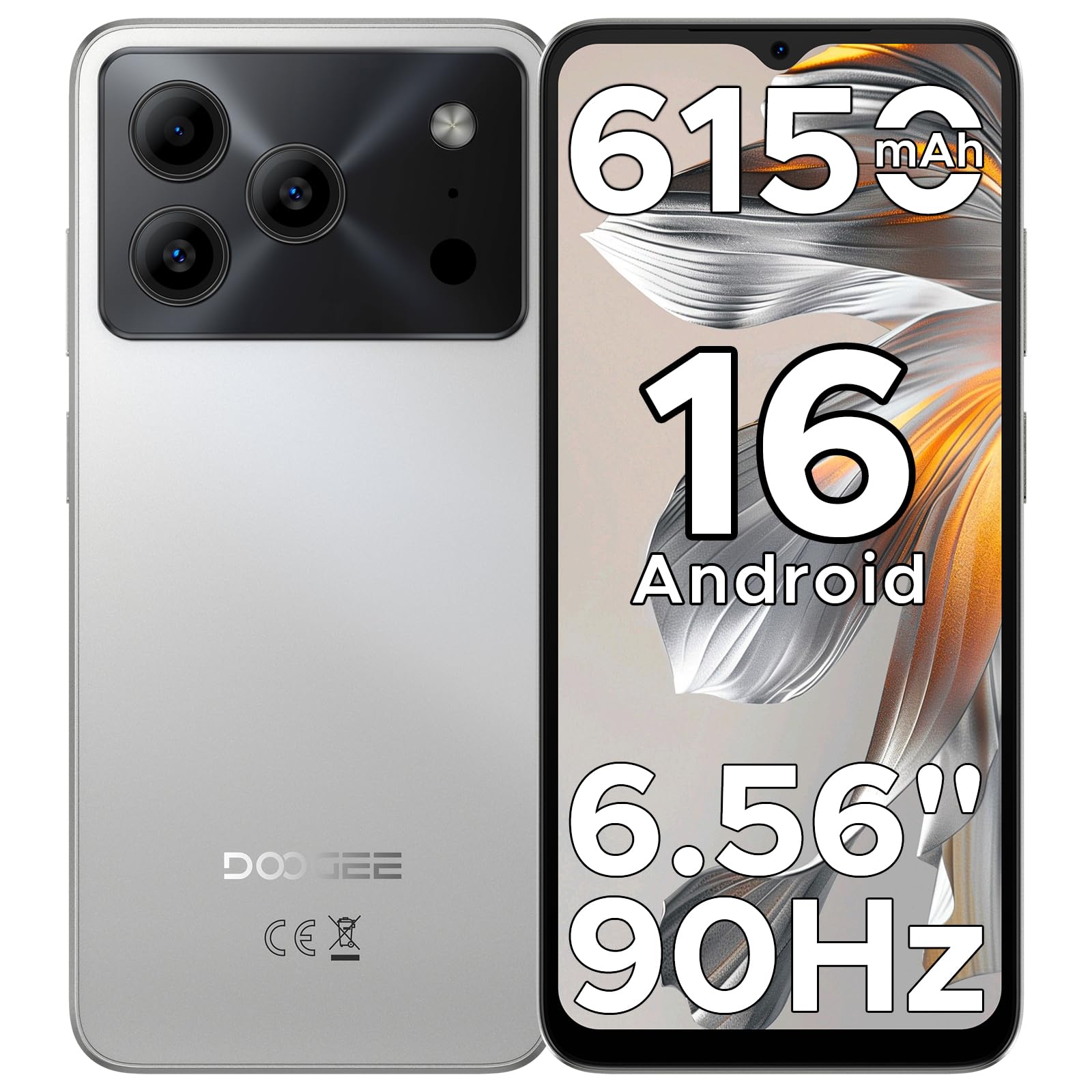
Image: The DOOGEE Note 56 smartphone, showcasing its slim design and key features such as the 8.45mm ultra-slim body, 6150mAh Silicon-Carbon Battery, Up-To-Date Android 16, 6.56" 90Hz Display, AI Scene Recognition, Instant Face Unlock, and 3.5mm Headphone Jack.

Gambar: A close-up view of the DOOGEE Note 56 highlighting its ultra-slim 8.45mm profile and lightweight 195g design, emphasizing its pocket-friendly and refined appearance.
Tombol fisik sareng palabuhan:
- Tombol Daya: Perenahna di sisi, dianggo pikeun ngahurungkeun/mareuman alat atanapi ngahudangkeun/ngahurungkeun layar.
- Tombol Volume: Perenahna di sisi, dianggo pikeun ngatur média sareng volume telepon.
- Port USB Tipe-C: Tempatna di handap, dianggo pikeun ngecas sareng mindahkeun data.
- Jack Headphone 3.5mm: Tempatna di luhur, pikeun nyambungkeun headphone kabel.
- Slot Kartu SIM/TF: Located on the side, for inserting SIM cards and a TF (microSD) card.
4. Setélan
4.1. Nyelapkeun Kartu SIM sareng TF
- Locate the SIM/TF card slot on the side of your phone.
- Insert the provided SIM eject tool into the small hole next to the slot to open the tray.
- Place your Nano-SIM card(s) and/or TF card into the tray according to the diagram on the tray.
- Taliti nyorong baki deui kana slot nepi ka siram jeung awak telepon.
4.2. Daya Awal Hurung sareng Setup
- Pencét terus tahan tombol Daya nepi ka logo DOOGEE némbongan.
- Turutan pituduh dina layar pikeun milih basa anjeun, nyambung ka Wi-Fi, sareng nyetél akun Google anjeun.
- Configure security settings, including Face Unlock, for quick and secure access.
5. Parentah Operasi
5.1. Sistem Operasi Android 16
Your DOOGEE Note 56 runs on the latest Android 16 OS, offering an intuitive and secure user experience. Navigate through apps, customize your home screen, and access various features with ease.

Image: A visual representation of the Android 16 operating system interface on the DOOGEE Note 56, showing various app icons and system settings.
5.2. Muka Muka konci
For convenient and secure unlocking, your device supports Face Unlock. To set it up:
- Pindah ka Setélan > Kaamanan > Muka konci raray.
- Turutan parentah dina-layar pikeun ngadaptarkeun beungeut anjeun.
- Pastikeun kaayaan cahaya anu saé nalika pendaptaran pikeun kinerja anu optimal.

Image: A user demonstrating the Instant Face Unlock feature on the DOOGEE Note 56, highlighting its quick and secure access capabilities.
5.3. Gemini AI Integration
The DOOGEE Note 56 integrates Gemini AI features, enhancing your device's intelligence and responsiveness. This includes smart body sensing, dual system mode, super clipboard, memory expansion, screen optimization, and customizable screen colors.
Video: This video demonstrates how to utilize and upgrade Gemini AI features on a DOOGEE smartphone, showcasing its capabilities within the Android 16 operating system.
6. Fitur kaméra
Capture memorable moments with the DOOGEE Note 56's advanced camera system.
6.1. Kaméra Tukang (8MP)
The 8MP main camera delivers clear, natural photos. Features include:
- HDR: Ningkatkeun rentang dinamis pikeun paparan anu saimbang dina cahaya anu nangtang.
- Modeu Pro: Nawiskeun kontrol manual kana setélan kaméra.
- Modeu wengi: Ningkatkeun kualitas poto dina kondisi cahaya remen.
- Pangakuan Adegan AI: Automatically detects 12 scenes and optimizes settings for stunning shots.
- Modeu Potrét: Nyiptakeun pangaruh depth-of-field pikeun potret anu katingali profésional.
- Seuri Capture: Otomatis nyokot poto nalika aya seuri nu kadeteksi.
- Panoramas: Capture wide-angle scenic views.
- Burst Shots: Candak sababaraha poto sacara gancang.
- Fun Filters: Larapkeun saringan kreatif kana poto anjeun.

Image: An illustration of the DOOGEE Note 56's camera capabilities, including AI Scene Recognition icons and various sample photos taken with the 8MP main camera and 5MP front camera.
6.2. Kaméra Hareup (5MP)
The 5MP front camera is perfect for selfies and video calls, featuring Beauty Mode and Portrait Effect for bright and natural results.
7. Konektipitas
Stay connected with a range of network and wireless options.
- 4G Dual SIM: Ngarojong dua kartu SIM pikeun pamakéan jaringan fléksibel.
- Wifi: Nyambung ka jaringan nirkabel pikeun aksés internét.
- Bluetooth 4.2: Pikeun nyambungkeun ka asesoris nirkabel.
- GPS: Pikeun layanan navigasi sareng lokasi.
- Radio FM: Enjoy your favorite radio stations.
7.1. Supported Network Bands:
- GSM: B2/3/5/8
- WCDMA: B1/2/4/5/8
- TDD: B38 / 40/41
- FDD: B1/2/3/4/5/7/8/18/19/20/25/26/28A/28B/66
- Rojongan: EDGE/GPRS
8. Manajemén batré
The DOOGEE Note 56 is equipped with a large 6150mAh Silicon-Carbon battery for extended usage.

Gambar: Hiji internal view of the DOOGEE Note 56 highlighting its 6150mAh Silicon-Carbon Battery, emphasizing its longer lifespan, unmatched durability, 1000 charge cycles, 4 years durable battery, 20% smaller size, and 5W reverse charging capability.
Video: This video highlights the 6150mAh Silicon-Carbon Battery of the DOOGEE Note 56, showcasing its capacity and efficiency.
8.1. Ngecas Balik OTG
The device supports OTG (On-The-Go) reverse charging, allowing you to use your Note 56 to charge other compatible devices.
8.2. Tips for Extending Battery Life:
- Adjust screen brightness to a lower level.
- Pareuman Wi-Fi, Bluetooth, sareng GPS upami teu dianggo.
- Tutup aplikasi latar tukang.
- Enable battery saver mode in settings.

Image: This image illustrates various usage scenarios for the DOOGEE Note 56, demonstrating its extended battery life for web browsing (7 hours), music playing (49.5 hours), video watching (14 hours), and calling (28 hours).
9. Panyimpenan sarta Performance
The DOOGEE Note 56 is powered by a UNISOC SC9863A Octa-Core processor, ensuring smooth performance for applications and daily tasks.
- RAM: 24GB (virtual RAM expansion, 8GB physical RAM).
- Panyimpenan internal: 64GB.
- Panyimpenan anu tiasa dilegakeun: Supports up to 2TB via TF (microSD) card (TF card needs to be purchased separately).

Image: A visual representation of the DOOGEE Note 56's internal memory and storage, showing 64GB ROM and 24GB RAM (3GB+21GB virtual expansion), emphasizing smooth multitasking and ampangkasa.
10. Témbongkeun
Experience immersive visuals on the 6.56-inch HD+ 90Hz IPS waterdrop screen.
- ukuran: 6.56 inci
- Resolusi: 720 x 1612 piksel
- Laju Refresh: 90Hz
- Rasio Aspék: 20:9
- PPI: 269

Image: The DOOGEE Note 56 display showcasing its 6.56-inch HD+ screen with a 90Hz refresh rate, designed for smooth viewing and social media interaction.
11. Pangropéa sarta perawatan
To ensure the longevity and optimal performance of your DOOGEE Note 56, follow these care guidelines:
- Hindarkeun ngalaan telepon ka suhu anu ekstrim, sinar panonpoé langsung, atanapi kalembaban anu kaleuleuwihan.
- Anggo ukur pangecas sareng kabel anu disatujuan.
- Bersihkeun layar sareng bodi nganggo lawon anu lemes sareng henteu ngaganggu.
- Utilize the provided TPU protective case and pre-applied protective film to guard against scratches and minor impacts.
12. Cara ngungkulan
If you encounter issues with your DOOGEE Note 56, try the following basic troubleshooting steps:
- Alat teu hurung: Pastikeun batréna geus dieusian. Sambungkeun carjer sareng antosan sababaraha menit sateuacan nyobian hurung deui.
- Layar teu ngaréspon: Restart the device by pressing and holding the Power button for about 10-15 seconds.
- Masalah jaringan: Check if your SIM card is properly inserted. Verify network settings and ensure you have an active plan with your carrier.
- Aplikasi ngadat: Hapus cache tina aplikasi anu bermasalah atanapi pasang deui. Pastikeun parangkat lunak alat anjeun parantos diropéa.
For more complex issues, refer to the official DOOGEE support websitus atanapi ngahubungan layanan palanggan.
13. Spésifikasi
| Fitur | Rincian |
|---|---|
| Ngaran modél | CATETAN56 |
| Sistem operasi | Android 16 |
| Prosesor | UNISOC SC9863A Octa-Core (1.6 GHz CPU Speed) |
| Ram | 24 GB (8GB fisik + 16GB virtual) |
| Panyimpenan internal | 64 GB |
| Panyimpenan Expandable | Nepi ka 2 TB via kartu TF |
| Ukuran tampilan | 6.56 inci |
| Resolusi tampilan | 720 x 1612 (HD+) |
| Refresh Laju | 90 Hz |
| Kaméra tukang | 8 MP |
| Kaméra hareup | 5 MP |
| Kapasitas batré | 6150 Miliamp Jam (Li-Po) |
| Konektipitas | 4G Dual SIM, Wi-Fi, Bluetooth 4.2, GPS, FM Radio, USB Type-C |
| Audio Jack | 3.5 mm |
| Diménsi | 6.45 x 2.98 x 0.33 inci |
| Item Beurat | 6.9 ons (195 gram) |
| Fitur husus | Dual SIM, Expandable Memory, Supports USB OTG, Face Unlock |
14. Garansi jeung Rojongan
Your DOOGEE Note 56 comes with a warranty. Please refer to the included Warranty Card in your product package for detailed information on warranty terms, conditions, and duration.
For technical support, service, or further inquiries, please visit the official DOOGEE website or contact their customer service channels. Keep your purchase receipt and warranty card handy for any claims.


