1. Bubuka
This manual provides essential information for the safe and efficient operation of your FLSUN S1 3D Printer. The FLSUN S1 is an advanced delta-type FDM 3D printer designed for high-speed and precise printing. It features a fully enclosed structure, AI-assisted functions, and broad material compatibility. Please read this manual thoroughly before using the printer.

Gambar 1: Hareupeun view of the FLSUN S1 3D Printer, showcasing its sleek, enclosed design and user interface.
2. Émbaran Kasalametan
Salawasna perhatikeun tindakan pencegahan kaamanan ieu pikeun nyegah cilaka atanapi karusakan kana printer:
- Pastikeun panyitak disimpen dina permukaan datar anu stabil.
- Operankeun printer di tempat anu ventilasina saé.
- Do not touch the nozzle or heated bed during operation, as they reach high temperatures.
- Jauhkeun barudak sareng piaraan tina printer nalika dioperasikeun.
- Anggo ngan ukur adaptor daya anu disayogikeun sareng printer.
- The FLSUN S1 features a closed structure and dual filtration system to optimize air quality during printing, blocking 99% of particulate matter and volatile organic compounds. However, proper ventilation is still recommended.
- Cabut colokan printer sateuacan ngalakukeun pangropéa atanapi beberesih.
3. Eusi Paket
Pastikeun yén sadaya item aya dina bungkusan:
- FLSUN S1 3D Printer
- Kabel Daya
- Manual pangguna (dokumén ieu)
- Tool Kit (includes necessary tools for assembly and maintenance)
- Sampjeung Filamén
4. Setélan
The FLSUN S1 is designed for quick setup, allowing you to begin printing in approximately 10 minutes from unboxing.
- Ngabongkar bungkusan: Carefully remove the printer and all accessories from the packaging. Retain the packaging for future transport or storage.
- panempatan: Place the printer on a stable, level surface with adequate space around it for ventilation and access.
- Sambungan Daya: Connect the power cable to the printer and then to a grounded power outlet.
- Daya mimiti Hurung: Turn on the printer using the power switch. Follow the on-screen prompts for initial setup.
- Leveling otomatis: The FLSUN S1 features fully automatic bed leveling. Initiate the auto-leveling process via the touchscreen interface as prompted during initial setup or from the settings menu.
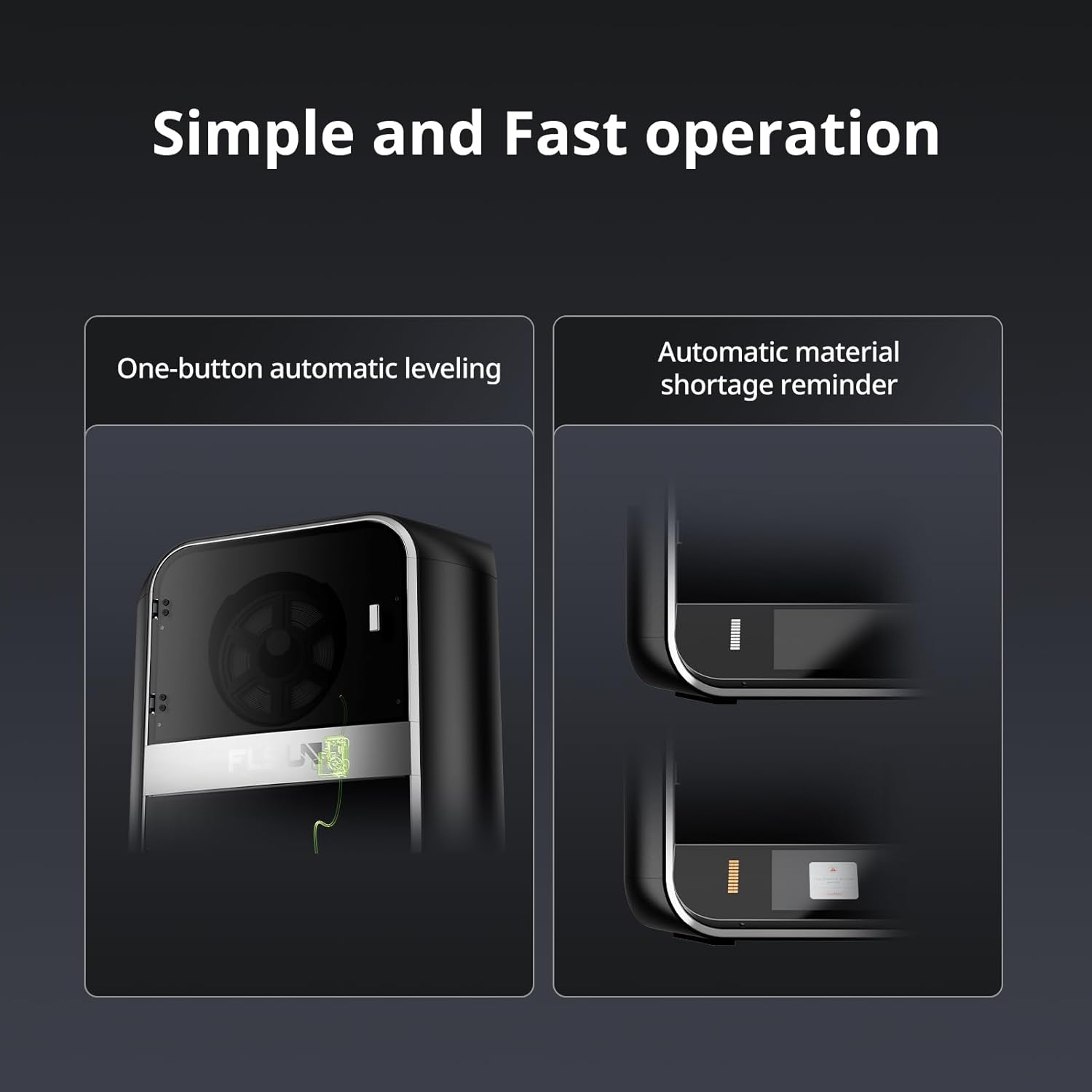
Figure 2: The FLSUN S1's touchscreen interface showing the one-button automatic leveling function and an indicator for automatic material shortage panginget.
- Filamén Loading: Load your chosen filament into the designated slot. The direct drive extruder system will guide the filament. Refer to the on-screen instructions for proper loading.

Figure 3: Illustration of the FLSUN S1's fully enclosed delta structure, highlighting the cylindrical build volume with a diameter of 320mm and height of 430mm.
5. Parentah Operasi
The FLSUN S1 is designed for high-speed and precise 3D printing.
5.1 Prosés percetakan
- Nyiapkeun Modél: Use a compatible slicing software to prepare your 3D model (.STL, .OBJ, etc.) and generate a G-code file.
- Transfer G-code: Transfer the G-code file to the printer via USB or network connection.
- Select and Start Print: On the printer's touchscreen, select your G-code file and initiate the print. The printer will automatically preheat the nozzle and bed to the required temperatures.
- Monitor Print: Monitor the printing process. The built-in AI Camera can self-optimize print quality and proactively alert you to potential issues. Remote monitoring is also available.
- Fotografi Time-Lapse: The AI Camera can capture time-lapse videos of your prints.
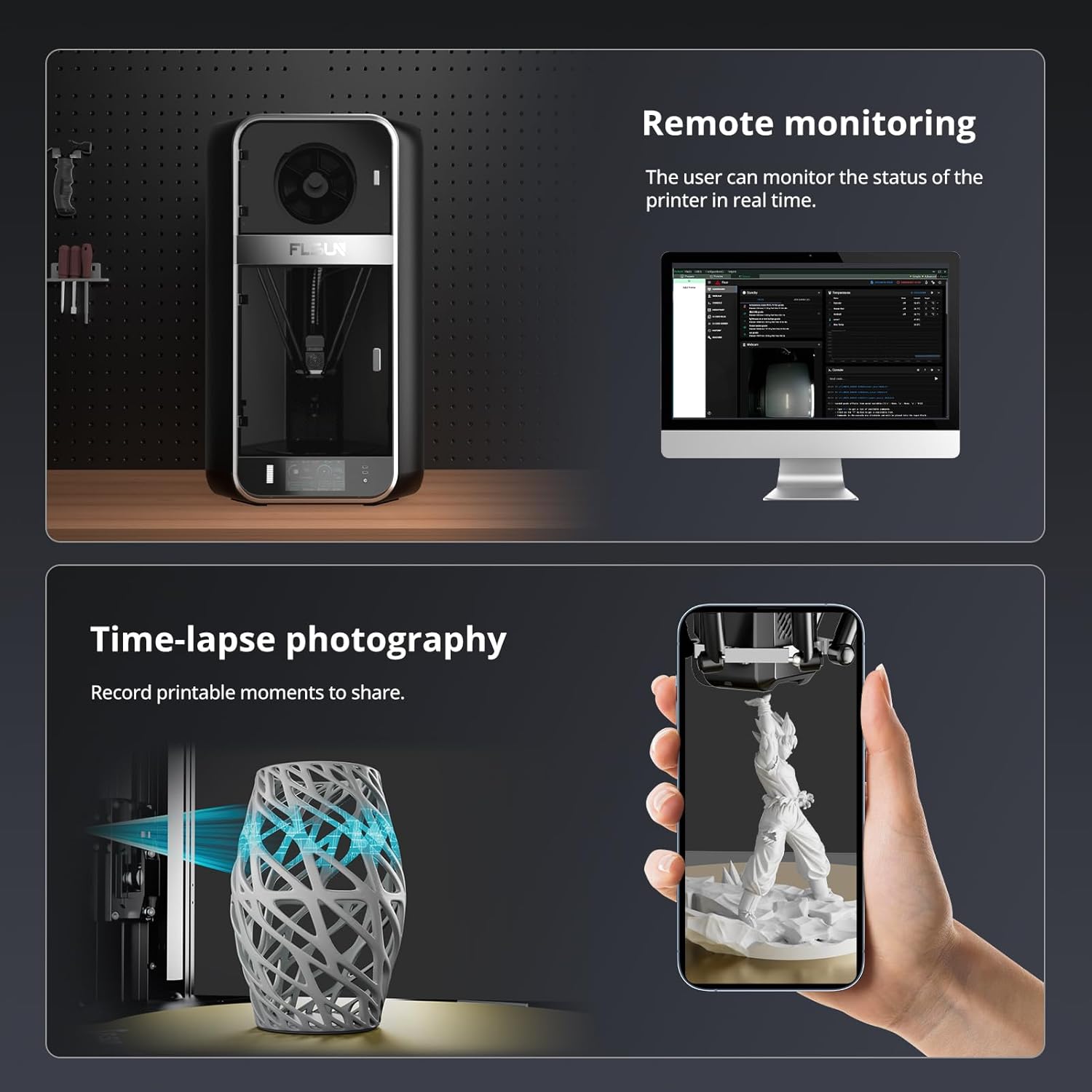
Figure 4: The FLSUN S1 offers remote monitoring capabilities via a computer interface and time-lapse photography, allowing users to record and share their printing process.
5.2 Nyetak Gancang
The FLSUN S1 is capable of ultra-high-speed printing with a maximum print speed of 1200 mm/s and an acceleration of 40,000 mm/s². This is achieved through its advanced delta-type 3D printing technology and optimized algorithms.

Figure 5: Visual representation of the FLSUN S1's high-speed printing specifications, including a maximum flow rate of 110mm³/s, maximum print speed of 1200mm/s, and maximum acceleration of 40,000mm/s².
5.3 Bahan kasaluyuan
The FLSUN S1 supports a wide range of filament types due to its robust full-metal direct extruder, which can reach temperatures up to 350°C, and a heated bed up to 120°C. The chamber temperature can reach up to 50°C.
- Bahan anu Dirojong: PLA, ABS, PETG, ASA, TPU, PVA, PET, PA, PC, and Carbon materials.

Figure 6: Diagram illustrating the FLSUN S1's temperature capabilities for multi-filament printing, showing a 350°C nozzle temperature, 50°C chamber temperature, and 120°C hot bed temperature.
5.4 Fitur canggih
- Closed-Loop Motors: Real-time position monitoring automatically adjusts to detect and correct lost steps, ensuring print accuracy.
- Santunan Geter: Optimized algorithms minimize vibration, ensuring print accuracy and preventing surface roughness and deformation.
- CPAP High-Pressure Turbo Fan: A fan with a wind speed of 40,000 rpm automatically adjusts its speed based on printing requirements to ensure optimal cooling and material melting, supporting high-temperature printing up to 350°C.

Figure 7: Demonstrates the effect of closed-loop motors in correcting print errors ("Before" and "After" images of a square print) and the effectiveness of vibration compensation ("OFF" and "ON" images showing print quality improvement).
6. Pangropéa
Regular maintenance ensures the longevity and optimal performance of your FLSUN S1 3D Printer.
- beberesih: Regularly clean the print bed, nozzle, and interior of the printer to remove any filament debris or dust. Use a soft cloth and appropriate cleaning solutions.
- Sistim filtrasi: The dual filtration system helps maintain air quality. Check and replace the filters periodically as recommended by FLSUN to ensure effective removal of particulate matter and VOCs.
- Lubrication: Apply lubricant to moving parts (e.g., linear rails) as specified in the detailed maintenance guide (if provided separately by FLSUN).
- Pembaruan firmware: Keep the printer's firmware updated to benefit from performance improvements and new features. Check the official FLSUN websitus pikeun apdet panganyarna.
7. Cara ngungkulan
This section addresses common issues you might encounter. For more complex problems, refer to the FLSUN support resources.
| Masalah | Mungkin Cukang lantaranana | Solusi |
|---|---|---|
| Cetakanna teu nempel kana kasur | Bed not level, incorrect bed temperature, dirty print surface. | Perform automatic bed leveling. Adjust bed temperature in slicing software. Clean the print surface with isopropyl alcohol. |
| Filamén teu kaluar | Nozzle clogged, filament tangled, incorrect nozzle temperature. | Clear nozzle clog. Ensure filament spool is free. Verify nozzle temperature is appropriate for the filament type. Check for material shortage panginget. |
| Poor print quality (layer shifts, rough surfaces) | Vibrations, incorrect print speed, mechanical issues. | Ensure printer is on a stable surface. The S1's vibration compensation should mitigate this; if not, check for loose components. Adjust print speed. The AI Camera may alert to issues. |
| Printer teu hurung | Power cable disconnected, faulty power outlet. | Check power cable connections. Test power outlet with another device. |
8. Spésifikasi
| Fitur | Rincian |
|---|---|
| Modél | FLSUN S1 |
| Téhnologi percetakan | FDM (Fused Deposition Modeling) Delta |
| Jilid ngawangun | 12.6 x 12.6 x 16.9 inches (320mm diameter x 430mm height) |
| Max Print Speed | 1200 mm/s |
| Gancangan Max | 40,000 mm/s² |
| Tipe Extruder | Dual-Gear Direct Drive, Full-Metal |
| Max Nozzle Suhu | 350°C |
| Max Hot Bed Temperature | 120°C |
| Suhu Kamar | Nepi ka 50 ° C |
| Filamen anu Dirojong | PLA, ABS, PETG, ASA, TPU, PVA, PET, PA, PC, Carbon materials |
| Leveling | Pinuh Otomatis |
| Fitur AI | AI Camera for print quality optimization, issue alerts, time-lapse photography |
| Filtrasi hawa | Dual filtration system (blocks 99% particulate matter and VOCs) |
| Dimensi produk | 21.6 "D x 23.4" W x 40.5" H (54.9 x 59.4 x 102.9 cm) |
| Item Beurat | 90.4 pon (41 kg) |
| Bahan | logam |
| Warna | Hideung |
9. Garansi jeung Rojongan
FLSUN provides comprehensive support for the S1 3D Printer.
- Garansi: FLSUN offers a 12-month after-sales service for the FLSUN S1 3D Printer.
- Bantosan Téknis: For any questions or support needs regarding the product, please contact FLSUN via Amazon. Support inquiries will be responded to within 24 hours.
- Sumberdaya Online: Visit the official FLSUN website for additional resources, FAQs, and firmware updates.