1. Bubuka
This manual provides detailed instructions for the setup, operation, and maintenance of your LIGE EF12 Smart Watch. Please read this manual thoroughly before using the device to ensure proper function and to maximize your user experience. Keep this manual for future reference.
2. Eusi Paket
Pastikeun yén sadaya item aya dina bungkusan:
- LIGE EF12 Smart Watch (1 unit)
- Kabel Charger (1 unit)
- Manual pamaké (1 unit)
- Pangatur Tali (1 unit)
- Straps (3 units): 1 Steel strap, 2 Silicone straps
3. Produk Langkungview
The LIGE EF12 Smart Watch is designed for daily wear and fitness tracking, featuring a 1.75-inch HD display, Bluetooth 5.2 calling, and a 1000mAh battery. It includes health monitoring functions, multiple sports modes, and a built-in LED flashlight.

Gambar 3.1: Hareupeun view of the LIGE EF12 Smart Watch, showcasing its round display, metal casing, and integrated flashlight. The screen displays time, date, steps, calories, heart rate, and weather information.
Fitur konci:
- tampilan: Layar rampa HD 1.75" (resolusi 360x360)
- Konektipitas: Bluetooth 5.2 for calls and notifications
- Batré: 1000mAh, providing 10-15 days of typical use
- Pangimeutan Kaséhatan: Heart Rate, SpO2, Sleep Tracking, Breath Monitor
- Nyukcruk kabugaran: 120+ Sports Modes, Activity Tracker (steps, calories, distance)
- Fitur husus: Built-in LED Flashlight (3 modes), Custom Watch Faces, Music Control, Camera Control, Weather Forecast, Alarm Clock, Sedentary Alerts, Hydration Reminders, Voice Control
- Tahan cai: IP68
- Kasaluyuan: Android 5.1+ sareng ios 9.0+
4. Setélan
4.1 Ngecas Smart Watch
Before first use, fully charge your smart watch. Connect the magnetic charging cable to the charging contacts on the back of the watch and plug the USB end into a standard USB power adapter (not included) or a computer USB port. A full charge typically takes approximately 2.5 hours.

Gambar 4.1: Illustration highlighting the 1000mAh battery capacity of the LIGE EF12 Smart Watch, indicating longer battery life and faster charging compared to other models.
4.2 Pamasangan Aplikasi sareng Papasangan
- Unduh Aplikasi: Scan the QR code in the user manual or search for the companion app (e.g., "GloryFit" or similar, typically mentioned in the physical manual) in your smartphone's app store (Google Play Store for Android, Apple App Store for iOS).
- Pasang sareng Daftar: Pasang aplikasi sareng turutan pitunjuk dina layar pikeun nyieun akun atanapi log in.
- Aktipkeun Bluetooth: Pastikeun Bluetooth diaktipkeun dina smartphone Anjeun.
- Pasangkeun arloji: Open the app, navigate to the device section, and search for your LIGE EF12 Smart Watch. Select the watch from the list to initiate pairing. Confirm the pairing request on both your phone and the watch if prompted.
Once paired, the watch will synchronize data with your phone, including time, date, and notifications.
4.3 Pamasangan tali sareng adjustment
The LIGE EF12 Smart Watch comes with three interchangeable straps. To attach a strap, align the spring bar with the lug holes on the watch body and slide it into place. Use the provided strap adjuster for the steel strap to remove or add links for a comfortable fit.

Gambar 4.2: The LIGE EF12 Smart Watch packaging, showing the watch, charging cable, user manual, strap adjuster, and the three included straps (steel and two silicone).
5. Parentah Operasi
5.1 Napigasi Dasar
- Layar cabak: Swipe left/right to navigate between main screens (e.g., activity data, heart rate, weather). Swipe up/down to access quick settings or notifications.
- Kancing samping: The watch typically has two side buttons. One usually serves as a power/home button, while the other may be a shortcut to sports modes or other functions. Refer to the specific button functions in the app or physical manual.
- Layar hudang: Raise your wrist or press a side button to wake the screen.
5.2 Telepon Bluetooth sareng Bewara
Once paired via Bluetooth, you can manage calls and receive notifications directly on your watch.
- Nelepon/Ngawalon Telepon: Tap the phone icon on the watch screen to access the dial pad or recent calls. When an incoming call arrives, you can answer or reject it from the watch.
- Bewara: Ensure app notifications are enabled in your phone's settings and the companion app. Swipe down on the watch face to view recent notifications from apps like WhatsApp, Twitter, Facebook, and InstagRAM.
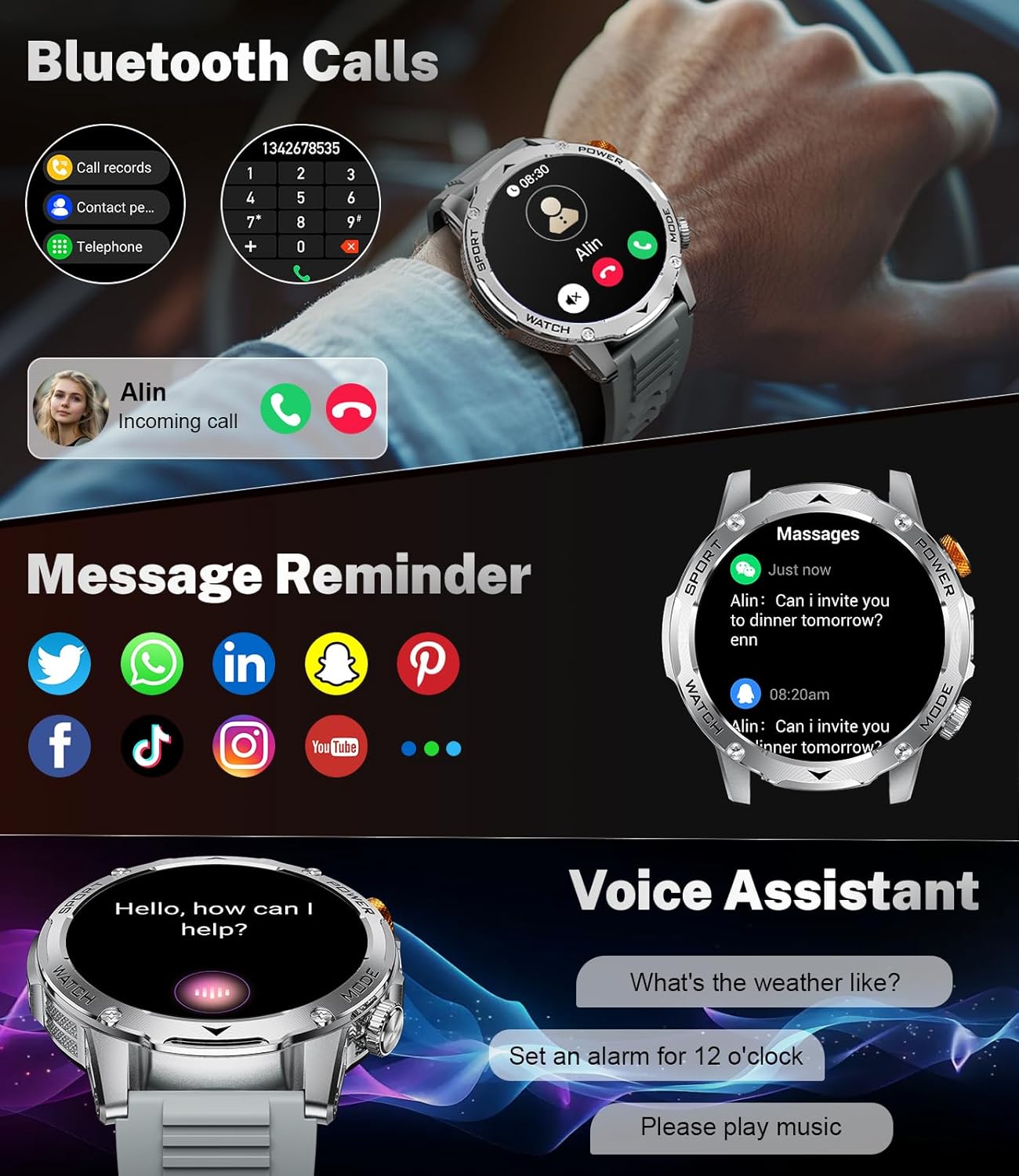
Gambar 5.1: The LIGE EF12 Smart Watch displaying an incoming call and various app icons for message reminders, including WhatsApp, Twitter, Facebook, and InstagRAM.
5.3 Diwangun-di LED Senter
The watch features an integrated LED flashlight with three modes:
- Cahaya anu kuat: Nyayogikeun cahaya anu terus-terusan.
- Kedip-kedip: Emits a blinking light.
- SOS: Transmits an SOS signal.
To activate, typically a long press on a designated side button or a specific gesture on the screen will toggle the flashlight modes. Refer to your physical manual for the exact activation method.

Gambar 5.2: The LIGE EF12 Smart Watch screen, emphasizing its 1.75-inch HD display and illustrating the three flashlight modes: Constant-On, Warning (Flashing), and SOS, shown in different outdoor scenarios.
5.4 Ngaropea Watch Faces
The watch supports over 150 watch faces and allows for custom photo uploads. Access watch face settings through the companion app or by long-pressing the watch face on the device itself. You can switch styles to match your preference.
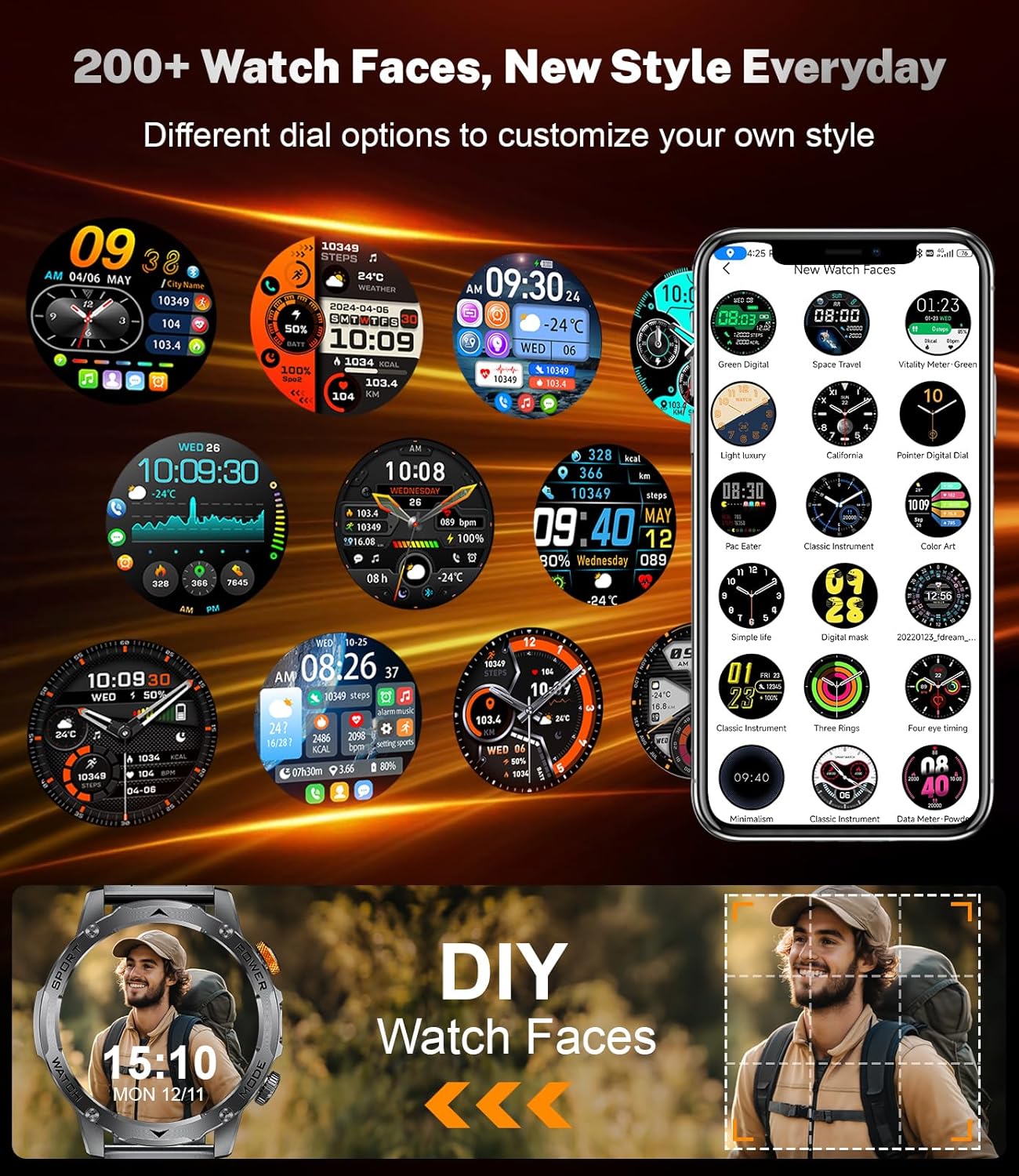
Gambar 5.3: A collage of different watch faces available for the LIGE EF12 Smart Watch, along with an illustration of how users can create their own custom watch faces using personal photos.
5.5 Health and Wellness Tracking
The LIGE EF12 Smart Watch continuously monitors several health metrics:
- Laju Jantung: Ngawaskeun denyut jantung sacara real-time. View historical data in the app.
- SpO2 (Oksigén Getih): Ukur tingkat oksigén getih.
- Monitor Saré: Lagu saré stages (jero, hampang, REM) sareng masihan wawasan ngeunaan kualitas sare.
- Monitor Napas: Guides breathing exercises to help reduce stress.
For accurate readings, ensure the watch is worn snugly on your wrist, about one finger's width above the wrist bone.
5.6 Modeu Olahraga sarta Tracking Kagiatan
The watch supports over 120 sports modes to track your workouts. It records calories burned, steps taken, and distance covered.
- Ngaksés Modeu Olahraga: Navigate to the sports mode section on the watch or via a dedicated button. Select your desired activity to start tracking.
- Data Kagiatan: View real-time data during your workout and detailed summaries in the companion app after completion.

Gambar 5.4: An image showing the LIGE EF12 Smart Watch interface for sports modes, displaying metrics like calories, steps, and distance, along with icons representing various activities such as running, cycling, and hiking.
5.7 Other Smart Tools
- Kontrol Musik: Kontrol playback musik dina smartphone anjeun (ulin, jeda, skip lagu).
- Kontrol kaméra: Paké arloji salaku jepret jauh pikeun kaméra telepon anjeun.
- Ramalan Cuaca: View current weather and forecasts (requires app synchronization).
- Jam alarem: Set alarms through the app or directly on the watch.
- Peringatan Nuju Teu Dianggo: Nampi panginget pikeun pindah saatos periode teu aktip.
- Panginget Hidrasi: Setel panginget pikeun nginum cai.
- Asistén Sora: Interact with your phone's voice assistant (e.g., "What's the weather like?").

Gambar 5.5: The LIGE EF12 Smart Watch displaying various multi-functional features including music control, flashlight, camera control, weather, alarm clock, and drink reminders.
6. Pangropéa
6.1 beberesih
Regularly clean your smart watch and straps to prevent skin irritation and maintain functionality.
- Lap layar sareng awak jam tangan nganggo lawon anu lemes sareng henteu ngaganggu. Upami diperyogikeun, usap sakedikampen lawon jeung cai.
- For silicone straps, wash with mild soap and water, then rinse thoroughly and dry.
- For steel straps, use a soft brush to clean crevices and wipe with a dry cloth. Avoid harsh chemicals.
6.2 Tahan Cai (IP68)
The LIGE EF12 Smart Watch is IP68 rated, meaning it is resistant to dust and can withstand immersion in water up to 1.5 meters for up to 30 minutes. It is suitable for daily use, such as hand washing, rain, and shallow swimming. However, it is not recommended for hot showers, saunas, or diving, as steam and high water pressure can compromise the seals.
6.3 Perawatan Batré
- Hindarkeun sering-sering ngeusi batre.
- Charge the watch using the provided cable and a compatible power adapter.
- Simpen arloji dina tempat anu tiis sareng garing upami henteu dianggo kanggo waktos anu lami.
7. Cara ngungkulan
| Masalah | Solusi anu mungkin |
|---|---|
| Arloji teu hurung. | Pastikeun arloji dicas pinuh. Sambungkeun ka carjer sahenteuna 30 menit. |
| Teu tiasa dipasangkeun sareng smartphone. |
|
| Bewara teu katampa. |
|
| Data kaséhatan anu teu akurat. |
|
| Batré gancang boros. |
|
8. Spésifikasi
| Fitur | Rincian |
|---|---|
| Nomer modél | EF12-G |
| Dimensi produk | 2.36 x 0.79 x 1.18 inci |
| Item Beurat | 10.8 ons |
| Ukuran layar | 1.75 inci |
| Resolusi | 360x360 |
| Kapasitas batré | 1000 Miliamp Jam (Litium Polimér) |
| Konektipitas | Bluetooth 5.2 |
| Kasaluyuan System Operasi | Android 5.1+, ios 9.0+ |
| Peunteun Résistansi Cai | IP68 |
| Kapasitas Panyimpenan Mémori | 128 MB |
| Fitur husus | LED Light, Activity Tracker, Breath Monitor, Distance Tracker, Heart Rate Monitor, Calorie Counter, Multisport Tracker, Music Player, Sleep Monitor, Phone Call, Touchscreen, Voice Control, Alarm Clock, Weather Forecast, Stress Monitor, Stopwatch, Timer, Calculator, Phone Finder |
9. Garansi jeung Rojongan
For warranty information and customer support, please refer to the documentation included with your purchase or contact the manufacturer directly. Our dedicated support team aims to reply to inquiries within 24 hours.
For further assistance, visit the official LIGE websitus atanapi ngahubungan layanan palanggan maranéhna.


