1. Bubuka
This manual provides detailed instructions for the setup, operation, and maintenance of your Elitech DR-230 Large Digital Wall Thermometer and Elitech TM-2TH Digital Fridge Thermometer. Please read this manual thoroughly before using the devices to ensure proper functionality and accurate readings.

Image 1.1: The Elitech DR-230 Large Digital Wall Thermometer (left) and the Elitech TM-2TH Digital Fridge Thermometer (right).
2. Produk Langkungview
2.1 Elitech DR-230 Large Digital Wall Thermometer
The DR-230 is designed for large spaces, featuring a 10.6-inch jumbo screen for high visibility. It offers advanced data tracking capabilities, storing up to 30,000 data points with auto-overwriting. Real-time data and PDF reports are accessible via a Bluetooth app. It supports flexible power options and installation methods.
- tampilan: 10.6" jumbo screen for clear viewing.
- Panyimpenan Data: 30,000 auto-overwriting data points.
- Konektipitas: Bluetooth with a 147ft range for app access.
- kakuatan: 100–240V global voltage with 4 plug adapters (US/EU/UK/CN).
- Pamasangan: Wall-mount or desktop stand.
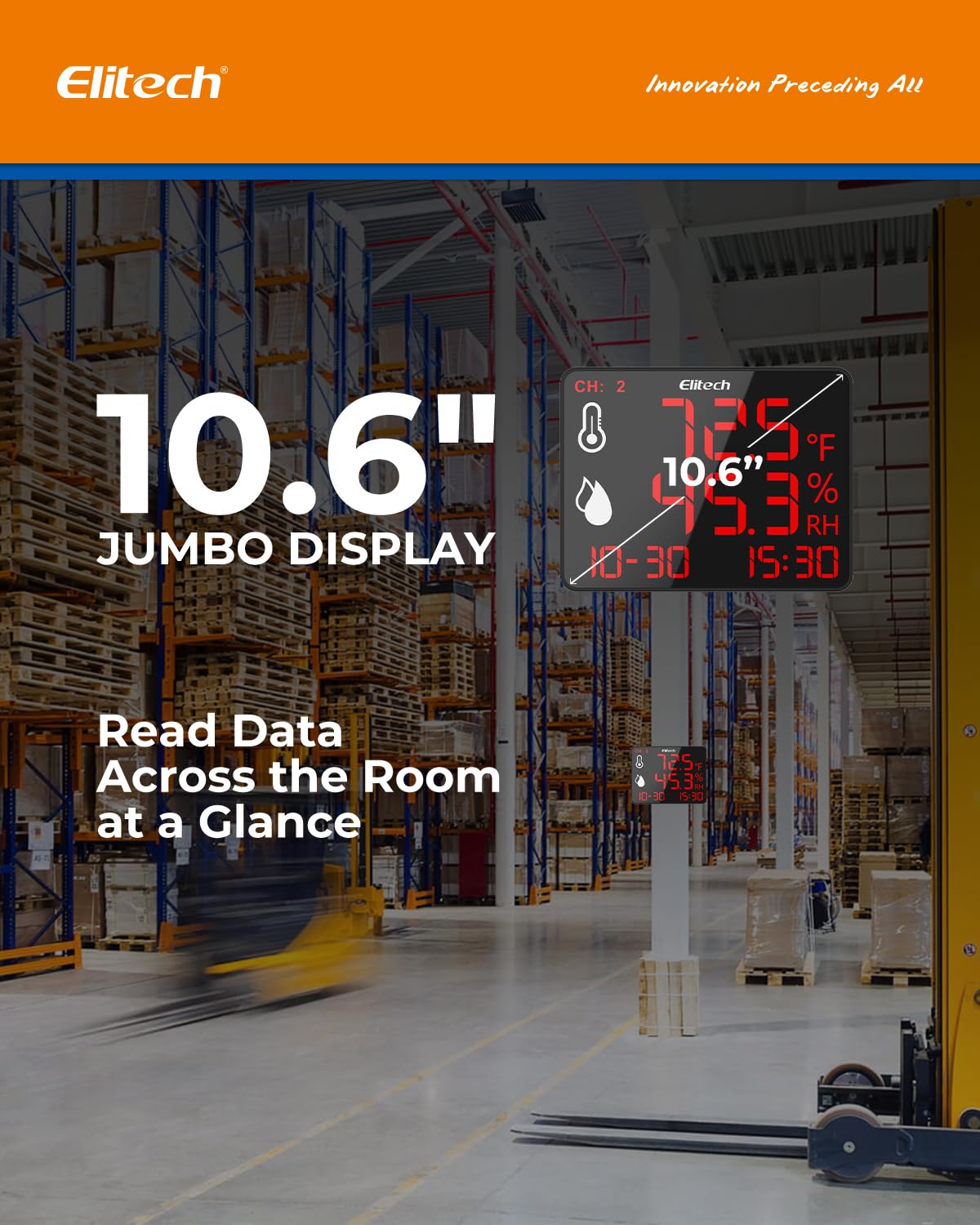
Image 2.1: The Elitech DR-230 displaying its large 10.6-inch screen, suitable for reading data from a distance in large environments.

Image 2.2: A user interacting with the Elitech app, demonstrating real-time data charts and PDF report generation for the DR-230.
2.2 Elitech TM-2TH Digital Fridge Thermometer
The TM-2TH is a compact, battery-powered thermometer ideal for refrigerators, freezers, and other tight spaces. It features an oversized digit LCD for easy reading and IPX3 waterproofing for durability in damp environments. It offers versatile placement options.
- tampilan: Compact LCD with oversized digits.
- kakuatan: Battery-powered (CR2032).
- Daya tahan: IPX3 waterproofing.
- Pamasangan: Hook, magnet, or stand options.
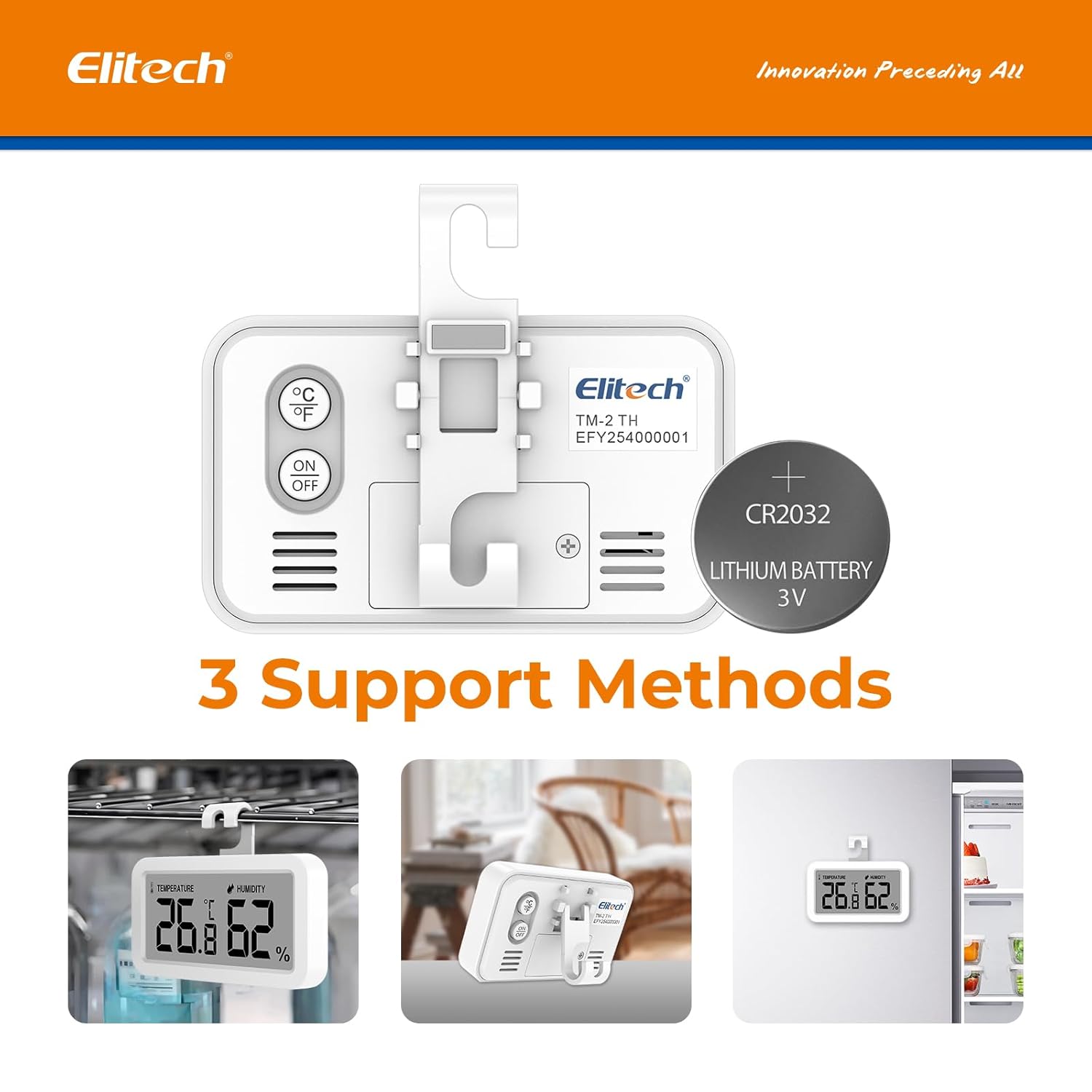
Image 2.3: The Elitech TM-2TH highlighting its three versatile support methods: a hanging hook, a fold-out stand, and a magnetic back.

Image 2.4: The Elitech TM-2TH placed inside a refrigerator, illustrating its temperature and humidity accuracy and resolution specifications.
3. Setélan
3.1 Elitech DR-230 Setup
- Sambungan Daya: Connect the DR-230 to a power outlet using the provided adapter. Select the appropriate plug adapter for your region (US/EU/UK/CN).
- panempatan: Choose a suitable location for the DR-230. It can be wall-mounted or placed on a desktop using its integrated stand. Ensure the location allows for clear visibility of the large display.
- App Pairing (Optional): Download the Elitech app from your device's app store. Enable Bluetooth on your mobile device and follow the in-app instructions to pair with the DR-230 for real-time data monitoring and report generation.
3.2 Elitech TM-2TH Setup
- Pamasangan batré: Open the battery compartment and insert one CR2032 lithium battery, ensuring correct polarity.
- panempatan: The TM-2TH offers multiple installation options:
- Hook: Hang the thermometer from a shelf or rack.
- Nangtung: Use the fold-out stand to place it on a flat surface.
- Magnét: Attach it to any metal surface, such as a refrigerator door.
- Pilihan Unit: Press the °C/°F button on the back of the unit to switch between Celsius and Fahrenheit display modes.

Image 3.1: Visual representation of the TM-2TH's versatile installation options: hanging by its hook, standing on a surface, and attaching via magnet.
4. Parentah Operasi
4.1 Elitech DR-230 Operation
- Pangimeutan sacara real-time: Once powered on, the DR-230 will immediately begin displaying current temperature and humidity readings on its large screen.
- Data logging: The device automatically logs data points, storing up to 30,000 records. Older data will be overwritten as new data is collected.
- Fitur Aplikasi:
- Data waktos nyata: View live temperature and humidity readings on your paired mobile device.
- Data Graph: Access historical data in graphical format for trend analysis.
- Konpigurasikeun Parameter: Adjust settings and alarm thresholds through the app.
- Ékspor Data: Generate and export PDF reports of your logged data.
- Fungsi Alarm: The DR-230 features a screen flashing alert. An optional 110dB external siren can be connected for audible alerts. Smart alarm delay (3-10s adjustable) helps prevent false alarms.

Image 4.1: The DR-230 screen indicating its capacity for 30,000 data points with auto-overwriting, ensuring continuous data capture.
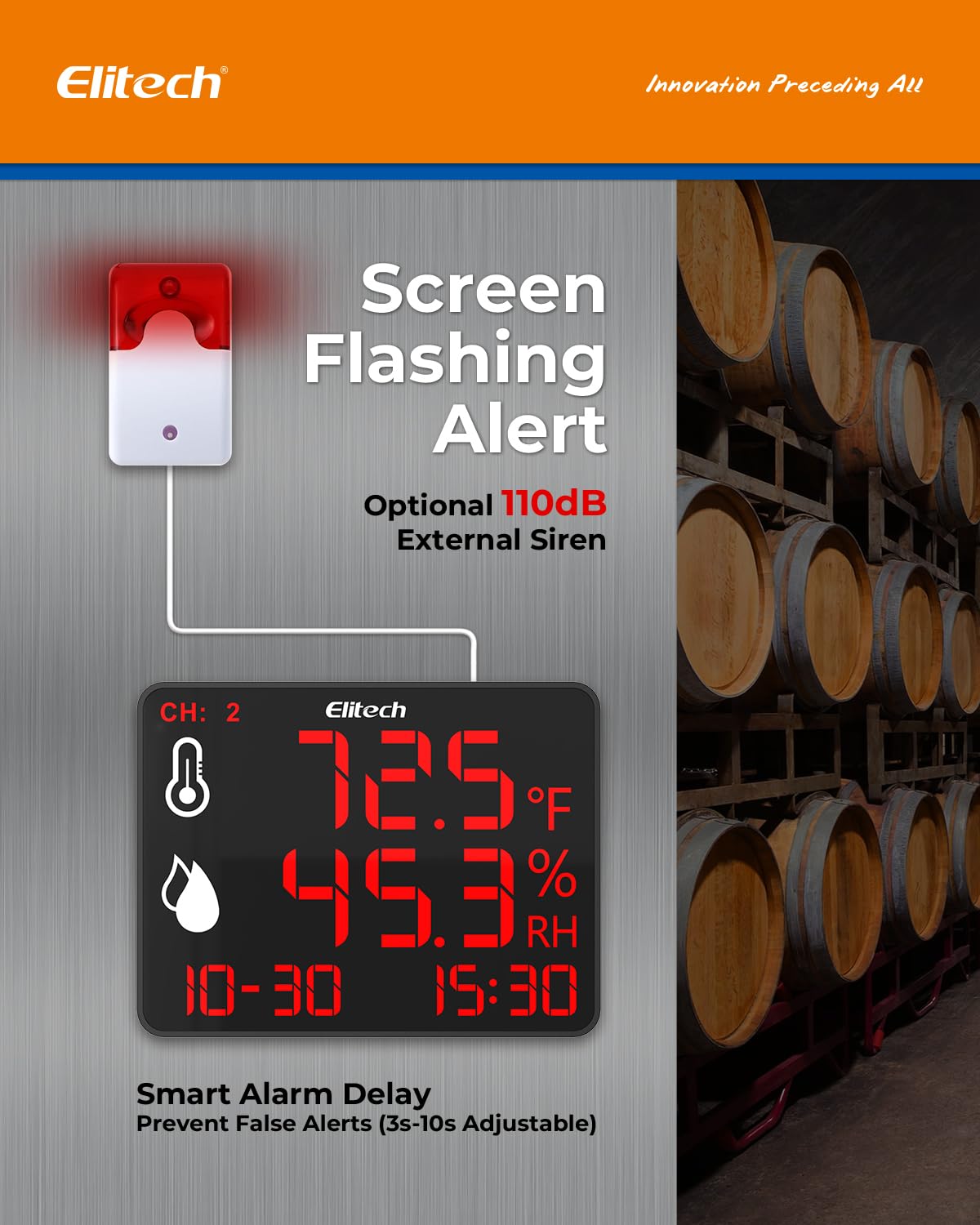
Image 4.2: The DR-230 demonstrating its screen flashing alert feature, with an illustration of an optional external siren connection for enhanced notification.
4.2 Elitech TM-2TH Operation
- Hurungkeun/Pareuman: Press the "ON/OFF" button on the back of the unit to turn the thermometer on or off.
- Temperature/Humidity Display: The TM-2TH will display the current temperature and humidity readings on its LCD screen.
- Ngalihkeun Unit: Pencét tombol "°C/°F" pikeun ngaganti antara unit suhu Celsius sareng Fahrenheit.
- Max/Min Readings: The device may display maximum and minimum recorded temperatures. Consult the specific product details for how to access or reset these readings if available.
5. Pangropéa
- beberesih: Wipe the devices with a soft, dry cloth. Do not use abrasive cleaners or immerse the DR-230 in water. The TM-2TH has IPX3 waterproofing, allowing it to withstand splashes, but it should not be submerged.
- Battery Replacement (TM-2TH): When the display dims or the unit stops functioning, replace the CR2032 battery. Ensure proper polarity during installation.
- Panyimpenan: Store the thermometers in a cool, dry place when not in use for extended periods.

Image 5.1: The TM-2TH, highlighting its construction from ABS environmentally friendly material, indicating durability and ease of maintenance.
6. Cara ngungkulan
| Masalah | Mungkin Cukang lantaranana | Solusi |
|---|---|---|
| DR-230 display is blank. | No power or power adapter issue. | Check power connection. Ensure adapter is securely plugged in and outlet is functional. |
| TM-2TH display is dim or blank. | batré lemah atawa maot. | Ganti batré CR2032. |
| DR-230 not connecting to app via Bluetooth. | Bluetooth off on mobile device, device out of range, or app issue. | Ensure Bluetooth is enabled. Move closer to the DR-230 (within 147ft). Restart the app or your mobile device. |
| Bacaan teu akurat. | Sensor obstruction or extreme environmental conditions. | Ensure sensors are clear of obstructions. Avoid placing devices in direct sunlight or near heat/cold sources that could skew readings. |
7. Spésifikasi
7.1 Elitech DR-230 Specifications
- Ukuran tampilan: 10.6 inci
- Kamampuh Data: 30,000 data points (auto-overwriting)
- Konektipitas: Bluetooth (147ft range)
- Sasayogian tanaga: 100–240V AC with US/EU/UK/CN plug adapters
- Pamasangan: Wall-mount, Desktop stand
- Panggeuing: Screen flashing, Optional 110dB external siren
- Tunda Alarm: 3-10 detik (bisa diatur)
7.2 Elitech TM-2TH Specifications
- Akurasi Suhu: ± 1.8 ° F (± 1 ° C)
- Akurasi kalembaban: ± 5% RH
- Resolusi Suhu: 0.2°F (0.1°C)
- Resolusi kalembaban: 1% RH
- Sasayogian tanaga: 1 x CR2032 Lithium Battery
- Waterproofing: IPX3
- Bahan: ABS bahan ramah lingkungan
- Pamasangan: Hook, Magnet, Stand
Note: Specific operating temperature and humidity ranges for both devices are typically found in the full product datasheet.
8. Garansi jeung Rojongan
Elitech products are designed for reliability and performance. For warranty information, technical support, or service inquiries, please refer to the official Elitech website or contact Elitech customer service directly. Keep your purchase receipt as proof of purchase for warranty claims.
Elitech Official Websitus: www.elitechlog.com


