Bubuka
This manual provides essential information and instructions for the safe and efficient use of your XIAOMI Redmi 15C 4G LTE smartphone. Please read this manual thoroughly before operating your device to ensure proper functionality and to prevent damage.
The Redmi 15C features a 6.9-inch FHD+ DotDisplay, a 50MP AI dual camera system, a 6000mAh battery with 33W turbo charging, and IP64 dust and water resistance.
Eusi pakét
Pariksa yén pakét anjeun ngandung barang-barang ieu:
- Smartphone XIAOMI Redmi 15C
- 33W témbok carjer
- Kabel Tipe-C USB
- Kasus Telepon
- Alat ngaluarkeun SIM
Alat Langkungview
Below is an image of the XIAOMI Redmi 15C smartphone, highlighting its design and display.
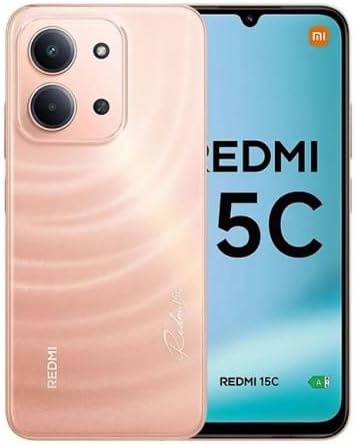
Gambar: Hareup jeung tukang view of the XIAOMI Redmi 15C smartphone in Twilight Orange.
Disetél
1. Kartu SIM jeung Pamasangan Kartu Micro SD
- Tangtukeun lokasi baki kartu SIM di sisi alat Anjeun.
- Selapkeun alat ngaluarkeun SIM kana liang leutik gigireun baki terus pencét pageuh nepi ka baki pops kaluar.
- Place your Nano SIM cards (up to two) and a Micro SD card (if desired) into the designated slots on the tray. Ensure the gold contacts face downwards.
- Taliti selapkeun deui baki kana telepon.
Catetan Penting ngeunaan Kompatibilitas Jaringan: This device supports Dual Nano SIM. For users in the USA, it is compatible with T-Mobile, Mint, and Tello networks. It is also compatible with 4G VoLTE networks globally. Please verify your carrier's compatibility before use. The device is not compatible with Verizon, AT&T, Xfinity, Boost, Virgin, Visible, Cricket, or other CDMA carriers.

Image: Chart indicating compatible (T-Mobile, Mint, Tello, Outside USA) and incompatible (Verizon, AT&T, Xfinity, Boost, Virgin, Visible, Cricket, other CDMA) network carriers.
2. Ngecas Awal jeung Power On
- Connect the USB Type-C cable to your phone and the 33W wall charger. Plug the charger into a power outlet.
- Allow the phone to charge for at least 30 minutes before first use, or until the battery indicator shows sufficient charge.
- To power on, press and hold the Power button (usually on the right side) until the XIAOMI logo appears.
3. Konfigurasi Alat Awal
Turutan ajakan dina layar pikeun ngarengsekeun setelan awal, anu ngawengku:
- Milih basa sareng daérah anjeun.
- Nyambungkeun ka jaringan Wi-Fi.
- Asup sareng akun Google anjeun.
- Setting up screen lock methods (PIN, pattern, password).
- Configuring the rear fingerprint sensor and AI face unlock for enhanced security.
Parentah Operasi
1. Tampilan jeung Napigasi
- The 6.9-inch FHD+ DotDisplay offers a resolution of 720x1600.
- The refresh rate can be adjusted up to 120Hz for smoother visuals in supported applications. The touch sampling rate is up to 288Hz for responsive interaction.
- Adjust brightness in Settings > Display. The display features 700 nits (typ) and 850 nits HBM brightness.
- Utilize Reading mode to reduce eye strain, certified by TÜV Rheinland for Low Blue Light, Circadian Friendly, and Flicker Free.
- Navigate the device using the touchscreen interface. Swipe, tap, and pinch gestures are standard.
2. Pamakéan kaméra
Your Redmi 15C is equipped with a 50MP main camera and an 8MP front camera.
- Kaméra tukang: The 50MP main camera (f/1.8, 5P lens) captures high-resolution images. It supports 1080p HD video recording at 30 fps and 720p HD video recording at 30 fps.
- Kaméra hareup: The 8MP front camera (f/2.0) is ideal for selfies and video calls. It supports 1080p HD video recording at 30 fps and 720p HD video recording at 30 fps.
- Modeu kaméra: Access various modes such as filmCamera, HDR mode, Soft-light ring (for front camera), Portrait mode, and Time-lapse through the camera application.
3. Konektipitas
- Wifi: Connect to 2.4GHz and 5GHz Wi-Fi networks via Settings > Wi-Fi.
- Bluetooth: Pair with Bluetooth 5.1 devices (e.g., headphones, speakers) via Settings > Bluetooth.
- GPS: The device supports GPS, AGPS, GLONASS, Beidou, and Galileo for accurate location services.
- Jack audio: Jack headphone 3.5mm sayogi kanggo asesoris audio kabel.
Pangropéa
1. Kaperawatan batré
- The 6000mAh (typical) battery provides extended usage.
- Use only the provided 33W wall charger and USB Type-C cable for optimal and safe charging.
- Ulah ngantep alat kakeunaan suhu anu ekstrim, sabab ieu tiasa ngirangan umur batré.
- For long-term storage, charge the battery to approximately 50% and power off the device.
2. Cleaning and Protection
- Bersihkeun layar sareng awak nganggo lawon anu lemes sareng henteu ngaganggu. Hindarkeun bahan anu kasar atanapi bahan kimia anu keras.
- The device features IP64 dust and water resistance, offering protection against dust ingress and splashes of water. It is not designed for submersion.
- Use the included phone case for additional physical protection.
3. Apdet parangkat lunak
Your device runs on Xiaomi HyperOS based on Android 15. Regularly check for and install software updates via Settings > About phone > System update to ensure optimal performance, security, and access to new features.
Pamérésan masalah
1. Alat Teu Dihurungkeun
- Pastikeun batréna geus dieusian. Sambungkeun carjer sareng antosan sababaraha menit sateuacan nyobian hurung deui.
- Pencét jeung tahan tombol Daya sahenteuna 10-15 detik pikeun maksa balikan deui.
2. Masalah Konektipitas Jaringan
- Verify that your SIM card is correctly inserted and activated with a compatible carrier.
- Pariksa naha Modeu Pesawat dinonaktipkeun.
- Balikan deui alat.
- Reset network settings via Settings > Connection & sharing > Reset Wi-Fi, mobile networks, and Bluetooth.
3. Tampilan Teu Ngaréspon
- Pareuman terus hurungkeun deui alat sacara paksa (tahan tombol Daya).
- Pastikeun layar bersih sareng bébas tina kalembaban.
4. Factory Reset (Data Loss Warning)
If persistent issues occur, a factory reset may be necessary. This will erase all data on your device. Back up important data before proceeding.
- Buka Setélan > Ngeunaan telepon > Reset pabrik.
- Turutan parentah dina-layar pikeun mastikeun reset.
spésifikasi
Below are the key technical specifications for the XIAOMI Redmi 15C smartphone.
| Fitur | Rincian |
|---|---|
| Nomer modél | Redmi 15C (25078RA3EL) |
| Sistem operasi | Xiaomi HyperOS dumasar kana Android 15 |
| tampilan | 6.9-inch FHD+ DotDisplay, 720 x 1600 resolution, up to 120Hz refresh rate, 700 nits (typ) brightness |
| Prosesor | Octa Core Helio G81 2.0GHz, GPU Mali-G52 MC2 |
| Ram | 4GB |
| Panyimpenan | 256GB (expandable via Micro SD) |
| Kaméra tukang | Kaméra utama 50MP (f/1.8) + lensa bantu |
| Kaméra hareup | 8MP (f/2.0) |
| Batré | 6000mAh (typ), 33W turbo ngecas |
| Konektipitas | 4G LTE, Wi-Fi (2.4GHz/5GHz), Bluetooth 5.1, GPS (AGPS, GLONASS, Beidou, Galileo) |
| Palabuhan | USB Tipe-C, jack headphone 3.5mm |
| Sénsor | Sénsor sidik pungkur, muka konci raray AI, Sénsor jarak, Sénsor cahaya ambient, Akselerometer |
| Diménsi | 7 x 4 x 2 inches (Package Dimensions, actual device dimensions not provided) |
| Beurat | 6 ons (Beurat Barang) |
| Lebu jeung Cai Résistansi | IP64 |
For regulatory compliance and certification details, refer to the device's information screen:
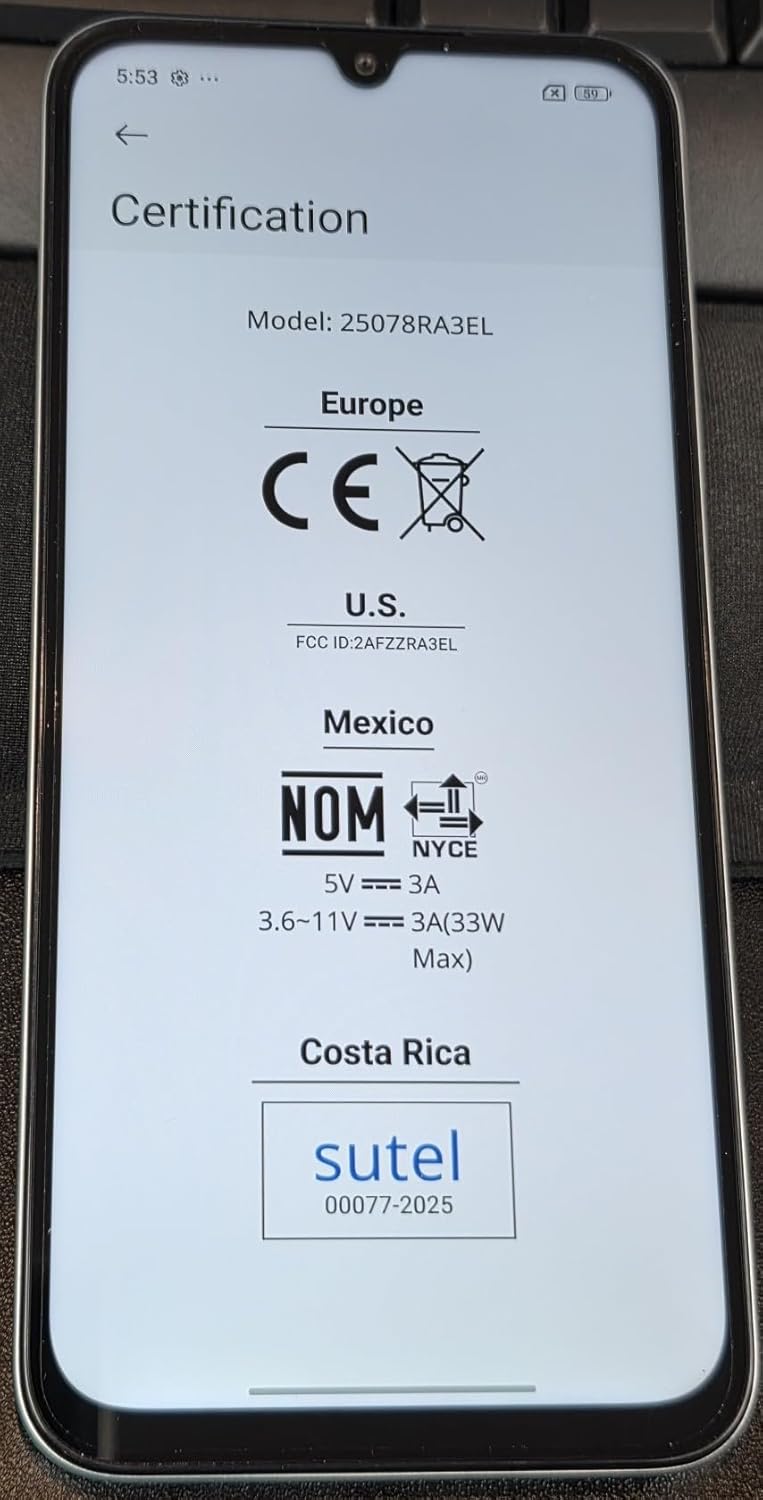
Image: Screen displaying certification information for the XIAOMI Redmi 15C, including Model: 25078RA3EL, CE, FCC ID: 2AFZZRA3EL, NOM, and SUTEL markings.
Garansi sareng Rojongan
Your XIAOMI Redmi 15C smartphone is covered by a manufacturer's warranty. For detailed warranty terms, conditions, and duration, please refer to the warranty card included in your product packaging or visit the official XIAOMI support websitus.
For technical support, service, or further inquiries, please contact XIAOMI customer service or visit their official support channels. Keep your proof of purchase for warranty claims.
Toko resmi XIAOMI: Toko XIAOMI di Amazon


