1. Bubuka
This manual provides essential information for the proper setup, operation, and maintenance of your XIAOMI Redmi 15C 4G LTE smartphone. Please read this guide thoroughly to ensure optimal performance and longevity of your device.
2. Eusi Paket
Pastikeun yén sadaya barang aya dina bungkusan produk anjeun:
- XIAOMI Redmi 15C 4G LTE Smartphone
- 33W témbok carjer
- Adaptor
- Kasus Telepon
- Pakakas Pangeluar SIM (tiasa kalebet)
- Pituduh Mimitian Gancang (tiasa kalebet)
3. Alat Leuwihview
Familiarize yourself with the physical components of your Redmi 15C smartphone.

Gambar 3.1: Hareup jeung pungkur view of the XIAOMI Redmi 15C smartphone. The image displays the device's 6.9-inch screen, the front camera notch, and the rear camera module with two lenses and a flash.
- Tampilan Hareup: 6.9 inci FHD + DotDisplay.
- Kaméra hareup: Tempatna di tengah luhur tampilan.
- Modul kaméra pungkur: Contains the 50MP main camera and an auxiliary lens.
- Tombol Daya: Biasana di sisi katuhu, sering diintegrasikeun sareng sénsor sidik jari.
- Tombol Volume: Located near the power button.
- Port USB Tipe-C: Pikeun ngecas jeung mindahkeun data, ayana di handap.
- Jack Headphone 3.5mm: Pikeun kaluaran audio.
- Slot Kartu SIM/MicroSD: Perenahna di sisi pikeun nyelapkeun kartu SIM sareng panyimpenan anu tiasa dilegaan.
4. Parentah Setup
4.1. Nyelapkeun Kartu SIM sareng MicroSD
- Tangtukeun lokasi baki kartu SIM di sisi alat.
- Selapkeun alat SIM ejector kana liang leutik gigireun baki terus pencét gently dugi baki pops kaluar.
- Place your Nano SIM cards (up to two) and/or a MicroSD card into the designated slots on the tray. Ensure the gold contacts face downwards.
- Taliti selapkeun deui baki kana telepon nepi ka ngaklik kana tempatna.
4.2. Daya Awal Hurung sareng Ngecas
- Pencét terus tahan tombol Daya nepi ka logo XIAOMI nembongan.
- Turutan pitunjuk dina layar pikeun ngalengkepan setelan awal, kalebet pilihan basa, sambungan Wi-Fi, sareng setelan akun Google.
- To charge the device, connect the provided 33W wall charger and USB Type-C cable to the phone's charging port. The device supports 33W turbo charging.
4.3. Kasaluyuan Jaringan (Pamaké AS)
For users in the USA, this device is primarily compatible with specific carriers. Please review the compatibility information below:

Gambar 4.1: Network compatibility chart. The chart indicates that the device is compatible with T-Mobile, Mint, Tello, and Ultra in the USA, and generally compatible outside the USA. It is NOT compatible with Verizon, AT&T, Xfinity, Boost, Virgin, Visible, Cricket, or other CDMA carriers.
Compatible USA Carriers: T-Mobile, Mint, Tello, Ultra (requires previous SIM card activation).
Not Compatible USA Carriers: Verizon, AT&T, Xfinity, Boost, Virgin, Visible, Cricket, sareng operator CDMA anu sanésna.
The device supports 4G VoLTE worldwide and operates on the following bands:
- 2G GSM: 2/3/5/8
- 3G WCDMA: 1/5/8
- 4G LTE FDD: 1/2/3/4/5/7/8/20/28
- 4G LTE TDD: 38/40/41
5. Parentah Operasi
5.1. Napigasi Dasar
- Hurungkeun/Pareuman: Pencét jeung tahan tombol Daya. Pilih 'Power off' atawa 'Restart'.
- Konci layar/Buka konci: Press the Power button briefly. Use fingerprint, face unlock, or PIN/pattern/password to unlock.
- Kontrol volume: Paké tombol Volume Up/Turun.
- Layar Utama: Swipe up from the bottom of the screen (if using gestures) or tap the Home button (if using navigation bar).
5.2. Setélan tampilan
Your Redmi 15C features a 6.9-inch FHD+ DotDisplay with a resolution of 720x1600 pixels. Key display features include:
- Laju Refresh: Up to 120Hz for smoother visuals.
- Caang: 700 nits (has), 850 nits (HBM).
- Kanyamanan panon: Disertifikasi ku TÜV Rheinland Low Blue Light, Circadian Friendly, sareng Flicker Free pikeun ngirangan galur panon.
5.3. Pamakéan kaméra
Alat ieu dilengkepan sistem kaméra ganda AI 50MP di tukang sareng kaméra payun 8MP.
- Kaméra tukang: Lénsa utama 50MP (f/1.8) kalayan lénsa bantu. Ngarojong rékaman vidéo HD 1080p dina 30 fps.
- Kaméra hareup: 8MP (f/2.0). Features include filmCamera, HDR mode, Soft-light ring, Portrait mode, and Time-lapse. Supports 1080p HD video recording at 30 fps.
- To open the camera, tap the Camera app icon on your home screen or lock screen.
5.4. Manajemén batré
The Redmi 15C is powered by a large 6000mAh (typical) battery, designed for extended usage. To optimize battery life:
- Utilize the built-in battery saver modes.
- Ngurangan kacaangan layar atawa aktipkeun kacaangan adaptif.
- Tutup aplikasi anu henteu dianggo jalan di latar tukang.
- Pareuman Wi-Fi, Bluetooth, atanapi GPS upami teu dianggo.
5.5. Fitur Kaamanan
Alat ieu nawiskeun sababaraha pilihan kaamanan:
- Sénsor Sidik Rear: Ngadaptarkeun sidik jari anjeun pikeun muka konci anu gancang sareng aman.
- AI Face Unlock: Anggo raray anjeun pikeun muka konci alat.
- PIN, Pattern, Password: Pilihan kaamanan Android standar.
5.6. Konektipitas
Redmi 15C ngadukung rupa-rupa pilihan konéktivitas:
- Wifi: Supports 2.4GHz and 5GHz bands.
- Bluetooth: Vérsi 5.1.
- GPS: Includes GPS, AGPS, GLONASS, Beidou, and Galileo for accurate location services.
- Catetan: alat ieu ngalakukeun TEU kaasup fungsionalitas NFC.
6. Pangropéa
6.1. Ngabersihan Alat Anjeun
- Anggo lawon anu lemes sareng henteu lint pikeun ngusap lembut layar sareng awak telepon.
- Hindarkeun ngagunakeun bahan kimia kasar, pembersih abrasive, atanapi semprot aerosol.
- Pastikeun teu aya Uap anu asup kana liang atanapi liang.
6.2. Apdet parangkat lunak
Regularly check for and install system updates to ensure your device has the latest features, security patches, and performance improvements. You can usually find this option in Settings > About phone > System update.
7. Cara ngungkulan
Bagian ieu ngabahas masalah umum anu anjeun tiasa pendak sareng Redmi 15C anjeun.
7.1. Alat Teu Dihurungkeun
- Pastikeun batréna geus dieusian. Sambungkeun carjer sareng antosan sababaraha menit sateuacan nyobian hurungkeun.
- Pencét jeung tahan tombol Daya sahenteuna 10-15 detik pikeun maksa balikan deui.
7.2. Sinyal Jaringan Goréng atanapi Teu Aya Layanan
- Pariksa yén kartu SIM anjeun parantos dipasang kalayan leres.
- Check if your carrier is compatible with the device (refer to Section 4.3).
- Balikan deui alat.
- Go to Settings > SIM cards & mobile networks and ensure your SIM is enabled and network settings are correct.
- Coba pindah ka daérah anu jangkauan jaringanana langkung saé.
7.3. Aplikasi nabrak atanapi katirisan
- Tutup sareng buka deui aplikasina.
- Hapus cache sareng data aplikasi (Setélan> Aplikasi> [Ngaran Aplikasi]> Panyimpenan> Hapus cache/Hapus data).
- Pastikeun aplikasi diropéa kana versi panganyarna na.
- Balikan deui telepon anjeun.
7.4. Batré Draining Gancang
- Review pamakean batré dina Setelan > Batré pikeun ngaidentipikasi aplikasi anu boros daya.
- Kurangkeun kacaangan layar sareng durasi timeout layar.
- Disable background app refresh for non-essential applications.
- Pastikeun parangkat lunak alat anjeun tos mutahir.
8. Spésifikasi
Detailed technical specifications for the XIAOMI Redmi 15C smartphone:
| Fitur | Spésifikasi |
|---|---|
| Ngaran modél | Redmi 15C (25078RA3EL) |
| Sistem operasi | Xiaomi HyperOS dumasar kana Android 15 |
| Prosesor | Octa Core Helio G81 2.0GHz (GPU Mali-G52 MC2) |
| tampilan | 6.9 Inches FHD+ DotDisplay, 720 x 1600 Resolution |
| Refresh Laju | Nepi ka 120 Hz |
| Ram | 4 GB |
| Panyimpenan internal | 128 GB |
| Kaméra tukang | 50MP Utama (f/1.8) + Lénsa bantu |
| Kaméra hareup | 8MP (f/2.0) |
| Kapasitas batré | 6000 mAh (biasa) |
| Ngecas | 33W Turbo Charging (33W wall charger included) |
| Konektipitas | Wi-Fi (2.4GHz | 5GHz), Bluetooth 5.1, GPS, AGPS, GLONASS, Beidou, Galileo |
| Audio Jack | 3.5 mm |
| Kaamanan | Sénsor Sidik Rear, AI Face Unlock |
| Dimensi (Pakét) | 7 x 4 x 2 inci |
| Item Beurat | 6 ons |
| ID FCC | 2AFZZRA3EL |
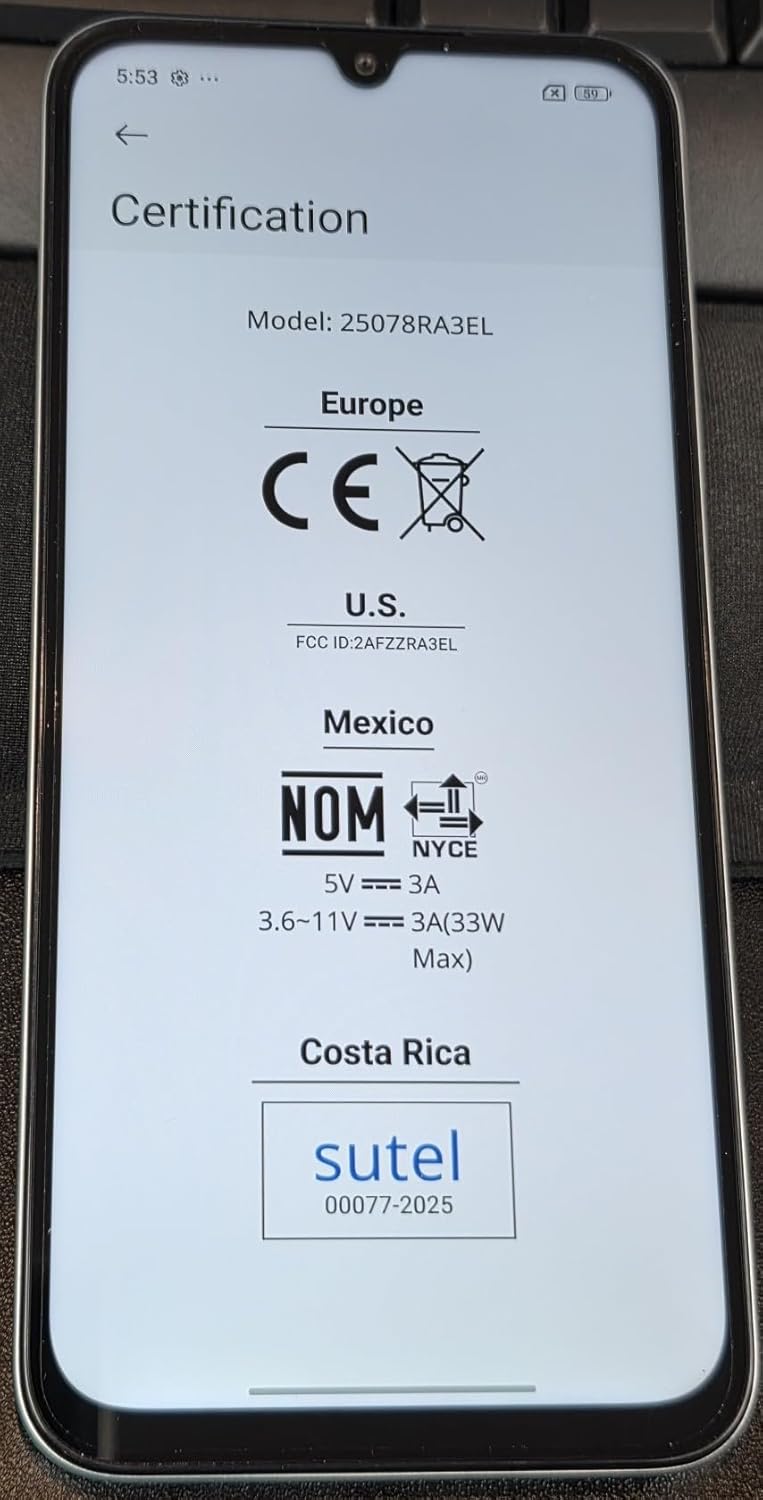
Gambar 8.1: Screen displaying certification details for the XIAOMI Redmi 15C, including Model: 25078RA3EL, CE mark for Europe, FCC ID: 2AFZZRA3EL for U.S., NOM for Mexico, and SUTEL for Costa Rica.
9. Émbaran Kasalametan
Mangga turutan pedoman kaamanan ieu pikeun nyegah karusakan kana alat anjeun atanapi cidera ka diri anjeun:
- Ulah ngalaan alat ka suhu ekstrim, sinar panonpoé langsung, atawa Uap kaleuleuwihan.
- Anggo ukur pangecas sareng asesoris anu disatujuan.
- Hindarkeun ragrag atanapi ngagentoskeun alat kana dampak anu parah.
- Ulah nyobian ngabongkar atanapi ngalereskeun alat nyalira. Hubungi petugas servis anu diidinan.
- Buang alat sareng batréna sacara tanggung jawab nurutkeun peraturan lokal.
10. Garansi jeung Rojongan
For warranty information, please refer to the warranty card included with your purchase or visit the official XIAOMI website. Support resources, including FAQs and contact information, can also be found on the manufacturer's official support pages.
Salawasna mésér ti retailers otorisasi pikeun mastikeun cakupan jaminan valid.


