Bubuka
Thank you for choosing the Geek AiroCook Torix 25 Litre Smart Air Fryer Oven. This appliance combines the functions of an air fryer and an OTG (Oven Toaster Griller), allowing you to air fry, grill, bake, roast, and toast with ease. This manual provides essential information for safe operation, proper use, and maintenance of your new appliance. Please read it thoroughly before first use and keep it for future reference.
Parentah Kasalametan penting
Nalika nganggo alat-alat listrik, pancegahan kaamanan dasar kedah diturutan pikeun ngirangan résiko kahuruan, kejutan listrik, sareng tatu pikeun jalma.
- Baca sadaya parentah sateuacan nganggo alat.
- Ulah noél surfaces panas. Paké handles atanapi knobs. Salawasna nganggo sarung tangan oven atanapi sarung tangan nalika nanganan bahan panas.
- To protect against electric shock, do not immerse the cord, plugs, or the appliance body in water or other liquid.
- Pengawasan anu ketat diperyogikeun nalika alat naon waé dianggo ku atanapi caket barudak.
- Cabut colokan tina stop kontak nalika henteu dianggo sareng sateuacan beberesih. Ngidinan pikeun niiskeun sateuacan dipasang atanapi nyabut bagian.
- Entong ngoperasikeun alat naon waé anu nganggo kabel atanapi colokan anu ruksak, atanapi saatos alatna teu tiasa dianggo atanapi parantos ruksak dina cara naon waé. Kontak rojongan customer pikeun pitulung.
- Pamakéan kantétan aksésori anu henteu disarankeun ku produsén alat tiasa nyababkeun tatu.
- Ulah make di luar.
- Entong ngantepkeun kabelna ngagantung dina ujung méja atanapi konter, atanapi nyabak permukaan anu panas.
- Ulah nempatkeun dina atawa deukeut gas panas atawa burner listrik, atawa dina oven dipanaskeun.
- Awas pisan kedah dianggo nalika mindahkeun alat anu ngandung minyak panas atanapi cairan panas sanés.
- Sok pasangkeun heula colokan kana alat, teras colokkeun kabel kana stop kontak témbok. Pikeun megatkeun sambungan, balikkeun sagala kadali kana "off", teras cabut colokan tina stop kontak témbok.
- Entong nganggo alat pikeun tujuan anu sanés.
- Pangan anu ageung atanapi perkakas logam teu kedah diselapkeun dina oven pemanggang roti sabab tiasa nyababkeun seuneu atanapi résiko kejutan listrik.
- Seuneu bisa lumangsung lamun oven katutupan atawa noel kana bahan kaduruk, kaasup curtains, drapes, tembok, jeung sajabana, nalika operasi.
- Ulah nempatkeun sagala bahan lian ti asesoris dianjurkeun produsén urang dina oven.
- Ulah nempatkeun kardus, plastik, kertas, atawa bahan sarupa dina oven.
- Ulah nyimpen bahan naon wae, lian ti asesoris dianjurkeun produsén urang, dina oven ieu lamun teu dipake.
- Ulah ngabersihan ku hampang scouring logam. Potongan tiasa ngarecah pad sareng ngarampa bagian listrik, nyiptakeun résiko kejutan listrik.
- Entong nyobian ngaluarkeun tuangeun nalika alatna dicolokkeun kana stop kontak listrik.
- Always ensure the appliance is placed on a stable, heat-resistant surface with adequate ventilation around it.
Eusi pakét
Carefully unpack your Geek AiroCook Torix and check that all items are present and in good condition.
- 1x Geek AiroCook Torix 25 Litre Smart Air Fryer Oven
- Dulang Crumb
- Karanjang Puteran
- Rak Oven
- Sarung Tangan Tahan Panas
- Buku Resep
- Rotisserie Rod
- Fetch Tool (for rotisserie and hot trays)
- Baking Dulang
- Airfryer Baskét

angka 1: Asesoris kaasup. This image displays the nine smart accessories that come with the Geek AiroCook Torix oven: a crumb tray, rotating basket, oven rack, heat-resistant glove, recipe book, rotisserie rod, fetch tool, baking tray, and airfryer basket.
Produk Leuwihview
Familiarize yourself with the components and control panel of your Geek AiroCook Torix oven.
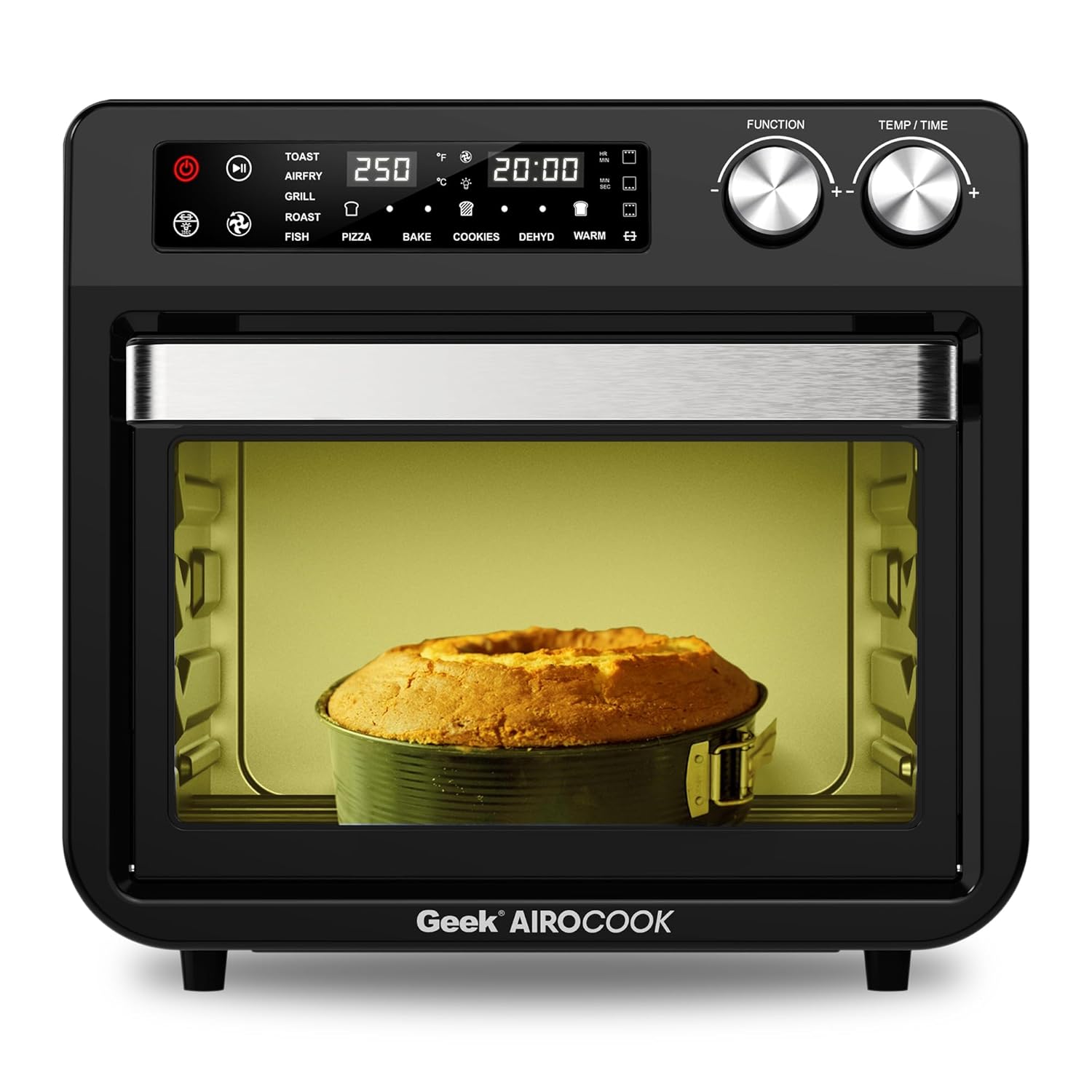
Gambar 2: Hareupeun View of the Geek AiroCook Torix. This image shows the overall design of the air fryer oven, featuring the digital display, control knobs, and the transparent glass door with an internal light.
Panél kontrol

Angka 3: Panel Kontrol Digital. This image highlights the "Smart Touch" control panel with its various buttons and digital display.
- Tombol Daya: Ngahurungkeun / mareuman alat.
- Tombol Mimitian/Reureuh: Mimitian atanapi ngareureuhkeun siklus masak.
- Tombol Lampu: Controls the internal oven light.
- Tombol Panggang: Activates/deactivates the rotisserie function.
- Tombol kipas: Controls the convection fan.
- Tombol Menu: Ngaliwatan fungsi masak anu tos disetel.
- Time/Temperature Knobs: Saluyukeun waktos masak sareng suhu.
- Layar LCD Digital: Nembongkeun setelan ayeuna, waktu, jeung suhu.
Disetél
- Ngabongkar bungkusan: Remove all packaging materials, stickers, and labels from the appliance and accessories.
- Bersihan awal: Ngusap bagian luar oven nganggo iklanamp cloth. Wash all removable accessories (baking tray, airfryer basket, rotating basket, rotisserie kit, oven rack, crumb tray) with warm soapy water, rinse thoroughly, and dry completely.
- panempatan: Place the oven on a stable, level, heat-resistant surface. Ensure there is at least 10-15 cm (4-6 inches) of clear space on all sides and above the oven for proper ventilation. Do not place it near flammable materials.
- Pamakéan munggaran (Burn-in): Before cooking food, it is recommended to run the oven empty for about 15-20 minutes at 200°C (390°F) to burn off any manufacturing residues. A slight odor or smoke may be present during this process; this is normal. Ensure the area is well-ventilated.
Parentah Operasi
Operasi Dasar
- Daya Hurung: Plug the appliance into a grounded electrical outlet. Press the Power Button to turn on the oven. The digital display will illuminate.
- Pilih Fungsi: Use the Menu Button to cycle through the available cooking functions (e.g., Toast, Air Fry, Grill, Roast, Fish, Pizza, Bake, Cookies, Dehydrate, Warm).
- Adjust Time and Temperature: Once a function is selected, use the Time/Temperature knobs to adjust the desired cooking time and temperature. The display will show the current settings.
- Mimitian masak: Press the Start/Pause Button to begin the cooking process. The oven light may turn on, and the fan will activate depending on the selected function.
- Reureuh/eureun: Press the Start/Pause Button again to pause cooking. Press the Power Button to stop the cooking cycle and turn off the oven.
Ngagunakeun Preset Menus
The Geek AiroCook Torix features 10 precise preset menus for common dishes.

Figure 4: 10 Preset Menu Options. This image illustrates the various preset cooking functions available, including Toast, Air Fry, Roast, Pizza, Cookies, Fish, Grill, Cake, Dehydrate, and Warm, along with their default temperature and time settings.
- Roti bakar: 250°C / 5 mnt
- Goreng hawa: 204°C / 25 mnt
- Panggang: 204°C / 1 hr
- Pizza: 232°C / 15 mnt
- Cookies: 170°C / 12 mnt
- Lauk: 210°C / 16 mnt
- Panggangan: 230°C / 18 mnt
- Kue: 177°C / 30 mnt
- Dehidrasi: 66°C / 5 mnt
- haneut: 82°C / 1 hr
To use a preset, simply select it using the Menu Button. The oven will automatically set the recommended time and temperature. You can then adjust these settings manually if desired before pressing Start/Pause.
Fungsi Rotisserie
The rotisserie function is ideal for roasting whole chickens or other large cuts of meat.
- Prepare your food and secure it onto the rotisserie rod using the forks. Ensure the food is centered and balanced.
- Selapkeun batang rotisserie kana liang anu ditunjuk di jero oven.
- Select a cooking function (e.g., Roast, Grill) and set the desired time and temperature.
- Press the Rotisserie Button to activate the rotation.
- Pencét Mimitian / Reureuh pikeun ngamimitian masak.
- Once cooking is complete, use the Fetch Tool to safely remove the hot rotisserie rod and food from the oven.
Pangropéa jeung beberesih
Pembersih rutin ngajamin kinerja optimal sareng manjangkeun umur alat anjeun.
- Sok Cabut colokan: Sateuacan beberesih, sok cabut colokan oven tina stop kontak teras antepkeun dugi ka tiis sagemblengna.
- Luar: Ngusap luar nganggo iklanamp lawon jeung detergent hampang. Ulah make cleaners abrasive atawa hampang scouring logam.
- Interior: Ngusap témbok interior nganggo iklanamp cloth. For stubborn food residue, use a non-abrasive sponge with mild soap. Ensure the interior is dry before next use.
- Asesoris: Wash the baking tray, airfryer basket, rotating basket, rotisserie kit, oven rack, and crumb tray with warm soapy water. Rinse thoroughly and dry completely. Catetan: Asesoris ieu teu aman pikeun mesin cuci piring.
- Dulang Crumb: Regularly remove and empty the crumb tray located at the bottom of the oven to prevent grease buildup and potential fire hazards.
- Ulah Lebetkeun: Ulah pernah ngalelepkeun unit utama, kabel, atanapi colokan kana cai atanapi cairan naon waé.
Pamérésan masalah
| Masalah | Mungkin Cukang lantaranana | Solusi |
|---|---|---|
| Alat henteu hurung. | Teu plugged di; masalah stop kontak listrik; tombol daya teu dipencet. | Ensure the power cord is securely plugged into a working outlet. Press the Power Button. |
| Dahareun teu rata. | Rapat teuing; suhu/waktos teu leres; kadaharan teu digilir. | Do not overcrowd the basket/tray. Adjust temperature/time. For best results, flip or shake food halfway through cooking. |
| Haseup bodas kaluar tina hawu. | Grease/oil residue; fatty food cooking. | Clean the oven and accessories thoroughly. For fatty foods, ensure the crumb tray is clean and consider using less oil. |
| Fungsi rotisserie teu jalan. | Rotisserie rod not properly installed; Rotisserie button not pressed. | Ensure the rotisserie rod is correctly seated in its slots. Press the Rotisserie Button to activate. |
spésifikasi
| Ngaran modél | AiroCook Torix |
| Kapasitas | 25 Liter |
| Kaluaran kakuatan | 1800 Watt |
| Voltage | 220 volt |
| Ukuran produk (D x W x H) | 39.5D x 37.5W x 43.5H Sentimeter |
| Item Beurat | 10 kg |
| Bahan | Beusi sténless |
| Fitur husus | Air Fryer oven + OTG |
Garansi sareng Rojongan
Your Geek AiroCook Torix 25 Litre Smart Air Fryer Oven comes with a garansi 1 taun from the date of purchase. This warranty covers manufacturing defects under normal use. Please retain your purchase receipt as proof of purchase.
For warranty claims, technical support, or any other inquiries, please contact Geek Customer Care:
- Nomer Pelayanan Pelanggan: 1800 121 922922
You can also refer to the included recipe book and access the Geek Recipe App for additional cooking inspiration and tips.


