Bubuka
This instruction manual provides detailed guidance for assembling, operating, and maintaining your CaDA Master C66005W Japanese Coffee House Building Set. This modular building kit consists of 768 high-precision pieces, designed to create a detailed miniature coffee shop with an integrated lighting system. The finished model measures approximately 18 x 13.2 x 13.5 cm (7.1 x 5.2 x 5.3 inches) and is recommended for ages 14 and up.
Please read all instructions carefully before beginning assembly to ensure a smooth and enjoyable building experience.
Setup sareng Majelis
The CaDA Master C66005W set includes 768 pieces made from high-quality ABS plastic, ensuring smooth and precise interlocking for stable construction. Follow the step-by-step instructions provided in the physical manual included with your kit.
Fitur Majelis Utama:
- Desain modular: The model features a removable roof and an opening back wall, allowing easy access to the detailed interior.
- Interior anu lengkep: The panoramic window design reveals an exquisite bar counter, high stools, a coffee machine, and other decorative elements.
- Rincian Éksterior: Potted flowers adorn the entranceway, adding a vibrant touch to the modern design.
- Pencahayaan terpadu: A professional built-in LED lighting system is included to illuminate the interior and exterior details.

Image: The complete CaDA Master C66005W Japanese Coffee House Building Set, highlighting its 768 pieces and included USB lighting system.

Gambar: Hiji ngabeledug view illustrating the modular construction of the coffee house, separating the roof, main structure, and back wall for assembly reference.

Gambar: Deukeut views of various features of the building set, including the shop signboard, functional opening door, transparent display window, and a rooftop air conditioner unit.
Operating the Lighting System
The CaDA Master C66005W set includes an integrated LED lighting system to enhance the display of your coffee house model. The lights are USB-powered and designed to illuminate the interior and exterior details, creating a lively and inviting atmosphere.
Parentah pikeun pamakéan:
- Sambungkeun Kakuatan: Locate the USB cable for the lighting system. Connect the USB plug to a compatible USB power source (e.g., a USB wall adapter, power bank, or computer USB port).
- Modeu cahaya: The lighting system features eight different modes. Refer to the specific instructions in your physical manual for details on how to cycle through these modes, typically via a small button or switch on the USB controller.
- panempatan: Ensure the LED wires are carefully routed during assembly to avoid pinching or damage. The lights are strategically placed to highlight the bar counter, coffee machines, and other decor.

Image: The coffee house model illuminated by its eight-mode LED lighting system, demonstrating how it creates a vibrant street atmosphere.
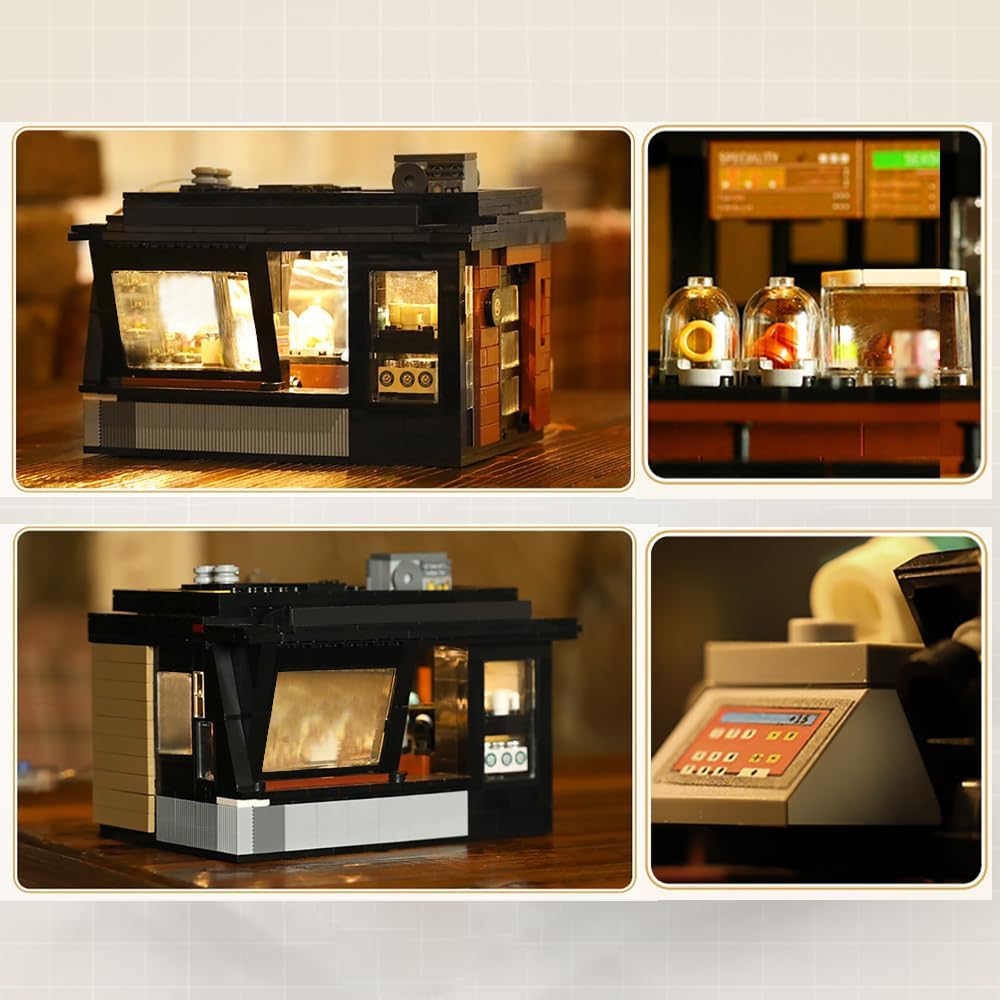
Gambar: Hiji interior view of the assembled coffee house, showcasing the detailed bar area, coffee equipment, and the effect of the integrated LED lighting.
Pangropéa
Proper care and maintenance will help preserve the appearance and integrity of your CaDA Master C66005W building set.
beberesih:
- Use a soft, dry cloth or a small, soft brush to gently remove dust from the model.
- Keur kokotor bandel, enteng dampen a cloth with water (avoiding excessive moisture) and wipe the affected areas. Do not use harsh chemicals or abrasive cleaners, as these can damage the plastic.
Panyimpenan:
- Simpen modél ieu di tempat anu tiis, garing, sareng jauh tina sinar panonpoé langsung pikeun nyegah parobahan warna atanapi bengkokna potongan plastik.
- If disassembling for storage, keep all pieces organized in sealed bags or containers to prevent loss.
Pamérésan masalah
If you encounter any issues with your CaDA Master C66005W building set, refer to the following common solutions.
Potongan anu leungit:
- Carefully check all packaging materials and bags to ensure no small pieces were overlooked.
- If pieces are genuinely missing, contact CaDA customer support or the retailer where you purchased the set for assistance. Provide the model number (C66005W) and a clear description of the missing parts.
Lighting System Not Working:
- Pariksa sambungan USB: Ensure the USB cable is securely plugged into both the lighting system and a functional power source.
- Pariksa Sumber Daya: Test the USB power source with another device to confirm it is providing power.
- Pariksa Kawat: Gently inspect the LED wires for any visible damage or disconnections. Avoid excessive bending or pulling of the wires.
- Fungsi Controller: If your lighting system has a controller, ensure it is functioning correctly and try cycling through the modes.
spésifikasi
| Fitur | Rincian |
|---|---|
| Nomer modél | C66005W |
| Jumlah Potongan | 768 |
| Ukuran Produk (saatos dirakit) | 18 x 13.2 x 13.5 cm (7.1 x 5.2 x 5.3 inci) |
| Item Beurat | 3.3 pon |
| Bahan | Plastik ABS kualitas luhur |
| Disarankeun Umur | 14 taun ka luhur |
| Sistim cahaya | Integrated LED, USB Powered, Eight-mode |

Image: A visual representation of the assembled model's dimensions, indicating a length of 18cm, width of 13.2cm, and height of 13.5cm.
Émbaran Kasalametan
PERHATOSAN: BAHAYA CHOKING - Bagian leutik. Henteu kanggo murangkalih sahandapeun 3 taun.
This product contains small components that may pose a choking hazard. Adult supervision is recommended during assembly, especially when children are present. Keep all small parts out of reach of young children.
Garansi sareng Rojongan
For warranty information, replacement parts, or further technical support, please contact the manufacturer, CaDA, or the retailer from whom you purchased this product. Refer to the packaging or the official CaDA websitus pikeun detil kontak husus.


