1. Bubuka
This manual provides detailed instructions for the setup, operation, and maintenance of your artfone A400 4G VoLTE Big Button Cell Phone. Designed for ease of use, this device features large buttons, a clear display, and essential functions for reliable communication. Please read this manual thoroughly to ensure proper usage and to maximize the phone's capabilities.
2. Naon dina Box
Pastikeun yén sadaya item aya nalika unboxing:
- 1x artfone A400 Mobile Phone (Battery not installed)
- Batré 1x1800mAh
- 1x USB Charger Cable
- 1x Charging Base/Stand
- 1 x Manual Pamaké

Gambar 2.1: Package contents of the artfone A400, showing the phone, battery, USB-C cable, charging dock, and user manual.
3. Alat Leuwihview
Familiarize yourself with the physical components of your artfone A400.

Gambar 3.1: Hareupeun view of the artfone A400 in its charging dock, highlighting the large buttons and 1800mAh battery indicator. The back view shows the camera, SOS button, and speaker.
3.1 Fitur sareng Komponen Kunci
- Layar 2.4 inci: Clear screen for easy viewing.
- Tombol badag: Ergonomically designed for comfortable dialing and navigation.
- Tombol SOS: Located on the back for quick access to emergency contacts.
- Tombol Volume: Located on the side, also used for the time-telling function.
- Saklar Senter: Dedicated side switch for easy activation.
- Keypad Lock Switch: Side switch to prevent accidental key presses.
- Kaméra 2MP: For basic photo capture.
- Speaker nyaring: Enhanced audio for calls and multimedia.
- Palabuhan USB-C: Pikeun ngecas langsung.
- Charging Dock Connectors: For convenient drop-in charging.

Gambar 3.2: The artfone A400 showing its dimensions (145mm L x 68mm W x 13mm T) and various side views, including the volume buttons, power switch, and charging port.

Gambar 3.3: A lengkep view of the artfone A400's side buttons, including volume controls, the power switch, and the prominent SOS button on the back.

Gambar 3.4: The artfone A400 keypad, emphasizing the large fonts and keys designed for easy visibility and use.
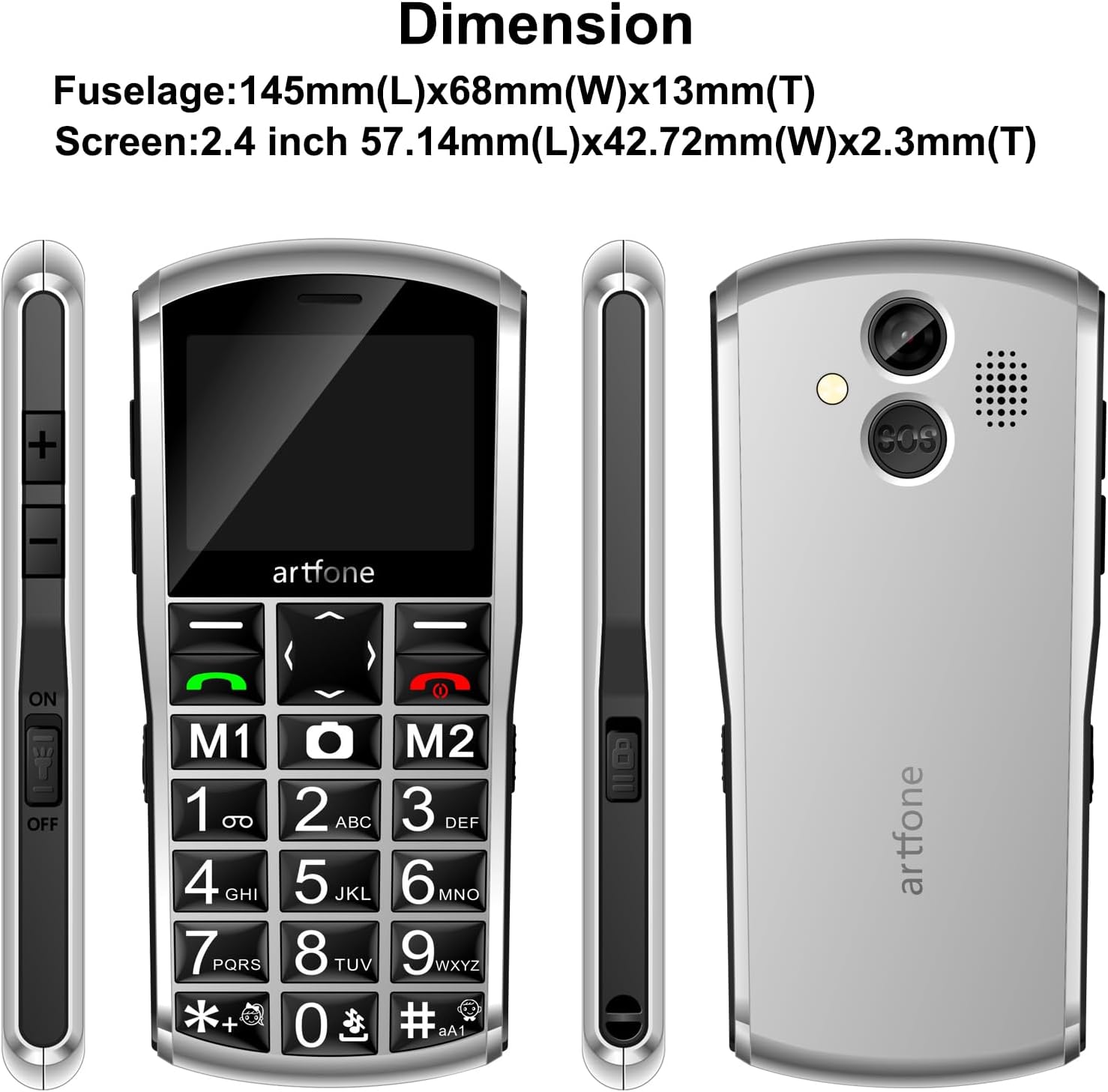
Gambar 3.5: The artfone A400's front receiver and rear speaker, designed for clear audio during calls and multimedia playback.
4. Setélan
4.1 Pamasangan batré
- Leupaskeun panutup tukang telepon ku gently prying eta muka tina kiyeu.
- Insert the 1800mAh battery into the battery compartment, ensuring the gold contacts align with the phone's terminals.
- Ganti panutup tukang, pencét pageuh nepi ka klik kana tempatna.
4.2 SIM Card and Micro-SD Card Installation
The artfone A400 supports dual SIM cards (Nano-SIM) and a Micro-SD card for expanded storage.
- Saatos panutup tukang sareng batréna dicabut, pilari slot kartu SIM.
- Carefully insert your Nano-SIM card(s) into the designated slots. Ensure the metal contacts face downwards and the card is correctly oriented.
- If desired, insert a Micro-SD card (up to 64GB) into its dedicated slot for additional storage for photos, music, etc.
- Pasang deui batré sareng panutup tukang.
Gambar 4.1: Internal view of the artfone A400, illustrating the placement of Nano-SIM cards and a Micro-SD card.
4.3 Ngecas Telepon
Your phone can be charged using the included USB-C cable or the charging dock.
- Ngagunakeun Dock Ngecas: Connect the USB charger cable to the charging dock, then place the phone into the dock. Ensure the phone is seated correctly and the charging indicator appears on the screen.
- Nganggo Kabel USB-C: Connect the USB charger cable directly to the USB-C port on the bottom of the phone and to a power adapter.
A full charge typically takes approximately three hours. The battery indicator on the screen will show charging status.
5. Parentah Operasi
5.1 Daya Hurung/Pareuman
- Pikeun Ngahurungkeun: Press and hold the red End Call/Power button until the screen lights up.
- Pikeun mareuman: Press and hold the red End Call/Power button until the power-off options appear, then select 'Power off'.
5.2 Nelepon jeung Narima Telepon
- Pikeun nelepon: Lebetkeun nomer telepon nganggo keypad teras pencét tombol Telepon héjo.
- Pikeun Ngajawab Telepon: Pencét tombol Telepon héjo nalika telepon disada.
- Pikeun ngeureunkeun telepon: Pencét tombol Telepon Tungtung beureum.
5.3 Fungsi Darurat SOS
The SOS button allows you to quickly contact pre-set emergency numbers.
- Nyetél Kontak SOS: Navigate to the SOS settings in the phone's menu. You can add up to 5 emergency contacts.
- Using the SOS Button: In an emergency, press and hold the SOS button located on the back of the phone for 3 seconds. The phone will automatically call and send an emergency text message to your pre-set contacts until one answers.

Gambar 5.1: A hand demonstrating how to press the SOS button on the back of the artfone A400 for emergency calls.

Gambar 5.2: Visual representation of the SOS function, showing how pressing the SOS button can alert up to 5 pre-selected emergency contacts.
5.4 Time-Telling Function
The phone can announce the current time verbally.
- Pikeun Aktipkeun: Press and hold the Volume Up (+) button on the side of the phone. The phone will announce the current time.

Gambar 5.3: A hand holding the artfone A400, with an inset showing the volume '+' button, indicating its use for the time reporting function.
5.5 Contacts and Speed Dial
Store up to 1000 contacts and assign speed dial numbers.
- Nambahkeun Kontak: Navigate to the 'Contacts' menu, select 'Add New', and enter the name and number. You can also associate contact photos.
- Dial gancang: Assign numbers to M1, M2, and keys 1-9, *, # for quick dialing. Refer to the phone's menu for specific instructions on setting up speed dial.
5.6 Olahtalatah
The phone supports text messaging using T9 predictive text input.
- Composing Messages: Go to the 'Messages' menu, select 'New Message', and use the keypad to type your message.
- T9 Input: Press the number keys corresponding to the letters of your word. The phone will suggest words, which you can select.
5.7 Multimedia sareng Pakakas
The artfone A400 includes several useful features:
- Kaméra: Aksés kaméra tina menu pikeun nyandak poto.
- Radio FM: Dengekeun kana stasiun radio lokal.
- Putereun Audio/Video: Muterkeun média files stored on a Micro-SD card.
- Senter: Activate using the dedicated side switch.
- Calculator, Alarm, Calendar: Standard utility functions are available in the 'Tools' menu.
6. Fitur Leuwihview
The artfone A400 is designed with specific user needs in mind, offering a range of practical features.
- Konéktivitas 4G VoLTE: Ensures clear call quality and reliable network performance on compatible 2G, 3G, and 4G LTE networks (T-Mobile and its MVNOs only).
- Ningkatkeun Usability: Features a redesigned operating system with larger fonts and clearer menu icons, ideal for users with visual impairments. The automatic keyboard backlight improves visibility in low-light conditions.
- Batré awét: Equipped with an 1800mAh battery for extended usage and standby time.
- Pilihan Dual Charging: Conveniently charge via the included USB-C cable or the desktop charging dock.
- Personalized Contacts: Supports associating contact photos with phone numbers for easy caller identification.
- Speaker nyaring: Nyadiakeun amplified audio for calls and alerts, ensuring important sounds are not missed.
Klip 6.1: An official product video from Shenzhen Yujie Communication Co., Ltd, showcasing various features of the artfone A400, including its large buttons, SOS function, and charging methods. This video provides a visual demonstration of the phone's user-friendly design.
7. Pangropéa
To ensure the longevity and optimal performance of your artfone A400, follow these maintenance guidelines:
- beberesih: Anggo lawon anu lembut sareng garing pikeun ngabersihan layar sareng awak telepon. Hindarkeun nganggo pembersih cair atanapi bahan abrasive.
- Perawatan batré: Avoid extreme temperatures. Do not expose the battery to direct sunlight or very cold conditions. Charge the phone regularly, but avoid overcharging for extended periods.
- Panyimpenan: Upami nyimpen telepon kanggo waktos anu lami, pastikeun telepon parantos dicas sabagian (sakitar 50%) sareng disimpen di tempat anu tiis sareng garing.
- Perlindungan: While durable, the phone's plastic shell can scratch. Consider using a protective pouch if available.
8. Cara ngungkulan
If you encounter issues with your artfone A400, refer to the following common problems and solutions:
| Masalah | Mungkin Cukang lantaranana | Solusi |
|---|---|---|
| Telepon teu hurung | Batré lemah; Batré teu dipasang kalawan bener | Charge the phone for at least 30 minutes; Reinstall the battery, ensuring proper contact. |
| Teu bisa nyieun/nampa telepon | No SIM card; SIM card not inserted correctly; Out of network coverage; Incorrect network settings | Ensure SIM card is inserted correctly; Check network signal; Verify phone is compatible with your carrier (T-Mobile and MVNOs only). |
| Poor call quality/Loud speaker not working | Volume too low; Obstruction of speaker/microphone | Adjust volume using side buttons; Ensure speaker and microphone are clear of debris. |
| Fungsi SOS teu jalan | SOS contacts not set up; No network signal | Set up emergency contacts in the SOS settings; Ensure phone has network coverage. |
| Screen is dim or unresponsive | Low battery; Software glitch | Charge the phone; Restart the phone. |
9. Spésifikasi
Key technical specifications for the artfone A400:
- Ngaran modél: A400
- Sistem operasi: artfone OS
- Téknologi sélular: 4G (VoLTE), 3G, 2G
- Kasaluyuan Pamawa Nirkabel: T-Mobile and its MVNOs only (Not compatible with AT&T, Verizon, or locked SIM cards)
- Ukuran layar: 2.4 inci
- Kapasitas batré: 1800 Miliamp Jam (mAh)
- Waktu Ngobrol Telepon: Nepi ka 8 Jam
- Kapasitas Panyimpen Mémori: 0.13 GB (Internal), expandable with Micro-SD card (up to 64GB)
- Ukuran RAM anu dipasang: 48 MB
- Téknologi konektipitas: Bluetooth, USB (USB-C)
- Jack audio: 3.5 mm
- Kaméra: Tukangeun
- Fitur husus: VoLTE, SOS Button, Time-Telling Function, Loud Speaker, Charging Dock, Dual SIM, Speed Dial, Large Buttons, Keyboard Backlight
- Beurat barang: 9.1 ons
- Ukuran Paket: 5.98 x 4.65 x 2.32 inci
10. Garansi jeung Rojongan
For warranty information or technical support, please refer to the documentation included with your purchase or contact artfone customer service. Keep your purchase receipt as proof of purchase for warranty claims.


