1. Bubuka
Hatur nuhun pikeun meuliasing the Monster S350 Bluetooth Speaker. This portable wireless speaker features a touch screen, Bluetooth 6.0 connectivity, and support for TF cards, offering a versatile audio experience. This manual provides detailed instructions for setup, operation, maintenance, and troubleshooting to ensure optimal performance and longevity of your device.
2. Émbaran Kasalametan
- Ulah ngalaan speaker ka suhu ekstrim, sinar panonpoé langsung, atawa kalembaban luhur.
- Hindarkeun lungsur atanapi nahan panyatur kana tabrakan anu kuat.
- Jauhkeun spéker tina cai sareng cairan sanés.
- Ulah nyobian ngabongkar, ngalereskeun, atawa ngaropéa speaker sorangan. Kontak tanaga layanan mumpuni lamun diperlukeun.
- Anggo ukur kabel ngecas anu disayogikeun atanapi anu sarimbag anu disertipikasi.
- Buang batré nurutkeun peraturan lokal. Ulah dibakar.
3. Eusi Paket
Mangga parios pakét kanggo barang-barang ieu:
- Spiker Bluetooth Monster S350
- Kabel Ngecas USB
- Manual pamaké
4. Produk Langkungview
Familiarize yourself with the components of your Monster S350 speaker.

Gambar 4.1: Hareupeun view of the Monster S350 Bluetooth Speaker, showcasing its retro design and touch screen.

Gambar 4.2: Close-up of the speaker's top controls, illustrating the long press function for power and swipe gestures for volume adjustment.
Kontrol sareng palabuhan:
- Kenop Daya/Volume: Long press to turn on/off. Swipe up to increase volume, swipe down to decrease volume.
- Tampilan layar toél: For navigation, settings, and displaying information.
- Slot Kartu TF: Lebetkeun kartu TF (microSD) kanggo muterkeun musik lokal.
- Port ngecas USB-C: Pikeun ngecas speaker.
5. Setélan
5.1 Ngecas Speaker
- Connect the USB charging cable to the speaker's USB-C port.
- Sambungkeun tungtung kabel anu sanés ka adaptor kakuatan USB (teu kalebet) atanapi port USB komputer.
- The charging indicator on the screen will show the charging status. A full charge typically takes approximately 2-3 hours.
5.2 Powering on / Pareum
- Pikeun Ngahurungkeun: Long press the Power/Volume knob until the screen lights up.
- Pikeun mareuman: Long press the Power/Volume knob until the screen turns off.
5.3 Nyapasangkeun Bluetooth
Pair your Monster S350 with a Bluetooth-enabled device.
- Pastikeun speaker dihurungkeun sareng aya dina jangkauan alat Bluetooth anjeun (contona, smartphone, tablet).
- Dina alat Bluetooth anjeun, aktipkeun Bluetooth sareng milarian alat anu sayogi.
- Pilih "Monster S350" tina daptar alat anu kapendak.
- Sakali dipasangkeun, speaker bakal nunjukkeun sambungan anu suksés, sareng anjeun tiasa mimiti muterkeun audio.

Gambar 5.1: The speaker displaying its Bluetooth connection status alongside a smartphone's Bluetooth settings.
5.4 Putereun Kartu TF
Maénkeun musik langsung tina kartu TF (microSD).
- Pastikeun spiker dipareuman.
- Insert a TF card (up to 32GB, formatted to FAT32) into the TF card slot until it clicks into place.
- Power on the speaker. The speaker will automatically detect the TF card and switch to local music playback mode, or you can select it from the touch screen menu.

Gambar 5.2: Demonstrating the insertion of a TF card into the speaker's dedicated slot for local music playback.
6. Parentah Operasi
6.1 Putereun Audio Dasar
- Puter / Reureuh: Tap the play/pause icon on the touch screen.
- Lagu salajengna: Swipe right on the touch screen or tap the next track icon.
- Lagu Sateuacanna: Swipe left on the touch screen or tap the previous track icon.
- Kontrol volume: Swipe up on the Power/Volume knob to increase volume, swipe down to decrease volume. Alternatively, adjust volume via the connected Bluetooth device.
6.2 Ngagunakeun Layar Toél
The full-color touchscreen display allows for intuitive navigation and access to various features.
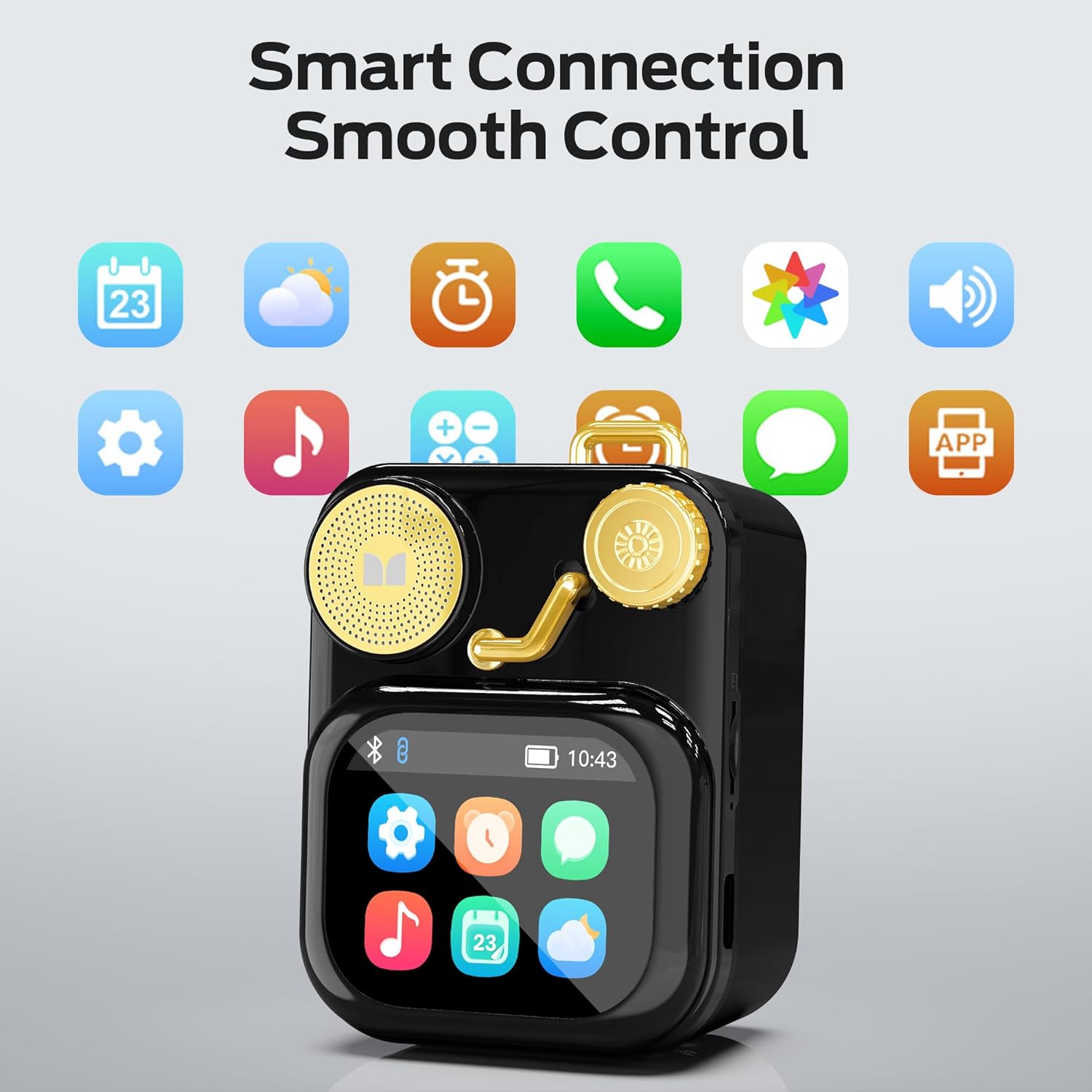
Gambar 6.1: The speaker's touch screen displaying various application icons for smart features.
- Napigasi: Swipe left/right or up/down to browse through menus and options.
- Pilihan: Ketok ikon atanapi pilihan pikeun milihna.
- Setélan: Access system settings, Bluetooth options, display preferences, and more through the settings icon.
6.3 Fitur pinter
When connected to a compatible smartphone via Bluetooth and the companion app (if available), the speaker can display various smart features:

Gambar 6.2: Examples of smart features displayed on the speaker's screen, including notifications, weather, lyrics, and Bluetooth call information.
- Mobile Notifications: Receive alerts for messages and other app notifications.
- Inpormasi Lagu: Display song titles and artist information during playback.
- Alarm: Set and manage alarms directly from the speaker.
- Pembaruan Cuaca: View inpormasi cuaca sacara real-time.
- Noise bodas: Access soothing white noise sounds for relaxation.
7. Pangropéa
7.1 beberesih
- Wipe the speaker's surface with a soft, dry, lint-free cloth.
- Do not use abrasive cleaners, alcohol, or chemical solvents, as these may damage the finish.
- Jaga port-portna bébas tina lebu sareng runtah.
7.2 Panyimpenan
- Simpen spéker dina tempat anu tiis sareng garing jauh tina sinar panonpoé langsung sareng suhu anu ekstrim.
- Upami nyimpen kanggo waktos anu panjang, ngeusi batre sakitar 50% unggal tilu bulan pikeun ngawétkeun umur batre.
8. Cara ngungkulan
If you encounter issues with your Monster S350 speaker, refer to the following solutions:
| Masalah | Mungkin Cukang lantaranana | Solusi |
|---|---|---|
| Speaker teu hurung. | Batré béak. | Ngecas spéker nganggo kabel USB anu disayogikeun. |
| Teu aya sora ti panyatur. | Volume is too low or muted. Device not paired. | Increase speaker volume. Ensure Bluetooth device is paired and playing audio. |
| Teu bisa masangkeun via Bluetooth. | Spiker teu aya dina modeu pairing. Alatna di luar jangkauan. Gangguan. | Ensure speaker is on and Bluetooth is enabled. Move devices closer. Turn off other Bluetooth devices. |
| Musik dina kartu TF teu diputer. | Kartu teu dipasang kalawan bener. Teu dirojong file format. Corrupted card. | Pasangkeun deui kartu TF. Pastikeun musikna aya files aya dina format nu dirojong (contona, MP3). Coba kartu TF béda. |
| Smart features not working. | Not connected to companion app. App issues. | Ensure the speaker is connected to the companion app on your smartphone. Check app permissions and updates. |
9. Spésifikasi
Technical details of the Monster S350 Bluetooth Speaker:
- Ngaran modél: S350
- merek: Raksasa
- Bahan: logam
- warna: Hideung
- Ukuran produk: 12.5D x 10.5W x 5.4H Centimetres (approx. 4.9 x 4.1 x 2.1 inches)
- Beurat barang: 160 Gram (kira-kira 0.35 lbs)
- Téknologi konektipitas: Bluetooth 6.0
- Daya Kaluaran Maksimum Speaker: 10 Watt
- Mode Kaluaran Audio: Stereo
- Tipe Pamasangan: Tabletop
- Batré: 1 batré Litium Ion (kaasup)
- Dukungan Kartu TF: Yes (up to 32GB, FAT32 format recommended)

Gambar 9.1: Diagram illustrating the internal woofer for deep bass and tweeter for crisp highs, contributing to the speaker's audio quality.
10. Garansi jeung Rojongan
For warranty information or technical support, please refer to the documentation included with your purchase or contact Monster customer service. Keep your proof of purchase for warranty claims.
Kontak Layanan Pelanggan: Please visit the official Monster website or refer to your product packaging for the most current support contact information.


