1. Parentah Kasalametan penting
Mangga baca sagala parentah taliti saméméh ngagunakeun alat ieu. Gagalna nuturkeun parentah ieu bisa ngakibatkeun shock listrik, seuneu, atawa tatu serius.
- Perkakas ieu kanggo panggunaan rumah tangga wungkul. Ulah make di luar atawa dina surfaces baseuh.
- Ulah ngidinan barudak pikeun beroperasi vacuum cleaner. Pengawasan anu ketat diperyogikeun nalika dianggo caket barudak.
- Ulah nyokot cair kaduruk atawa combustible, kayaning béngsin, atawa dipaké di wewengkon mana maranéhna bisa jadi aya.
- Ulah nyokot naon bae anu kaduruk atawa ngaroko, kayaning roko, korek api, atawa lebu panas.
- Entong dianggo upami wadah lebu sareng saringanna teu acan dipasang kalayan leres.
- Turn off the appliance before making any adjustments, changing accessories, or storing.
- Anggo ngan sakumaha anu dijelaskeun dina manual ieu. Paké ngan kantétan dianjurkeun produsén urang.
- Upami alat-alat henteu jalan sakumaha mistina, parantos murag, dirusak, ditingal di luar ruangan, atanapi murag kana cai, kintunkeun ka pusat jasa.
2. Eusi Paket
Pastikeun yén sadaya item aya dina pakét anjeun:
- Cordless Vacuum Cleaner (Main Motor Unit)
- 2-in-1 Sikat
- Nozzle Celah Panjang
- Pakakas Sikat Bebersih
- Lempeng Gunung Tembok
- Charger
- Saringan HEPA anu tiasa diganti
- Kantong Pakakas
- Manual pangguna (dokumén ieu)

Gambar 2.1: Leuwihview of the Fieety DSV103 Cordless Vacuum Cleaner and its accessories.
3. Setup jeung Majelis
3.1 Ngarakit Unit Utama
- Attach the Dust Cup: Align the dust cup with the main motor unit and push until it clicks into place.
- Selapkeun saringan: Ensure the stainless steel filter, HEPA filter, and sponge filter are correctly placed inside the dust cup.
Video 3.1: Instructions on how to install and disassemble the dust cup and its internal filters for the Fieety DSV103.
3.2 Attaching the Extension Tube and Floor Brush
- Connect Extension Tube: Insert the orange extension tube into the main motor unit until it locks securely.
- Pasangkeun Sikat Lantai: Connect the motorized floor brush head to the other end of the extension tube. Ensure it clicks into place.
Video 3.2: Guide on installing the brush head onto the Fieety DSV103 cordless vacuum cleaner.
3.3 Ngecas Batré
The Fieety DSV103 features a removable battery. For initial use, fully charge the battery. A full charge provides up to 60 minutes of runtime in Eco mode.
- Connect the charger to the battery pack or directly to the main unit while mounted on the wall.
- Layar LED bakal nunjukkeun status ngecas.
- Ngecas biasana peryogi waktos sakitar 4 jam.

Figure 3.1: The removable battery provides extended runtime for comprehensive cleaning.
4. Parentah Operasi
4.1 Ngahurungkeun sareng Nyaluyukeun Sedotan
Press the power button to turn on the vacuum. The LED touch display allows you to monitor and adjust settings.
- Layar Toél LED: Provides real-time information on battery level, suction mode, and alerts for brush blockages or a full dust cup.
- Modeu nyeuseup:
- Modeu Eco: Up to 60 minutes runtime, suitable for light cleaning on hard floors.
- Mode pertengahan: Approximately 30 minutes runtime, for general cleaning tasks.
- Mode Max: Approximately 20 minutes runtime, for deep cleaning carpets or stubborn dirt.
- Touch the suction adjustment icon on the LED display to cycle through the modes.

Figure 4.1: The smart LED touch display provides essential operational information and allows for easy mode selection.
Video 4.1: Demonstration of the Fieety DSV103 Cordless Vacuum Cleaner in operation, highlighting its 550W motor and 45kPa suction.
4.2 Ngagunakeun Kantétan
The vacuum comes with various attachments for different cleaning needs:
- Sikat Lantai Bermotor: Ideal for both hard floors and carpets. Features LED lights to illuminate dust and debris.
- Sikat 2-in-1: Can be used as a brush or a wide nozzle for upholstery, curtains, or car interiors.
- Long Crevice Nozzle: Sampurna pikeun ngahontal rohangan anu ketat, juru, sareng celah.

Figure 4.2: The flexible floor brush head allows for deep cleaning under furniture and in hard-to-reach areas.
5. Pangropéa
Regular maintenance ensures optimal performance and extends the lifespan of your Fieety DSV103 vacuum cleaner.
5.1 Ngosongkeun Piala Debu
The 1.5L dust cup is designed for one-touch emptying to minimize contact with dirt.
- Cekel unit utama dina luhureun tempat sampah.
- Press the dust cup release button (usually red) to open the bottom flap and empty the contents.
- Tutup tutupna aman saatos dikosongkeun.
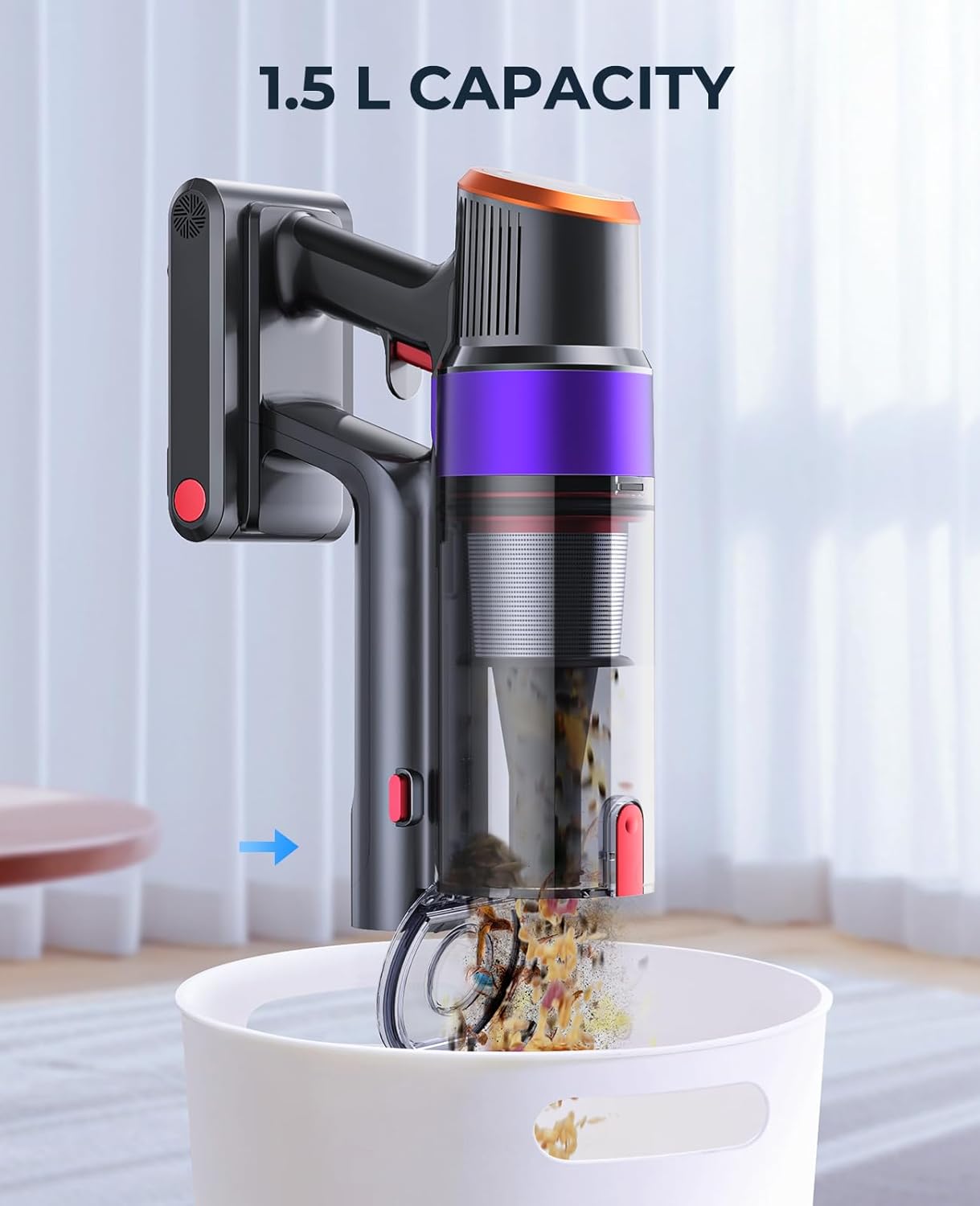
Figure 5.1: The 1.5L dust cup can be emptied with a single touch for convenience.
5.2 Ngabersihan Saringan
The 7-layer filtration system includes a stainless steel filter, HEPA filter, and sponge filter. Clean these regularly to maintain suction power and air quality.
- Cabut cangkir lebu tina unit utama.
- Twist and pull out the internal filter components (stainless steel, HEPA, sponge).
- Tap off loose dirt from the filters. For thorough cleaning, rinse the filters under running water.
- Ngidinan sadaya komponén saringan ka hawa garing lengkep sahenteuna sahenteuna 24 jam sateuacan dipasang deui. Ulah make vakum kalawan saringan baseuh.
Video 5.2: This video demonstrates the disassembly and reassembly of the dust cup and filters for cleaning.
5.3 Ngabersihan Sikat Roll
Periodically check the motorized floor brush for tangled hair or debris. Remove any obstructions to ensure effective cleaning.
- Pareuman vakum sareng cabut sikat lantai.
- Use the provided cleaning tool or scissors to cut and remove any hair or fibers wrapped around the brush roll.
- Reinstall the brush roll securely.
6. Cara ngungkulan
| Masalah | Mungkin Cukang lantaranana | Solusi |
|---|---|---|
| Vakum henteu hurung. | Batré henteu dieusi atanapi henteu dipasang leres. | Pastikeun batréna tos dicas pinuh sareng dipasang kalayan pageuh. |
| kakuatan nyeuseup low. | Wadah lebu pinuh, saringan tersumbat, atanapi gulungan sikat tersumbat. | Empty the dust cup, clean all filters, and remove any blockages from the brush roll or nozzle. |
| Gulungan sikat eureun muter. | Hair or debris is tangled in the brush roll, or a blockage is present. | Turn off the vacuum, remove the brush roll, and clear any obstructions. The LED display may show a brush blockage indicator. |
| Noise mahiwal salila operasi. | Foreign object caught in the brush roll or suction path. | Turn off the vacuum and inspect the brush roll and suction path for any foreign objects. |

Figure 6.1: The LED display provides alerts for exceptions such as brush blockages or a full dust cup.
7. Spésifikasi
| Fitur | Rincian |
|---|---|
| merek | Fieety |
| Ngaran modél | DSV103 |
| Daya Motor | 550W Brushless Motor |
| Nyeuseup maksimum | 45 KPA |
| Runtime | 20-60 Minutes (Eco/Mid/Max modes) |
| Kamampuh Piala lebu | 1.5 liter |
| Sistim filtrasi | 7-layer, 99.99% Micron Capture, HEPA Filter |
| Fitur husus | Color touch screen, 3 suction levels, Removable battery, 270° swivel with front light, Anti-tangling brushes, Low noise level ≤ 68dB |
| Dimensi produk | 9 "L x 4.9" W x 14" H |
| Item Beurat | 1.7 pon |
8. Garansi jeung Rojongan
Fieety provides a 3-year service for this product. If the vacuum cleaner battery is damaged or the vacuum cleaner does not work as expected, please contact our customer support for assistance.
For further support or inquiries, please visit the official Fieety store or contact our customer service team.
Fieety Store: https://www.amazon.com/stores/Fieety/page/39CD9E7D-8A24-4BBD-B967-009EAB6146D1


