1. Bubuka
Welcome to the user manual for your AWOW Mini PC AMD Ryzen 5 7430U. This guide provides essential information for setting up, operating, and maintaining your new mini PC. Please read this manual thoroughly before using the device to ensure optimal performance and longevity.
2. Produk Langkungview
The AWOW Mini PC BA7 is a compact and powerful computing solution designed for various applications, from daily tasks to light gaming and multi-display setups. It features an AMD Ryzen 5 7430U processor, ampmémori anu cekap, sareng panyimpenan anu gancang.
Fitur konci:
- Prosesor: AMD Ryzen 5 7430U (6 Cores, 12 Threads, nepi ka 4.3 GHz)
- Grafik: Grafis AMD Radeon terpadu
- Mémori: 16GB DDR4 RAM (bisa dilegakeun nepi ka 64GB)
- Panyimpenan: 512GB PCIe 3.0 SSD (expandable up to 2TB M.2 NVMe)
- Sistem operasi: Windows 11 Pro
- Dukungan Tampilan: Triple 4K display output via HDMI 2.0, DisplayPort 1.2, and USB-C
- Konektipitas: WiFi 6, Bluetooth 5.2, 1000Mbps RJ45 LAN
- Desain kompak: Small footprint with efficient cooling.
Rincian prosésor
The AWOW Mini PC is equipped with an AMD Ryzen 5 7430U processor, offering 6 cores and 12 threads for efficient multitasking and performance. It boasts a turbo frequency of up to 4.3 GHz and includes 16 MB of cache.
Gambar: Detil view of the AMD Ryzen 5 7430U processor, highlighting its 6 cores, 12 threads, 4.3GHz turbo frequency, and 16MB cache.
Antarbeungeut sareng palabuhan
The mini PC provides a comprehensive set of ports for various connections, including multiple USB ports, display outputs, and network connectivity.

Gambar: Hareup jeung pungkur views of the AWOW Mini PC, illustrating the location of the Power Button, Type-C Full Function port, USB3.2*2, CLR CMOS, 3.5mm Audio Jack, DC IN, DP1.2, HDMI2.0, USB 2.0*2, and RJ45 LAN 1000 Mbps port.
3. Setup Guide
3.1 Unboxing jeung Eusi Paket
Sateuacan ngamimitian, pastikeun sadaya komponén aya dina pakét:
- AWOW BA7 Mini PC
- Adaptor kakuatan
- Screws
- Gunung VESA
- Kabel HDMI
- Manual pangguna (dokumén ieu)

Image: Contents of the AWOW Mini PC package, including the mini PC unit, power adapter, screws, VESA mount, HDMI cable, and user manual.
3.2 Nyambungkeun périferal
- Sambungkeun tampilan: Use the provided HDMI cable or a DisplayPort/USB-C cable to connect your monitor(s) to the corresponding ports on the mini PC.
- Sambungkeun kibor sareng beurit: Plug your USB keyboard and mouse into the available USB ports.
- Sambungkeun Kakuatan: Plug the power adapter into the DC IN port on the mini PC, then connect the adapter to a power outlet.
- Sambungan Jaringan (Opsional): For a wired connection, connect an Ethernet cable from your router to the RJ45 LAN port.
3.3 Boot Awal
Press the Power Button on the front of the mini PC. The system will boot up, and you will see the Windows 11 Pro operating system. Follow any on-screen instructions for initial setup.
4. Parentah Operasi
4.1 Daya Hurung/Pareuman
- Daya Hurung: Pencét Tombol Daya sakali.
- Pareum listrik: Click the Windows Start button, then select Power > Shut down. Alternatively, press and hold the Power Button for 5 seconds to force a shutdown (use only when necessary).
4.2 Konfigurasi tampilan
The AWOW Mini PC supports up to three 4K displays simultaneously. Connect your monitors to the HDMI, DisplayPort, and USB-C ports. Windows will automatically detect the displays. You can configure display settings (resolution, orientation, extended/duplicated desktop) via the Windows Display Settings.
4.3 Ékspansi gudang
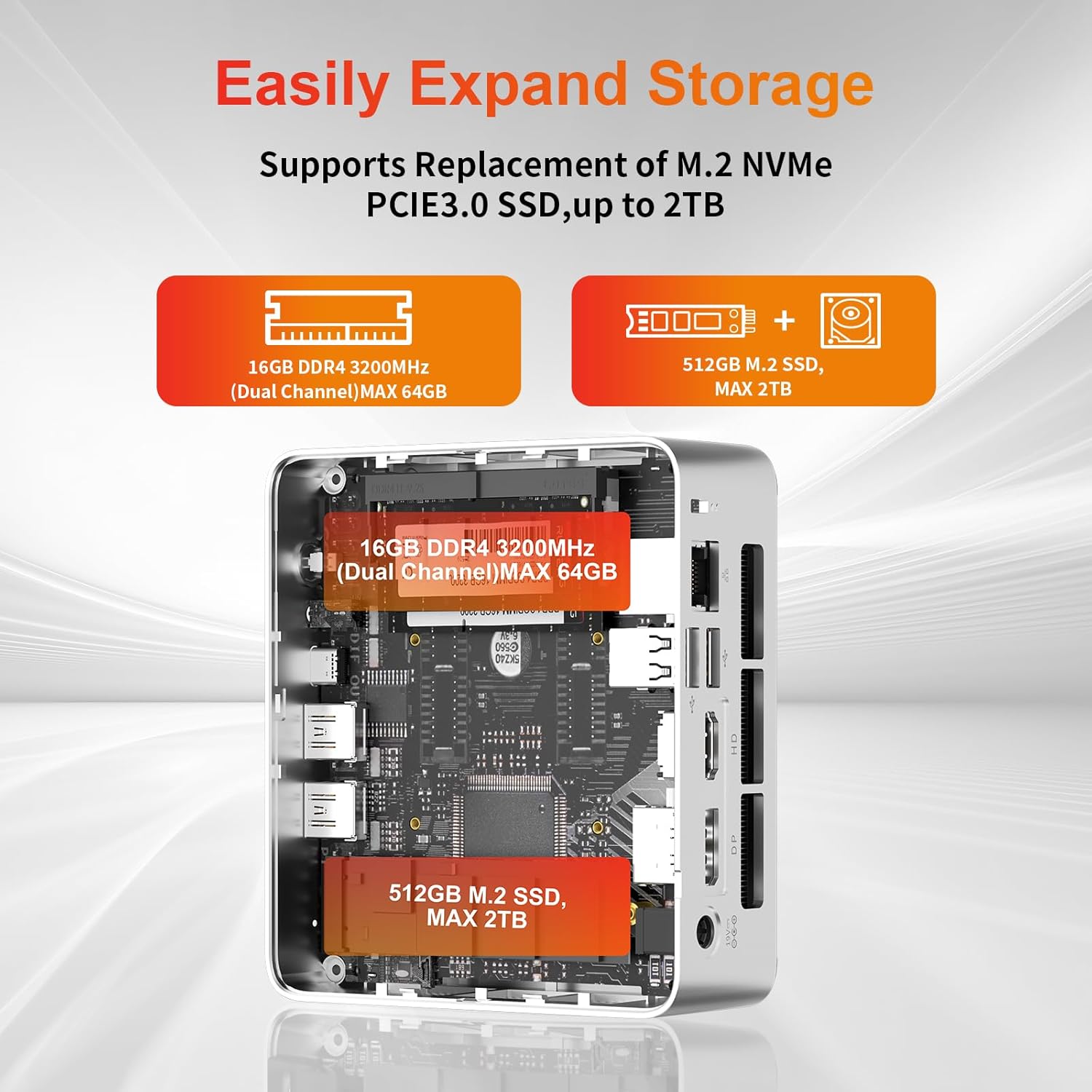
The mini PC allows for easy storage expansion. You can replace the existing M.2 NVMe PCIe 3.0 SSD with a larger one (up to 2TB) or add a 2.5-inch SATA SSD/HDD.

Gambar: internal view of the AWOW Mini PC showing the locations for the 16GB DDR4 RAM (expandable to 64GB) and the 512GB M.2 SSD (expandable to 2TB).
4.4 Jaringan sareng Konéktivitas Nirkabel
- WiFi 6: Connect to wireless networks via the built-in WiFi 6 module. Access network settings through Windows.
- Bluetooth 5.2: Pair Bluetooth devices such as keyboards, mice, or headphones.
- RJ45 LAN: For a stable wired connection, use the 1000Mbps Ethernet port.
5. Pangropéa
5.1 beberesih
- Pastikeun alat dipareuman sareng dicabut colokan sateuacan beberesih.
- Anggo lawon anu lemes sareng garing pikeun ngusap bagian luar mini PC.
- Keep the ventilation openings clear of dust and debris to maintain optimal airflow.
5.2 Sistim cooling
The AWOW Mini PC features an efficient cooling system with a low-noise fan to dissipate heat effectively, ensuring stable performance.
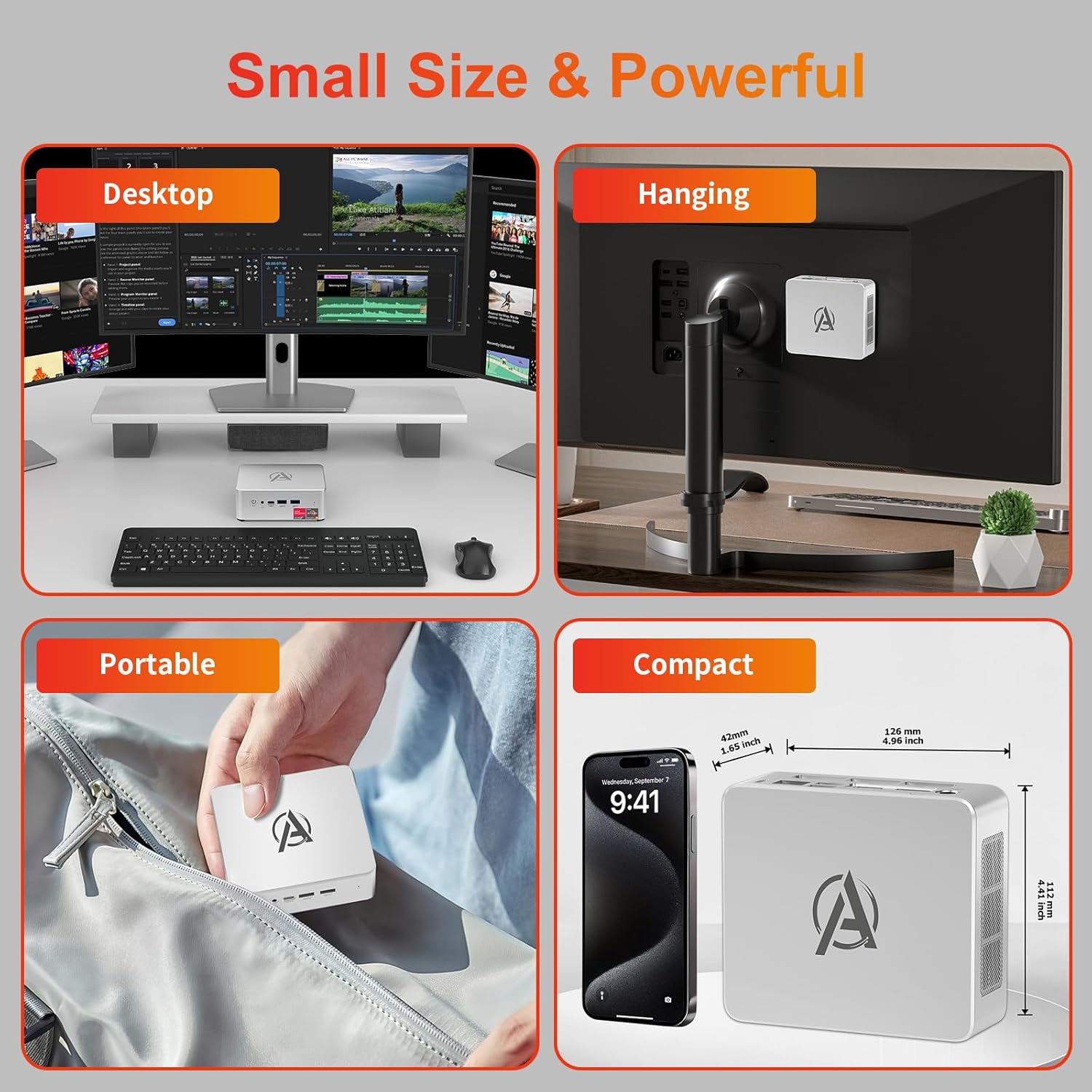
Image: Diagram illustrating the internal cooling system of the AWOW Mini PC, showing the fan and heat sink working to dissipate hot air.
5.3 Apdet parangkat lunak
Regularly update your Windows operating system and drivers to ensure security, stability, and performance. Windows Update can be accessed through the Settings menu.
6. Cara ngungkulan
If you encounter issues with your AWOW Mini PC, refer to the following common troubleshooting steps:
- Henteu aya kakuatan:
- Pastikeun adaptor kakuatan disambungkeun sacara aman ka mini PC sareng stopkontak listrik anu tiasa dianggo.
- Pastikeun stop kontak listrik berpungsi ku cara nyolokkeun alat sejen.
- Henteu aya tampilan:
- Check that the HDMI, DisplayPort, or USB-C cable is firmly connected to both the mini PC and the monitor.
- Ensure your monitor is set to the correct input source (e.g., HDMI 1, DisplayPort).
- Cobi sambungkeun ka layar anu béda atanapi nganggo kabel anu béda.
- Masalah Konektipitas Jaringan:
- For WiFi, check if the WiFi adapter is enabled in Windows settings and ensure you are connected to the correct network.
- For wired LAN, ensure the Ethernet cable is properly connected and your router is functioning.
- Restart your router and the mini PC.
- Performance Lambat:
- Tutup aplikasi anu teu perlu jalan di latar tukang.
- Check available storage space on your SSD.
- Pastikeun Windows sareng supirna parantos diropéa.
- Sistim teu responsif:
- Press and hold the Power Button for 5 seconds to force a shutdown, then restart the PC.
7. Spésifikasi
| Fitur | Spésifikasi |
|---|---|
| merek | AWÉH |
| Nomer modél | BA7 |
| Prosesor | AMD Ryzen 5 7430U (6 Cores, 12 Threads, nepi ka 4.3 GHz) |
| Grafika | Grafis AMD Radeon terpadu |
| Ram | 16GB DDR4 (Max 64GB) |
| Panyimpenan | 512GB PCIe 3.0 SSD (Max 2TB M.2 NVMe) |
| Sistem operasi | Windows 11 Pro |
| Kaluaran tampilan | 3x 4K (HDMI 2.0, DP 1.2, USB-C) |
| Konéktipitas Wireless | WiFi 6, Bluetooth 5.2 |
| LAN kabel | 1000Mbps RJ45 |
| palabuhan USB | 2x USB 3.2, 2x USB 2.0, 1x Type-C (Full Function) |
| Palabuhan Audio | 1x 3.5mm Audio Jack |
| Palabuhan anu sanés | 1x DC IN, 1x CLR CMOS |
| Ukuran (L x W x H) | 126mm x 112mm x 42mm (4.96 x 4.41 x 1.65 inci) |
| Beurat | 398g |
8. Garansi jeung Rojongan
8.1 Émbaran jaminan
Please refer to your purchase documentation or contact AWOW customer support for specific warranty details regarding your Mini PC. Warranty terms may vary by region and retailer.
8.2 Rojongan Palanggan
For technical assistance, product inquiries, or further support, please visit the official AWOW website or contact their customer service department. Contact information can typically be found on the AWOW websitus atanapi dina bungkusan produk Anjeun.


