1. Bubuka
The Trevi RDA 70 BR is a compact and versatile portable radio designed to provide a comprehensive listening experience. It combines traditional radio functionality with modern digital features, making it suitable for listening to music or news anywhere. This manual provides instructions for the proper setup, operation, and maintenance of your device.
2. Émbaran Kasalametan
- Baca sadaya parentah taliti samemeh make alat.
- Ulah ngantepkeun radio ka hujan, kalembaban, atanapi suhu anu ekstrim.
- Hindarkeun nempatkeun alat caket sumber panas atanapi dina sinar panonpoé langsung.
- Ulah ngabongkar atanapi nyobian ngalereskeun unit sorangan. Rujuk sadayana jasa ka tanaga anu mumpuni.
- Jauhkeun alat tina médan magnét anu kuat.
- Use only the specified charging cable (USB Type-C) for recharging the battery.
3. Eusi Paket
Pastikeun sadaya item aya dina bungkusan:
- Trevi RDA 70 BR Portable Radio
- Kabel Ngecas USB Tipe-C
- Manual pangguna (dokumén ieu)
4. Produk Langkungview
Familiarize yourself with the various parts and controls of your Trevi RDA 70 BR radio.

Gambar 1: Angled hareup view of the Trevi RDA 70 BR Portable Radio, showing the speaker grille, display, and main controls.
Kadali Panel hareup
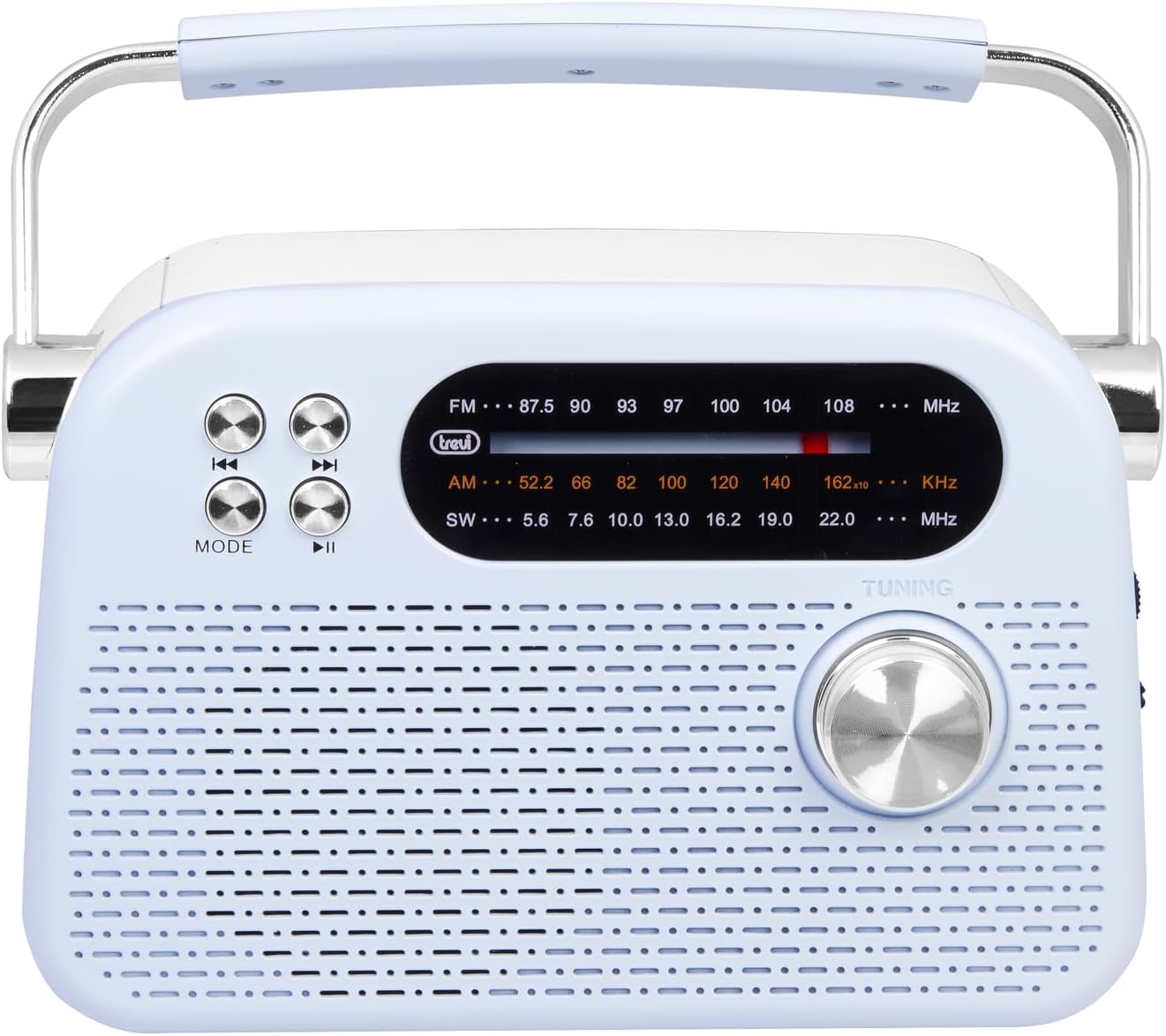
Gambar 2: hareup lengkep view highlighting the display, mode button, playback controls, and tuning knob.
- tampilan: Némbongkeun frékuénsi, mode, sareng inpormasi anu sanésna.
- Tombol MODE: Switches between radio bands (FM/AM/SW) and media playback modes (USB/Micro SD/Wireless).
- Playback Controls (◀◀ / ▶▶ / ▶▶): Used for skipping tracks in media mode or fine-tuning in radio mode.
- Kenop Tuning: For manual station tuning.
Side Panel Controls and Ports

Gambar 3: Sisi view showing the power switch, volume control, USB port, Micro SD slot, and USB Type-C charging port.
- OFF/ON/Volume Knob: Turns the radio on/off and adjusts the volume level.
- DC 5V IN (USB Type-C): Charging port for the internal battery.
- Port USB: Pikeun nyambungkeun flash drive USB pikeun muterkeun MP3.
- Micro SD Slot (TF): For inserting Micro SD cards for MP3 playback.
- Saklar Pamilih Pita: Selects between FM, AM, and SW radio bands, and MEDIA mode for USB/Micro SD/Wireless.
Panel tukang

Gambar 4: Tukangeun view showing the telescopic antenna and battery compartment.
- Antena Teleskopik: Extend for improved radio reception, especially for FM and SW bands.
- Kompartemen batré: Houses the rechargeable lithium battery.
5. Setélan
5.1 Ngecas Batré
- Locate the USB Type-C charging port on the side of the radio.
- Connect the provided USB Type-C cable to the radio's charging port.
- Sambungkeun tungtung kabel USB anu sanés ka adaptor kakuatan USB standar (teu kalebet) atanapi port USB komputer.
- The charging indicator light will illuminate (if present) to show charging status.
- Once fully charged, disconnect the cable. A full charge ensures maximum portability and uninterrupted use.
5.2 Adjustment anteneu
For optimal radio reception, extend the telescopic antenna fully. Adjust its direction and angle to achieve the clearest signal, especially for FM and Shortwave (SW) broadcasts.
6. Parentah Operasi
6.1 Daya Hurung / Pareum sareng Kontrol Volume
- Pikeun ngahurungkeun radio ON, rotate the OFF/ON/Volume knob clockwise.
- Continue rotating the knob clockwise to ningkatkeun polumeu.
- Rotate the knob counter-clockwise to ngurangan volume.
- Pikeun ngahurungkeun radio Pareum, rotate the knob counter-clockwise until it clicks into the OFF position.
6.2 Pamilihan Mode
Ngagunakeun éta Band Selector Pindah on the side panel to choose your desired mode:
- FM: For Frequency Modulation radio stations.
- AM: Pikeun Amplitude Modulation radio stations.
- SW: For Shortwave radio stations.
- SATENGAH: For playing audio from USB, Micro SD, or Wireless (Bluetooth) sources.
6.3 Radio Tuning
- Select the desired radio band (FM, AM, or SW) using the Band Selector Switch.
- Panjangkeun anteneu teleskopik pikeun panarimaan anu langkung saé.
- Lalaunan muterkeun Kenop Tuning on the front panel to scan for stations.
- The frequency will be displayed on the screen. Stop tuning when you find a clear station.
6.4 USB/Micro SD Playback (MP3)
- Insert a USB flash drive or a Micro SD card (with MP3 files) into the corresponding port/slot on the side panel.
- Switch the Band Selector Switch to MEDIA mode. The radio should automatically detect and begin playing MP3 files.
- Ngagunakeun éta Kadali Playback (◀◀ / ▶▶) to skip to the previous or next track.
- Ngagunakeun éta Play/Pause (▶▶) tombol pikeun ngareureuhkeun atawa neruskeun playback.
6.5 Wireless (Bluetooth) Connection
The radio supports wireless audio streaming from compatible devices.
- Switch the Band Selector Switch to MEDIA mode. The radio will enter Bluetooth pairing mode (indicated by an audible prompt or flashing indicator).
- Dina telepon pinter, tablet, atanapi alat Bluetooth anu sanés, aktipkeun Bluetooth teras milarian alat anu sayogi.
- Pilih"Trevi RDA 70 BR" (or similar name) from the list of devices to pair.
- Saatos dipasangkeun, anjeun tiasa ngalirkeun audio tina alat anjeun ka radio.
- Use the playback controls on your connected device or the radio's playback controls to manage audio.
7. Pangropéa
- beberesih: Anggo lawon anu lemes sareng garing pikeun ngabersihkeun bagian luar radio. Entong nganggo pembersih atanapi pangleyur anu abrasif.
- Panyimpenan: Upami henteu dianggo salami lami, simpen radio di tempat anu tiis sareng garing, jauh tina sinar panonpoé langsung sareng suhu anu ekstrim.
- Perawatan batré: Pikeun manjangkeun umur batre, ulah miceun batre pinuh. Ngecas deui sacara teratur, sanaos henteu dianggo angger.
8. Cara ngungkulan
| Masalah | Mungkin Cukang lantaranana | Solusi |
|---|---|---|
| Taya kakuatan | Battery is discharged; Power knob is OFF. | Charge the battery; Rotate the power knob to ON. |
| panarimaan radio goréng | anteneu teu ngalegaan; sinyal lemah; gangguan. | Extend and adjust the telescopic antenna; Move the radio to a different location; Tune carefully. |
| USB / Micro SD teu maén | Incorrect mode; Unsupported file format; Korupsi files. | Ensure Band Selector Switch is on MEDIA; Check if files are MP3 format; Try a different USB/Micro SD card. |
| Cannot connect via Wireless (Bluetooth) | Radio not in pairing mode; Bluetooth off on device; Device already connected to another unit. | Ensure radio is in MEDIA mode; Enable Bluetooth on your device; Disconnect from other devices and try again. |
9. Spésifikasi
| Fitur | Rincian |
|---|---|
| merek | Trevi |
| Modél | RDA 70 BR |
| Ukuran (L x W x H) | 18.5 x 7 x 12.5 cm |
| Beurat | 600 gram |
| Sumber Daya | Batré Litium Rechargeable |
| Port ngecas | USB Tipe-C (DC 5V) |
| Band Radio Dirojong | FM, AM, SW |
| Média Playback | USB, Micro SD (MP3 format) |
| Konéktipitas Wireless | Yes (Bluetooth compatible) |
| Fitur husus | Portabel, tiasa dicas deui |
10. Garansi jeung Rojongan
For warranty information and customer support, please refer to the documentation provided at the time of purchase or visit the official Trevi website. Standard return policies apply for products purchased through retailers. For specific details regarding returns or defective products, consult your purchase platform's help pages.


