1. Bubuka
The LAUNCH CRP123I V3.0 Elite OBD2 Scanner is an advanced diagnostic tool designed for comprehensive vehicle system analysis. This device offers enhanced diagnostic capabilities for engine, anti-lock braking system (ABS), supplemental restraint system (SRS), and transmission systems, alongside a suite of reset functions and full OBD2 modes. It features a new processor, Android 8.1 operating system, a 5-inch touchscreen, and a 6000mAh rechargeable battery for efficient and reliable performance.

Gambar 1.1: Leuwihview of the LAUNCH CRP123I V3.0 Elite OBD2 Scanner's key features, including 4 system diagnostics and 7 special functions.
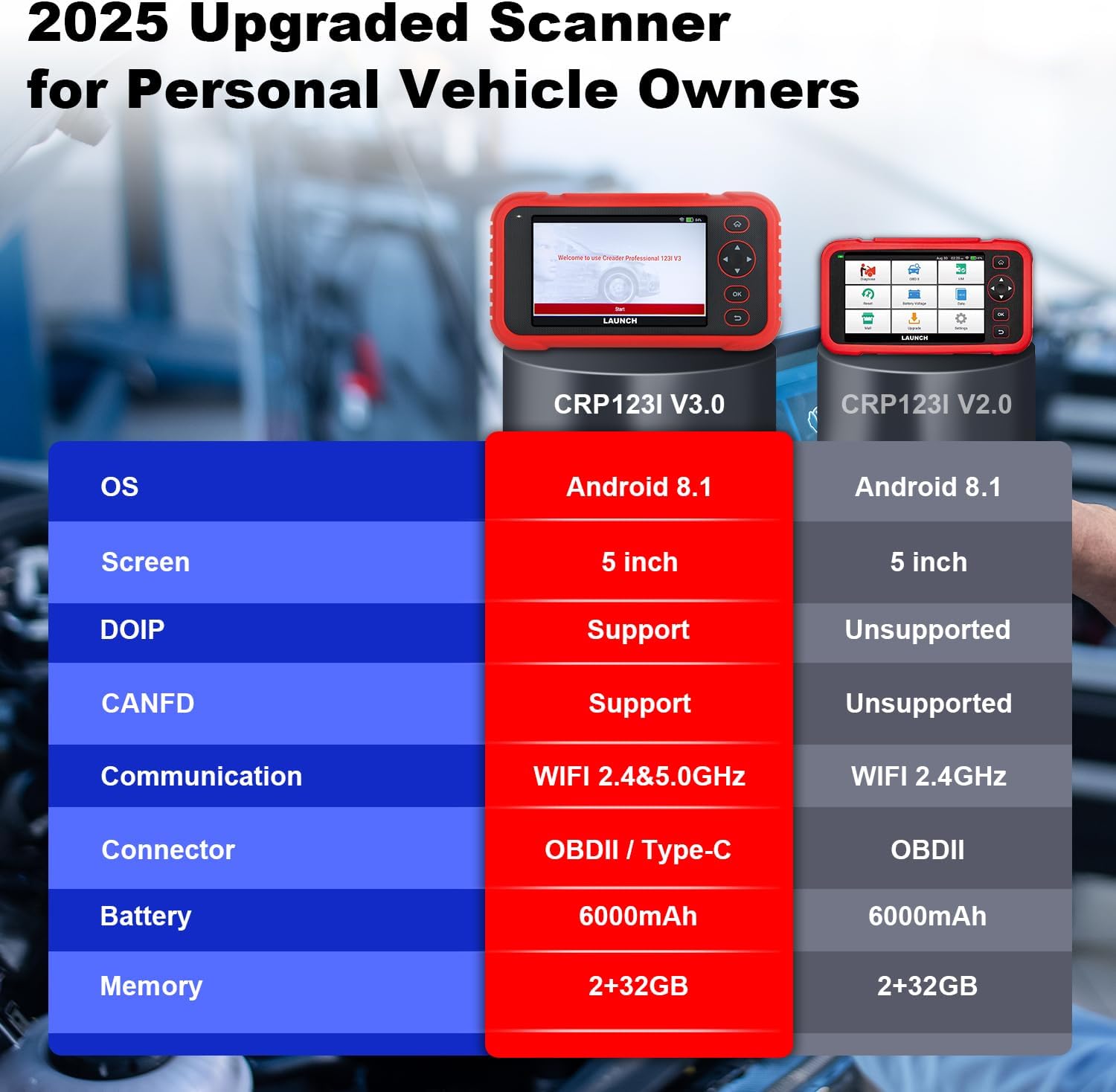
Image 1.2: Feature comparison between the CRP123I V3.0 and its predecessor, highlighting upgrades such as DOIP, CANFD, and dual-band WiFi.
2. Eusi Paket
Saatos unboxing, pariksa yén sadaya komponén aya:
- CRP123I V3.0 Scan Tool
- Kabel Diagnostik OBDII
- Kabel USB
- Manual pamaké
- Mawa Kasus

Image 2.1: The complete package contents, including the scan tool, cables, user manual, and carrying case.
3. Setélan
Follow these steps for initial setup and connection:
- Daya Hurung: Ensure the device is charged. The CRP123I V3.0 features a 6000mAh rechargeable battery.
- Nyambung ka Kendaraan: Locate your vehicle's OBDII port, typically under the dashboard on the driver's side. Connect the diagnostic cable from the scanner to the vehicle's OBDII port. The device supports OBDII and Type-C connections.
- Boot-up mimiti: The scanner will power on automatically or prompt you to press the power button. The 5-inch touchscreen will display the LAUNCH logo and then the main interface.
- Sambungan jaringan: For updates and online features, connect the device to a Wi-Fi network. The CRP123I V3.0 supports 2.4GHz and 5GHz dual Wi-Fi. Navigate to 'Settings' > 'Wi-Fi' to connect.
- Pembaruan parangkat lunak: It is recommended to perform a software update upon first use to ensure you have the latest features and vehicle coverage. Access the 'Upgrade' menu for one-touch lifetime free updates.
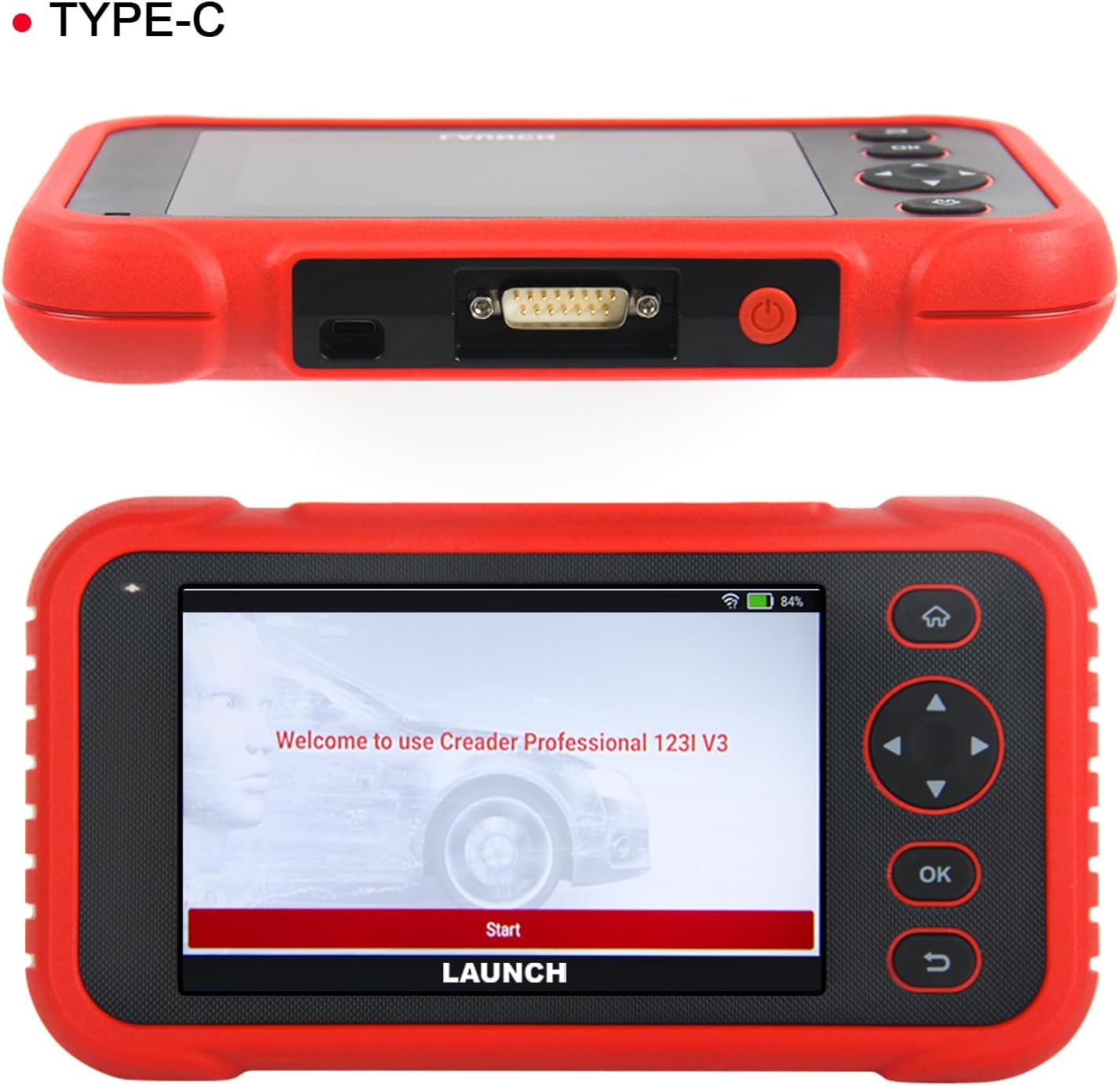
Gambar 3.1: Luhur view of the scanner showing the OBDII connector, and front view displaying the initial welcome screen.
4. Parentah Operasi
4.1. 4-System Diagnostics
The CRP123I V3.0 allows for in-depth diagnostics of four major vehicle systems:
- Sistim mesin: Maca sareng ngahapus kode gangguan mesin, views live data, and turns off the Malfunction Indicator Lamp (MIL).
- Sistem Rem Anti-konci (ABS): Diagnoses ABS issues, reads/clears codes, and monitors live data related to braking performance.
- Sistem Pengekangan Tambahan (SRS/Airbag): Detects and clears airbag system fault codes, ensuring proper functionality of safety components.
- Sistem transmisi: Analyzes transmission performance, reads/clears codes, and displays live data such as transmission temperature.

Image 4.1: Visual representation of the four OE-level systems (Engine, SRS, Transmission, ABS) that the scanner can diagnose.
4.2. 7 Reset Fungsi
The tool provides 7 frequently used reset functions for common maintenance tasks:
- Reset minyak: Ngareset sistem hirup oli saatos ganti oli.
- Electric Throttle Relearn: Diajar deui posisi awak throttle sanggeus beberesih atawa ngagantian.
- Steering Angle Reset (SAS): Ngareset sensor sudut steering.
- Perdarahan ABS: Ngalaksanakeun perdarahan rem ABS pikeun mulangkeun sensitipitas rem.
- Battery Matching (BMS Reset): Ngareset sistem manajemen batré saatos ngagantian batré.
- Brake Reset (EPB): Ngareset kampas rem parkir éléktronik saatos digentos.
- Reset DPF: Performs Diesel Particulate Filter regeneration.
Note: The availability of specific service functions may vary by vehicle make, model, and year.

Image 4.2: An illustration of the seven hot reset services available on the CRP123I V3.0.
4.3. Full OBDII Functions
The CRP123I V3.0 supports all 10 OBDII test modes for comprehensive emissions-related diagnostics:
- Baca Konci: Mintonkeun Kode Masalah Diagnostik (DTCs).
- Hapus Kodeu: Erases DTCs and turns off the MIL.
- Data Langsung: Shows real-time data stream from vehicle sensors.
- Kesiapan I / M: Checks the readiness of emission monitors.
- Frame Frame: Stores a snapshot of vehicle operating conditions when an emission-related fault occurs.
- Tés Sénsor O2: Retrieves O2 sensor monitor hasil tés.
- Tes Monitor On-Board: Retrieves hasil pikeun komponén powertrain patali émisi jeung sistem.
- Tés EVAP: Initiates a test of the Evaporative Emission System.
- Inpormasi Kendaraan: Retrieves vehicle identification information (VIN, CID, CVN).
- Pilarian Kode DTC: Nyayogikeun definisi pikeun kodeu generik sareng spésifik produsén.

Image 4.3: A comprehensive display of the professional full OBDII functions supported by the scanner.
4.4. Live Data Streams and Smog Test
Monitor up to 4 real-time data streams simultaneously on one screen. This allows for quick diagnosis and verification of repairs without switching views. The I/M Readiness function helps check emission system status, assisting in preparation for smog tests by identifying potential issues like faulty sensors or catalytic converter problems.

Image 4.4: The 4-in-1 live data graphic display feature, enabling visualization and analysis of multiple data streams.

Image 4.5: A real-time voltage monitor display, useful for assessing battery and charging system health.
4.5. Vehicle Identification and Diagnostic Reports
The scanner supports automatic VIN (Vehicle Identification Number) detection for quick vehicle identification. For vehicles that do not support AUTO VIN, you can manually input the VIN. After diagnosis, the tool can generate and allow you to share or print detailed diagnostic reports.

Image 4.6: The AUTO VIN feature, simplifying vehicle identification.

Image 4.7: The VIN scan function and options for sharing and printing diagnostic reports.
4.6. Jangkauan Kendaraan
The CRP123I V3.0 is compatible with all U.S. road vehicles manufactured after 1996 that comply with OBD2/EOBD/JOBD standards. This includes over 10,000 models, covering most gasoline cars, many 12V diesel vehicles, light-duty trucks, and a small range of gasoline-electric hybrid vehicles. It also supports AutoAuth for FCA SGW to access 2018+ FCA SGW-equipped models.

Image 4.8: An illustration of the extensive vehicle coverage across different regions and vehicle types.
5. Pangropéa
To ensure optimal performance and access to the latest features and vehicle compatibility, regularly update the scanner's software. The CRP123I V3.0 offers lifetime free software updates.
- Apdet parangkat lunak: Connect the device to Wi-Fi and navigate to the 'Upgrade' section on the main menu to download and install available updates.
- beberesih: Anggo lawon anu lemes sareng garing pikeun ngabersihkeun alat. Hindarkeun pembersih atanapi pangleyur anu abrasif.
- Panyimpenan: Store the scanner in its carrying case in a cool, dry place when not in use.

Image 5.1: The 'Lifetime Free Updated' feature ensures the scanner remains current with the latest vehicle data and functions.
6. Cara ngungkulan
If you encounter issues with the CRP123I V3.0, consider the following:
- Alat Teu Dihurungkeun: Ensure the battery is charged or the device is properly connected to the vehicle's OBDII port.
- Masalah sambungan: Verify the OBDII cable is securely connected to both the scanner and the vehicle. Ensure the vehicle's ignition is on.
- Henteu aya komunikasi sareng kendaraan: Check if your vehicle is OBDII compliant (generally 1996 and newer for U.S. vehicles). Ensure the vehicle's battery has sufficient voltage.
- Fungsi Teu Gawé: Some functions are vehicle-specific. Confirm compatibility for your vehicle's make, model, and year.
- Performance Lambat: Ensure the device has sufficient memory. Perform regular software updates.
For specific fault code definitions, use the built-in DTC Library or the Fault Codes Google Search feature.

Image 6.1: The DTC Search function, providing quick access to fault code explanations via Google.
7. Spésifikasi
| Produsén | ngaluncurkeun |
| Modél | CRP123I |
| Sistem operasi | Android 8.1 |
| Ukuran layar | 5 Inches (720P) |
| Mémori | 32GB |
| Batré | 6000mAh Lithium Ion (kaasup) |
| Konektipitas | 2.4 & 5GHz Dual WiFi, OBDII / Type-C |
| Protokol anu dirojong | CANFD & DoIP, OBD2/EOBD/JOBD |
| Item Beurat | 2.27 pon |
| Ukuran Paket | 9.84 x 7.09 x 2.76 inci |
| Automotive Fit Tipe | Universal Fit |
8. Garansi jeung Rojongan
The LAUNCH CRP123I V3.0 Elite OBD2 Scanner comes with a 5-year warranty. Enjoy lifetime free software updates to keep your diagnostic tool current with the latest features and vehicle compatibility. For any inquiries, technical assistance, or support, please contact our dedicated customer service team.
Email Dukungan Palanggan: nina@hilson.com.cn
Our 24/7 professional service team is committed to providing one-on-one customer service to ensure your satisfaction.


