1. Bubuka
This manual provides essential information for the safe and efficient use of your VIVO T4 Pro 5G smartphone. Please read this guide thoroughly before using your device to ensure optimal performance and longevity. The VIVO T4 Pro 5G is a high-performance smartphone designed for advanced mobile communication and multimedia experiences.
2. Eusi Paket
Pariksa yén pakét anjeun ngandung barang-barang ieu:
- VIVO T4 Pro 5G Smartphone
- Adaptor kakuatan
- Kabel Tipe-C USB
- Alat Ejector SIM
- Gancang Mimitian Guide
- Émbaran Kasalametan
Note: Contents may vary by region.
3. Alat Leuwihview
Familiarize yourself with the physical components of your VIVO T4 Pro 5G.
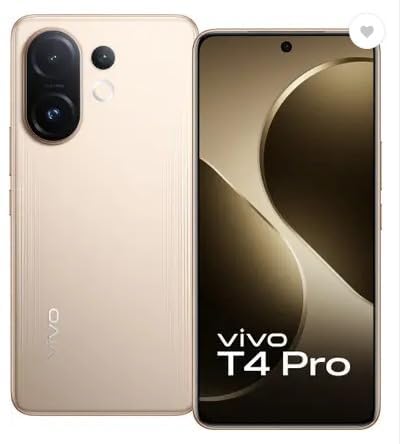
Gambar 3.1: Hareup jeung tukang View of the VIVO T4 Pro 5G. This image displays the overall design of the smartphone, highlighting its sleek profile and the placement of the rear camera module.
3.1. Tombol sareng Port Fisik
- Tombol Daya: Located on the right side, used to power on/off the device, or wake/sleep the screen.
- Tombol Volume: Located above the power button, used to adjust media volume, call volume, and notification volume.
- Port USB Tipe-C: Tempatna di handap, dianggo pikeun ngecas sareng mindahkeun data.
- Baki Kartu SIM: Typically on the side, for inserting Nano-SIM cards and microSD cards.
- Panyatur: Perenahna di handap pikeun kaluaran audio.
- Mikropon: Integrated for calls and voice recording.
3.2. Sistim kaméra
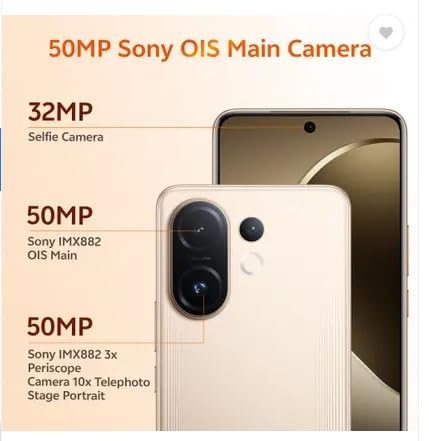
Gambar 3.2: Diwincik view of the VIVO T4 Pro 5G camera system. This image illustrates the arrangement of the 50MP Sony OIS Main Camera, 50MP Sony IMX882 3x Periscope Camera, and the 32MP Selfie Camera.
The VIVO T4 Pro 5G features an advanced camera system for high-quality photography and videography:
- Kaméra tukang: Includes a 50MP Sony OIS Main Camera and a 50MP Sony IMX882 3x Periscope Camera for versatile shooting, including telephoto and portrait modes.
- Kaméra hareup: A 32MP Selfie Camera for clear self-portraits and video calls.
3.3. Komponen Internal
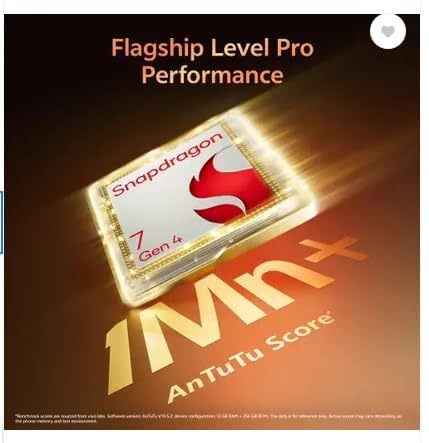
Gambar 3.3: Representation of the Snapdragon 7 Gen 4 processor. This image highlights the powerful chipset responsible for the device's performance.
The device is powered by a Snapdragon 7 Gen 4 processor, ensuring smooth performance for demanding applications and multitasking.
3.4. Fitur durability

Gambar 3.4: Illustration of the VIVO T4 Pro 5G's IP68 and IP69 water and dust protection. This image demonstrates the device's resistance to environmental elements.
The VIVO T4 Pro 5G features IP68 and IP69 ratings for industry-leading water and dust protection, enhancing its durability in various environments.
4. Setélan
4.1. Nyelapkeun Kartu SIM sareng Kartu microSD
- Tangtukeun lokasi baki kartu SIM di sisi alat Anjeun.
- Selapkeun alat SIM ejector kana liang leutik gigireun baki terus pencét pageuh nepi baki pops kaluar.
- Teundeun kartu Nano-SIM anjeun jeung/atawa kartu microSD kana slot nu ditunjuk dina baki. Pastikeun kontak emas nyanghareup ka handap.
- Taliti selapkeun deui baki kana alat nepi ka ngaklik kana tempatna.
4.2. Ngahurungkeun Mimiti sareng Setelan Dasar
- Pencét terus tahan tombol Daya nepi ka logo VIVO nembongan.
- Turutan parentah dina-layar pikeun milih basa anjeun, wewengkon, jeung nyambung ka jaringan Wi-Fi.
- Asup sareng akun Google Anjeun atawa jieun nu anyar pikeun ngakses ladenan Google jeung Play Store.
- Setel metode konci layar anu anjeun pikaresep (PIN, pola, kecap akses, sidik jari, atanapi muka konci nganggo raray).
- Complete the remaining setup steps as guided by the device.
5. Parentah Operasi
5.1. Napigasi Dasar
- Layar Utama: Gesek ka kenca atawa ka katuhu pikeun napigasi antara layar utama.
- Laci Aplikasi: Gesek ka luhur ti bagean handap layar pikeun ngakses sadaya aplikasi anu dipasang.
- Panel Bewara: Gesek ka handap ti luhur layar pikeun view bewara sareng setelan gancang.
- Aplikasi panganyarna: Swipe up and hold from the bottom (gesture navigation) or tap the square button (3-button navigation) to view aplikasi anu nembe dianggo.
5.2. Nelepon jeung Ngirim Talatah
- Telepon: Open the Phone app, enter the number, and tap the call icon. To answer an incoming call, swipe up. To reject, swipe down.
- Pesen: Open the Messages app, tap the "Start chat" or "+" icon, enter the recipient's number or select from contacts, type your message, and tap send.
5.3. Nyambungkeun ka Jaringan
- Wifi: Pindah ka Setelan > Jaringan & Internét > Wi-Fi. Hurungkeun Wi-Fi, pilih jaringan anu dipikahoyong, teras lebetkeun kecap akses upami diperyogikeun.
- Bluetooth: Pindah ka Setelan > Alat nu disambungkeun > Bluetooth. Turn Bluetooth on, scan for devices, and pair with your desired accessory.
- Data Seluler: Pindah ka Setelan > Jaringan & Internét > Jaringan selulerPastikeun data sélulér diaktipkeun.
5.4. Ngagunakeun kaméra
The VIVO T4 Pro 5G camera offers various modes and features:
- Buka aplikasi kaméra.
- Select your desired mode (e.g., Photo, Portrait, Video, Night, Pro).
- Ketok tombol jepret pikeun ngarekam poto atanapi ngamimitian/ngeureunkeun ngarékam pidéo.
- Use pinch-to-zoom or the on-screen zoom controls to adjust magnification, including the 3x optical zoom.
- Access settings within the camera app to adjust resolution, filters, and other parameters.
6. Pangropéa
6.1. Ngabersihan Alat Anjeun
- Anggo lawon anu lemes sareng henteu lint pikeun ngusap layar sareng awak.
- Ulah make bahan kimia kasar, bahan abrasive, atawa hawa dikomprés.
- Pikeun smudges nekad, rada dampen lawon kalawan cai atawa cleaner layar dirancang pikeun éléktronika.
6.2. Kaperawatan batré
- Hindarkeun suhu anu ekstrim, sabab tiasa ngirangan umur batre.
- Paké ngan asesoris ngecas aslina atawa Certified.
- Do not fully discharge the battery frequently. Optimal battery health is maintained between 20% and 80% charge.
6.3. Apdet parangkat lunak
Rutin pariksa sareng pasang apdet parangkat lunak pikeun mastikeun alat anjeun gaduh fitur panganyarna, patch kaamanan, sareng perbaikan kinerja. Pindah ka Setélan > Sistem > Apdet sistem.
7. Cara ngungkulan
| Masalah | Solusi |
|---|---|
| Alat teu hurung | Ensure the battery is charged. Connect to the power adapter and wait a few minutes before attempting to power on again. If unresponsive, perform a force restart by holding the Power button for 10-15 seconds. |
| Aplikasi nabrak atanapi katirisan | Tutup sareng buka deui aplikasina. Hapus cache aplikasi (Setelan > Aplikasi > [Ngaran Aplikasi] > Panyimpenan & cache > Hapus cache). Update the app from the Play Store. If the issue persists, uninstall and reinstall the app. |
| Konéktivitas jaringan anu goréng | Check if Wi-Fi or mobile data is enabled. Restart your device. Reset network settings (Setelan > Sistem > Reset pilihan > Reset Wi-Fi, mobile & Bluetooth). Ensure your SIM card is properly inserted. |
| Batré gancang boros | Reduce screen brightness, disable unnecessary background apps, turn off Wi-Fi/Bluetooth/GPS when not in use. Check battery usage in Setélan> Batré pikeun ngaidentipikasi aplikasi-lapar kakuatan. |
| Sénsor sidik henteu jalan | Pastikeun ramo anjeun bersih sareng garing. Catet deui sidik jari anjeun dina Setélan > Kaamanan & privasi > Muka konci alat > Sidik jari. |
7.1. Reset pabrik
If you encounter persistent issues that cannot be resolved through basic troubleshooting, a factory reset may be necessary. Awas: A factory reset will erase all data on your device. Back up important data before proceeding. Go to Setélan> Sistem> Pilihan Reset> Pupus sadaya data (reset pabrik).
8. Spésifikasi
| Ngaran modél | VIVO T4 Pro 5G |
| Sistem operasi | Android 14 |
| Prosesor | Snapdragon 7 Gen 4 (2.8 GHz) |
| Ram | 8 GB |
| Panyimpenan internal | 128 GB |
| Resolusi tampilan | 1080 x 2392 piksel |
| Konektipitas | 5G, Wi-Fi, Bluetooth, GPS |
| Palabuhan Audio | USB Tipe C |
| Kapasitas batré | 6500 Miliamp Jam-jaman |
| Ukuran (L x W x H) | 16.4 x 7.7 x 0.8 cm |
| Item Beurat | 250 g |
| Warna | Blaze Gold |
| Produsén | Vivo Mobile India Pvt. Ltd. |
9. Garansi jeung Rojongan
9.1. Garansi produk
Your VIVO T4 Pro 5G smartphone comes with a standard manufacturer's warranty. Please refer to the warranty card included in your package for specific terms, conditions, and duration. Keep your purchase receipt as proof of purchase for warranty claims.
9.2. Rojongan Palanggan
For technical assistance, service, or further inquiries, please contact VIVO customer support. You can find contact information on the official VIVO websitus atawa dina bagian rojongan setelan alat Anjeun.
- Dukungan Online: Nganjang ka resmi VIVO India Support Websitus for FAQs, troubleshooting guides, and service center locations.
- Puseur Palayanan: Locate authorized VIVO service centers for in-person assistance.


