1. Bubuka
The CINMOORE 2.5K Pet/Dog Camera is an advanced indoor security and monitoring solution designed to keep you connected to your home, pets, and loved ones. This camera features 2.5K Ultra HD video, Pan-Tilt-Zoom (PTZ) functionality, and AI-powered detection for persons, pets, and baby crying, all without monthly subscription fees. It also includes full-duplex two-way audio, color night vision, and flexible storage options to ensure comprehensive coverage and peace of mind.

Image: The CINMOORE 2.5K Pet/Dog Camera, showcasing its sleek design alongside a smartphone displaying live footage of a baby and a dog.
2. Naon dina Box
Upon unboxing your CINMOORE 2.5K Pet/Dog Camera, please verify that all the following components are included:
- CINMOORE 2.5K Pet/Dog Camera (x1)
- Sekrup Pemasangan (x1 set)
- Pituduh Gancang (x1)
- Kabel Daya (x1)

Image: All components included in the CINMOORE 2.5K Pet/Dog Camera package, neatly arranged on a wooden surface.
3. Setélan
Follow these steps to set up your CINMOORE 2.5K Pet/Dog Camera:
- Daya Hurung: Connect the camera to a power source using the provided power cable and adapter. The camera will power on automatically.
- Unduh Aplikasi: Download the 'Cinmoore' app from your smartphone's app store (Google Play or Apple App Store).
- Tambahkeun Alat: Open the app, create an account if you don't have one, and click the '+' icon to add a new device.
- Scan QR Code: Scan the QR code located on the bottom of your camera using the app.
- Reset Camera (if needed): If prompted, reset the camera by pressing the reset button (located under the lens when tilted upwards) for 5 seconds until you hear a prompt, then press it twice.
- Nyambung ka Wi-Fi: Turutan parentah dina aplikasi pikeun nyambungkeun kaméra ka jaringan Wi-Fi 2.4GHz anjeun. (Catetan: Wi-Fi 5GHz henteu dirojong).
- Sebutkeun Ngaran Kaméra Anjeun: Assign a memorable name to your camera within the app.
- Pilihan Pasang: The camera can be placed on a tabletop, mounted on a wall, or ceiling. Use the included mounting screws and base if wall or ceiling mounting is desired.
Video: A quick start guide demonstrating the unboxing, power-on, and app connection process for the CINMOORE C2U Indoor Camera, highlighting the 1-minute setup.
4. Fitur Leuwihview
The CINMOORE 2.5K Pet/Dog Camera is equipped with a range of features to enhance your home monitoring experience:
- Video 2.5K Ultra HD: Nyadiakeun foo video jelas tur lengkeptage, ensuring you don't miss any important moments.
- Fungsi PTZ: Offers 360° horizontal and 109° vertical rotation, allowing you to remotely adjust the camera's view ngaliwatan aplikasi.
- AI Detection (No Monthly Fee): Advanced AI for local detection of persons, pets, and baby crying, providing smart alerts without subscription costs.
- Full Duplex 2-Way Audio: Enables real-time, simultaneous two-way communication, allowing you to speak and listen through the camera.
- Color Night Vision 2.0: Ensures clear visibility in low-light conditions without disturbing sleeping babies or pets.
- 2.4GHz WiFi + Bluetooth Connectivity: Offers faster and more stable connection for seamless streaming.
- Panyimpenan anu fleksibel: Supports local storage via SD card (up to 256GB, not included) with advanced encryption, and optional AWS cloud storage.
- Modeu Privasi: Allows you to physically conceal the camera lens for enhanced privacy when needed.
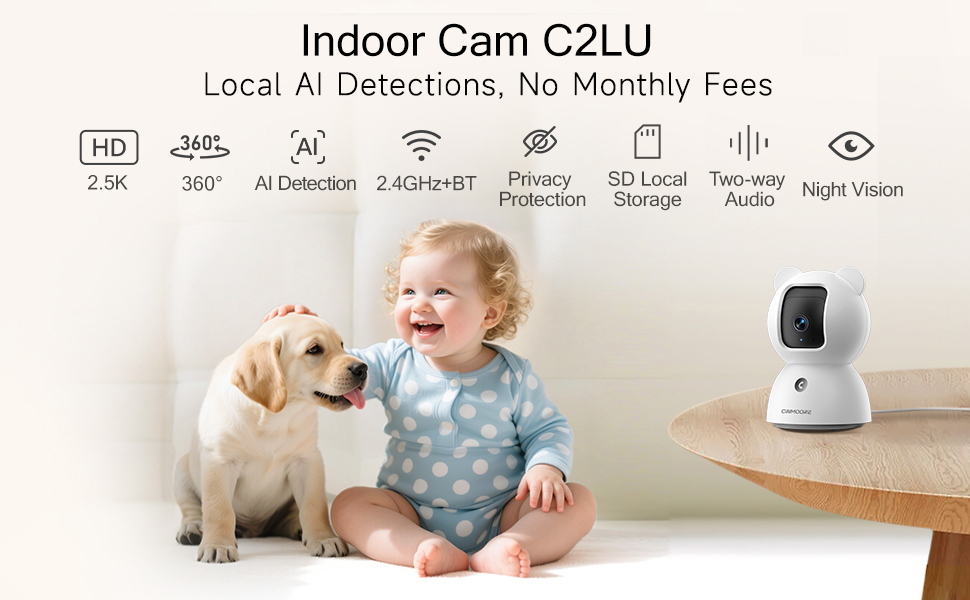
Image: A visual summary of the camera's key features, including its 2.5K resolution, pan-tilt capabilities, and various AI detection modes.
Video: A promotional video highlighting the simplicity and affordability of the CINMOORE camera, emphasizing its features for home monitoring.
5. Parentah Operasi
Utilize the 'Cinmoore' app to control and manage your camera:
- Hirup View: Tap the camera image in the app to access the live video feed.
- Panci & Dengdekkeun: Use the directional arrows within the live view interface to remotely adjust the camera's horizontal (pan) and vertical (tilt) angles.
- Obrolan Dua Arah: Press and hold the microphone icon to speak through the camera. Release to listen. The camera also features a one-click call button for quick family alerts.
- Ngarékam: Initiate manual recording or set up continuous 24/7 recording to an SD card. Access recorded footage via the 'Record' tab.
- Deteksi & Peringatan Pinter: Configure Person, Pet, and Baby Cry Detection settings. Customize detection zones and sensitivity levels to receive relevant alerts.
- Modeu Privasi: Activate privacy mode through the app to physically close the camera lens, ensuring your privacy.
- Alarm sora: Utilize the siren feature or customize sound alarms for deterrence.

Image: Demonstrates the full duplex two-way talk feature, allowing seamless communication with pets.
6. Pangropéa
To ensure optimal performance and longevity of your CINMOORE 2.5K Pet/Dog Camera, follow these maintenance guidelines:
- beberesih: Lembut usap lénsa kaméra jeung awakna ku kaén nu garing tur lemes. Hindarkeun ngagunakeun bahan kimia anu kasar atanapi bahan abrasive anu tiasa ngaruksak permukaan atanapi lensa.
- Apdet parangkat lunak: Regularly check the 'Cinmoore' app for available firmware updates. Keeping your camera's software up-to-date ensures access to the latest features, security enhancements, and bug fixes.
- panempatan: Pastikeun kaméra disimpen di lokasi anu stabil, jauh tina sinar panonpoé langsung, suhu anu ekstrim, sareng kalembaban anu luhur.
- Sasayogian tanaga: Anggo ngan ukur adaptor daya sareng kabel asli anu disayogikeun sareng kaméra pikeun nyegah karusakan.
7. Cara ngungkulan
If you encounter issues with your CINMOORE 2.5K Pet/Dog Camera, refer to the following common troubleshooting tips:
- Kaméra offline:
- Check your Wi-Fi connection and ensure it is 2.4GHz.
- Verify the camera is powered on and the power cable is securely connected.
- Pareuman terus hurungkeun deui kaméra ku cara cabut colokan sareng pasang deui.
- Kualitas pidéo goréng:
- Pastikeun sinyal Wi-Fi anjeun kuat di tempat kaméra ayana.
- Bersihkeun lénsa kaméra ku kaén anu lembut.
- Check app settings for video resolution and adjust if necessary.
- Teu Aya Bewara:
- Verify that detection settings (Person, Pet, Cry) are enabled in the app.
- Check app notification settings on your phone to ensure they are not blocked.
- Adjust detection sensitivity and zones.
- Masalah Audio Dua Arah:
- Ensure your phone's microphone and speaker are enabled for the app.
- Check the camera's volume settings in the app.
8. Spésifikasi
| Fitur | Rincian |
|---|---|
| Nomer modél | CM-C2LU |
| Resolusi Capture Video | 2.5K |
| Pamakéan jero rohangan / outdoor | jero rohangan |
| Protokol konektipitas | Wi-Fi (2.4GHz wungkul) |
| Sumber Daya | Kabel Listrik |
| Tipe Pamasangan | Ceiling Mount / Tabletop Mount / Wall Mount |
| Tipe Siaga | Person Detection, Pet Detection, Cry Detection |
| Flash Mémori Dirojong Ukuran Maximum | 256 GB (SD card not included) |
| Kamampuh Ngarékam Audio Visual | Audio, Video |
| Dimensi produk | 3 x 3 x 4.5 inci |
| Item Beurat | 11.7 ons |
9. Garansi jeung Rojongan
The CINMOORE 2.5K Pet/Dog Camera comes with a manufacturer's warranty. For specific warranty details, including coverage period and terms, please refer to the warranty card included in your product packaging or contact CINMOORE customer support directly. For technical assistance, troubleshooting, or any other inquiries, please visit the official CINMOORE websitus atanapi ngahubungan tim layanan palanggan maranéhanana.


