1. Bubuka
Thank you for choosing the MCHOSE ACE 68 Mechanical Gaming Keyboard. This 60% compact keyboard is engineered for high-performance gaming, featuring Hall Effect magnetic switches, Rapid Trigger technology, adjustable actuation, and an 8000Hz polling rate for ultra-low latency. This manual will guide you through the setup, operation, and maintenance of your new keyboard to ensure optimal performance.
2. Naon dina Box
- MCHOSE ACE 68 Mechanical Gaming Keyboard
- Kabel USB (Tipe-C)
- Keycap & Pindah Puller
- 2 x Replacement Switches
- Panutup lebu
- Manual pangguna (dokumén ieu)
3. Setélan
3.1 Panyambung Hardware
- Connect the provided USB Type-C cable to the port on the MCHOSE ACE 68 keyboard.
- Plug the other end of the USB cable into an available USB port on your computer (PC, Laptop, Gaming Console, PS5, XBOX).
- Kibor bakal otomatis dikenal ku sistem operasi anjeun.
3.2 Software Installation (M HUB Web Supir)
For advanced customization and optimal performance, it is recommended to use the MCHOSE M HUB web supir.
- Buka anjeun web browser and navigate to the MCHOSE official websitus: https://www.mchose.com.cn.
- Select your preferred language from the options provided on the websitus.
- Click on the 'Enter M HUB WEBtombol '.
- On the M HUB page, click on the image corresponding to the 'Ace 68' keyboard to enter its configuration interface.

Image: Step 1 - Webpage input for MCHOSE HUB web supir.

Image: Step 2 - Language selection and entering M HUB WEB.
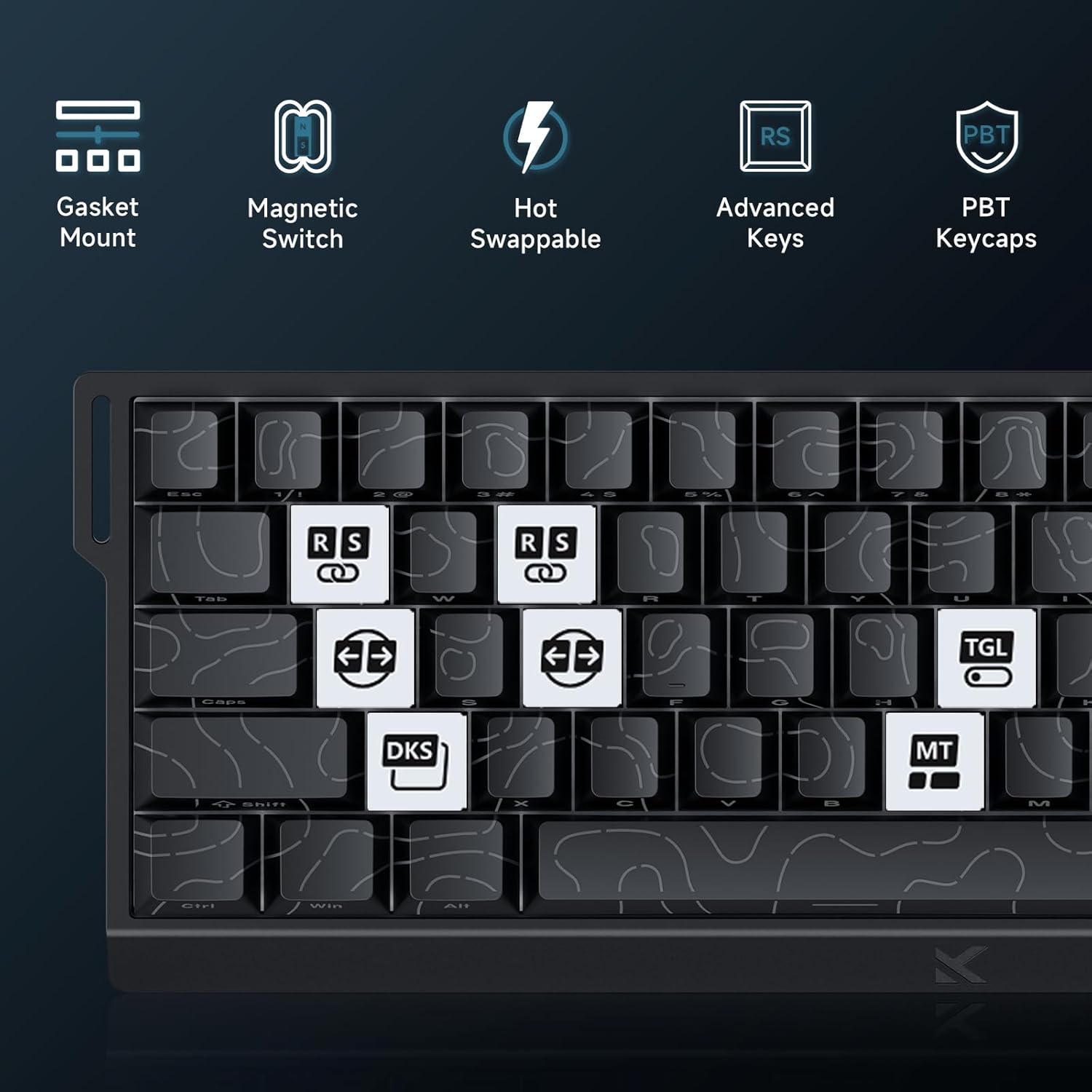
Image: Step 3 - Selecting the Ace 68 device within the M HUB web panganteur.
4. Parentah Operasi
4.1 Polling Rate and Latency
The MCHOSE ACE 68 features an 8000Hz polling rate and a 128K scan rate, resulting in an ultra-low 0.1ms latency. This ensures rapid and precise input registration.

Image: Visual representation of 8000Hz Polling Rate and 0.1ms Report Rate, highlighting fast actuation and response time.
4.2 Pemicu Gancang sareng Aktuasi Anu Bisa Disaluyukeun
The keyboard's magnetic switches allow for dynamic actuation and deactivation points, eliminating traditional input latency.
- Rapid pemicu: Keys activate when pressed and deactivate when released, without a fixed reset point. This allows for faster repeated inputs.
- Aktuasi anu tiasa disaluyukeun: Customize the actuation point of each key from 0.1mm to 4.0mm using the M HUB software. This provides precise control over key sensitivity.

Image: Comparison of Rapid Trigger (dynamic reset) versus traditional fixed actuation/reset points.
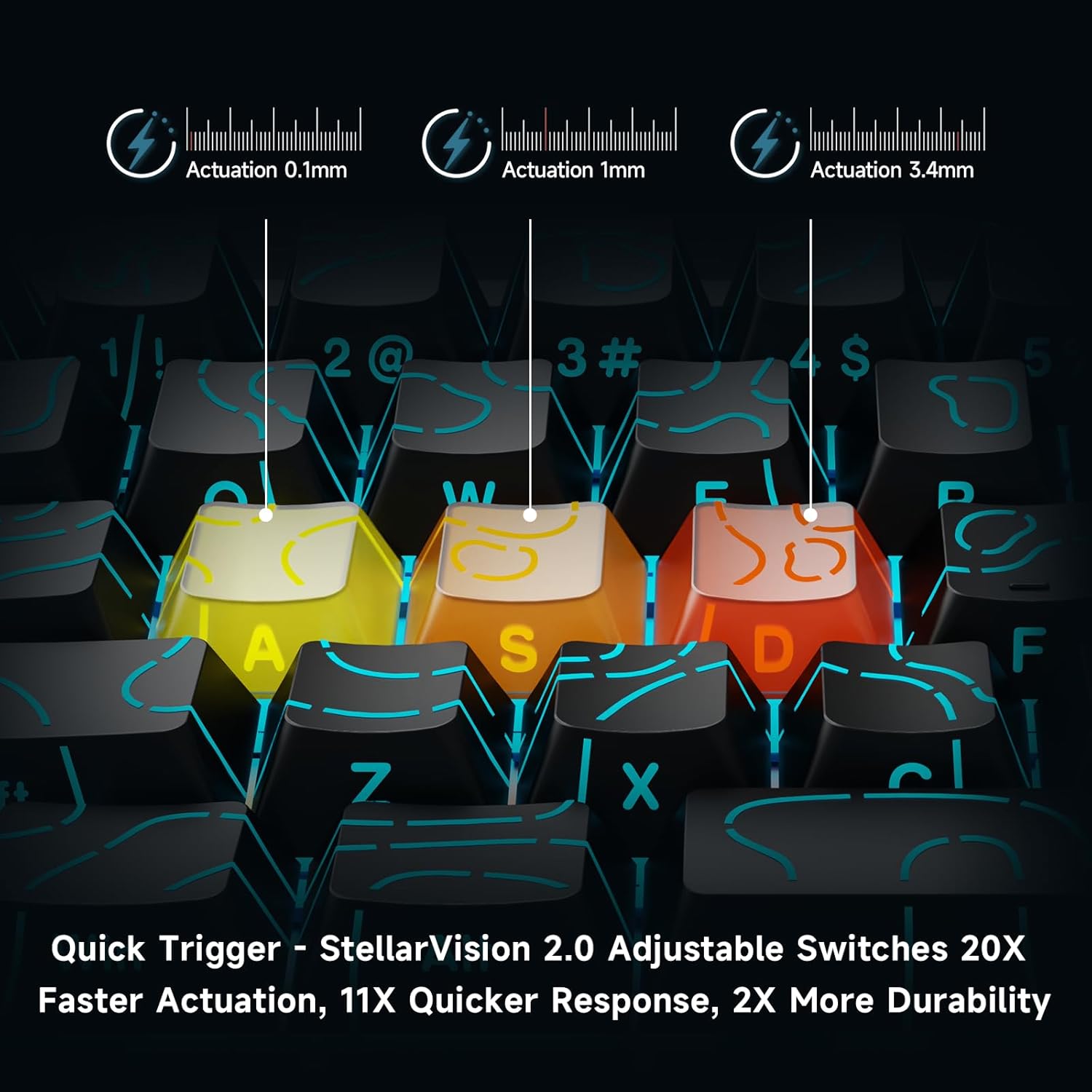
Image: Visual demonstration of adjustable actuation points (0.1mm, 1mm, 3.4mm) for StellarVision 2.0 switches.
4.3 Advanced Key Functionality (M HUB Software)
The M HUB software allows for advanced customization of key behavior:
- RS (Rappy Snappy): Monitors at least two selected keys and activates the key pressed the furthest. When both are at the same depth, it uses your selected SOCD resolution. This enhances movement in games.
- SOCD (Simultaneous Opposing Cardinal Directions): When opposing direction keys (e.g., Left + Right) are pressed together, you can set it to neutralize, prioritize the last-pressed, or hold the first-pressed direction.
- DKS (Dynamic Key Press): Map up to four separate actions along a single key's travel at actuation, bottom-out, first release, and full release for complex macros or multi-stage paréntah.
- MT (Mod-Tap): Assign a key to send one keycode on a quick tap and a different (usually modifier) code when held, blending typing and modifier layers seamlessly.
- TGL (Toggle): Turn any key into an on/off switch-press once to latch the output; press again to cancel. A hold still provides momentary behavior.

Gambar: Leuwihview of key features including Advanced Keys (RS, DKS, TGL, MT).

Image: Diagram explaining the concept of 4-in-1 Action Keys, allowing multiple actions per key based on press depth.
4.4 Kustomisasi Lampu RGB
The MCHOSE ACE 68 features customizable RGB backlighting with 16.8 million colors and 22+ dynamic lighting effects.
- Kombinasi konci FN: Use the Function (FN) key in combination with other keys to adjust lighting effects directly on the keyboard.
- M HUB Software: For full customization, including per-key lighting and advanced effects, use the M HUB web supir.

Image: FN key combinations for adjusting RGB lighting effects, brightness, and speed.

Image: The MCHOSE ACE 68 keyboard displaying various preset RGB lighting effects.
5. Pangropéa
5.1 beberesih
- Pegatkeun sambungan keyboard tina komputer Anjeun sateuacan beberesih.
- Anggo lawon anu lemes sareng garing pikeun ngusap tutup tombol sareng awak kibor.
- Pikeun beberesih anu langkung jero, anggo kaléng udara anu dikomprés pikeun miceun lebu sareng kokotor tina sela-sela tutup tombol.
- Ulah nganggo bahan kimia anu kasar atanapi bahan anu abrasif, sabab ieu tiasa ngaruksak lapisan kibor atanapi legenda keycap.
5.2 Keycap sarta Ngagantian Pindah
The MCHOSE ACE 68 features hot-swappable magnetic switches, allowing for easy replacement without soldering.
- Paké puller keycap disadiakeun pikeun gently nyabut keycap nu dipikahoyong.
- Use the provided switch puller to carefully extract the magnetic switch from its socket.
- Sejajarkeun pin saklar anyar jeung liang dina PCB terus pencét pageuh nepi ka ngaklik kana tempatna.
- Pasangkeun deui tutup konci kana saklar anyar.

Image: Diagram showing the hot-swappable PCB, pre-lubed magnetic switch, plate-mounted stabilizers, hot-swap socket, and north-facing per-key LEDs.
6. Cara ngungkulan
- Keyboard Teu Ngabales:
- Pastikeun kabel USB disambungkeun sacara aman ka kibor sareng komputer.
- Coba sambungkeun kibor ka port USB anu béda dina komputer anjeun.
- Nguji keyboard dina komputer sejen pikeun ngaluarkeun masalah husus sistem.
- Input Lag or Dropped Inputs:
- Ensure the M HUB web driver is installed and updated to the latest version.
- Check the polling rate setting in the M HUB software; ensure it is set correctly for your needs.
- If 'Berserk Mode' is enabled in the M HUB software, be aware that while it offers maximum accuracy, it may impact stability with mixed switch configurations. Try disabling it if issues persist.
- Ensure no other software or background processes are interfering with keyboard input.
- Lampu RGB Teu Jalan/Salah:
- Check FN key combinations for lighting control (refer to section 4.4).
- Verify lighting settings within the M HUB software.
- Pastikeun firmware kibor parantos mutahir.
- Keys Not Actuating Correctly:
- Check the adjustable actuation settings for the specific key in the M HUB software.
- If a switch feels faulty, consider replacing it using the provided spare switches and switch puller (refer to section 5.2).
7. Spésifikasi
| Fitur | Rincian |
|---|---|
| Nomer modél | MCHOSE ACE 68 |
| Tata perenah kibor | 60% Kompak (61 Konci) |
| Pindah Tipe | TTC Dragon Lord Magnetic Switches (Hall Effect) |
| Rentang Aktuasi | 0.1mm - 4.0mm (Tiasa disaluyukeun) |
| Laju Polling | 8000Hz |
| Laju Laporan | 0.1 ms |
| Kancing konci | PBT Keycaps, Cherry Profile, Shine-through legends |
| Lampu tukang | RGB (16.8 Million Colors, 22+ Effects) |
| Konektipitas | Kabel (USB-C) |
| Alat nu cocog | PC, Laptop, Gaming Console, PS5, XBOX |
| Dimensi produk | 12.6 "L x 4.56" W x 1.54 "H (32cm x 11.7cm x 3.9cm) |
| Item Beurat | 2.55 pon (1.16 kg) |
| Fitur husus | Rapid Trigger, Adjustable Actuation, Hot-Swappable Switches, Programmable Keys, Gasket Mount |
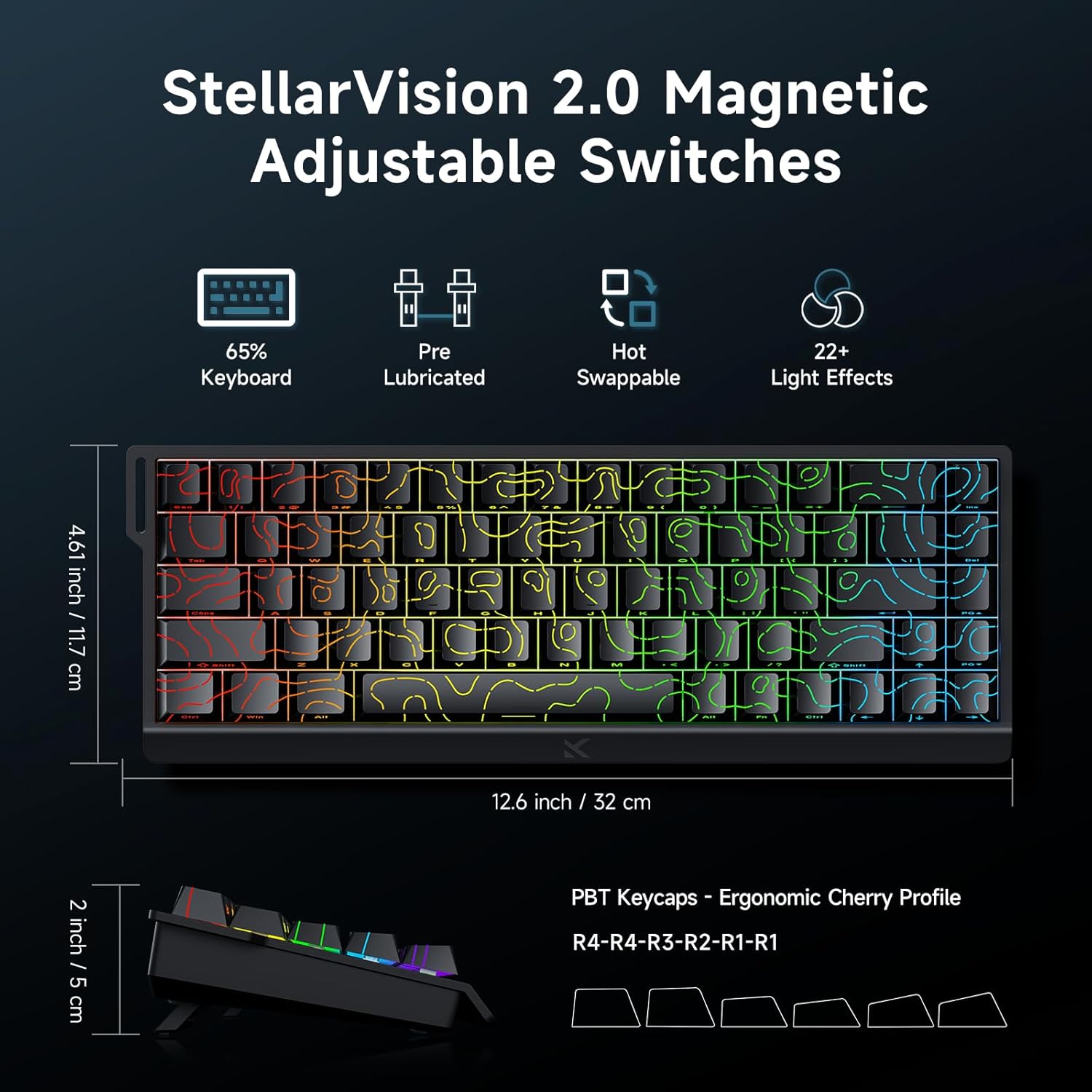
Image: MCHOSE ACE 68 keyboard with dimensions (12.6 inches / 32 cm length, 4.61 inches / 11.7 cm width, 2 inches / 5 cm height) and key features like StellarVision 2.0 Magnetic Adjustable Switches, pre-lubricated, hot-swappable, and 22+ light effects.

Image: Detailed specifications of the Uranus Magnetic Switch eSports, including switch type, actuation range (0.1-3.4mm), lifespan (100 Million Clicks), sensitivity (0.005mm), total travel (3.4mm), and trigger pressure (32 +/- 5 gf).
8. Garansi jeung Rojongan
MCHOSE products are designed for durability and performance. For warranty information, technical support, or further assistance, please visit the official MCHOSE websitus atanapi ngahubungan layanan palanggan maranéhanana langsung. Simpen resi pameseran anjeun pikeun klaim jaminan.
Resmi Websitus: https://www.mchose.com.cn


