1. Bubuka
The Mecpow P50 Fume Extractor is designed to provide a cleaner and safer working environment by effectively removing smoke, dust, and harmful particles generated during various processes, such as laser engraving and soldering. This manual provides essential information for the proper setup, operation, and maintenance of your P50 Fume Extractor.
2. Parentah Kasalametan
Mangga baca sadaya pitunjuk kaamanan kalayan saksama sateuacan ngoperasikeun alat ieu. Upami henteu nuturkeun pitunjuk ieu tiasa nyababkeun cilaka atanapi karusakan kana produk.
- Ensure the power supply matches the specifications listed on the device.
- Do not operate the fume extractor in wet conditions or near flammable liquids or gases.
- Jaga saluran asup jeung kaluarna hawa tetep bébas tina halangan pikeun mastikeun aliran hawa lancar.
- Regularly inspect the power cord for damage. Do not use if the cord is damaged.
- Ulah nyobian ngabongkar atanapi ngalereskeun unit nyalira. Hubungi petugas servis anu mumpuni pikeun bantosan.
- Replace filters as recommended to maintain optimal performance and air quality.
- Jauhkeun tina jangkauan barudak.
3. Produk Langkungview
3.1 Fitur konci
- Nyeuseup kuat: Equipped with a 50W brushless motor, providing 128m³/h airflow for instant smoke and particle capture.
- Sistim Filtrasi 3 Lapisan: Includes a pre-filter, medium HEPA filter, and activated carbon filter for 99.97% purification efficiency.
- Desain disegel: Integrated sealed design with precision-fit air inlet and protective foam to prevent smoke leakage.
- 3 Modeu Speed: Adjustable low, medium, and high-speed settings for various tasks.
- Operasi sepi: Operates at a noise level under 55 dB.
- Kasaluyuan lega: Compatible with Mecpow M1, Atomstack P1, and other laser engravers with a Φ50 mm flange.
3.2 Komponén
The Mecpow P50 Fume Extractor consists of the main unit, a flexible exhaust hose, and a power cable. The internal filtration system comprises three distinct layers.
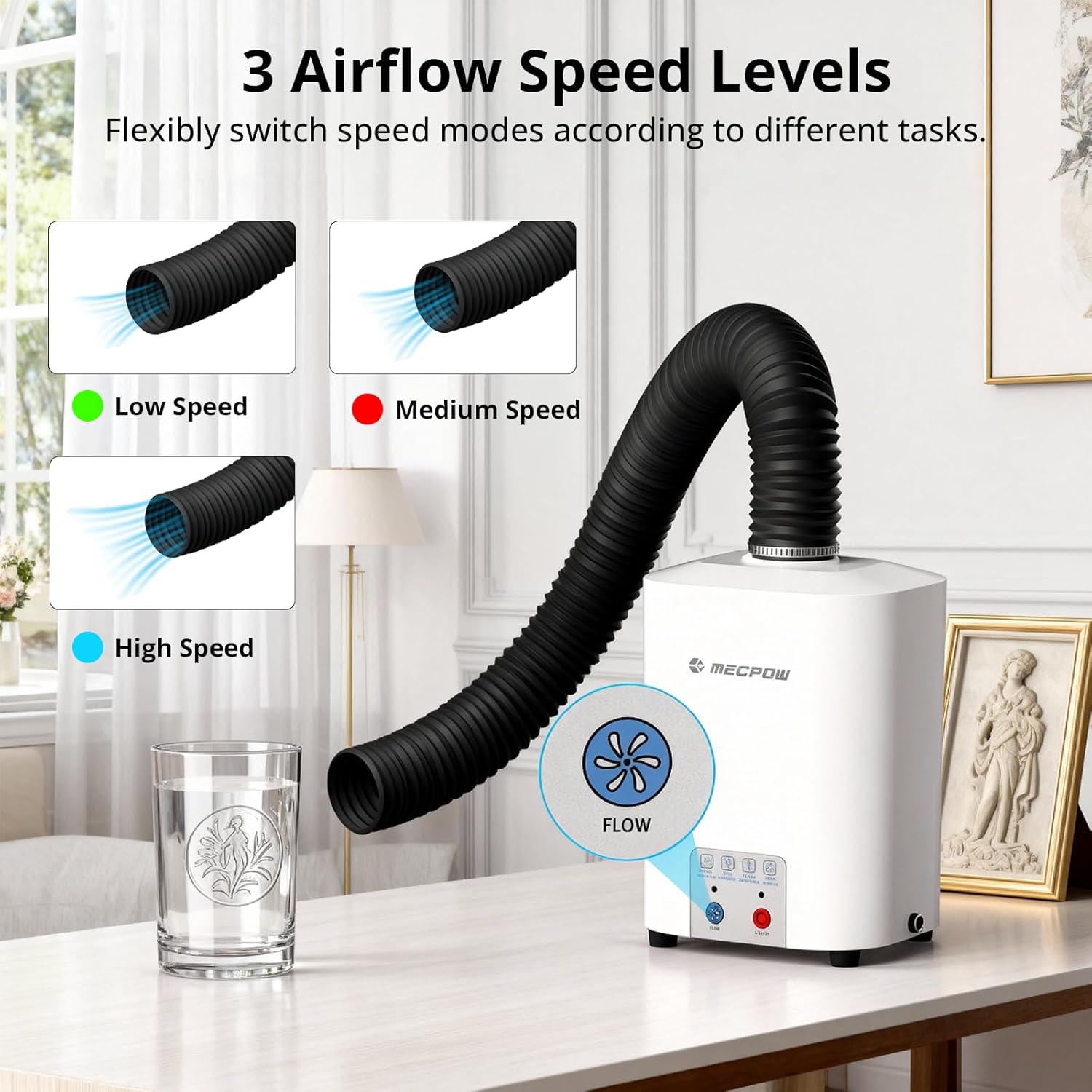
Figure 3.2.1: Mecpow P50 Fume Extractor with exhaust hose. This image shows the complete fume extractor unit, including the main body and the flexible exhaust hose connected to the top.
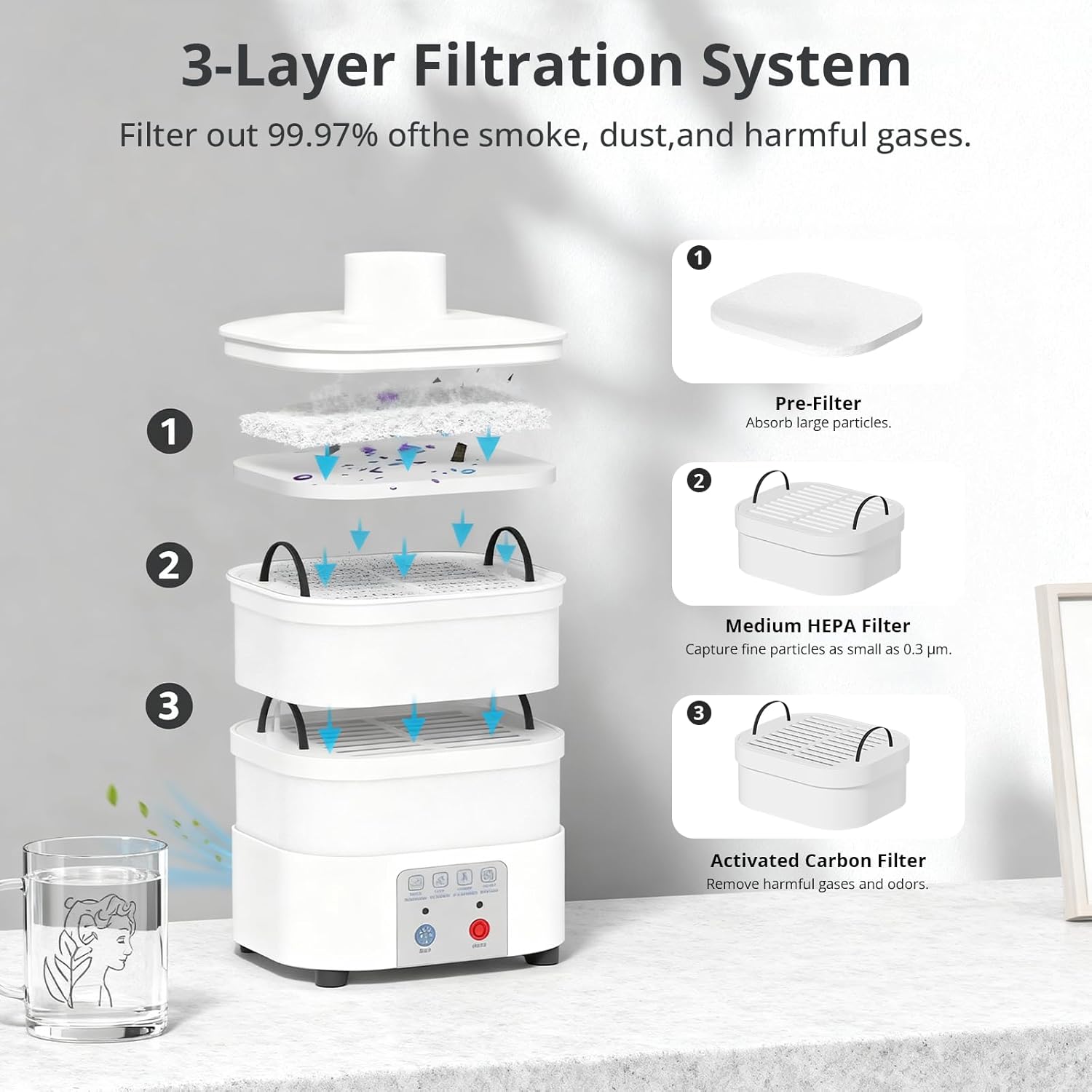
Gambar 3.2.2: Detil view of the 3-Layer Filtration System. This diagram illustrates the three filter layers: (1) Pre-Filter for large particles, (2) Medium HEPA Filter for fine particles, and (3) Activated Carbon Filter for harmful gases and odors.

Figure 3.2.3: Product Dimensions of the Mecpow P50. This image displays the height (240 mm / 9.45 inch) and width (148 mm / 5.83 inch front, 128 mm / 5.04 inch side) of the fume extractor unit.
4. Setélan
- Ngabongkar bungkusan: Sacara saksama miceun sadaya komponén tina bungkusan. Pastikeun yén sadaya bagian anu didaptarkeun dina daptar bungkusan aya.
- Pamasangan Filter:
- Open the top cover of the fume extractor.
- Insert the activated carbon filter at the bottom, followed by the medium HEPA filter, and finally the pre-filter on top. Ensure they are seated correctly.
- Tutup panutup luhur aman.
- Sambungan selang: Attach one end of the flexible exhaust hose to the outlet on top of the fume extractor. Secure it firmly.
- panempatan: Position the fume extractor on a stable, flat surface near your laser engraver or soldering station. Connect the other end of the exhaust hose to the fume outlet of your laser engraver (if applicable) or position it to capture fumes effectively.
- Sambungan Daya: Connect the power cable to the fume extractor and then plug it into a suitable power outlet.

Figure 4.1: Mecpow P50 Fume Extractor set up with a laser engraver. This image demonstrates the fume extractor connected via its hose to a laser engraver, showing a typical setup for fume extraction during operation.
5. Parentah Operasi
- Daya Hurung: Pencét éta ON/OFF button located on the front panel to turn on the fume extractor. The indicator light will illuminate.
- Adjusting Airflow Speed:
- Pencét éta ALIRAN button to cycle through the three airflow speed levels: Low, Medium, and High.
- Select the appropriate speed based on the intensity of fumes and your working environment.
- Operasi: Begin your laser engraving or soldering task. The fume extractor will continuously draw in smoke and particles, purifying the air.
- Pareum listrik: After completing your task, press the ON/OFF button again to turn off the fume extractor.

Figure 5.1: Control panel and airflow speed levels. This image highlights the control buttons for power and airflow, showing indicators for Low, Medium, and High speed settings.

Figure 5.2: Sealed design for effective fume containment. This image illustrates the fume extractor's sealed design, demonstrating how it prevents smoke leakage and maintains a clean workspace.

Figure 5.3: Quiet operation of the Mecpow P50. This image shows the fume extractor in a home environment, emphasizing its low noise level (under 55 dB) compared to typical traffic noise or normal conversation.
6. Pangropéa
Regular maintenance ensures the longevity and optimal performance of your Mecpow P50 Fume Extractor.
6.1 Filter ngagantian
The 3-layer filtration system requires periodic replacement to maintain 99.97% purification efficiency. The frequency of replacement depends on usage and the type of materials processed.
- Pareum listrik: Ensure the fume extractor is turned off and unplugged before performing any maintenance.
- Open Unit: Carefully open the top cover of the fume extractor.
- Hapus Saringan Lawas: Remove the pre-filter, medium HEPA filter, and activated carbon filter. Dispose of used filters responsibly according to local regulations.
- Pasang Saringan Anyar: Place new filters in the correct order: activated carbon filter at the bottom, then the medium HEPA filter, and finally the pre-filter on top. Ensure a snug fit.
- Tutup Unit: Securely close the top cover.
Replacement filters can be purchased from authorized Mecpow retailers or the official Mecpow websitus.
6.2 Ngabersihan Unit
- Wipe the exterior of the fume extractor with a soft, damp lawon. Ulah make cleaners abrasive atawa pangleyur.
- Pastikeun teu aya cairan anu asup kana komponén internal.
- Periodically check the exhaust hose for any blockages or damage. Clean if necessary.
7. Cara ngungkulan
| Masalah | Mungkin Cukang lantaranana | Solusi |
|---|---|---|
| Unit teu hurung. |
|
|
| kakuatan nyeuseup low. |
|
|
| Noise mahiwal salila operasi. |
|
|
8. Spésifikasi
- model: P50
- Daya Motor: 50W (Tanpa Sikat)
- Laju aliran hawa: 128 m³/jam
- Sistim filtrasi: 3-Layer (Pre-filter, Medium HEPA filter, Activated Carbon filter)
- Purification Rate: 99.97%
- Tingkat Noise: <55 dB
- Kasaluyuan: Mecpow M1, Atomstack P1, and other laser engravers with Φ50 mm flange.
- Beurat barang: 10.01 pon (kira-kira 4.54 kg)
- Ukuran (approx.): 148 mm (W) x 128 mm (D) x 240 mm (H)
9. Garansi jeung Rojongan
9.1 Émbaran jaminan
Mecpow provides a 1-year warranty for the P50 Fume Extractor from the date of purchase. This warranty covers manufacturing defects and workmanship under normal use. It does not cover damage caused by misuse, accidents, unauthorized modifications, or improper maintenance.
Punten tahan bukti pameseran anjeun pikeun klaim garansi.
9.2 Rojongan Palanggan
For technical assistance, troubleshooting, or warranty inquiries, please contact Mecpow customer support through the official website or your retailer. Our support team is available to help you with any questions or issues you may encounter.
Visit the official Mecpow websitus kanggo inpormasi dukungan sareng detail kontak pangénggalna: www.mecpow.com


