1. Bubuka
Welcome to the Insta360 X4 Air, a lightweight and powerful 8K 360 action camera designed to capture every moment with exceptional clarity and flexibility. This manual provides essential information for setting up, operating, and maintaining your camera to ensure optimal performance.

Image 1.1: The Insta360 X4 Air camera in action, demonstrating its lightweight design and 360-degree capture capabilities.
2. Produk Langkungview
The Insta360 X4 Air is engineered for ease of use and versatility, featuring advanced technology to simplify your content creation process. Key features include:
- Lightweight & Portable (165g): Designed for effortless carrying and use, making it ideal for travel and daily adventures.
- 8K 360 Video: Captures stunning 8K30fps 360-degree footage, ensuring no detail is missed.
- Shoot First, Frame Later: Record everything around you and choose your desired angles during post-production using the Insta360 app.
- Invisible Selfie Stick Effect: Achieve drone-like shots and third-person perspectives with a selfie stick that automatically vanishes from your footage.
- Replaceable Lenses: Durable lenses that can be easily replaced if damaged, extending the camera's lifespan.
- FlowState Stabilization & 360° Horizon Lock: Ensures smooth, steady, and perfectly level videos in any situation.
- 8K30fps Active HDR: Enhances colors and details in challenging lighting conditions.
- AI-Powered Editing: Simplifies video editing with smart tools, templates, and effects in the Insta360 app.
- Built-in Wind Guard: Reduces wind noise for clear audio capture.
- Tahan cai: Water-resistant up to 49ft (15m) without a case.

Gambar 2.1: Leuwihview of the Insta360 X4 Air's key features and design elements.
3. Setélan
3.1. Inserting the Battery and MicroSD Card
- Pastikeun kaméra dipareuman.
- Teang panto kompartemen batré di sisi kaméra.
- Open the door and insert the provided battery, ensuring the contacts align correctly.
- Insert a compatible MicroSD card (UHS-I, V30 or above recommended) into the designated slot until it clicks into place.
- Tutup panto kompartemen batré aman pikeun ngajaga waterproofing.

Image 3.1: Proper insertion of the battery into the Insta360 X4 Air camera.
3.2. Ngecas Batré
Connect the camera to a power source using the provided USB-C cable. The indicator light will show charging status. A full charge provides up to 88 minutes of 8K30fps video recording.
3.3. Attaching the Selfie Stick
The Insta360 X4 Air is compatible with various accessories, including the Invisible Selfie Stick (sold separately). To attach:
- Align the 1/4" screw mount on the selfie stick with the tripod thread at the bottom of the camera.
- Rotate the selfie stick clockwise until it is securely fastened.

Image 3.2: The Invisible Selfie Stick effect, achieved by attaching the camera to a compatible selfie stick.
4. Parentah Operasi
4.1. Daya Hurung / Pareum sareng Kontrol Dasar
- Tombol Daya: Pencét jeung tahan pikeun mareuman/nonaktipkeun.
- Tombol jepret: Press to start/stop recording or take a photo.
- Tombol Pindah Gancang: Press to cycle through shooting modes.
4.2. Modeu shooting
The X4 Air offers versatile shooting modes:
- Video 360: Captures full 360-degree footage in 8K30fps.
- Single Lens Mode: Records traditional flat video (up to 4K60fps) using one of the camera's lenses.
- Modeu Poto: Takes 360-degree or single-lens still images.

Image 4.1: The camera's ability to capture immersive 8K 360 video.
4.3. Stabilization and Horizon Lock
The camera features FlowState Stabilization and 360° Horizon Lock, which automatically keep your footage smooth and level, even during dynamic movements.
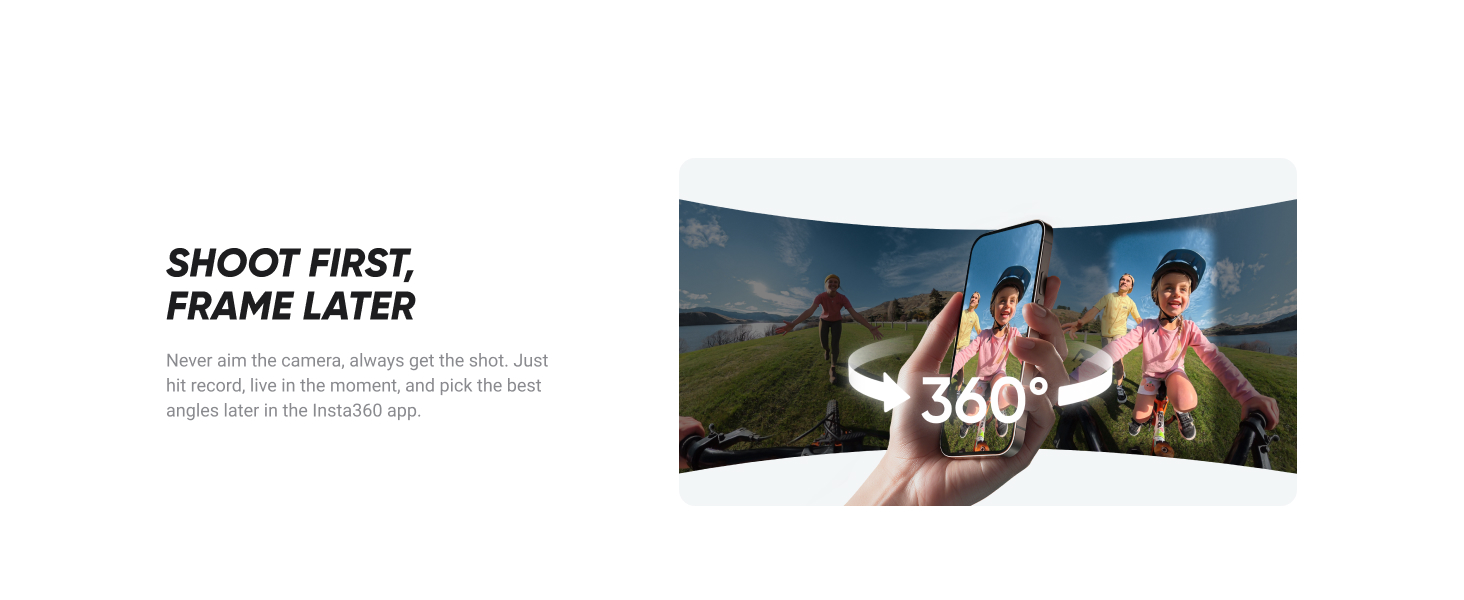
Image 4.2: Demonstrating the effectiveness of FlowState Stabilization for smooth video.
4.4. AI-Powered Editing
Utilize the Insta360 app for advanced AI editing tools, including:
- Auto Edit: Creates dynamic videos with music, camera moves, and transitions.
- AI Frame: Identifies and suggests the best parts of your shot.
- Preset Perspectives: Choose between forward or selfie views without manual reframing.
- One-Tap Templates: Apply fun effects and creative styles easily.

Gambar 4.3: Examples of AI-powered editing features available in the Insta360 app.
5. Pangropéa
5.1. Ngabersihkeun Lénsa
Gently wipe the lenses with a microfiber cloth. Avoid using harsh chemicals or abrasive materials that could scratch the lens surface.
5.2. Replacing Lenses
The X4 Air features replaceable lenses. If a lens becomes damaged, refer to the official Insta360 lens replacement kit instructions for safe and proper replacement.

Image 5.1: Illustration of the replaceable lens feature on the Insta360 X4 Air.
5.3. Waterproofing Precautions
Ensure all ports and the battery compartment are securely closed before exposing the camera to water to maintain its 49ft (15m) waterproof rating.
6. Cara ngungkulan
- Kaméra teu hurung: Pastikeun batre tos dicas pinuh sareng diselapkeun leres.
- Masalah Rekaman: Check if the MicroSD card has sufficient space and is of the recommended speed class.
- Masalah Konektipitas Aplikasi: Ensure Bluetooth and Wi-Fi are enabled on your mobile device and the camera, and that the Insta360 app is up to date.
- Overheating: If the camera becomes excessively hot, stop recording and allow it to cool down in a well-ventilated area.
7. Spésifikasi
| Fitur | Rincian |
|---|---|
| merek | Insta360 |
| Nomer modél | CINSAAFA |
| Item Beurat | 15.5 ounces (approx. 165g camera only) |
| Resolusi Video | 8K (360), 4K (Single Lens) |
| Stabilisasi | FlowState Stabilization, 360° Horizon Lock |
| Tahan cai | Nepi ka 49 suku (15 méter) |
| Kahirupan batré | Up to 88 minutes (8K30fps) |
| Panyimpenan | Micro SD (UHS-I, V30 or above) |
| Konektipitas | USB |
8. Naon dina Box
- 1x Insta360 X4 Air Camera
9. Garansi jeung Rojongan
The Insta360 X4 Air comes with a standard manufacturer's warranty. For detailed warranty information, technical support, or service requests, please visit the official Insta360 websitus atanapi ngahubungan layanan palanggan maranéhna. Simpen bukti pameseran anjeun pikeun klaim garansi.


