Bubuka
This manual provides essential information for setting up and operating your Vivitar Kidztech Purple Panda Digital Video Camera. Designed for young photographers aged 3 to 9, this camera captures high-definition photos and videos, offering a fun and durable tool for creative expression. Please read through these instructions carefully to ensure proper use and to maximize your enjoyment of the product.
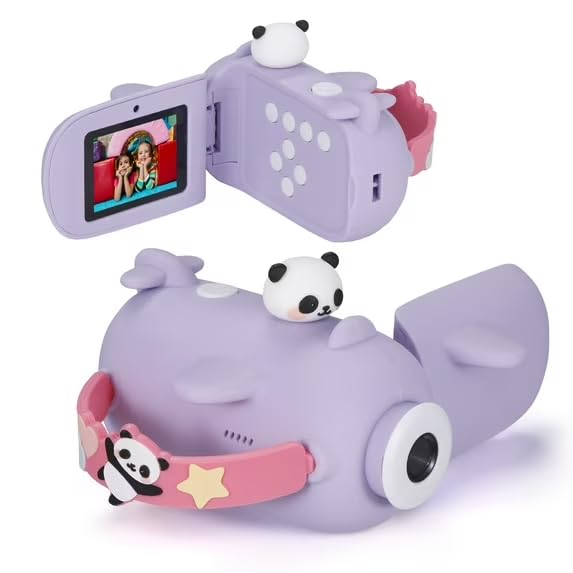
Image: Vivitar Kidztech Purple Panda Digital Video Camera, showcasing its compact and kid-friendly design.
Naon dina Box
Upon unboxing your Vivitar Kidztech Purple Panda Digital Video Camera, please ensure all the following items are present:
- Awak kaméra: The main digital video camera unit.
- Batré: Integrated 750mAh lithium polymer battery.
- Kabel USB: Pikeun ngecas sareng mindahkeun data.
- Kartu MicroSD: A preinstalled 32GB MicroSD card for storage.
- Lanyard: An innovative lanyard that also functions as a charging and data transfer cable.
Disetél
- Ngecas kaméra: Connect the camera to a USB power source using the provided USB cable. The camera features a robust 750mAh lithium polymer battery designed for extended use.
- Kartu MicroSD: The camera comes with a preinstalled 32GB MicroSD card. Ensure it is securely inserted into the designated slot.
- Ngalampirkeun Lanyard: Secure the innovative lanyard to the camera. This lanyard is designed for easy carrying and also doubles as a charging and data transfer cable.
Parentah Operasi
- Hurungkeun/Pareuman: Press and hold the power button (usually located on the side or top) for a few seconds until the screen illuminates or turns off.
- Napigasi: Use the directional buttons (up, down, left, right) to navigate through the camera's menu options and settings. The 'OK' button typically confirms selections.
- Modeu Poto: Select the camera icon from the main menu. Press the shutter button to capture photos. The camera supports up to 16MP photos.
- Modeu Video: Select the video camera icon from the main menu. Press the shutter button to start and stop video recording. The camera records in 1920 x 1080 resolution.
- Ngazum Digital: In photo mode, use the zoom buttons (often integrated with directional buttons) to digitally zoom in or out.
- Kaméra selfie: The camera features a built-in selfie camera. To activate, rotate the lens to face the user. This allows children to easily capture their own adventures.
- Kaulinan: The camera includes built-in games for entertainment. Navigate to the 'Games' icon in the menu to access them.
- Setélan: Access the 'Settings' menu (often represented by a gear icon) to adjust various camera parameters such as resolution, date/time, and other preferences.
Mindahkeun Files
To transfer photos and videos from your camera to a computer or other compatible device:
- Ngagunakeun Kabel USB: Connect the camera directly to your computer using the provided USB cable. The camera should appear as a removable drive, allowing you to copy files.
- Using the MicroSD Card: Alternatively, you can remove the MicroSD card from the camera and insert it into a compatible card reader connected to your computer.
Pangropéa
- beberesih: Anggo lawon anu lemes sareng garing pikeun ngabersihkeun awak kaméra sareng lénsa. Hindarkeun nganggo bahan kimia anu keras atanapi bahan anu kasar.
- Panyimpenan: Simpen kaméra di tempat anu tiis sareng garing jauh tina sinar panonpoé langsung sareng suhu anu ekstrim nalika henteu dianggo.
- Daya tahan: The camera is made from safe, durable ABS plastic and food-grade silicone to withstand everyday play. However, avoid intentional drops or impacts.
Pamérésan masalah
- Kaméra Henteu Hurung: Ensure the battery is fully charged. Connect the camera to a power source and allow it to charge for at least 30 minutes before attempting to power on again.
-
Dokumén Patali - Purple Panda Digital Video Camera

Vivitar DVR48K 4K Waterproof Camcorder User Manual
Comprehensive user manual for the Vivitar DVR48K 4K Waterproof Camcorder, covering setup, operation, features, specifications, and warranty information.
Vivitar 4K Digital Camcorder DVR5K Instruction Manual
This manual provides instructions for operating the Vivitar 4K Digital Camcorder DVR5K, including setup, features, modes, and troubleshooting.
Vivitar DVR 4K (v4) Pituduh Gampang Camcorder Digital
Pituduh gampang komprehensif pikeun Vivitar DVR 4K (v4) Digital Camcorder, ngawengku setelan, operasi, setelan sistem, manajemén kartu memori, playback, konektipitas, pamakéan aplikasi, jeung ngungkulan.
Vivitar DVR 508v2 Digital Video Camcorder User Manual
Comprehensive user manual for the Vivitar DVR 508v2 Digital Video Camcorder, detailing setup, features, operation, software, and troubleshooting. Learn to capture high-quality videos and photos with your Vivitar camcorder.
Vivitar DVR 4K (v3) Pituduh Gampang Camcorder Digital
Pituduh gampang ieu nyadiakeun parentah komprehensif pikeun Vivitar DVR 4K (v3) Digital Camcorder, ngawengku setelan awal, ngecas batré, sarat sistem, kontrol lengkep, modeu operasi, manajemén kartu memori, nyambungkeun ka komputer, ngagunakeun aplikasi iDV-PRO, sarta ngungkulan masalah umum. Optimalkeun pangalaman ngarékam pidéo sareng fotografi 4K anjeun nganggo manual penting ieu.
Vivitar DVR 908HD Digital Camcorder User Manual: Setup, Features, and Operation
Comprehensive user manual for the Vivitar DVR 908HD digital camcorder. Learn about setup, features like ViviLink and LED flash, video/photo capture and playback modes, technical specifications, system requirements, software installation, and troubleshooting.