Bubuka
The Divoom MiniToo is a compact, retro PC-style computer speaker featuring a smart pixel screen. It offers Bluetooth and USB audio connectivity, along with alarm, white noise, and focus tools. This manual provides instructions for setting up, operating, maintaining, and troubleshooting your MiniToo speaker.
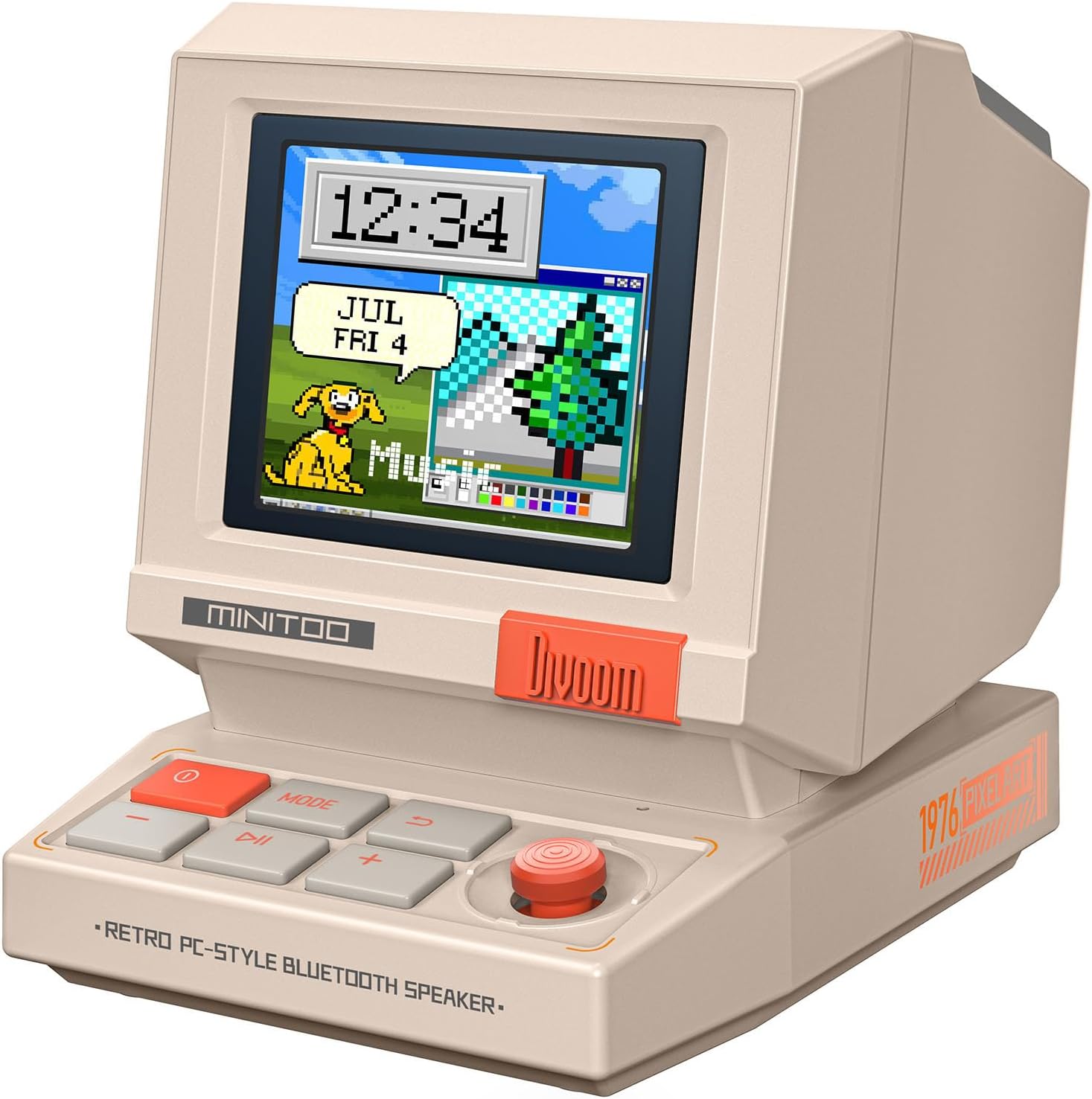
Gambar: Hareupeun view of the Divoom MiniToo speaker, showcasing its retro computer design and pixel art display with a clock and a dog illustration.
Eusi pakét
- Divoom MiniToo Speaker
- Gancang Mimitian Guide
- Kabel Ngecas USB
Disetél
1. Powering On sareng Ngecas
The MiniToo speaker includes a built-in battery. Before first use, fully charge the device using the provided USB cable. Connect the USB cable to the speaker's charging port and a compatible USB power adapter (not included) or computer USB port.

Gambar: Tukangeun view of the Divoom MiniToo speaker, highlighting the USB port for charging and audio, and the TF card slot.
2. Sambungan Awal
The MiniToo supports Bluetooth, USB audio, and TF card playback.
- Masangkeun Bluetooth:
- Pencét jeung tahan tombol daya pikeun ngahurungkeun spiker.
- The pixel screen will display a Bluetooth icon, indicating it's in pairing mode.
- On your device (smartphone, tablet, computer), enable Bluetooth and search for "Divoom MiniToo".
- Select "Divoom MiniToo" to connect. A confirmation sound will play upon successful pairing.
- Audio USB: Connect the speaker to your computer using a USB cable. The speaker will be recognized as an audio output device. Select it from your computer's sound settings.
- Playback Kartu TF: Lebetkeun kartu TF nganggo audio files into the designated slot on the back of the speaker. The speaker will automatically switch to TF card playback mode.

Image: The Divoom MiniToo speaker connected to a laptop via USB, illustrating its versatile connectivity options including Bluetooth, USB Audio, and TF Card playback.
3. Divoom App Installation
For full functionality, including pixel art customization and advanced features, download the Divoom app from your device's app store (iOS App Store or Google Play Store). Follow the in-app instructions to connect your MiniToo speaker.
Parentah Operasi
1. Kadali dasar
The MiniToo features several buttons and a joystick for navigation and control:
- Tombol Daya (Beureum): Press and hold to power on/off. Short press to switch display modes.
- Tombol MODE: Short press to cycle through different functions (e.g., Music, Clock, Alarm, Tools).
- Tombol Puter/Reureuh: Puter atanapi ngareureuhkeun audio.
- Tombol Volume (+/-): Saluyukeun polumeu.
- Joysticks: Navigate menus, confirm selections, or snooze alarms.

Image: The Divoom MiniToo speaker showcasing its pixel screen with a digital clock and retro computer-style interface, demonstrating its display capabilities.
2. Pixel Screen Customization
The 1.77" pixel display can be customized via the Divoom app:
- DIY Faces & Messages: Create your own pixel art, animations, or text messages.
- Clock Faces: Choose from over 70 retro clock faces and widgets.
- Photo Display: Cast photos from your phone to the speaker's screen using the app.

Image: A user interacting with the Divoom app on a smartphone to create pixel art, which is simultaneously displayed on the MiniToo speaker's screen.

Image: The Divoom MiniToo speaker displaying a photo on its screen, demonstrating the photo casting feature from a smartphone app.

Image: A collage showing multiple retro clock faces and widgets available for the Divoom MiniToo speaker, both on the device and within the companion app.
3. Alarm Clock, White Noise & Focus Tools
The MiniToo integrates several utility functions:
- Jam alarem: Set gentle alarms with various sounds directly on the device or through the app. Use the joystick to snooze.
- White Noise & Sleep Sounds: Access a selection of white noise and natural sounds (e.g., rain, forest) to aid sleep or relaxation.
- Focus Tools: Utilize Pomodoro timers and reminders to manage your work or study sessions.

Image: The Divoom MiniToo speaker displaying an alarm, accompanied by a visual list of 12 distinct wake-up sounds available for selection.

Image: The Divoom MiniToo speaker on a bedside table, showing a pixel art display, with visual cues for its white noise and sleep sound functions.
Pangropéa
1. beberesih
Wipe the speaker with a soft, dry, lint-free cloth. Do not use abrasive cleaners, solvents, or spray directly onto the device. Avoid getting moisture into any openings.
2. Kaperawatan batré
Pikeun manjangkeun umur batré, ulah sering ngosongkeun batréna. Upami nyimpen alat kanggo waktos anu lami, eusian dugi ka sakitar 50% unggal sababaraha bulan.
Pamérésan masalah
| Masalah | Mungkin Cukang lantaranana | Solusi |
|---|---|---|
| Alat teu hurung. | Batré lemah atawa tombol daya teu dipencet bener. | Cas alatna. Pencét terus tahan tombol daya salami 3-5 detik. |
| Taya sora tina speaker. | Volume teuing leutik, sumber input salah, atanapi alat teu nyambung. | Increase volume. Check Bluetooth connection, USB audio selection, or TF card insertion. |
| Papasangan Bluetooth gagal. | Speaker not in pairing mode, or device too far. | Ensure speaker is in pairing mode. Move devices closer. Forget "Divoom MiniToo" on your device and try pairing again. |
| Pixel screen is unresponsive or frozen. | Software glitch. | Perform a soft reset by holding the power button until the device restarts. If issues persist, consult the Divoom app for firmware updates. |
spésifikasi
| Ngaran modél | MiniToo |
| Tipe Speaker | Speaker Speaker |
| Téhnologi konektipitas | Bluetooth 5.3, USB Audio, TF Card |
| Speaker Maksimum Kaluaran Power | 5 Watt |
| tampilan | 1.77" TFT, 128x160, 60 Hz |
| Diménsi Produk (W x D x H) | 3.2 x 2.4 x 2.9 inci |
| Item Beurat | 201.8 g (kira-kira 7.1 ons) |
| Batré | 5.55 Wh, approx. 6 hours playtime |
| Komponén Kaasup | Quick Start Guide, USB Charging Cable |

Image: A detailed diagram illustrating the physical dimensions and key technical specifications of the Divoom MiniToo speaker.
Garansi sareng Rojongan
For warranty information, please refer to the Quick Start Guide included in your package or visit the official Divoom website. For technical support or further assistance, please contact Divoom customer service through their official channels.
Divoom Resmi Websitus: www.divoom.com


