Bubuka
The ARCCTV Y2U3 Indoor Security Camera is designed to enhance your home's security and monitoring capabilities. Featuring advanced Wi-Fi 6 and dual-band (5GHz/2.4GHz) connectivity, it ensures stable and fast streaming. This camera offers 2.5K Quad HD resolution for clear visuals, two-way audio for communication, and intelligent motion detection with tracking. It also includes true-color night vision, automatic patrol cruise, and compatibility with Amazon Alexa for voice control.
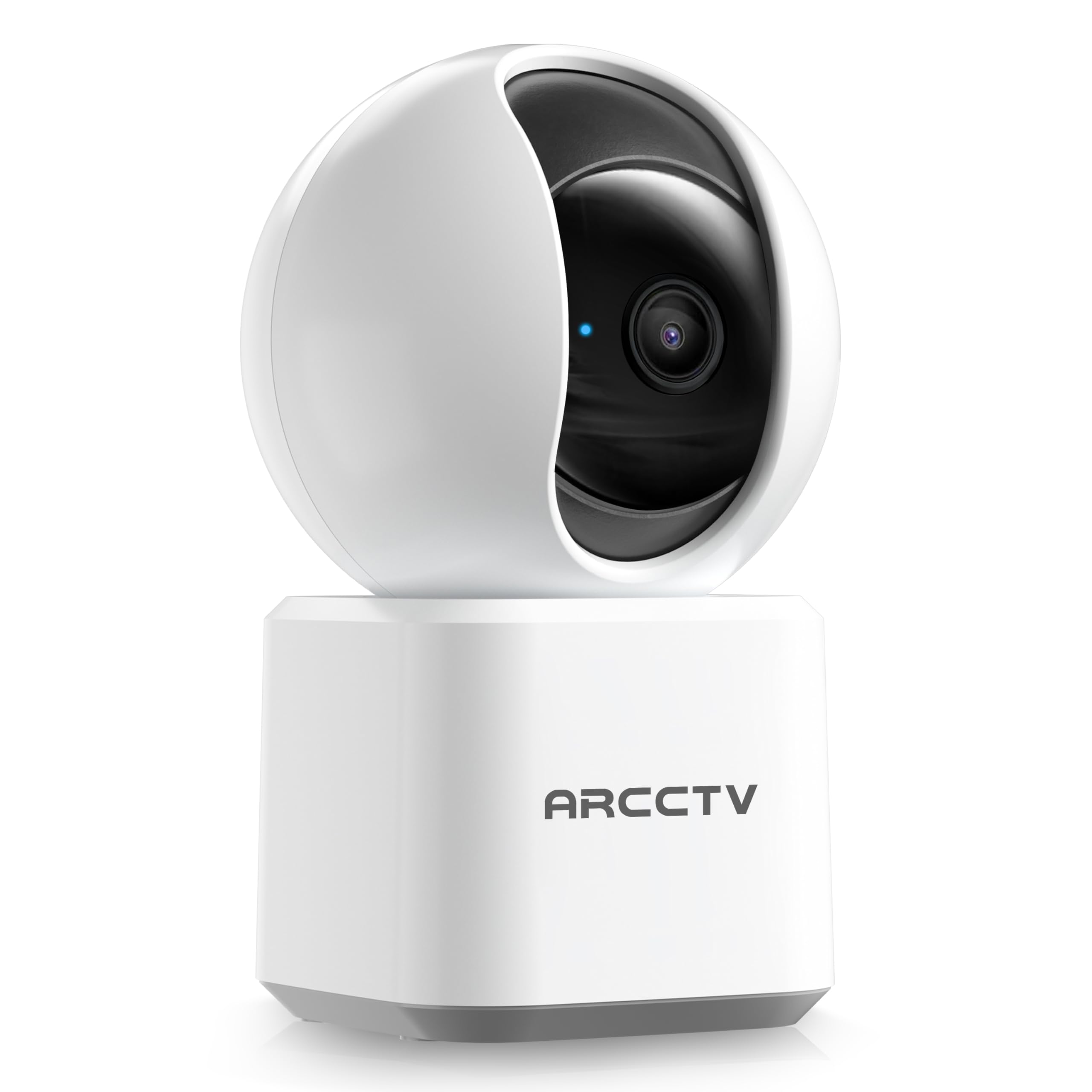
Image: The ARCCTV Y2U3 Indoor Security Camera.
Naon dina Box
Upon unboxing your ARCCTV Y2U3 camera, you should find the following components:
- ARCCTV Y2U3 Indoor Security Camera Body
- USB Power Adapter (for your region)
- Kabel Daya USB-C
- Ningkatna Kurung
- Pemasangan Screws sareng Jangkar Tembok
- Gancang Mimitian Guide

Image: The ARCCTV Y2U3 camera and its included accessories laid out on a wooden surface.
Video: An unboxing video demonstrating the contents of the ARCCTV Y2U3 Indoor Security Camera package, including the camera, power adapter, USB-C cable, mounting bracket, screws, and quick start guide.
Disetél
- Daya Hurung: Connect the USB-C cable to the camera's port (located at the back of the base) and the USB power adapter. Plug the adapter into a power outlet. The camera will initiate a self-test and a blue indicator light will appear.
- Unduh Aplikasi: Scan the QR code in the Quick Start Guide or search for the "ARCCTV Security" app on your smartphone's app store (available for Android and iOS).
- Pendaptaran Akun: Buka aplikasi sareng ngadaptarkeun akun énggal atanapi lebet upami anjeun parantos gaduh.
- Tambahkeun Alat: Follow the in-app instructions to add your new camera. This typically involves selecting "Add Device," choosing your camera model, and scanning a QR code displayed on your phone with the camera's lens.
- Sambungan Wi-Fi: Ensure your smartphone is connected to a 2.4GHz or 5GHz Wi-Fi network. The camera supports both bands. The app will guide you through connecting the camera to your home Wi-Fi.
- Pamasangan Kartu MicroSD (Opsional): If you plan to use local storage, gently rotate the camera lens upwards to reveal the microSD card slot. Insert a compatible microSD card (up to 256GB, not included) with the gold contacts facing down.
- Pamasangan (Opsional): If mounting the camera, use the provided mounting bracket, screws, and wall anchors. Secure the bracket to your desired location (wall or ceiling), then attach the camera to the bracket. Ensure the camera is within range of a power outlet.
Video: Pra-view of the ARCCTV Y2U3 camera setup process, demonstrating the initial power-on, app connection, and basic functionality like pan/tilt control and live view.
Parentah Operasi
Hirup View sarta Pan / Dengdekkeun Control
Access the live feed through the ARCCTV Security app. Use the on-screen controls to remotely pan (355° horizontal) and tilt (90° vertical) the camera lens, providing a 360° panoramic view of your space. This allows you to monitor every corner of the room.

Image: The camera's pan and tilt capabilities are illustrated, showing its wide coverage range.
Audio Dua Arah
Utilize the built-in microphone and speaker for real-time two-way communication. Speak through the app to interact with family members, pets, or deter intruders. The audio quality is designed for clear conversations.

Image: A visual representation of the two-way communication feature, allowing interaction with individuals near the camera.
Deteksi gerak sareng nyukcruk
The camera features intelligent motion detection that sends instant notifications to your smartphone when activity is detected. With Smart Motion Tracking, the camera's lens automatically follows moving subjects, ensuring continuous monitoring of important events. You can customize monitoring zones to focus on specific areas.

Image: The camera's precision motion detection capability, distinguishing between human and pet movements.

Image: Smart motion tracking in action, where the camera automatically adjusts to follow moving subjects.
Visi Peuting
The camera is equipped with true-color night vision using an invisible light spectrum, allowing for clear monitoring in low-light conditions without disruptive red glows. The night vision range is up to 32 feet.

Image: A depiction of the camera's night vision capability, providing clear monochrome images in darkness.
Pilihan Panyimpenan
The ARCCTV Y2U3 supports local storage via a microSD card (up to 256GB) for continuous recording. Additionally, encrypted cloud storage is available through a paid subscription, ensuring your data is secure even if the device is damaged.

Image: The camera highlighting its microSD card slot for local video storage.

Image: An illustration of encrypted cloud storage, emphasizing data security and accessibility.
Kasaluyuan Alexa
Integrate your ARCCTV Y2U3 camera with Amazon Alexa for convenient voice control. Use simple voice commands like "Alexa, show me the nursery" to view the live feed on compatible Alexa-enabled devices.
Image: A user interacting with the camera via Alexa voice commands, viewing the feed on a tablet.
Pangropéa
- beberesih: Gently wipe the camera lens and body with a soft, dry cloth. Avoid using harsh chemicals or abrasive materials that could scratch the lens or surface.
- Pembaruan firmware: Regularly check the ARCCTV Security app for available firmware updates. Keeping your camera's firmware up-to-date ensures optimal performance, security, and access to new features.
- Siklus kakuatan: If the camera experiences connectivity issues or unusual behavior, try power cycling it by unplugging it from the power source for 10 seconds and then plugging it back in.
- Manajemén Kartu MicroSD: Upami nganggo kartu microSD, puter deui sacara berkalaview and back up important recordings. Format the card within the app as needed to maintain performance and free up space.
Pamérésan masalah
- Kaméra offline:
- Pariksa lamun kaméra dihurungkeun tur adaptor kakuatan disambungkeun aman.
- Verify your Wi-Fi network is active and the camera is within range of the router.
- Balikan deui router Wi-Fi sareng kaméra anjeun.
- Ensure the camera is connected to a supported 2.4GHz or 5GHz Wi-Fi network.
- Kualitas pidéo goréng:
- Pastikeun lénsa kaméra bersih sareng bébas tina lebu atanapi kokotor.
- Check your Wi-Fi signal strength in the app. A weak signal can affect video quality.
- Adjust the video resolution settings within the app to a lower quality if your network bandwidth is limited.
- Deteksi gerak teu jalan:
- Pariksa yén deteksi gerak diaktipkeun dina setélan aplikasi.
- Adjust the motion detection sensitivity levels.
- Pastikeun teu aya halangan anu ngahalangan kaméra view in the monitored zones.
- Masalah Audio Dua Arah:
- Check the microphone and speaker volume settings in the app.
- Ensure there is no physical obstruction covering the microphone or speaker on the camera.
- Minimalkeun gangguan sora latar tukang pikeun komunikasi anu langkung jelas.
- Ngareset kaméra: If issues persist, locate the reset button (usually near the microSD card slot, accessible by rotating the lens upwards) and press and hold it for several seconds until you hear a prompt or see the indicator light change. This will restore factory settings, and you will need to set up the camera again.
spésifikasi
| Fitur | Rincian |
|---|---|
| Ngaran modél | Y2U3 |
| merek | ARCCTV |
| Téhnologi konektipitas | Nirkabel (Wi-Fi) |
| Téknologi Komunikasi Nirkabel | Bluetooth, Wi-Fi (Dual-Band: 2.4GHz, 5GHz) |
| Resolusi Capture Video | 1440p (2.5K Quad HD) |
| Resolusi Masih Éféktif | 4 MP |
| Fitur husus | 2-Way Audio, PTZ Technology (Pan/Tilt/Zoom), Motion Tracking, Night Vision, Alexa Compatibility |
| Viewdina Angle | 360 Degrees (Pan & Tilt) |
| Wengi Sawangan Sawangan | 32 suku |
| Sumber Daya | Kabel Listrik (5 Volt) |
| Flash Mémori Dirojong Ukuran Maximum | 256 GB (MicroSD card) |
| Item Ukuran L x W x H | 10 x 1.98 x 2.7 inci |
| Item Beurat | 12.6 ons |
| Dianjurkeun Mangpaat Pikeun Produk | Kaamanan jero rohangan |
Garansi sareng Rojongan
For warranty information, technical support, or further assistance with your ARCCTV Y2U3 Indoor Security Camera, please refer to the official ARCCTV website or contact their customer service directly. Details can typically be found in the Quick Start Guide or on the product packaging.
You can also visit the ARCCTV Store on Amazon for product updates and additional resources: ARCCTV Store


