1. Produk Langkungview
The KLIM Cassette Player Boombox is a versatile audio device combining classic cassette playback with modern features like AM/FM radio, Bluetooth connectivity, and USB playback/recording. Its portable design allows for use at home or on the go.
Fitur konci:
- Pamuter kaset sareng pangrékam
- AM/FM Radio Tuner
- Bluetooth Connectivity for wireless streaming
- USB Port for MP3 playback and recording
- Integrated Microphone for direct recording
- Headphone Jack for private listening
- Dual Power: AC power cord or 4 x C-type batteries (not included)
- Portable design with a carrying handle
Naon anu aya dina Kotak:
- KLIM Cassette Player Boombox
- Kabel Daya AC
- Manual pamaké

Gambar 1: Hareupeun view of the KLIM Cassette Player Boombox, showcasing its controls and cassette compartment.
2. Setélan
Powering Alat:
The KLIM Cassette Player Boombox can be powered in two ways:
- Daya AC: Connect the included AC power cord to the device's power input and then to a standard wall outlet.
- Daya Batré: For portable use, insert 4 x C-type batteries (not included) into the battery compartment located on the underside of the device. Ensure correct polarity.

Gambar 2: Underside view showing the battery compartment for portable power.
3. Parentah Operasi
3.1. Cassette Player/Recorder
- Slide the function selector to 'TAPE'.
- Press the 'OPEN' button to open the cassette compartment.
- Insert a cassette tape with the open side facing up.
- Tutup kompartemen kasét.
- Use the 'PLAY', 'STOP/EJECT', 'FFWD' (Fast Forward), and 'REW' (Rewind) buttons to control playback.
- To record, ensure a blank tape is inserted. Press the 'REC' button to start recording from the built-in microphone, radio, or USB.

Gambar 3: Top view of the boombox with a cassette tape inserted into the compartment.
3.2. Radio AM/FM
- Slide the function selector to 'RADIO'.
- Manjangkeun anteneu teleskopik pikeun panarimaan optimal.
- Use the 'BAND' switch to select between AM and FM frequencies.
- Rotate the 'TUNING' knob to find your desired radio station.
3.3. Konektipitas Bluetooth
- Slide the function selector to 'BT' (Bluetooth).
- The device will enter pairing mode, indicated by a flashing light or audible prompt.
- Dina smartphone atanapi tablet anjeun, aktipkeun Bluetooth sareng milarian alat anu sayogi.
- Select 'KLIM Cassette Player' (or similar name) from the list to pair.
- Sakali dipasangkeun, anjeun tiasa ngalirkeun audio sacara nirkabel tina alat anjeun.
3.4. USB Playback and Recording
- Slide the function selector to 'USB'.
- Selapkeun USB flash drive nu ngandung audio MP3 files kana port USB.
- The device will automatically begin playing the audio files. Use the playback controls (play/pause, skip) to navigate.
- To record to USB, ensure a USB drive is inserted. Press the 'REC' button while in radio or cassette mode to record the audio source directly to the USB drive.
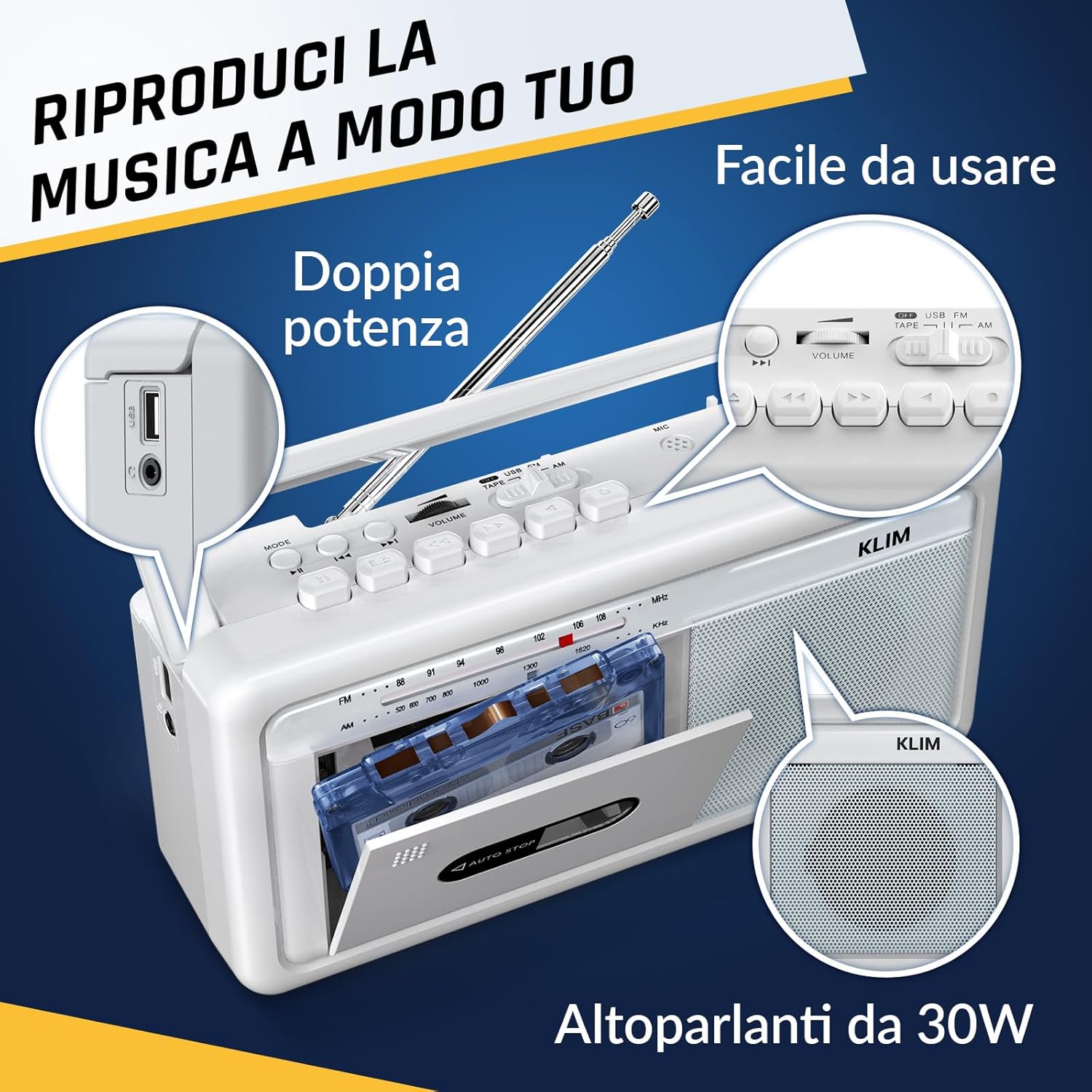
Gambar 4: Sisi view highlighting the USB port for media playback and recording.
3.5. Paké Headphone
Connect standard 3.5mm headphones to the headphone jack for private listening. The internal speakers will automatically mute when headphones are connected.
Video 1: Instructions on how to record a tape to USB using the WTB-795 model. This video demonstrates the USB recording functionality.
Video 2: Leuwihview of a retro cassette player with USB, Bluetooth, and AM/FM radio features, similar to the KLIM Cassette Player Boombox.
4. Pangropéa
- Jaga alat tetep bersih ku cara ngusap ku kaén anu lembut sareng garing. Hindarkeun nganggo pembersih cair atanapi pangleyur.
- Regularly clean the cassette head and pinch rollers with a cotton swab lightly dampdilebur ku alkohol isopropil pikeun mastikeun kualitas sora anu optimal sareng nyegah karusakan pita.
- Keep the device away from direct sunlight, heat sources, and excessive dust or moisture.
- When not in use for extended periods, remove batteries to prevent leakage.
5. Cara ngungkulan
| Masalah | Solusi anu mungkin |
|---|---|
| Taya kakuatan | Check if the AC power cord is securely connected. If using batteries, ensure they are inserted correctly and are not depleted. |
| Teu aya sora ti panyatur | Increase the volume. Ensure headphones are not connected. Check the function selector is in the correct mode (TAPE, RADIO, BT, USB). |
| panarimaan radio goréng | Extend the telescopic antenna fully. Adjust the antenna direction. Try moving the unit to a different location. |
| Pita kaset teu diputer/ngarekam | Ensure the tape is inserted correctly. Check if the tape is damaged. Clean the cassette head and pinch rollers. |
| Bluetooth teu nyambung | Ensure the unit is in Bluetooth mode. Make sure your device's Bluetooth is enabled and within range. Try unpairing and re-pairing the device. |
| Masalah playback USB | Ensure the USB drive is formatted correctly (FAT32) and contains compatible audio files (MP3, WAV, WMA, AAC, FLAC). Try a different USB drive. |
6. Spésifikasi
- merek: KLIM
- model: Pamuter kaset
- Ukuran produk: 25 x 13.1 x 7.6 cm
- Beurat barang: 1 kg
- Alat anu cocog: Pamuter MP3, Smartphone, Tablet
- Mode Kaluaran Audio: Stereo
- Format Audio anu Dirojong: Cassette, Analog Radio, MP3, WAV, WMA, AAC, FLAC, Bluetooth
- Sumber Daya: Corded Electric (AC) / 4 x C-type Batteries (not included)
- Téknologi konektipitas: USB, Bluetooth
- warna: Ibun Bodas
- Jumlah barang: KLSIN4825
7. Jaminan & Dukungan
The KLIM Cassette Player Boombox comes with a garansi 5 taun. For any questions, technical assistance, or warranty claims, please contact KLIM customer support. Our team is available 24/7 to assist you.
Please refer to the contact information provided in your product packaging or visit the official KLIM websitus pikeun detil salajengna.


