1. Produk Langkungview
The Oilsky HiFi MP3 Player M308 is a portable digital audio player designed for high-fidelity music playback. It features Bluetooth and Wi-Fi connectivity, a touch screen interface, and support for various lossless audio and video formats. This manual provides essential information for setting up, operating, and maintaining your device.

Gambar: Hareup jeung tukang view of the Oilsky HiFi MP3 Player M308, showcasing its sleek design and touch screen.
2. Naon dina Box
Pastikeun yén sadaya item aya dina bungkusan:
- 1x Oilsky HiFi MP3 Player M308
- 1x USB Cable (for charging and data transfer)
- 1x Case Pelindung
- 1 x Manual Pamaké
- 1x 64GB TF Card (pre-installed or included separately)

Image: All included accessories laid out, including the player, USB cable, protective case, user manual, and 64GB TF card.
3. Setélan
3.1. Ngecas Alat
Before first use, fully charge the player. Connect the provided USB cable to the player's charging port and to a USB power adapter (not included) or a computer's USB port. The battery indicator on the screen will show charging status. A full charge typically takes approximately 3 hours.

Image: Visual representation of the player's 1450mAh battery, indicating 3 hours for full charge and 15 hours of music playback.
3.2. Daya Hurung / Pareum
- Pikeun Ngahurungkeun: Pencét jeung tahan tombol daya (biasana di sisi) nepi ka layar hurung.
- Pikeun mareuman: Pencét terus tahan tombol daya, teras pilih 'Pareuman' tina pilihan dina layar.
- Pikeun Saré / Hudang: Briefly press the power button to put the device into sleep mode or wake it up.
3.3. Setup Awal
Saatos dihurungkeun pikeun anu munggaran, turutan pitunjuk dina layar pikeun ngonpigurasikeun setélan dasar:
- Pilihan Basa: Pilih basa anu anjeun pikaresep.
- Sambungan Wi-Fi: Connect to a Wi-Fi network to enable online features and app downloads. Go to Settings > Network & Internet > Wi-Fi.
- Tanggal sareng Waktos: Set the correct date and time, or enable automatic synchronization via network.
4. Parentah Operasi
4.1. Napigasi Dasar
The player features a 2.8-inch full touch screen for navigation. Swipe, tap, and pinch gestures are used to interact with the interface. A retro mechanical knob is available for precise volume adjustment.

Image: A hand interacting with the touch screen and adjusting the mechanical volume knob on the Oilsky M308 player.
4.2. Puterkeun Musik
The player supports a wide range of audio formats, including MP3, WAV, APE, FLAC, AAC, ALAC, DSF, DFF, ISO, and DTS. Video formats such as AVI, MKV, RMVB, MP4, MPG, and MOV are also supported.
- Nambahkeun Musik: Mindahkeun musik files from your computer to the player's internal storage or the inserted TF card via USB.
- Maén Musik: Open the music player application. Browse your library by album, artist, genre, or folder. Tap a song to begin playback.
- Kadali Puteran: Use the on-screen controls for play/pause, skip tracks, repeat, and shuffle.

Image: Icons representing various supported audio (MP3, WAV, APE, FLAC, AAC, ALAC, DSF, DFF, ISO, DTS) and video formats (AVI, MKV, RMVB, MOV, MP4, MPG).
4.3. Konektipitas Bluetooth
The player features Bluetooth V4.1 for wireless audio transmission. It supports high-quality lossless transmission codecs such as LDAC, SBC, and AAC.
- papasangan: Go to Settings > Connected devices > Bluetooth. Turn on Bluetooth and scan for available devices. Select your Bluetooth headphones or speaker from the list to pair.
- Two-way Bluetooth: The player can act as a Bluetooth audio source (transmitting to headphones/speakers) or a Bluetooth decoding amplifier (receiving audio from another device).

Image: The player connected wirelessly to earbuds via Bluetooth and also showing a wired headphone jack, illustrating dual connection options.
4.4. Wi-Fi Connectivity and Online Streaming
Connect to Wi-Fi to access online music streaming services and download applications. The player supports 2.4G and 5G dual-band Wi-Fi for improved speed and reduced network delays.
- Nyambungkeun ka Wi-Fi: Navigate to Settings > Network & Internet > Wi-Fi. Select your network and enter the password.
- Musik Online: Once connected, you can download and use various music streaming applications (e.g., Spotify, Amazon Music) directly on the device.

Image: The player displaying various app icons like Spotify and a web browser, indicating its Wi-Fi streaming capabilities.
4.5. Custom Playlists
Organize your music by creating custom playlists. Songs can be sorted by adding time, file name, first letter, year, album, style, folder, year, sampling rate, and format.
- Creating a Playlist: Within the music player app, select the songs you wish to add and choose the option to create a new playlist.
- Managing Playlists: Edit, rename, or delete playlists as needed through the music player interface.

Image: Multiple screen views of the player demonstrating different ways to categorize and sort music for playlist creation.
4.6. Manajemén gudang
The player comes with 16GB of built-in memory and includes an additional 64GB TF card. The storage capacity can be expanded up to 1TB using a compatible microSD card.
- Mariksa Panyimpenan: View available storage space in Settings > Storage.
- Nyelapkeun / Nyabut Kartu TF: Carefully insert the TF card into the designated slot until it clicks. To remove, gently push the card in until it springs out.

Image: A close-up of the player showing a 64GB TF card being inserted into the expansion slot, highlighting the 1TB support.
5. Fitur konci
5.1. Puteran Audio Resolusi Tinggi
The Oilsky M308 supports native hard DSD512 playback, delivering high-resolution audio that aims to reproduce the original sound scene accurately. It is compatible with various lossless audio formats, ensuring a detailed listening experience.
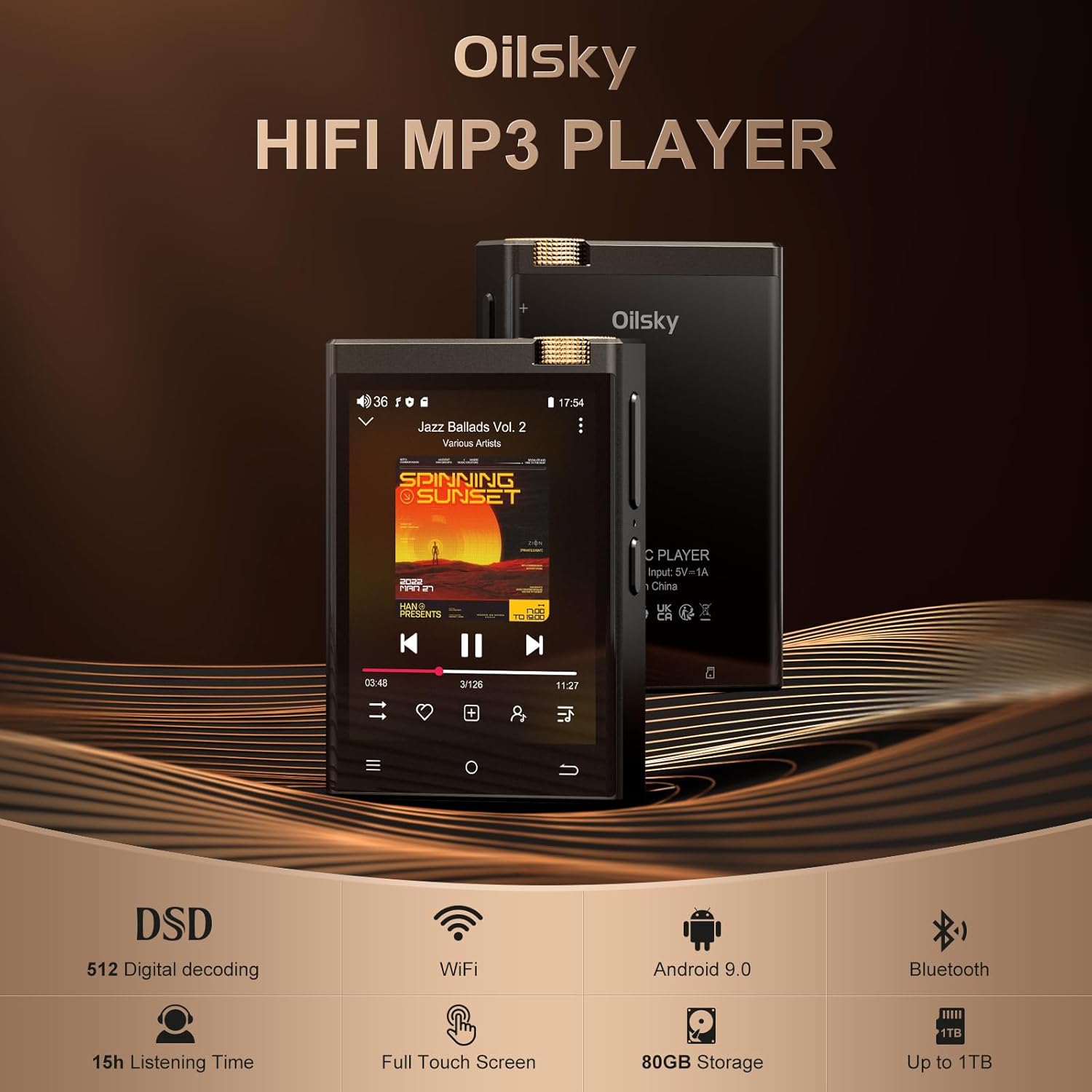
Image: The Oilsky M308 player with key features highlighted: DSD 512 Digital decoding, WiFi, Android 9.0, 15h Listening Time, Full Touch Screen, 80GB Storage, and Up to 1TB expansion.
5.2. Advanced DAC and AMP Téknologi
Equipped with a high-performance ESS9018Q2M DAC (Digital-to-Analog Converter) and a MAX97720 AMP (Amplifier) chip, the player is designed to deliver clear and powerful audio output.

Image: Diagram illustrating the integration of the ESS9018Q2M DAC and MAX97720 AMP chips within the player's architecture.
5.3. Tampilan jeung Interface pamaké
The 2.8-inch display with a resolution of 480*640 offers high color saturation, providing a clear view of music information, album art, and lyrics. The full touch LCD display ensures intuitive operation.
5.4. Daya Tahan Batré Anu Panjang
The integrated 1450mAh high-capacity battery provides up to 15 hours of continuous high-resolution audio playback via headphones or Bluetooth, suitable for extended listening sessions.
6. Pangropéa
- beberesih: Use a soft, dry cloth to clean the device. For the screen, use a microfiber cloth. Avoid abrasive cleaners or solvents.
- Panyimpenan: Nyimpen pamuter dina tiis, tempat garing jauh ti sinar panonpoé langsung jeung hawa ekstrim.
- Perawatan batré: To prolong battery life, avoid fully discharging the battery frequently. If storing for an extended period, charge the battery to about 50% before storage.
- Perlindungan: Use the provided protective case to guard against scratches and minor impacts.
7. Cara ngungkulan
| Masalah | Solusi anu mungkin |
|---|---|
| Alat teu hurung | Ensure the battery is charged. Connect to a power source and try again. If unresponsive, press and hold the power button for 10-15 seconds for a forced restart. |
| Taya kaluaran sora | Check volume level. Ensure headphones/speakers are properly connected or Bluetooth is paired correctly. Test with different audio files. |
| Teu bisa nyambung ka Wi-Fi | Verify Wi-Fi password. Ensure the player is within range of the Wi-Fi router. Restart the player and the router. |
| Masalah papasangan Bluetooth | Ensure the Bluetooth device is in pairing mode. Delete previous pairings on both devices and try again. Ensure devices are within close proximity. |
| Kartu SD henteu dikenal | Ensure the TF card is inserted correctly. Try reinserting the card. Format the card (this will erase all data) if issues persist, or try a different TF card. |
| Aplikasi ngadat atanapi kinerjana laun | Close background applications. Clear app cache (Settings > Apps > [App Name] > Storage > Clear cache). Restart the device. Ensure sufficient free storage space. |
8. Spésifikasi
| Fitur | Rincian |
|---|---|
| Ngaran modél | M308 |
| Dimensi produk | 0.55 x 2.17 x 3.15 inci |
| Item Beurat | 10.6 ons |
| Ukuran layar | 2.8 inci |
| Téhnologi konektipitas | Bluetooth, USB, Wi-Fi |
| Kapasitas Panyimpenan Mémori | 16GB (internal) + 64GB (TF Card included), expandable up to 1TB |
| Batré | 1450mAh Lithium Ion (kaasup) |
| Waktos Puterkeun Musik | Nepi ka 15 jam |
| Format Audio Dirojong | MP3, WAV, APE, FLAC, AAC, ALAC, DSF, DFF, ISO, DTS |
| Format Pidéo anu Dirojong | AVI, MKV, RMVB, MP4, MPG, MOV |
| Fitur husus | Equalizer, Touch Screen, DSD512 Playback, DAC ESS9018Q2M, AMP MAX97720 |
| Alat nu cocog | Headphone, Speaker |
9. Video Produk Resmi
Video: Hiji acara video produk resmicasing the features and design of the Oilsky HiFi MP3 Player M308.
10. Garansi jeung Rojongan
For warranty information and customer support, please refer to the warranty card included in your product packaging or visit the official Oilsky websitus. Simpen resi pameseran anjeun salaku bukti pameseran pikeun klaim garansi.


