1. Bubuka
Welcome to the user manual for your new Oilsky M303pro MP3 Player. This device is designed to provide a versatile audio and video experience with its advanced features, including Bluetooth, Wi-Fi, and a touch screen interface. This manual will guide you through the setup, operation, maintenance, and troubleshooting of your device to ensure optimal performance and enjoyment.
Video 1.1: Oilsky M303pro MP3 Player Overview. This video provides a visual introduction to the Oilsky M303pro MP3 Player, showcasing its key features such as the music player interface, video playback capabilities, powerful MTK 8-core processor, Google Play Store access for app downloads, Bluetooth connectivity, battery life, and the contents of the product package.
2. Naon dina Box
Mangga parios eusi pakét pikeun mastikeun yén sadaya barang aya:
- 1 x Oilsky M303pro MP3 Player
- 1 x 64GB Micro SD Card
- 1 x Film Pelindung
- 1 x Case Pelindung
- 1 x Kabel USB-C
- 1 x Earphone
- 1 x Manual Pamaké

Gambar 2.1: Eusi Pakét. This image displays all items included in the Oilsky M303pro MP3 Player package.
3. Alat Leuwihview
The Oilsky M303pro features a sleek design with a 4.0-inch IPS touch screen. Familiarize yourself with the device's physical components:

Image 3.1: Front and Back View tina Alat. This image illustrates the overall design of the Oilsky M303pro MP3 Player, highlighting its touch screen and rear panel.
Komponén konci:
- Layar Toél IPS 4.0 inci: Tampilan utama pikeun interaksi.
- Tombol Daya: Lokasina di sisi, dipaké pikeun ngahurungkeun alat on/off na konci layar.
- Tombol Volume: Atur kaluaran audio.
- Palabuhan USB-C: Pikeun ngecas sareng mindahkeun data.
- Jack Headphone 3.5mm: Pikeun kaluaran audio kabel.
- Slot Kartu SD Mikro: Pikeun ngalegaan panyimpenan.
- Speaker Diwangun-di: Pikeun playback audio tanpa headphone.
4. Setélan
4.1 Ngecas Alat
Before first use, fully charge your Oilsky M303pro.
- Connect the provided USB-C cable to the device's USB-C port.
- Sambungkeun tungtung kabel USB-C anu sanés ka adaptor kakuatan USB (teu kalebet) atanapi port USB komputer.
- Indikator ngecas bakal némbongkeun status ngecas. Ngecas pinuh biasana peryogi waktos sakitar 3 jam.

Image 4.1: Charging the Device. This image demonstrates the charging process and highlights the battery capacity and estimated usage times.
4.2 Nyelapkeun Kartu Micro SD
The device comes with a 64GB Micro SD card. You can expand storage up to 512GB.
- Tangtukeun lokasi slot kartu Micro SD di sisi alat.
- Lebetkeun kartu Micro SD kana slotna lalaunan dugi ka ngaklik kana tempatna. Pastikeun kartuna diposisikeun kalayan leres.
- Pikeun nyabutna, pencét kartu sakedik ka jero dugi ka kaluar.

Image 4.2: Micro SD Card Insertion. This image visually guides on how to insert the Micro SD card to expand the device's storage.
4.3 Power-On Awal sareng Setélan Dasar
- Pencét terus tahan tombol Daya nepi ka layar hurung.
- Turutan parentah dina-layar pikeun milih basa jeung wewengkon nu Anjeun pikaresep.
- Connect to a Wi-Fi network: Go to Setélan > Jaringan & Internét > Wifi, teras pilih jaringan anjeun sareng lebetkeun kecap aksesna.
5. Parentah Operasi
5.1 Basic Navigation and Touch Screen
The Oilsky M303pro features a responsive 4.0-inch IPS touch screen for intuitive control.
- Ketok: Pilih hiji item atawa buka aplikasi.
- Gesek: Navigate through menus or pages.
- Ciwit-pikeun-Zoom: Zoom in or out on images or videos.
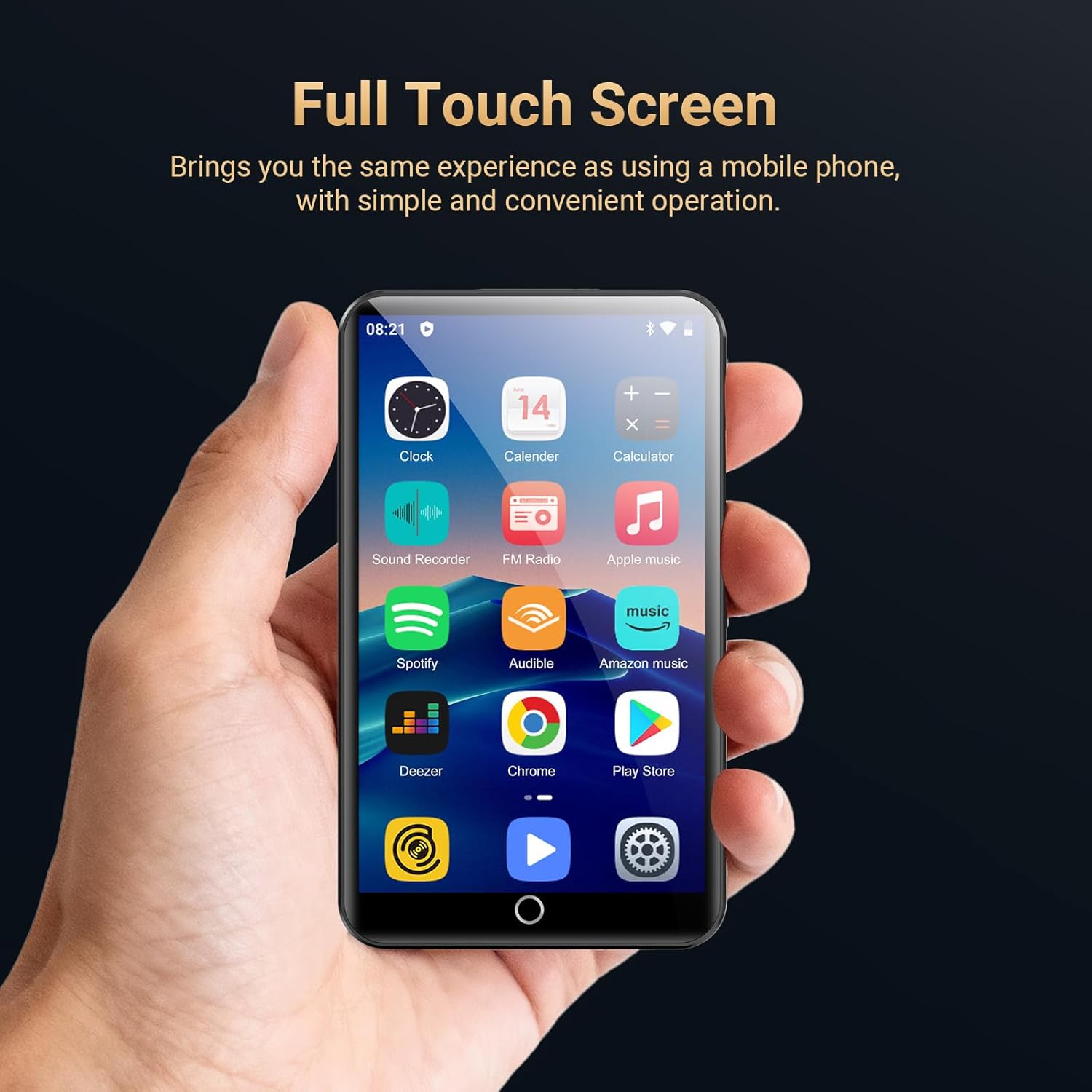
Image 5.1: Full Touch Screen Operation. This image shows the device being operated via its touch screen, similar to a smartphone.
5.2 Puterkeun Musik
The device supports various audio formats including MP3, OGG, FLAC, AAC, WAV, WMA, and APE.
- Buka na HiBy Music app or another preferred music application.
- Browse your music library by song category, artist, album, or search for specific tracks.
- Ketok hiji lagu pikeun ngamimitian muterkeun.
- Anggo kontrol dina layar pikeun puter/pause, luncat, balikan, sareng acak.
- Adjust the equalizer settings to customize your audio experience.

Image 5.2: HiBy Music Player Interface. This image displays the features available within the HiBy Music application for managing and playing audio files.
5.3 Puterkeun Pidéo
The device supports 720p and 1080p HD video playback for formats such as RM, RMVB, FLV, MP4, DAT, MKV, MPG, MOV, and TS.
- Buka na MX Player Pro app or another video player application.
- Select the video you wish to watch from your storage.
- The player offers features like loop/random playback, variable speed, sleep timer, and gesture zoom.

Image 5.3: Video Playback with MX Player Pro. This image demonstrates the video playback capabilities and features of the pre-installed video player.
5.4 Konektipitas Bluetooth
Connect your Oilsky M303pro to Bluetooth headphones, speakers, or car audio systems.
- Pastikeun aksésoris Bluetooth anjeun dina modeu papasangan.
- Dina alat Anjeun, buka Setélan > Alat disambungkeun > Bluetooth.
- Turn Bluetooth on and select "Pair new device".
- Select your accessory from the list of available devices to connect. The device will automatically connect to the last paired device.

Image 5.4: Bluetooth Connection. This image shows the MP3 player wirelessly connected to external audio devices.
5.5 Wi-Fi Connectivity and App Installation
Connect to Wi-Fi to access online streaming services and download applications from the Google Play Store.
- Pindah ka Setélan > Jaringan & Internét > Wifi and connect to your desired network.
- Once connected, open the Google Play Store aplikasi.
- Milarian pikeun and download popular apps like Spotify, Audible, Amazon Music, Pandora, Deezer, YouTube, Facebook, or Kindle.
- Pre-installed apps can also be uninstalled if not needed.

Image 5.5: Google Play Store and App Access. This image highlights the device's capability to download and manage applications via Wi-Fi.
5.6 Fitur séjén
- Radio FM: Access local radio stations.
- Rékam sora: Anggo mikropon anu tos aya pikeun ngarékam audio.
- Ékualiser: Fine-tune audio output for different music genres or personal preference.
6. Pangropéa
6.1 Ngabersihan Alat
Pikeun ngajaga penampilan sareng fungsionalitas alat anjeun:
- Anggo lawon anu lemes sareng henteu lint pikeun ngusap layar sareng awak.
- Hindarkeun nganggo pembersih abrasive, pangleyur, atanapi semprot aerosol.
- Ulah ngalaan alat ka beueus kaleuleuwihan.
6.2 Perawatan Batré
Proper battery care can extend the lifespan of your device's battery:
- Hindari suhu anu ekstrim, boh panas boh tiis.
- Ulah ninggalkeun alat pinuh discharged pikeun période nambahan.
- Pikeun panyimpenan jangka panjang, eusian batréna dugi ka sakitar 50% teras simpen di tempat anu tiis sareng garing.
6.3 Apdet parangkat lunak
Periodically check for software updates to ensure your device has the latest features and performance improvements.
- Pindah ka Setélan > Sistim > Maju > Pembaruan sistem.
- Turutan parentah dina-layar pikeun ngundeur tur masang sagala apdet sadia.
7. Cara ngungkulan
If you encounter issues with your Oilsky M303pro, refer to the following common problems and solutions:
| Masalah | Solusi |
|---|---|
| Alat henteu hurung. | Ensure the device is charged. Connect to a power source and try again. If unresponsive, press and hold the power button for 10-15 seconds to force a restart. |
| Teu bisa nyambung ka Wi-Fi. | Check if Wi-Fi is enabled in settings. Verify the Wi-Fi password. Restart your router and the MP3 player. |
| Alat Bluetooth teu dipasangkeun. | Ensure the Bluetooth accessory is in pairing mode and within range. Turn Bluetooth off and on again on the MP3 player. Remove previously paired devices and try pairing again. |
| Music/Video playback issues. | Pariksa lamun éta file format is supported. Ensure the file is not corrupted. Try a different media player app. Verify sufficient storage space. |
| Alatna lalaunan atanapi henteu ngaréspon. | Close unused applications. Clear cache from apps in Settings > Apps & notifications. Restart the device. Consider a factory reset if the issue persists (backup data first). |
8. Spésifikasi
| Fitur | Rincian |
|---|---|
| Ngaran modél | M303pro |
| Dimensi produk | 0.47 x 2.44 x 4.13 inci |
| Item Beurat | 7.4 ons |
| Ukuran layar | 4 Inches (IPS Touch Screen, 480*800 pixels) |
| Sistem operasi | Android |
| Prosesor | MTK 8-core processor |
| Internal Memory (ROM) | 16GB |
| Ram | 2GB |
| Panyimpenan Expandable | Up to 512GB via Micro SD Card (64GB card included) |
| Konektipitas | Bluetooth 5.0, Wi-Fi, USB-C, Aux (3.5mm) |
| Batré | 2000mAh Lithium Polymer (up to 45-50 hrs music, 6-8 hrs video) |
| Format Audio | MP3, OGG, FLAC, AAC, WAV, WMA, APE |
| Format pidéo | RM, RMVB, FLV, MP4, DAT, MKV, MPG, MOV, TS (supports 720p/1080p HD) |
| Fitur husus | Equalizer, FM Radio, Touch Screen, Voice Recorder, Preloaded Streaming Apps |
9. Garansi jeung Rojongan
9.1 Émbaran jaminan
Your Oilsky M303pro MP3 Player is covered by a manufacturer's warranty. Please refer to the warranty card included in your package for specific terms and conditions. Keep your proof of purchase for warranty claims.
9.2 Rojongan Palanggan
For any questions, technical assistance, or support regarding your Oilsky M303pro MP3 Player, please contact our customer service team:
- Surélék: oilskyservice@hotmail.com
- Please include your model number (M303pro) and a detailed description of your issue when contacting support.


