1. Bubuka
The Audizio Desio is a versatile digital radio that combines classic aesthetics with modern audio technology. It features DAB, DAB+, and FM tuning for clear radio reception, along with Bluetooth 5.0 for wireless streaming, a USB port for media playback, and a 3.5mm AUX input for wired connections. The radio is equipped with a 2.4-inch color LCD display and integrated stereo speakers, making it suitable for various environments such as living rooms, kitchens, or bedrooms.
This manual provides detailed instructions for setting up, operating, and maintaining your Audizio Desio radio. Please read it thoroughly before use to ensure proper functionality and to maximize your listening experience.
2. Émbaran Kasalametan
- Pastikeun voltase adaptor dayatage matches your local power supply before connecting.
- Ulah ngalaan unit ka hujan, Uap, atawa suhu ekstrim.
- Hindarkeun nempatkeun unit caket sumber panas atanapi dina sinar panonpoé langsung.
- Ulah muka casing; ngarujuk sadaya jasa ka tanaga anu mumpuni.
- Jauhkeun unit tina médan magnét anu kuat.
- Ngabersihan unit ukur ku kaén anu lembut sareng garing.
3. Eusi Paket
Punten parios yén sadaya barang aya nalika ngabongkar:
- Audizio Desio DAB/DAB+/FM Radio
- Adaptor Daya (DC 5V)
- Kadali jauh
- Manual pamaké
4. Kontrol jeung sambungan
Kadali Panel hareup
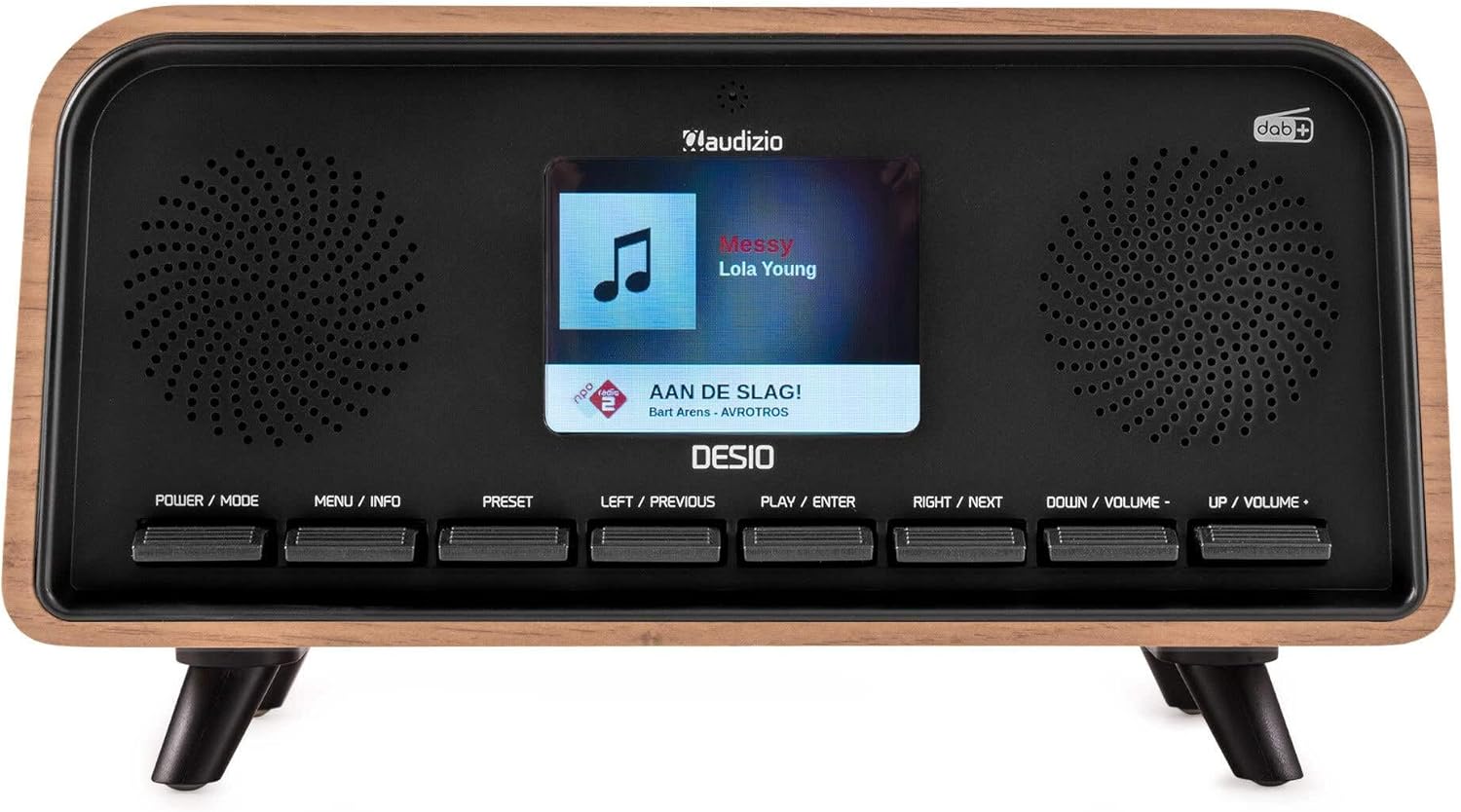
Hareupeun view of the Audizio Desio radio, showing the display playing music with artist and track information. The control buttons are visible below the screen.
- POWER / MODE: Press to turn on/off. Press and hold to switch between DAB, FM, Bluetooth, USB, and AUX modes.
- MENU / INFO: Press to access menu options. In playback mode, press to cycle through information display.
- PRESET: Press to recall saved stations. Press and hold to save current station.
- LEFT / PREVIOUS: Navigate left in menus, or skip to previous track/station.
- PLAY / ENTER: Confirm selection in menus, or play/pause media.
- RIGHT / NEXT: Navigate right in menus, or skip to next track/station.
- DOWN / VOLUME -: Decrease volume, or navigate down in menus.
- UP / VOLUME +: Increase volume, or navigate up in menus.
Sambungan Panel Rear
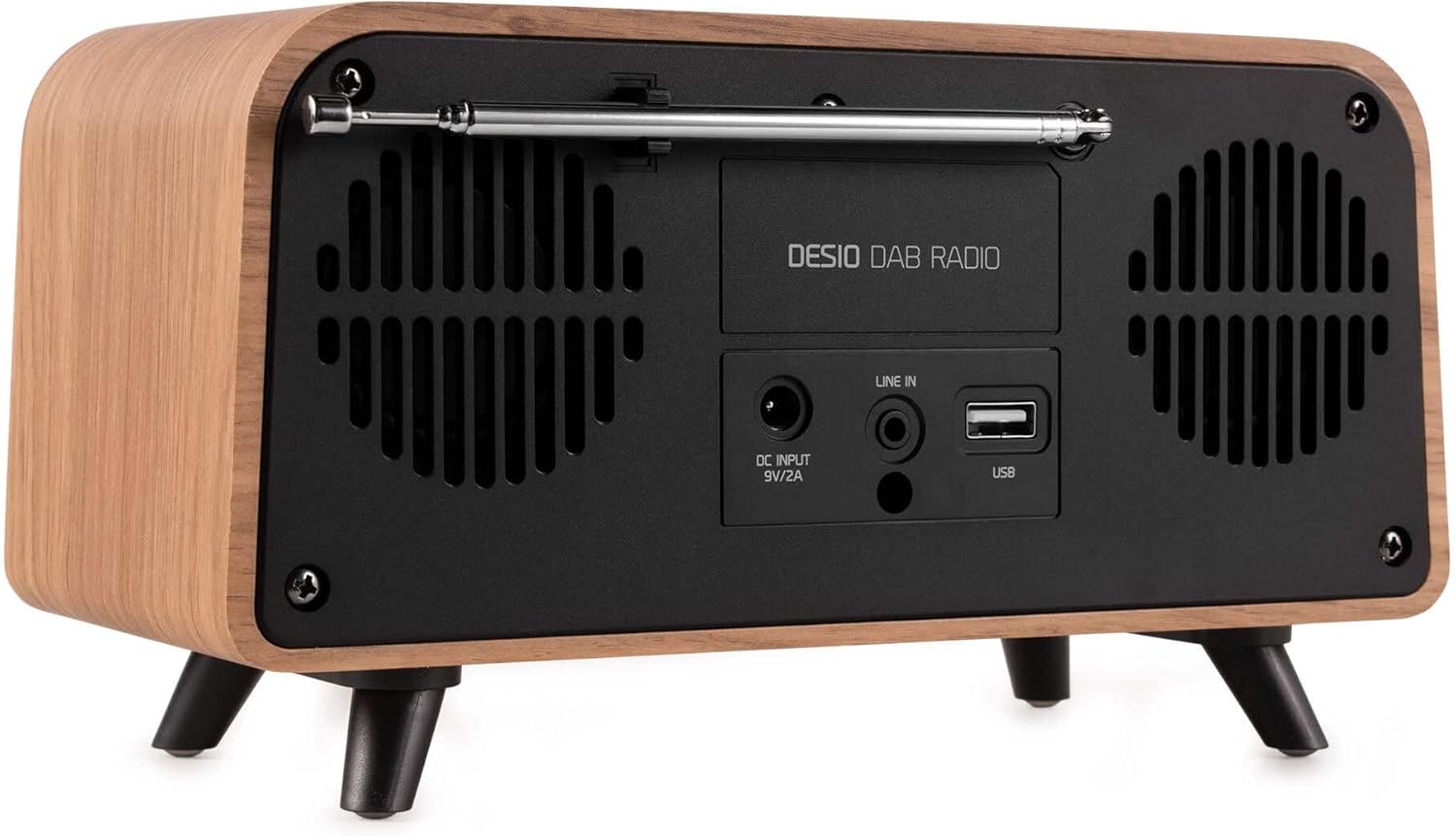
Tukangeun view of the Audizio Desio radio, highlighting the DC INPUT 9V/2A, LINE IN (3.5mm AUX), and USB ports. The telescopic antenna is extended.
- DC INPUT 9V/2A: Sambungkeun adaptor kakuatan anu disayogikeun di dieu.
- LINE IN (3.5mm AUX): Sambungkeun alat audio éksternal nganggo kabel audio 3.5mm.
- USB: Insert a USB flash drive for MP3 playback.
- Antena Teleskopik: Extend fully for optimal DAB/DAB+ and FM reception.
5. Setup Awal
- Sambungkeun Kakuatan: Plug the provided DC 5V power adapter into the DC INPUT port on the rear of the radio, then plug the adapter into a wall outlet.
- Manjangkeun Antenna: Fully extend the telescopic antenna located on the rear of the unit for best reception.
- Daya Hurung: Pencét éta POWER / MODE tombol pikeun ngahurungkeun radio.
- First-time DAB Scan: Upon first power-on, the radio will automatically perform a full scan for DAB/DAB+ stations. This may take a few minutes. The display will show the scanning progress.
- Setel waktos/tanggal: The time and date will usually be set automatically via DAB signal. If not, you can manually set them via the menu.
6. Parentah Operasi
6.1 Operasi Radio DAB/DAB+

Hareupeun view of the Audizio Desio radio, displaying a DAB radio station ('NPO Klassiek') and current time.
- Pilih Mode DAB: Pencét éta POWER / MODE button repeatedly until 'DAB' is displayed.
- Scan pikeun Stasion: If no stations are found or you wish to rescan, press MENU / INFO, teras nganggo LEFT / PREVIOUS or Katuhu / salajengna to select 'Full Scan' and press PLAY / ENTER.
- Pilih Stasion: Ngagunakeun éta LEFT / PREVIOUS or Katuhu / salajengna tombol pikeun ngotéktak stasiun anu sayogi. Pencét PLAY / ENTER pikeun milih stasiun.
- Simpen prasetél: Pikeun nyimpen hiji stasiun, pencét jeung tahan tombol PRESET kancing. Paké LEFT / PREVIOUS or Katuhu / salajengna to choose a preset number (1-50), then press PLAY / ENTER pikeun mastikeun.
- Recall Preset: Pikeun nginget deui stasiun anu disimpen, pencét PRESET button (do not hold). Use LEFT / PREVIOUS or Katuhu / salajengna pikeun milih setélan anu dipikahoyong, teras pencét PLAY / ENTER.

Hareupeun view of the Audizio Desio radio, showing the 'Preset Recall' menu on the display, indicating empty preset slots.
6.2 Operasi Radio FM
- Pilih Modeu FM: Pencét éta POWER / MODE button repeatedly until 'FM' is displayed.
- Scan Otomatis: Pencét jeung tahan PLAY / ENTER to automatically scan for and save available FM stations.
- Tuning Manual: Paké LEFT / PREVIOUS or Katuhu / salajengna pikeun ngaropea frékuénsi.
- Save/Recall Presets: Follow the same procedure as for DAB radio (Section 6.1).
6.3 Bluetooth (BT) Operation

Hareupeun view of the Audizio Desio radio, with the display showing 'BT' (Bluetooth) mode and 'Connected' status.
- Select BT Mode: Pencét éta POWER / MODE button repeatedly until 'BT' is displayed. The radio will enter pairing mode, indicated by a flashing Bluetooth icon.
- Pasangkeun Alat: On your smartphone, tablet, or laptop, enable Bluetooth and search for available devices. Select 'Audizio Desio' from the list.
- Nyambung: Once paired, the display will show 'Connected'. You can now stream audio from your device to the radio.
- Kontrol Puteran: Anggo alat anjeun anu nyambung atanapi radio PLAY / ENTER, LEFT / PREVIOUS, jeung Katuhu / salajengna tombol pikeun ngadalikeun playback.
6.4 Playback USB

Hareupeun view of the Audizio Desio radio, with the display showing 'USB' mode, current time, and details of an MP3 file keur diputer.
- Lebetkeun Drive USB: Insert a USB flash drive (formatted to FAT32) containing MP3 filekana port USB di tukang radio.
- Pilih USB Mode: Pencét éta POWER / MODE button repeatedly until 'USB' is displayed. The radio will automatically start playing the first compatible audio file.
- Napigasi Files: Paké LEFT / PREVIOUS or Katuhu / salajengna to skip tracks. Press PLAY / ENTER pikeun reureuhan / neruskeun playback.
6.5 Input AUX
- Sambungkeun Alat: Connect an external audio device (e.g., MP3 player, smartphone) to the 'LINE IN' (3.5mm AUX) port on the rear of the radio using a 3.5mm audio cable (not included).
- Pilih Modeu AUX: Pencét éta POWER / MODE button repeatedly until 'AUX' is displayed.
- Kontrol Playback: Playback is controlled directly from your connected external device. Adjust volume using the radio's volume controls.
6.6 Fungsi Alarm sareng Timer
- Setélan Alarm: Aksés setélan alarm ngalangkungan MENU / INFO button. You can set multiple alarms with customizable sources (DAB, FM, Buzzer), volume, and recurrence (daily, weekdays, weekends).
- Timer Saré: The sleep timer allows the radio to turn off automatically after a set period. Access this function via the MENU / INFO button and select the desired duration.
- Fungsi Tungkul When an alarm sounds, press any button (except Power) to activate the snooze function for a short period.
7. Pangropéa
- beberesih: Use a soft, dry, lint-free cloth to clean the radio's surface. Do not use abrasive cleaners, waxes, or solvents.
- Perawatan Antenna: Nanganan anteneu teleskopik sacara saksama pikeun nyegah ngabengkokkeun atanapi pegat.
- Panyimpenan: Upami nyimpen radio kanggo waktos anu lami, pegatkeun sambungan tina catu daya teras simpen di tempat anu tiis sareng garing.
8. Cara ngungkulan
| Masalah | Mungkin Cukang lantaranana | Solusi |
|---|---|---|
| Taya kakuatan | Adaptor daya teu nyambung atawa stop kontak faulty. | Pariksa sambungan adaptor daya teras cobian stop kontak anu béda. |
| Panarimaan DAB/FM anu goréng | Antenna not fully extended or poor signal area. | Fully extend the antenna. Try repositioning the radio. Perform a full scan. |
| Bluetooth teu nyambung | Radio not in BT mode, device not in pairing mode, or too far away. | Ensure radio is in BT mode. Put your device in pairing mode. Move device closer to the radio (within 10m). |
| playback USB teu jalan | USB drive not inserted correctly, unsupported file format, or drive not FAT32. | Reinsert USB drive. Ensure files are MP3. Check USB drive format (FAT32). |
| Teu aya sora ti AUX | Radio not in AUX mode, cable faulty, or external device volume low. | Select AUX mode. Check 3.5mm cable. Increase volume on both radio and external device. |
9. Spésifikasi Téknis
- merek: Audizio
- model: Desio
- Téknologi Tuner: FM, DAB+
- Bluetooth: Version 5.0 (Range: 10m)
- Pilihan Playback: Bluetooth, USB, 3.5mm AUX input
- Stasion prasetél: 50
- tampilan: 2.4 inci Warna LCD
- fungsi: Alarm, Sleep Timer, Snooze, Dimming, Week/Weekend Alarm
- Max Speaker Power: 30 Watt
- Sasayogian tanaga: DC 5V (Power Adapter)
- Ukuran produk (L x W x H): 32 x 16 x 18 cm
- beurat: 1.66 kg
10. Garansi jeung Rojongan
This product comes with a standard manufacturer's warranty. For detailed warranty terms and conditions, please refer to the documentation provided at the time of purchase or contact your retailer.
For technical support, troubleshooting assistance, or service inquiries, please contact the Audizio customer support team or your local dealer. Please have your product model number (Desio) and purchase information ready when contacting support.