Bubuka
Welcome to the user manual for your TCL FLIP 4 5G (T440W) flip phone. This guide provides essential information to help you get started, understand your device's features, and troubleshoot common issues. Please read this manual thoroughly to ensure proper use and optimal performance of your phone.
Naon dina Box
Your TCL FLIP 4 5G package includes the following items:
- Telepon
- Batré
- Charger
Produk Leuwihview
The TCL FLIP 4 5G is designed for straightforward communication with modern conveniences. It features a classic flip design with dual displays and large, tactile buttons for ease of use.
Fitur konci:
- Tampilan ganda: A 1.77-inch external display for notifications and a 3.2-inch internal display with adjustable text size, colors, and brightness.
- Easy Navigation Keyboard: Large tactile keypad with intuitive shortcut keys for quick access to contacts and messages.
- Konektipitas 5G: Reliable 5G network support for fast communication.
- Kaméra 5MP: Capture photos and videos of important moments.
- Sora HD: Ngajamin kualitas telepon anu jelas.
- Batré awét: Designed to keep you connected for extended periods.
- Sistem operasi: Powered by KaiOS.
Tata perenah alat:
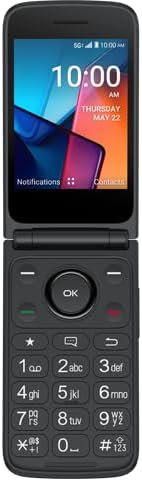
Gambar 1: Hareupeun view of the TCL FLIP 4 5G phone when open, displaying the internal screen and the physical keypad.
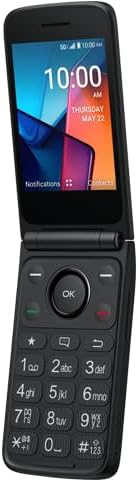
Gambar 2: Angled view of the TCL FLIP 4 5G phone in its open position, highlighting the screen and keypad layout.
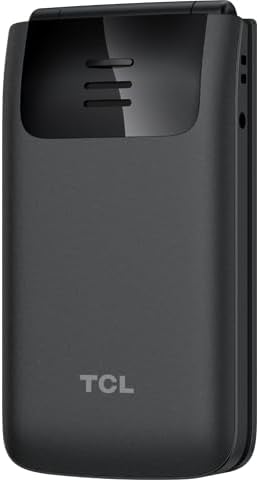
Gambar 3: Tukangeun view of the TCL FLIP 4 5G phone when closed, showing the external display, camera, and TCL branding.
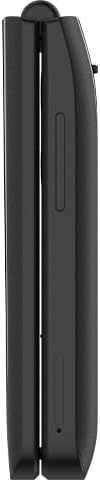
Gambar 4: Samping view of the closed TCL FLIP 4 5G phone, illustrating the device's slim profile sareng tombol samping.
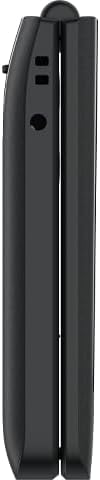
Gambar 5: Sisi sabalikna view of the closed TCL FLIP 4 5G phone, showing additional ports or buttons.
Disetél
1. Installing the Battery and SIM Card:
- Cabut panutup tukang telepon sacara lembut.
- Insert your SIM card(s) into the designated slot(s). Ensure the gold contacts face downwards and the notched corner is correctly aligned.
- Selapkeun batréna kana kompartemenna, sejajarkeun kontak emas dina batréna sareng anu aya dina telepon.
- Ganti panutup tukang, pencét pageuh nepi ka klik kana tempatna.
2. Ngecas Telepon:
- Connect the charger to your phone's charging port.
- Colokkeun carjer ka colokan listrik.
- Keun telepon ngecas sapinuhna sateuacan dianggo mimiti. Indikator batré dina layar bakal némbongkeun status ngecas.
Ngoperasikeun Telepon Anjeun
1. Hurung/Pareuman:
- Pikeun ngahurungkeun, pencét terus tombol Daya/Tutup Telepon dugi ka layar hurung.
- To power off, press and hold the Power/End Call button, then select "Power off" from the options.
2. Nelepon:
- Open the phone to access the keypad.
- Pencét nomer telepon anu dipikahoyong nganggo papan kenop numerik.
- Pencét tombol Telepon Héjo pikeun ngamimitian telepon.
- To end a call, press the Red End Call button or close the phone.
3. Sending Messages:
- From the main menu, navigate to "Messages".
- Pilih "Pesen Anyar" atanapi "Jieun Pesen".
- Asupkeun nomer telepon panarima atawa pilih tina kontak Anjeun.
- Ketik pesen anjeun nganggo keypad.
- Press the "Send" option to transmit the message.
4. Ngagunakeun kaméra:
- Access the camera application from the main menu.
- Bingkai poto anjeun nganggo tampilan internal.
- Press the "OK" button or a designated camera button to capture a photo or start/stop video recording.
- Photos and videos are saved to the phone's gallery.
5. Internet and Applications (KaiOS):
- Your phone runs on KaiOS, providing access to essential applications.
- Navigate through the menu to find apps like Web Browser, Weather, News, and more.
- Use the directional keys and "OK" button to interact with applications.
Pangropéa
- Keep your phone dry. Liquids can damage the device.
- Anggo ukur pangecas sareng asesoris anu disatujuan.
- Hindarkeun suhu anu ekstrim.
- Clean the screen and keypad with a soft, dry cloth.
- Do not attempt to disassemble or repair the phone yourself. Refer to authorized service centers.
Pamérésan masalah
| Masalah | Solusi |
|---|---|
| Telepon teu hurung. | Pastikeun batréna dipasang sareng dicas kalayan leres. Sambungkeun carjer teras cobian deui. |
| Teu tiasa nelepon atanapi nampi telepon. | Check if the SIM card is properly inserted and activated. Verify network signal strength. Contact your service provider if issues persist. |
| Kualitas panggero goréng. | Move to an area with better network coverage. Ensure the earpiece/microphone is not obstructed. |
| Batré gancang boros. | Reduce screen brightness, close unused applications, and limit background data usage. |
spésifikasi
| Ngaran modél | TCL Flip 4 5G |
| Nomer Modél Item | T440W |
| merek | TCL |
| Sistem operasi | KaiOS |
| Screen Size (Internal) | 3.2 inci |
| Ukuran Témbongkeun éksternal | 1.77 inci |
| Resolusi | 480 x 320 |
| Kapasitas Panyimpenan Mémori | 32 GB |
| Téhnologi sélular | 5G |
| Pamawa nirkabel | T-Mobile |
| Kapasitas batré | 3000 Miliamp Jam-jaman |
| Item Beurat | 6.4 ons |
| Warna | kulawu |
| Produsén | TCL |
Garansi sareng Rojongan
For warranty information and customer support, please refer to the documentation provided with your purchase or visit the official TCL support websitus. Simpen bukti pameseran anjeun pikeun klaim garansi.


